 Written by
 Introduction: The Block Revolution is Complete
After building 100+ WordPress plugins over the past decade, I’ve watched Gutenberg evolve from a controversial newcomer that divided the community to the foundation of everything we build today. The debates about whether to use the Classic Editor or Gutenberg? They’re over. Gutenberg won—and more importantly, WordPress won because of it.
The numbers tell the story clearly. Gutenberg adoption has climbed to over 60%, up dramatically from just 37% in 2020. Full Site Editing (FSE) grew by 145% in 2025 alone. This isn’t a trend anymore—it’s the new standard. WordPress powers over 43% of all websites globally, and the block editor is now how the majority of that content gets created.
But here’s what excites me most: we’re not just talking about a better editor anymore. We’re witnessing the convergence of block-based development with artificial intelligence, creating possibilities that simply didn’t exist two years ago. WordPress’s AI Building Blocks initiative, third-party AI integrations, and tools like Telex are reshaping what’s possible for both developers and site owners. If you’re interested in how AI is changing WordPress development, check out my comparison of ChatGPT Pro vs Claude Pro for WordPress plugin development.
In this article, I’ll share what I’ve learned from building blocks for BuddyPress, WooCommerce, and dozens of other projects—insights that can help whether you’re a developer creating custom blocks or a site owner trying to understand why everyone keeps talking about them. Let’s dive in.
How Gutenberg is Transforming WordPress Development
The transformation Gutenberg has brought to WordPress goes far beyond replacing the TinyMCE editor. It’s fundamentally changed how we think about building websites, creating content, and extending WordPress functionality.
For Developers: A Modern JavaScript Ecosystem
If you’re a developer who hasn’t touched Gutenberg development yet, the tooling will surprise you. The days of manually configuring webpack, babel, and endless build configurations are gone. The @wordpress/create-block CLI generates everything you need with a single command:
# Create a new block plugin
npx @wordpress/create-block my-custom-block
cd my-custom-block
npm run start  # Development with hot reload
npm run build  # Production build
The wp-scripts package handles building, linting, and formatting out of the box. When I started building blocks for BuddyPress, this tooling cut my setup time from hours to minutes. Interactive mode walks you through options, while experienced developers can use flags to scaffold exactly what they need. For maintaining code quality in your block development, I recently wrote about automating WordPress code quality with AI.
Block API Version 3 introduced significant architectural changes that developers need to understand. The editor now renders blocks inside an iframe, providing true isolation between the editor chrome and your content. This means your block styles won’t leak into the admin interface—and vice versa. The useBlockProps() hook is now required for all blocks, ensuring consistent behavior and accessibility across the ecosystem.
The new APIs introduced in 2025 deserve special attention:
- Block Bindings API – Connect block attributes to dynamic data sources like custom fields, post meta, or external APIs. This eliminates the need for many custom blocks that previously just displayed dynamic content.
- Commands API – The
useCommandshook lets you add custom commands to the admin command palette (Cmd+K / Ctrl+K). Users can trigger your plugin’s functionality without navigating menus. - DataViews and DataForm – Unified components for displaying and editing data. If you’re building admin interfaces, these provide consistent patterns that match core WordPress.
- Interactivity API – Finally, a WordPress-native solution for frontend JavaScript state management. No more jQuery spaghetti or fighting with how to properly enqueue React on the frontend.
The shift from PHP to JavaScript is real, and developers who haven’t made the transition yet need to prioritize it. That said, PHP isn’t going away—server-side rendering, dynamic blocks, and the Block Bindings API all require PHP knowledge. The modern WordPress developer needs both.
For Site Owners: Visual Editing Without Compromise
For site owners and content creators, Gutenberg has delivered on its original promise: true visual editing without touching code. But in 2026, it goes much further than the early versions.
Reusable blocks let you save content structures—a testimonial layout, a call-to-action section, a pricing table—and reuse them across your site. Update the reusable block once, and it updates everywhere. This alone has saved my clients countless hours of repetitive work.
Global Styles give you site-wide design control from one place. Change your heading font, adjust your color palette, modify spacing values—all without writing CSS. The changes cascade through your entire site, maintaining consistency that was previously only achievable with custom development.
Performance has improved dramatically too. Early Gutenberg was notorious for slowdowns with complex layouts. The current editor remains stable even with multiple browser tabs open and dozens of blocks on a page. The iframe architecture actually helps here—your content is isolated from the editor’s UI, reducing conflicts and memory issues.
For Website Development: Full Site Editing is the Standard
Full Site Editing (FSE) has moved from “experimental feature” to “how WordPress themes work now.” The statistics are clear: FSE adoption grew 145% in 2025, and the majority of new themes released are block themes.
What does this mean practically? Everything is editable. Headers, footers, archive templates, single post layouts, 404 pages—all of it can be customized visually without touching template files. Block themes replace PHP template files with HTML files containing block markup. The template hierarchy still exists, but the implementation is entirely different.
Block patterns have emerged as the design system approach for WordPress. Instead of building complex custom blocks, developers create patterns—predefined arrangements of core blocks that users can insert and customize. Patterns are easier to maintain, more flexible for users, and don’t require JavaScript knowledge to create.
The Customizer, WordPress’s previous theme customization interface, is fading into legacy status. New themes don’t need to support it. Site owners should expect their customization experience to happen entirely within the Site Editor going forward.
Gutenberg in the AI-Driven World
The intersection of WordPress blocks and artificial intelligence is where things get genuinely exciting. This isn’t theoretical anymore—AI tools are shipping, and block architecture makes them more powerful than they could be with traditional HTML.
WordPress’s Official AI Initiatives
WordPress Telex, announced at WordCamp US 2025, represents WordPress.org’s vision for AI-assisted development. The concept is straightforward: describe the block you want in natural language, and Telex generates a downloadable plugin. Early demonstrations showed requests like “create a testimonial carousel with star ratings” producing functional block plugins.
The broader WordPress AI Building Blocks initiative includes several components worth tracking:
- Abilities API – A standardized way to register what AI can do within WordPress, creating consistent interfaces for AI capabilities across plugins.
- MCP Adapter – Integration with the Model Context Protocol, allowing AI assistants to interact with WordPress sites programmatically.
- PHP AI SDK – Server-side tools for WordPress developers building AI features.
- AI Experiments Plugin – A sandbox for testing AI features before they potentially merge into core.
These aren’t shipping products yet, but they signal where WordPress development is heading. The community is actively building the infrastructure for AI-native WordPress experiences.
Third-Party AI Block Tools Available Now
While WordPress.org builds its AI foundation, third-party developers have already shipped production-ready AI features:
Kadence Blocks includes inline AI text generation. Highlight text, and you can adjust tone, length, or completely regenerate content without leaving the editor. It integrates with your existing content context, so suggestions feel relevant rather than generic.
AI Editor plugin functions as an AI assistant that can add blocks with generated content. Describe what you want—”add a three-column features section about our product benefits”—and it creates the layout with placeholder content you can refine.
Essential Blocks offers over 70 blocks with AI content and image generation built in. The AI features are context-aware, understanding the purpose of the block you’re working with.
Why Block Structure Makes AI More Powerful
Here’s what developers and site owners should understand: Gutenberg’s block architecture makes AI integration fundamentally more capable than it would be with arbitrary HTML.
Every block carries semantic metadata. A Heading block isn’t just text with a certain font size—it’s explicitly marked as a heading with a specific level. A Columns block contains structured layout information. A Button block has clear purpose and link data. This metadata gives AI systems genuine understanding of content intent, not just text parsing.
Consider what this enables:
- Layout suggestions – AI can recommend structural improvements because it understands what each block is trying to accomplish.
- Accessibility auditing – Automated tools can verify heading hierarchy, image alt text presence, and color contrast because the semantic information is explicit.
- SEO optimization – AI can analyze whether your heading structure supports your target keywords, suggest internal linking opportunities, and identify content gaps.
- Content expansion – When you ask AI to expand a section, it understands the surrounding context because that context is structured, not just adjacent text.
- Translation with cultural adaptation – Block metadata helps translation AI understand not just what words mean, but what purpose they serve in the layout.
Integration Possibilities with Claude, ChatGPT, and Other AI
The MCP (Model Context Protocol) adapter WordPress is developing opens interesting possibilities for AI assistants like Claude and ChatGPT to interact with WordPress sites directly. Imagine describing content changes in conversation and having them applied to your site, or asking an AI assistant to analyze your site’s content structure and suggest improvements.
For developers building AI integrations, block architecture provides clear insertion points. You’re not parsing arbitrary HTML and hoping for the best—you’re working with structured data that tells you exactly what each piece of content is and does.
How Easy is Block Development in 2026?
The honest answer: easier than it’s ever been, but still requiring real investment to do well. Let me break down what’s actually involved.
The Modern Tooling Stack
Starting a new block project has never been simpler. The @wordpress/create-block package handles scaffolding:
npx @wordpress/create-block my-custom-blockThis generates a complete block plugin with:
- Properly configured
block.jsonfor block registration - Edit and save components with React
- Build configuration via
wp-scripts - Development server with hot reload
- CSS/SCSS support
- PHP registration code
Here’s what a modern block.json looks like:
{
  "$schema": "https://schemas.wp.org/trunk/block.json",
  "apiVersion": 3,
  "name": "my-plugin/custom-block",
  "title": "My Custom Block",
  "category": "widgets",
  "icon": "smiley",
  "description": "A custom block for displaying special content.",
  "supports": {
    "html": false,
    "color": {
      "background": true,
      "text": true
    },
    "spacing": {
      "margin": true,
      "padding": true
    }
  },
  "editorScript": "file:./index.js",
  "editorStyle": "file:./index.css",
  "style": "file:./style-index.css"
}
The supports property is particularly powerful. Instead of building custom color pickers or spacing controls, you declare what core features your block supports and WordPress provides the UI automatically. This keeps your blocks consistent with the broader WordPress experience.
Block Patterns vs Custom Blocks: When to Use Each
One of the most common mistakes I see developers make is building custom blocks when patterns would serve better. Here’s how to decide:
Use Block Patterns when:
- You need reusable content sections (pricing tables, CTAs, hero sections)
- You’re creating page layout templates
- You want to establish consistent design system components
- Non-technical users need to implement designs without developer help
- The functionality can be achieved with core blocks arranged creatively
Use Custom Blocks when:
- Complex interactivity is required (carousels, accordions with specific behavior)
- You’re building advanced user engagement features (voting, reactions, activity feeds)
- Specialized data handling is needed (integrations with external APIs, complex calculations)
- The UI requirements can’t be met by styling core blocks
Consider Block Style Variations first. Before building a custom block, ask: can I achieve this with a style variation on a core block? Style variations are CSS-only modifications that appear as options in the block sidebar. They require no JavaScript and dramatically reduce maintenance burden.
No-Code and Low-Code Block Creation
Gartner reports that 70% of businesses are using low-code tools by 2025. WordPress now genuinely qualifies as a no-code platform for many use cases.
The Site Editor alone enables complete site building without code. Combined with block patterns and style variations, site owners can create sophisticated designs that previously required custom development.
Visual builders like Elementor, Beaver Builder, Divi, and Brizy provide additional abstraction layers for users who want even more visual control. These tools increasingly generate block-compatible output, meaning the content isn’t locked into proprietary formats.
For developers, the question is no longer “should we use the block editor?” but “how much custom development does this project actually require?” Often, the answer is less than you’d think. If you’re wondering why WordPress seems difficult, understanding blocks is actually the key to simplifying your workflow.
Learning Resources That Actually Help
After years of learning Gutenberg development, here are the resources I recommend:
- Official Block Editor Handbook – Comprehensive, authoritative, but can be dense. Essential reference material.
- WordPress Developer Blog – Monthly “What’s New in Gutenberg” posts explain changes in accessible language. Subscribe to this.
- Gutenberg Changelog – Follow along with technical decisions and community discussion.
- Gutenberg Times – Community perspective on Gutenberg development with tutorials and analysis.
The Current Landscape: Stats and Trends
Let’s look at where the Gutenberg ecosystem stands in 2026 with concrete data.
Adoption Statistics
| Metric | 2020 | 2023 | 2025-2026 |
|---|---|---|---|
| Block Editor Adoption | 37% | 60% | Growing steadily |
| FSE Adoption Growth | N/A | Emerging | 145% YoY |
| Block Themes Released | Minimal | Growing | Majority of new releases |
The trajectory is clear: block-based WordPress is now the default, not the alternative.
Top Block Plugins in 2026
| Plugin | Active Installs | Rating | Key Strength |
|---|---|---|---|
| Spectra | 700K+ | 4.7/5 | Comprehensive toolkit (forms, animations, advanced layouts) |
| Otter Blocks | 300K+ | 4.7/5 | 19+ advanced blocks with strong performance focus |
| Essential Blocks | Growing rapidly | 4.5+/5 | AI-powered content and image generation |
| Stackable | 400K+ | 4.8/5 | Design-focused with beautiful default styles |
| GenerateBlocks | 200K+ | 4.9/5 | Lightweight, developer-friendly approach |
Market Trends to Watch
Specialization over generalization. Rather than competing to offer the most blocks, successful plugins are focusing on specific niches: AI integration, forms, e-commerce enhancement, or particular industries.
Core blocks becoming more capable. With each WordPress release, core blocks gain features that previously required plugins. Smart plugin developers are focusing on functionality core won’t provide rather than competing with it.
Performance as differentiator. As sites use more blocks, performance optimization becomes critical. Plugins that prioritize lightweight output and efficient loading are gaining market share.
Voices from the Community
The WordPress community’s support for Gutenberg has grown significantly. Here’s what key voices in the ecosystem are saying about the block editor’s impact:

Matt Mullenweg’s vision for Gutenberg has always been about democratizing design. At State of the Word 2022, he shared his hope that Gutenberg could become “an open block standard that can be used anywhere”—a vision that’s increasingly becoming reality as the block format gains adoption beyond WordPress itself.

Rich Tabor, a pioneer in block theme development and the creator of themes like Developer and IcePress, has been instrumental in showing what’s possible with Full Site Editing. His work demonstrates that block themes aren’t just functional—they can be beautiful.
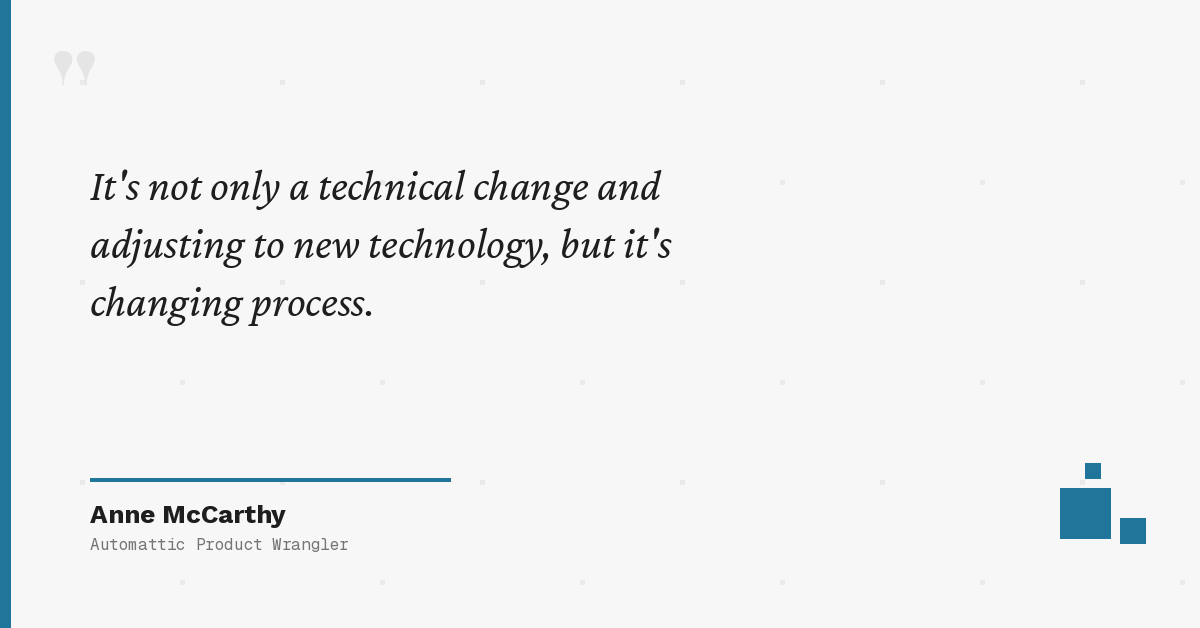
Anne McCarthy has led Gutenberg’s outreach efforts, helping the community understand and adopt Full Site Editing. Her perspective highlights something important: Gutenberg isn’t just about new technology—it’s about fundamentally changing how we approach WordPress development.

Brian Gardner’s message resonates with many in the community: rather than constantly building new features, the focus should be on making the existing block experience more polished, consistent, and accessible. This philosophy of refinement over expansion is shaping how many approach block development today.
What This Means for You
Let me translate all of this into actionable guidance for different audiences.
For Developers
Learn JavaScript and React if you haven’t. PHP-only WordPress development is increasingly limiting. You don’t need to become a frontend expert, but you need working knowledge of React patterns, hooks, and component architecture.
Migrate to Block API Version 3. If you have blocks using older API versions, migration is mandatory for compatibility with current and future WordPress. The iframe editor architecture isn’t optional.
Prefer patterns over custom blocks. Before building a custom block, ask if a pattern would work. Your future self maintaining the code will thank you.
Invest in AI integration skills. Understanding how to leverage AI APIs, work with the WordPress AI Building Blocks initiative, and build AI-enhanced features will differentiate you in the market.
For Site Owners
Block themes are the future—consider migration. If you’re still on a classic theme, start planning the transition. Classic themes will work for years, but they’re no longer receiving the innovation focus.
No-code capabilities are production-ready. You can build sophisticated sites without developer help using the Site Editor, patterns, and block plugins. Don’t assume you need custom development.
Evaluate AI tools for content workflows. Tools like Kadence Blocks’ AI features can genuinely accelerate content creation. Test them and see what fits your workflow.
Invest in learning the Site Editor. The time you spend understanding Global Styles, template editing, and pattern usage will pay dividends in site maintenance efficiency.
For Agencies
Train your teams on FSE and block development. This isn’t optional professional development—it’s core competency for WordPress agencies going forward.
Standardize on block patterns for client sites. Patterns are maintainable, teachable to clients, and don’t create long-term technical debt like custom blocks can.
Evaluate AI tools for content workflows. Your content teams can be more productive with the right AI integrations. Test tools before recommending them to clients.
Recognize classic themes as technical debt. Every client site still running a classic theme is a future migration project. Plan and price accordingly.
Conclusion: The Future is Blocks, The Future of Blocks is AI
After years of building classic PHP plugins and watching the WordPress ecosystem evolve, I can say with confidence: the block ecosystem has fundamentally changed how I approach every project. The debates about whether Gutenberg was the right direction for WordPress are settled. It was.
The transformation is complete. Gutenberg isn’t an alternative to WordPress—it is WordPress. Understanding blocks isn’t a specialization anymore; it’s baseline knowledge for anyone working seriously with the platform.
AI integration opens genuinely new possibilities. The combination of structured block content with AI capabilities creates opportunities for automation, assistance, and intelligence that weren’t possible with traditional WordPress architecture. We’re at the beginning of this curve, not the end.
Block development is more accessible than ever. The tooling has matured, the documentation has improved, and the community has built extensive resources. The barrier to entry for building blocks has never been lower.
The professionals who embrace this will thrive. Whether you’re a developer building blocks, a site owner leveraging them, or an agency delivering client solutions, competence with modern WordPress block development is essential.
My challenge to you:
- For developers: Start with
@wordpress/create-block. Build one pattern this week. Experiment with the Interactivity API. - For site owners: Explore a block theme. Try one of the AI content tools. Spend time understanding Global Styles.
The future of WordPress is blocks. The future of blocks is AI. The time to adapt is now.