Custom AI Agents for WordPress Plugin Development: A Full Repo Tour
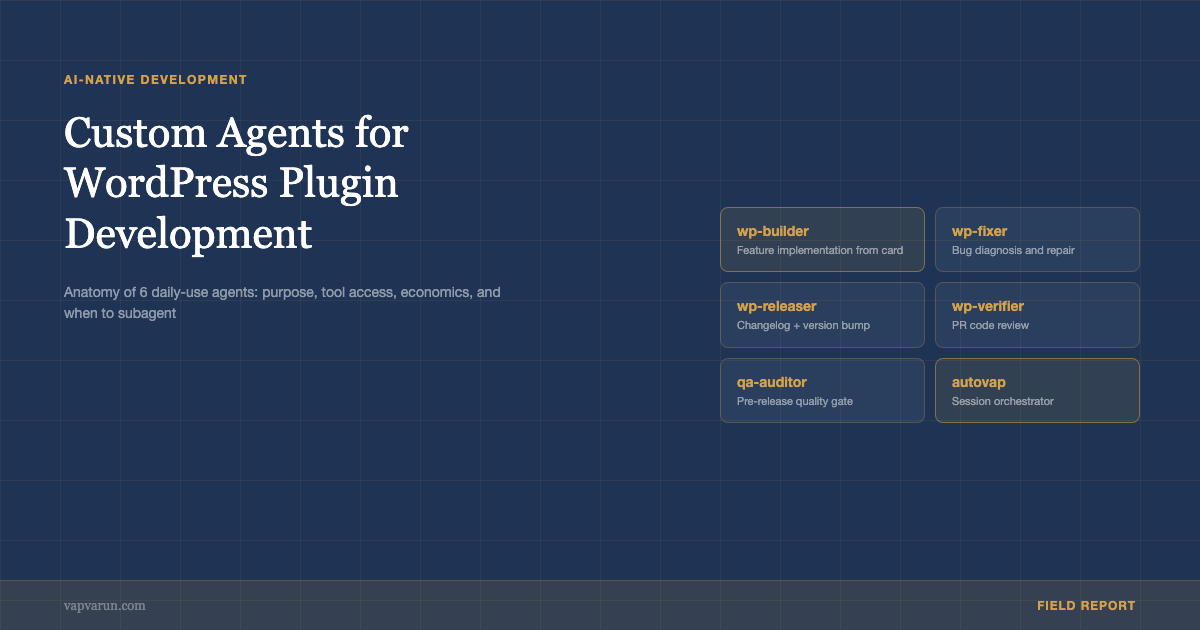
Over the past year, building WordPress plugins at Wbcom Designs has shifted from a human-first workflow to an AI-first one. At the center of that shift are six custom Claude agents: wp-builder, wp-fixer, wp-releaser, wp-verifier, qa-auditor, and autovap. This post is a tour of those agents: what each one does, how they are structured, when to subagent versus stay in-session, and what the cost-per-task economics look like in practice.
These are not generic AI tools configured for WordPress. They are purpose-built agents with specific tool access, constrained contexts, and defined exit conditions. The specificity is what makes them useful. A general-purpose coding assistant tries to do everything; a well-scoped agent does one thing reliably.
What Makes an Agent Different From a Prompt
A prompt is a single instruction. An agent is a system with memory, tool access, and the ability to take multi-step actions based on intermediate results. The key difference in practice: an agent can read a file, execute a command, read the output, and decide what to do next based on that output. A prompt cannot.
For WordPress plugin development, this matters because the tasks are multi-step by nature. Fixing a bug requires reading the code, running tests, reading the test output, fixing the code, running tests again, and confirming the fix. A prompt can generate a fix candidate; an agent can execute the full loop.
The Claude Code agent framework makes this practical via CLAUDE.md files, skills, and subagents. A CLAUDE.md file at the project root establishes the agent’s context: what the plugin does, what coding standards apply, what the architecture looks like. Skills define specific workflows the agent can invoke. Subagents allow one agent to spawn another for isolated tasks with their own context windows.
Agent 1: wp-builder
wp-builder handles new feature implementation from a Basecamp card description. It reads the card, identifies affected files, generates the implementation plan, implements it, writes tests, and creates a PR draft. The full cycle from card to PR takes 8-12 minutes for a medium-complexity feature.
The agent is scoped to a single plugin per session. It reads the plugin’s CLAUDE.md on startup to load the architecture context, then processes the Basecamp card. The exit condition is: tests pass, PHPCS is clean, PHPStan is clean, PR description is written. It does not merge or deploy.
The most important constraint on wp-builder is file scope. When implementing a feature, it requests explicit confirmation before creating new files. This prevents the agent from inventing architecture that the human reviewer then has to rationalize or clean up. The agent implements in the existing structure or it stops and asks.
Agent 2: wp-fixer
wp-fixer handles bug reports. It reads a bug description, reproduces the issue by examining the relevant code paths, generates a fix hypothesis, implements the fix, verifies it does not break the test suite, and produces a summary of what was wrong and why.
The agent is more constrained than wp-builder. It operates in a read-mostly mode: it reads the bug report, reads the relevant code, and reads the test suite before touching anything. This prevents premature fixes that address symptoms rather than causes. The rule is: no code changes until the root cause is identified and confirmed.
wp-fixer also does not create new tests. It verifies that existing tests catch the bug (and if they do not, flags the test gap) and confirms the fix passes. New tests are a separate task for wp-builder. This constraint keeps the agent focused: fix the bug, confirm it is fixed, report what was found.
Agent 3: wp-releaser
wp-releaser handles version bumps and release prep. It reads the commit history since the last release, generates a changelog in the standard action-prefix format (New, Improve, Fix, Security per bullet), bumps version numbers in the correct files (readme.txt, main plugin file, package.json), runs the pre-release check suite, and generates the GitHub release body.
The changelog generation is the most valuable part. The agent reads commit messages, groups them by type (feature, fix, improvement, security), and generates bullets that are customer-readable rather than developer-shorthand. This is a task that takes a developer 20-30 minutes manually and produces inconsistent results. The agent does it in 90 seconds and follows the exact format required by the WordPress plugin directory submission guidelines.
The version bump scope is also carefully constrained. wp-releaser touches only the files that need version numbers: readme.txt, the main plugin header, and if present, package.json and composer.json. It does not touch feature files, fix files, or anything that requires application logic judgment. Clean separation between “prepare release” and “implement changes” is what makes the agent reliable.

Agent 4: wp-verifier
wp-verifier does code review on PRs. It reads the diff, checks it against the plugin’s CLAUDE.md standards, runs static analysis, checks for security anti-patterns specific to WordPress (direct database queries, missing nonce verification, unescaped output), and produces a review summary with specific line-level comments.
The agent is calibrated to be strict on security and lenient on style. Security violations produce blocking comments. Style deviations from WPCS produce suggestions but not blocking comments unless they are in the error-severity list. This calibration means the review is actionable rather than noise.
wp-verifier is the agent most often used as a check on wp-builder’s output. When wp-builder generates a PR, wp-verifier reviews it before a human sees it. About 20% of wp-builder PRs have a wp-verifier finding that requires a revision. This catch rate is what makes the combination valuable: the builder generates at speed; the verifier catches what speed misses.
Agent 5: qa-auditor
qa-auditor handles pre-release quality audits. It runs the full test suite, runs PHPCS and PHPStan, checks for deprecated WordPress functions against the target minimum WP version, runs the accessibility audit on plugin output, and validates that the readme.txt changelog is in the correct format.
The agent produces a structured audit report that gates the release. If qa-auditor fails, the release does not proceed until the failures are addressed. This is not a suggestion; it is enforced by the release pipeline. wp-releaser checks for a clean qa-auditor result as a precondition.
Agent 6: autovap
autovap is the orchestrator. It runs at the start of a development session and coordinates the other agents based on a daily priority list from Basecamp. It reads open cards, classifies them by type (feature, bug, release, maintenance), assigns them to the appropriate agent, and tracks completion. It does not implement anything directly.
The orchestration pattern is the part that makes the whole system more than the sum of its parts. Without autovap, using the specialized agents requires manually deciding which agent handles which task and sequencing them correctly. With autovap, the session starts with a daily briefing and the agent handles the routing.
Subagent vs. In-Session: When to Spawn
The decision about when to subagent versus stay in-session comes down to context isolation. Subagenting is appropriate when the task needs a clean context window (no accumulated history from the current session), when the task is long enough to risk context overflow, or when the task is parallel (multiple independent tasks that can run concurrently).
In practice, wp-builder and wp-fixer almost always run as subagents. Each plugin fix or feature is independent; carrying context from one into the next creates confusion rather than continuity. wp-verifier runs in-session when reviewing a PR that was just generated by wp-builder in the same session, because the review benefits from the context of what was changed and why.
The cost implication of subagenting is real. Each subagent spawn costs a full context initialization: loading CLAUDE.md, loading the relevant tools, establishing the task. For short tasks (under 5 minutes), the initialization cost is significant relative to the task. For long tasks, it is negligible. The threshold at Wbcom Designs is roughly 10 minutes of work: tasks shorter than 10 minutes run in-session; longer ones subagent.
Cost-Per-Task Economics
The economics of running these agents on the Claude API are worth understanding in detail. At current pricing, a typical wp-builder run for a medium-complexity feature (2-3 files changed, tests written, PR description generated) costs approximately $0.08-0.15 in API credits. A wp-fixer run for a bug fix costs $0.03-0.08. A wp-releaser run costs $0.02-0.05. A qa-auditor run costs $0.05-0.12.
The comparison is against developer time. A medium-complexity feature implementation by a mid-level developer takes 2-4 hours. At $30-50/hour, that is $60-200. The agent does it in 8-12 minutes for $0.15. Even accounting for the review and integration time the human spends (30-60 minutes), the economics are not close.
The cost-per-task framing is the right one for evaluating AI tooling in a development shop. Monthly subscription costs for general-purpose AI tools are irrelevant; what matters is the cost per unit of work delivered. For well-scoped, reliable tasks like the ones these agents handle, that cost is an order of magnitude lower than the human equivalent.
If you want to see this workflow in the context of the broader AI-agency operating system, read how n8n + MCP + Claude saves 9 hours per week for the automation layer. If you want to see what this kind of AI-native development workflow looks like applied to a real plugin codebase, Wbcom Designs runs this stack on our full plugin suite. The development services page covers the specifics of what we build and how we do it.
Anatomy of a Well-Built Agent
The agents described here share a structure that is worth articulating explicitly. Each agent has: a clearly scoped purpose (one type of task), a defined set of tools it can access, explicit exit conditions (what “done” looks like), hard constraints on what it will not do, and a CLAUDE.md or skill file that encodes all of this in a form the AI can load and follow.
The CLAUDE.md is the key artifact. See the post on CLAUDE.md for WordPress developers for the detailed approach to layered knowledge files that back each of these agents. It is not a prompt; it is a reference document that the AI reads at session start and follows for the duration of the session. The discipline of writing a good CLAUDE.md – being explicit about what the agent does and does not do, defining the exit conditions clearly, encoding quality standards precisely – is where most of the agent design work happens.
The agents described in this post are specific to WordPress plugin development at Wbcom Designs. The design pattern generalizes: scoped purpose, tool access, exit conditions, hard constraints. Whatever development workflow you are running, those four elements are the architecture of a reliable agent.
The Tool Access Model
Each agent has a defined set of tools it can access, and those tools are constrained to what the task actually needs. wp-builder has read and write access to the file system, access to the test runner, and access to GitHub for PR creation. It does not have database access, API access to production systems, or access to the Basecamp card management tools beyond reading the card it was assigned.
Tool access constraints are not about security (the agent runs under the developer’s credentials anyway). They are about preventing the agent from taking unintended actions. An agent with fewer tools makes simpler decisions. An agent with access to production APIs will occasionally use them when it should not. The discipline of keeping tool access minimal is what separates reliable agents from ones that work most of the time.
The tools are configured at the skill level in Claude Code. Each skill file specifies which MCP servers and tool categories are relevant. wp-builder’s skill file lists: file system, bash runner, GitHub MCP, WordPress MCP (for plugin-specific WordPress knowledge). qa-auditor’s skill file lists: file system, bash runner, report generation. The tool lists are short by design.
Running Multi-Plugin Operations
At Wbcom Designs, we maintain over 100 WordPress plugins and themes. Running the agent workflow across that portfolio requires a different operational model than running it on a single plugin. The key difference is the startup cost of loading context.
For the most actively developed plugins (the ones with weekly releases), each plugin has a complete CLAUDE.md, an architecture document, and a recent changes log. The agent loads these on startup and has full context. For plugins in maintenance mode (monthly or quarterly updates), the CLAUDE.md is lighter, covering just the essential constraints and known issues.
Autovap, the orchestrator, manages this variation by reading each plugin’s CLAUDE.md before assigning tasks to wp-builder or wp-fixer. If the CLAUDE.md is incomplete or outdated, autovap flags the gap and requests a context refresh before proceeding. This prevents the common failure mode of an agent making changes to a plugin with an outdated architecture understanding.
What the Agents Cannot Do
The agents are not good at product decisions. They can implement a feature specification; they cannot determine whether the feature is worth building. They can fix a reported bug; they cannot identify which bugs are most important to fix given the customer impact distribution. They can generate a changelog; they cannot determine the right version bump strategy given the semantic versioning implications of a change.
They are also not good at architecture transitions. Refactoring a plugin from a procedural to an object-oriented architecture, migrating from a deprecated API to a new one, or restructuring the data model all require judgment about trade-offs that extend across the codebase. These are tasks where the agent can assist but cannot lead.
The boundary between what the agents do well and what they do poorly is roughly: tasks with well-defined success criteria (implement this spec, fix this bug, generate this release) versus tasks with judgment-dependent success criteria (is this the right architecture, is this the right feature, is this the right trade-off). The agents are excellent at the first category; they need human direction on the second.
Building the First Agent
If you are building the first agent for your WordPress development workflow, start with wp-fixer rather than wp-builder. Bug fixing has the most well-defined success criteria of any development task: the bug is fixed when the test that reproduces it passes. That clear exit condition makes the agent easy to evaluate and improves quickly.
The second agent to build is wp-releaser. Release prep is a high-friction, low-creativity task that most developers dislike. The agent does it faster and more consistently than a human. The ROI is immediate and measurable: compare the time a release prep took before and after.
wp-builder comes third, not first, because it requires the most careful scoping. Getting the constraints right on a feature implementation agent takes several iterations. The others are simpler to constrain because the task boundaries are cleaner.
Calibrating the Agents Over Time
The agents at Wbcom Designs were not reliable on day one. The first month involved significant calibration: adjusting the tool access lists when agents took unintended actions, tightening the exit conditions when agents declared tasks done prematurely, expanding the architecture documentation when agents made decisions based on incomplete context.
The calibration process is iterative. When an agent makes a mistake, the response is not to retrain it; there is no retraining in this model. The response is to update the constraint that the mistake exposed. If wp-builder creates a new file when it should have modified an existing one, add a constraint to the CLAUDE.md that prevents that. If wp-fixer fixes the symptom instead of the root cause, add a constraint requiring root cause identification before any code change.
After six months of operation, the agents make far fewer mistakes than they did initially. Not because the AI model improved (though it did), but because the constraint set is much tighter. The discipline of treating every mistake as a constraint gap that needs closing rather than as a one-time error is what makes the agents more reliable over time.
The agents described here represent what AI-native development looks like for a real WordPress agency in 2026. The economics are compelling, the reliability is workable, and the productivity gains are measurable. The catch is the upfront investment in constraint design. That investment pays back within weeks on an active plugin portfolio.
The Integration With Code Review
One thing that surprised us: the agents changed the quality of human code review, not just the speed of development. When wp-builder generates a PR and wp-verifier reviews it, the human reviewer sees a diff that has already passed static analysis, security checks, and test verification. The reviewer can focus entirely on design decisions, business logic correctness, and edge cases that tools cannot catch.
Before the agents, code review at Wbcom Designs was a mix of “is this approach correct” and “why is this not escaping output correctly.” The mechanical issues consumed review capacity that should have been spent on architectural questions. With the agents handling the mechanical layer, human code review became substantially more valuable per unit of time.
The agents also make junior developer output reviewable at a higher standard. When a junior developer runs their implementation through wp-builder’s quality checks before submitting a PR, the review no longer needs to teach the basics of WordPress security or PHPCS compliance. Those are handled. The review covers the parts of software development that genuinely require judgment and experience.
Sharing the Stack
Several people have asked whether we open-source the agent configurations. The CLAUDE.md files are plugin-specific and contain Wbcom Designs-specific context that would not transfer directly. The skill files that define the agent workflows are more portable. We have considered publishing them as reference implementations for other WordPress development shops that want to build similar setups.
The agents described here are a point in an evolving practice. The specifics will change as the AI models improve, as Claude Code adds new capabilities, and as we learn which constraints are essential and which are overcautious. The design principles – scoped purpose, tool access, exit conditions, hard constraints – will stay stable. Those are software engineering principles applied to a new execution environment, and they age well.