Let Your Members Publish, Collaborate & Earn: The Complete WB Member Blog Guide
What if your community members could publish professional blog posts directly from their profiles—and you could monetize every single one? That’s exactly what WB Member Blog delivers. Since version 2.0, we’ve transformed this plugin from a simple frontend posting tool into a complete community publishing platform that turns member contributions into revenue.
Whether you’re running a membership site, online community, learning platform, or multi-author publication, this guide shows you how WB Member Blog can help you build a thriving content ecosystem where members create value—and you capture it. If you are in education, you might also want to read about what we build when schools and colleges need a private student community, because member blogging is one of the most requested features in those setups.
What Your Members Will Experience
Let’s start with what matters most: the member experience. When your members log in, they get a clean, intuitive dashboard that makes content creation feel effortless. No clunky interfaces. No confusing options. Just a professional publishing environment that rivals Medium or Substack.
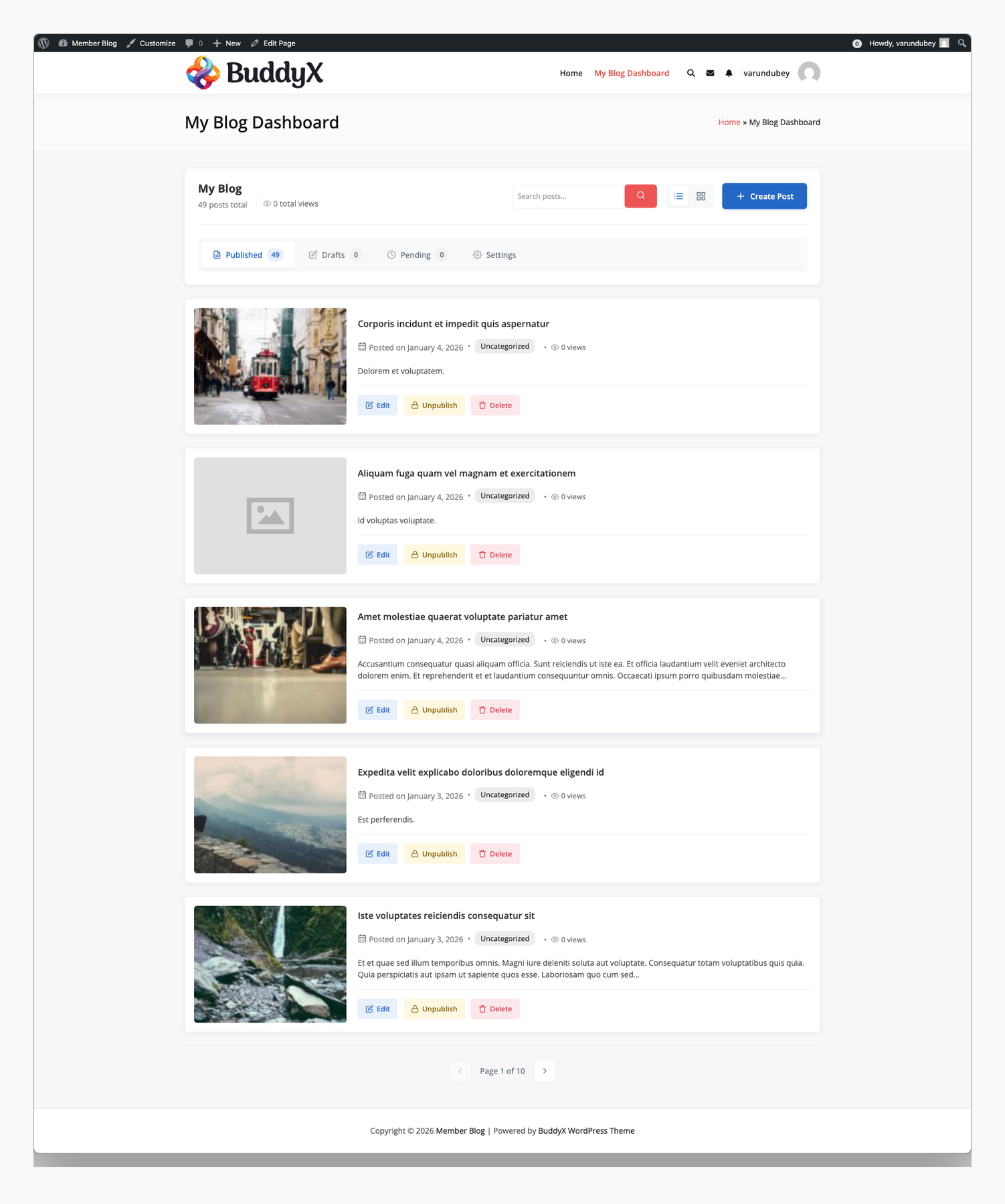
Here’s what your members see when they access their blog dashboard:
- At-a-glance stats – Total posts published and overall views, so they know their content is being read
- Organized content tabs – Published, Drafts, and Pending posts separated for easy management
- Quick search – Find any post instantly, even with hundreds of articles
- One-click actions – Edit, unpublish, or delete without navigating away
- Prominent “Create Post” button – Starting a new post is always one click away
This isn’t just a form slapped onto your site. It’s a complete publishing experience that makes members feel like professional authors—which means they’ll create more content and stay engaged longer.
Their Content, Showcased Beautifully
When members publish posts, their work appears right on their profile. Visitors browsing your community can discover content by exploring member profiles—creating a natural content discovery loop that keeps people on your site longer.
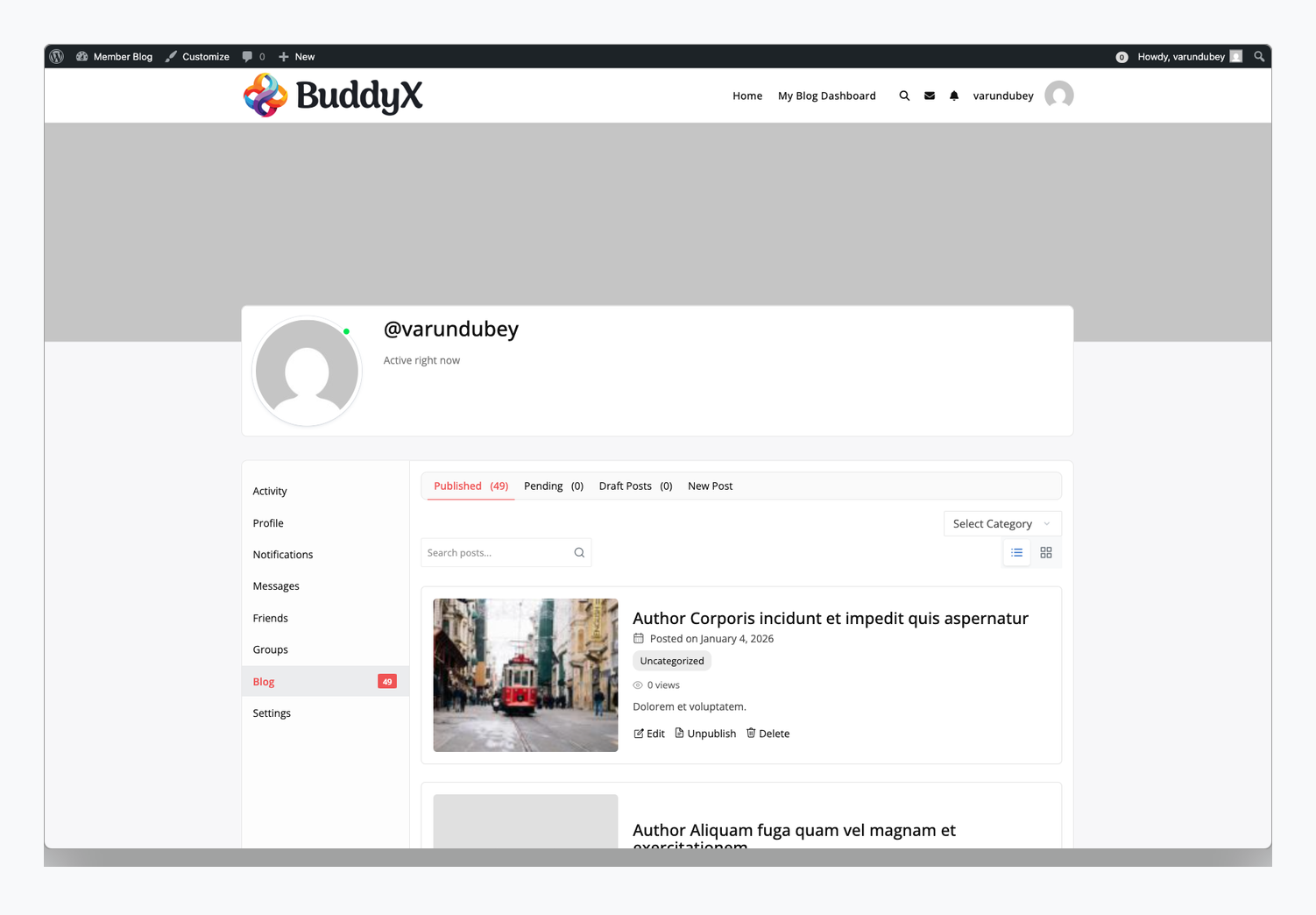
This profile integration works with BuddyPress, BuddyBoss Platform, and PeepSo. If you’re running standalone (no community plugin), members access their dashboard through a dedicated page—same great experience, different access point.
The result? Members feel ownership over their content. They share their profile links. They invite others to read their work. Your community grows organically through member pride.
A Writing Experience They’ll Actually Enjoy
The post creation form is where members spend most of their time, so it needs to be exceptional. We’ve built three editor options, but let me show you the one most communities choose: Editor.js.
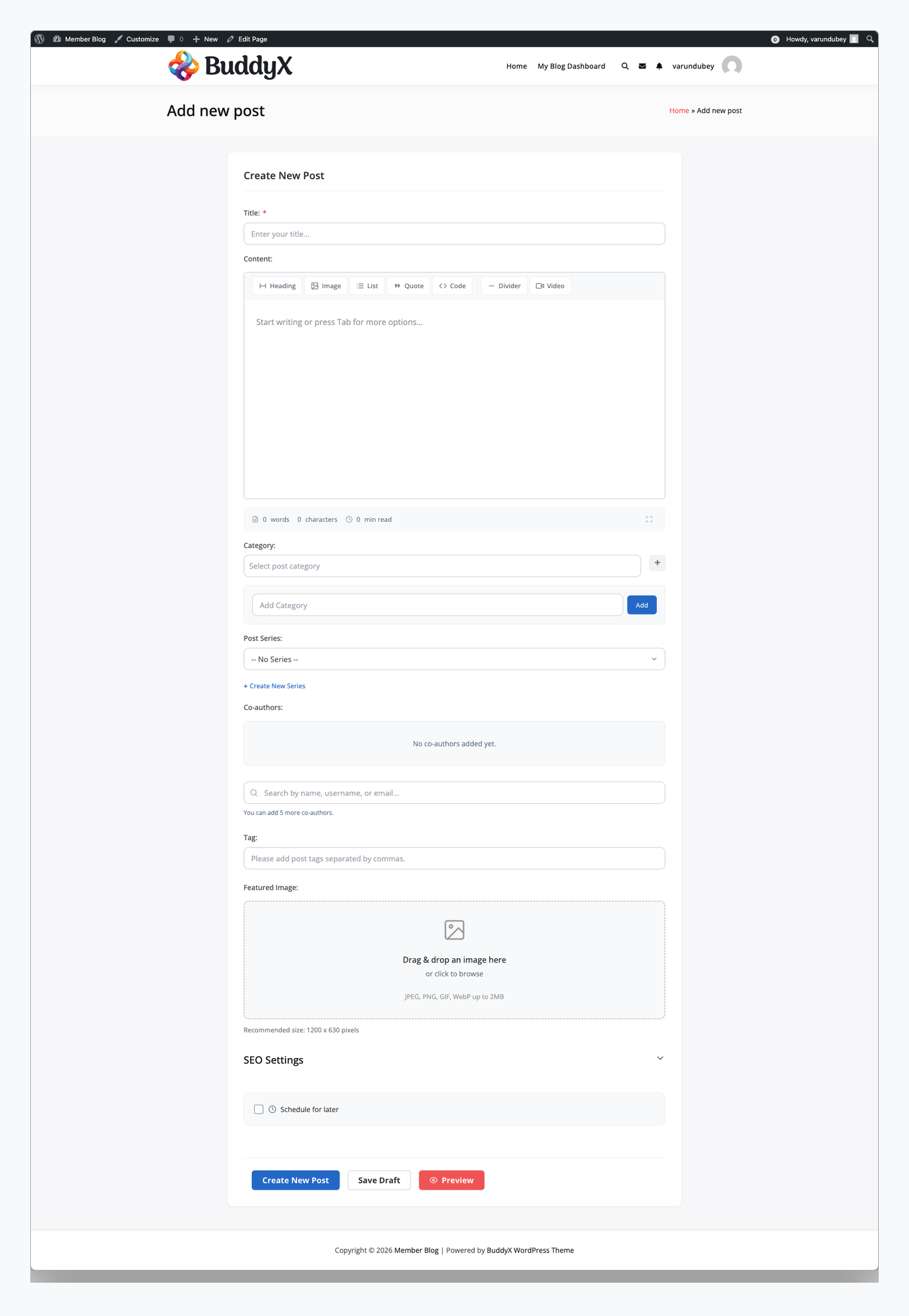
This isn’t the clunky WordPress editor your members might dread. It’s a modern block-based interface inspired by tools like Notion and Medium. Members can:
- Add headers, lists, and quotes with simple keyboard shortcuts
- Embed YouTube videos, tweets, and other media with just a URL
- Upload and position images effortlessly
- Focus on writing without toolbar clutter
We also offer a Medium-style editor for communities focused on long-form writing (distraction-free with floating toolbar) and a Classic TinyMCE editor for users who prefer traditional WordPress editing. Switch between them anytime based on your community’s preferences.
The Evolution: How We Got Here
Version 2.0 of WB Member Blog was a solid foundation: frontend posting, BuddyPress integration, basic management. But community site owners kept asking for more. They wanted monetization. They wanted collaboration. They wanted analytics. They wanted control.
Version 3.0 was our answer—a complete rebuild from the ground up.
We didn’t just add features to the old codebase. We architected a modular system where every PRO feature is a self-contained module. Enable what you need; disabled modules don’t even load. Your site stays fast, and you only pay attention to features that matter for your specific use case.
Now at version 3.2.0 (FREE) and PRO 2.2.0, the plugin powers thousands of community sites—from small hobby communities to large-scale membership platforms generating real revenue from member content.
Monetization: Turn Member Posts Into Revenue
Here’s where it gets exciting for site owners. The Post Credits system transforms your community blog from a cost center into a profit center. Every post published can generate revenue—without ads, without sponsorships, without compromising your community experience.
How Post Credits Work
The concept is simple but powerful:
- Members need credits to publish – Each published post costs credits (you set the amount, typically 1 credit per post)
- Credits come from multiple sources – Membership signup, purchasing credit packs, manual admin assignment, or promotional giveaways
- Zero credits = can’t publish – Members see their balance and a clear path to get more credits
- You control the economics – Set prices, create bundles, integrate with memberships
Three Monetization Models That Work
The Freemium Funnel: Give every new member 3-5 free credits. They experience the joy of publishing, see their content on their profile, maybe get some views and engagement. When they want to post more? Sell credit packs of 10, 25, or 50. You’ve already proven value—now they’re happy to pay.
Tiered Membership Value: Free members get 2 posts per month. Basic members ($9/month) get 10 posts. Pro members ($29/month) get 50. VIP members ($99/month) get unlimited. Now your membership tiers have tangible, differentiated value. Credits auto-refresh with each renewal, creating predictable recurring revenue.
Pay-Per-Post Marketplace: No membership required. Members buy credits when they want to publish. Perfect for guest posting platforms, job boards, classified-style sites, or communities where posting is occasional but valuable.
Seamless Integration With What You Already Use
Post Credits integrates directly with:
- Paid Memberships Pro – Map credits to membership levels automatically
- MemberPress – Credits assigned when members join or renew
- WooCommerce Memberships – Subscription-based credit allocation
- WooCommerce (standalone) – Sell credit packs as products with automatic fulfillment
Members see their credit balance everywhere it matters: on the dashboard, before publishing, and with clear “Get More Credits” calls-to-action when they’re running low.
Control Who Posts and How Often
Monetization through credits is one lever. Role-based restrictions give you another layer of control—preventing spam, encouraging quality, and managing your content review workload.
Time-Based Posting Limits
Set maximum posts per time period for each WordPress user role:
| Role | Per Hour | Per Day | Per Month | Strategy |
|---|---|---|---|---|
| Subscriber | 1 | 2 | 10 | Prevent spam, encourage quality |
| Contributor | 2 | 5 | 30 | Active contributors with review |
| Author | 5 | 10 | Unlimited | Trusted members, direct publish |
| Editor | Unlimited | Unlimited | Unlimited | Full access for staff |
Quality Requirements
Enforce content standards automatically:
- Minimum word count – Require 100, 200, or 500+ words to prevent thin content
- Smart warnings – Members see “You’ve used 8 of 10 posts this month” before hitting limits
- VIP overrides – Exempt specific users (staff, featured authors, contest winners) from all restrictions
The result: quality content from engaged members, not a flood of low-effort posts from bots or spammers.
Post Series: Keep Readers Coming Back
One of our most requested features lets members create multi-part content that keeps readers engaged across multiple visits. Think “Learn Python in 10 Days” or “Building My Startup: A Journey.”
What Members Can Create
When a member creates a series, readers get:
- Automatic navigation – “Previous” and “Next” buttons appear on every post, guiding readers through the content
- Table of contents – A list of all parts showing which they’ve read and which remain
- Progress tracking – “You’re 60% through this series (3 of 5 parts read)”
- Series landing page – A dedicated page where readers can start from the beginning or continue where they left off
Why Series Matter for Your Site
For engagement: Readers who start a series have a reason to return. They’ve invested in Part 1 and want to see how it ends. This drives repeat visits without any additional marketing effort.
For SEO: Series create natural internal linking between related posts. Search engines see comprehensive topic coverage—a signal of authority. You rank better for topic clusters, not just individual keywords.
For member satisfaction: Authors can create ambitious, comprehensive content without cramming everything into one post. Their best work gets the structure it deserves.
Series Use Cases
Tutorials: “Complete Guide to WordPress Security” in 8 parts—each focused on one aspect, all connected.
Courses: Use series as modules. Members create lesson posts. Students track their progress through the curriculum.
Journals: “My First Year as a Freelancer”—ongoing series that readers follow like a blog within your blog.
Collaborative Guides: Multiple authors contribute posts to the same series. The community builds comprehensive resources together.
Co-Authors: Professional Collaboration
Sometimes the best content comes from collaboration. The co-author system lets multiple members work on the same post with proper attribution and access controls.
How It Works
- Primary author starts a post and clicks “Add Co-Author”
- Search for collaborators by name or username
- Send invitations – Invitees get email and on-site notifications
- Accept and collaborate – The post appears in both members’ dashboards with full edit access
- Publish with proper credit – The byline shows all authors: “By Alice, Bob & Carol”
Built-In Safeguards
Post locking prevents conflicts—when one co-author is editing, others see “Alice is currently editing this post.”
Invitation expiry keeps things clean—unanswered invitations disappear after 7 days (configurable).
Clear permissions—only the primary author can delete the post or change its status. Co-authors can edit content but can’t accidentally (or intentionally) destroy the work.
Editorial Workflow Option
For magazine-style sites, enable the editorial workflow. Co-authors write and submit; designated reviewers approve or request changes with feedback. This adds a quality layer for sites that need it:
Co-authors write → Submit for review → Reviewer approves (or requests changes) → Post publishes
Analytics: Show Members Their Impact
When members can see their content’s performance, they create more. It’s that simple. The built-in analytics dashboard gives every author visibility into their impact.
What Members See
- Total views across all their posts—the big number that shows their overall reach
- Per-post performance – Which posts are resonating? Which topics should they write more about?
- Traffic sources – Are readers coming from search, social, or direct links?
- Trend charts – Daily, weekly, and monthly view patterns visualized with interactive graphs
- Top performers – Their most successful content highlighted for easy reference
Why This Matters
Analytics transform posting from “shouting into the void” to “building an audience.” Members who see their views growing become your most engaged content creators. They share their stats. They compete (friendly) with other authors. They optimize their content for better performance.
For you, it means more quality content without having to push or incentivize. The feedback loop does the work.
Custom Fields: Structured Content Beyond Blog Posts
What if your members need to submit more than just title and content? Custom fields let you collect structured data for any use case.
15+ Field Types
Text, textarea, number, email, URL, date, datetime, select dropdowns, multi-select, checkboxes, radio buttons, file uploads, image uploads, galleries, oEmbed (for videos/embeds), and color pickers.
Real Examples
Event listings: Add Event Date, Location, Ticket Price, and Event Poster fields. Members submit events; your site becomes an event directory.
Product reviews: Add Rating (1-5 stars), Pros, Cons, and Purchase Link fields. Members review products with consistent structure.
Job board: Add Company, Location, Salary Range, and Apply URL fields. Members post jobs; candidates browse easily.
Recipe site: Add Prep Time, Cook Time, Servings, Difficulty, and Recipe Video fields. Every recipe follows the same useful format.
Conditional Logic
Show fields only when relevant. If “Post Type” equals “Event,” show the date and location fields. Otherwise, hide them. Forms stay clean and contextual.
More Features That Matter
Post Scheduling
Members can write now and publish later. They see a visual calendar, pick a future date and time, and the post automatically goes live. Perfect for content calendars, vacation coverage, or timezone-optimized publishing. Members can manage all scheduled posts from their dashboard—reschedule, cancel, or publish immediately.
Group Blogs (BuddyPress/BuddyBoss)
Link posts to community groups. A “Photography” group gets a Blog tab where members share photography content. Posts appear in the group activity feed. Privacy follows group settings (public/private/hidden). Group admins can feature important posts. It creates natural content hubs around shared interests.
Notifications
Everyone stays informed. Admins get notified when posts need review. Members get notified when posts are approved (or rejected with feedback). Co-author invitations and responses trigger appropriate alerts. All notifications work via email and on-site (including BuddyBoss mobile app push notifications).
Auto-Save Drafts
Members never lose work. As they write, drafts auto-save in the background. Browser crashes, accidental navigation, computer shutdowns—their content survives. When they return, they pick up exactly where they left off.
Platform Flexibility
WB Member Blog adapts to your stack:
- BuddyPress – Blog tab in member profiles, activity integration
- BuddyBoss Platform – Full integration including mobile app, groups, LearnDash compatibility
- PeepSo – Profile integration and activity stream support
- Standalone – Works without any community plugin using dedicated pages and shortcodes
You don’t need to change your platform. WB Member Blog meets you where you are.
Frequently Asked Questions
Can members use the plugin without BuddyPress or BuddyBoss?
Absolutely. WB Member Blog works in standalone mode with any WordPress theme. Members access their dashboard through a dedicated page you create using our shortcodes. The experience is nearly identical—they just don’t have the profile tab integration that community plugins provide.
How do post credits work with existing membership plugins?
We integrate directly with Paid Memberships Pro, MemberPress, and WooCommerce Memberships. When a member joins or renews at a specific level, they automatically receive the credits you’ve configured for that level. No manual intervention needed—it’s completely automated.
Can I migrate existing posts to use series?
Yes. When you create a series, you can add any existing posts to it and set their order. This works great for organizing older content into coherent collections without rewriting anything.
What happens when co-authors try to edit simultaneously?
Our post locking system prevents conflicts. When someone opens a post for editing, other co-authors see a notice that the post is being edited and by whom. They can view the post but can’t make changes until the editing session ends. This prevents the frustration of overwritten work.
Do analytics affect site performance?
View tracking is lightweight and uses efficient database queries. For high-traffic sites, we recommend using object caching (Redis or Memcached) which the plugin fully supports. Analytics data is aggregated to prevent database bloat over time.
Can I customize the frontend appearance?
Yes. The plugin uses template files that you can override in your theme, just like WooCommerce templates. CSS is minimal and designed to inherit your theme’s styles. For deeper customization, all output passes through filters that developers can hook into.
Why Site Owners Choose WB Member Blog
After talking with hundreds of community site owners, here’s why they chose WB Member Blog over alternatives:
- Real monetization – Not theoretical. Actual revenue from post credits, integrated with WooCommerce and membership plugins they already use.
- Quality control – Restrictions prevent spam without heavy-handed moderation. Good content rises; junk never gets published.
- Member engagement – Analytics, series progress, and collaboration features keep members actively creating, not just signing up and disappearing.
- Professional experience – The frontend dashboard and editors rival standalone publishing platforms. Members feel like real authors, not WordPress users fighting the admin.
- Modular architecture – Enable only what you need. No bloat. Sites stay fast. Configuration stays simple.
- Proven reliability – Years of development, thousands of active installations, continuous updates based on real community feedback.
Getting Started
You can be up and running in under 10 minutes:
- Install the FREE plugin from WordPress.org or your dashboard
- Create pages using the one-click auto-create buttons for submission and dashboard
- Set permissions – Choose which roles can post
- Pick an editor – Editor.js (recommended), Medium, or Classic
- Invite members to post – They’ll see the Blog tab in their profile immediately
Want monetization, restrictions, series, co-authors, analytics, custom fields, scheduling, or group blogs? Add the PRO plugin and enable the modules you need. Each feature is self-contained—enable what matters, ignore what doesn’t.
Requirements: WordPress 6.0+, PHP 7.4+
Works with: BuddyPress, BuddyBoss Platform, PeepSo, WooCommerce, Paid Memberships Pro, MemberPress, WooCommerce Memberships—or none of them (standalone mode).
The Bottom Line
WB Member Blog turns your community members into content creators and turns that content into revenue. The member experience is polished and professional. The monetization is flexible and proven. The control you have over permissions, restrictions, and quality is granular without being complicated.
Whether you’re launching a new community with user-generated content at its core, adding blogging to an existing membership site for additional value, or building a multi-author publication with editorial workflow, WB Member Blog provides the complete toolkit.
Start with the free version. See how your members respond. Add PRO features as your monetization strategy develops. The plugin grows with your community.
Current versions: WB Member Blog FREE 3.2.0 | WB Member Blog PRO 2.2.0