WP Astro MCP v3.0: Headless WordPress Gets an Astro Frontend
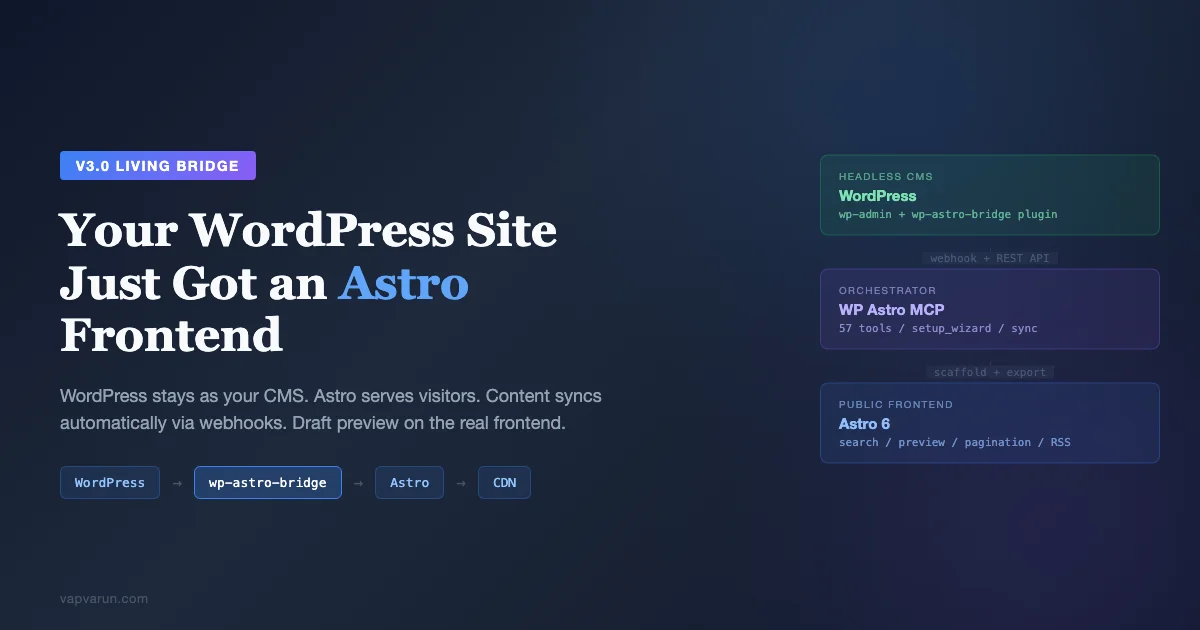
Today I am releasing WP Astro MCP v3.0, codenamed “Living Bridge.” It is the biggest update since the project started, and it fundamentally changes what the tool does.
The original WP Astro MCP was a build-time migration tool. Connect your WordPress site, extract content, generate an Astro project, push to GitHub, done. A one-time operation. Useful, but limited. Once the export finished, the connection between WordPress and Astro was severed. Editors would publish new posts in WordPress and nothing would happen on the Astro side until someone manually ran a sync command.
v3.0 changes that. WordPress and Astro now stay connected. Content flows automatically. Editors can preview drafts on the real Astro frontend. One command sets up the entire thing. And a lightweight WordPress plugin handles the bridge between the two systems.
This is not a migration tool anymore. It is a headless WordPress platform.
What Changed and Why
The core realization was simple: nobody wants to “migrate” from WordPress. What people want is WordPress’s content management with Astro’s performance. Editors love wp-admin. They know the block editor. They have workflows built around categories, featured images, and scheduled publishing. Asking them to learn a new CMS is a non-starter.
What they do not love is the public-facing side of WordPress. The PHP rendering, the plugin security surface, the caching gymnastics to make a dynamic site feel fast, the fact that every visitor hits a database query. That is the part that should be Astro: static HTML, served from a CDN, with zero JavaScript by default.
v3.0 makes that split clean. WordPress stays as the CMS. Astro becomes the public frontend. The bridge between them is automatic.
The Setup Wizard: Five Minutes, One Command
The biggest adoption barrier in v1 and v2 was the setup process. You had to run 8-10 separate MCP commands in the right order: site_add, site_analyze, site_export_config, convert_preview, scaffold_project, export_start, export_resume (multiple times), generate_redirects, github_init. It worked, but it felt like assembling furniture from instructions.
v3.0 introduces setup_wizard. One command that orchestrates the entire flow:
setup_wizard({
  url: "https://myblog.com",
  username: "admin",
  app_password: "xxxx xxxx xxxx xxxx",
  output_dir: "~/projects/myblog-astro",
  deploy_platform: "vercel"
})
That single command registers your WordPress site, auto-detects its capabilities (SEO plugin, ACF, post types, taxonomies), analyzes the content, configures the export, previews sample posts to verify conversion quality, scaffolds a complete Astro 6 project, exports all content in batches with automatic resume, generates redirect rules, and initializes a git repository.
Five minutes from “I have a WordPress blog” to “I have a deployed Astro frontend on Vercel.” No manual steps in between. Claude handles the orchestration. If you are new to MCP servers and how they fit into a WordPress workflow, I covered that in depth in MCP Servers for WordPress Developers.
wp-astro-bridge: The WordPress Plugin That Closes the Loop
The setup wizard handles the initial build. But what happens when an editor publishes a new post next Tuesday? In v2, nothing. You had to manually run sync_full to pull changes. Most people would forget, and their Astro site would drift out of date.
v3.0 ships a companion WordPress plugin called wp-astro-bridge. It is intentionally minimal: three PHP classes, zero Composer dependencies, no custom database tables, no JavaScript admin bundles, no cron jobs. It installs like any WordPress plugin and has a settings page with exactly three fields.
Here is what it does:
Webhook dispatcher. When an editor publishes, updates, or deletes a post, the plugin fires an HMAC-SHA256 signed webhook to your configured URL. The Astro deployment platform (Vercel, Netlify, Cloudflare) receives the webhook and triggers a rebuild. New content is live within 1-2 minutes of clicking “Publish” in WordPress. The webhook is debounced (2-second transient prevents autosave spam) and non-blocking (5-second timeout, failures do not affect WordPress).
Preview URL rewriter. This is the feature I am most excited about. The plugin overrides WordPress’s “Preview” button to point to the Astro frontend instead of the WordPress theme. When an editor clicks Preview on an unpublished draft, they see their content rendered on the real Astro design: the real layout, the real typography, the real styling. Not a WordPress theme preview. The actual production frontend.
The authentication is elegant. The plugin generates a short-lived HMAC token (signed with WordPress’s own salts, 5-minute expiry) and appends it to the Astro preview URL. The Astro side has a hybrid SSR route at /preview that validates the token against the WordPress plugin’s REST endpoint, fetches the draft content, and renders it with the same PostLayout component used for published posts. A yellow banner at the top says “You are previewing a draft. This page is not published.”
No shared secrets to configure. No JWT libraries. No permanent auth cookies. The token expires in 5 minutes, and each preview generates a fresh one.
Normalized SEO REST field. Every public post type gets an astro_seo REST field that returns a consistent format regardless of which SEO plugin the site uses. Yoast, RankMath, AIOSEO: same output shape. Title, description, canonical URL, OG image, robots directive, focus keyword. The MCP server’s frontmatter builder can consume this directly without caring about which SEO plugin is active.
Health endpoint. GET /wp-json/astro-bridge/v1/health returns the plugin version, WordPress version, configured URLs, webhook delivery status, and last webhook timestamp. The MCP server’s site_add command auto-detects whether the plugin is installed by hitting this endpoint.
Reactive Sync: One Post at a Time
The v2 sync tools (sync_check, sync_pull, sync_full) work by scanning the entire WordPress site for changes. That is fine for a daily cron job but slow for real-time updates. If an editor publishes one post, you do not want to scan 3,000 posts to find the one that changed.
v3.0 adds sync_webhook, a new action that processes individual post webhooks from wp-astro-bridge. It receives the webhook payload (post ID, action, slug), validates the HMAC signature, and syncs just that one post. Fetch, convert, write, done. Targeted and fast.
The scaffolded Astro project now includes a /api/hook.ts server route that receives these webhooks and can trigger platform-specific rebuild APIs. For most setups, pointing the plugin directly at your deploy platform’s build hook URL is simpler. But the endpoint is there for custom workflows.
And if you do not want the plugin at all, the existing sync tools still work. sync_schedule generates a GitHub Actions workflow that runs sync_full on a cron schedule. No plugin needed, just slower.
Production-Ready Scaffolding
In v2, the scaffolded Astro project was a starter template. Basic layouts, a blog listing page, a post page, RSS feed. Functional but not deployable without significant additions.
v3.0 scaffolds a production-ready Astro 6 project out of the box:
Paginated blog index. /blog/, /blog/page/2/, /blog/page/3/. 12 posts per page, static generation, previous/next navigation. No more single-page blog listing that loads every post title.
Pagefind search. A /search page with Pagefind integration. The search index is built at deploy time from the static HTML output (via a postbuild script). Client-side search with zero framework JavaScript. Instant results, works offline.
Related posts. At the bottom of every blog post, up to 3 related posts computed at build time. The scoring algorithm weights shared categories (2x) higher than shared tags (1x) and takes the top 3 matches. Zero runtime cost.
JSON Feed. /feed.json alongside the existing RSS feed and sitemap. JSON Feed v1.1 format for modern feed readers.
Reading progress bar. A thin fixed bar at the top of every post page that fills as the reader scrolls. Lightweight inline script, no framework dependencies.
Enhanced 404 page. A styled 404 with links to the homepage, blog, and search. Not just “Page not found.”
Hybrid rendering mode. The Astro config sets output: 'hybrid' so the preview route works as a server-side rendered page while everything else remains statically generated. Best of both worlds.
The 13-Step Content Pipeline
Under the hood, every WordPress post goes through a 13-step sequential transformation before it becomes an Astro Markdown file. I am including the full pipeline here because it is the part people ask about most:
- Sanitize. DOMPurify strips XSS vectors (script tags, onclick handlers, javascript: URLs) while preserving legitimate content HTML. This runs first because everything downstream assumes clean input.
- Resolve shortcodes. Built-in handlers for gallery, video, audio, caption, and embed shortcodes. Plus per-site custom rules you configure with
shortcode_configure. Five resolution modes: strip, keep content, remove, map to Astro component, or convert to HTML. - Process Gutenberg blocks. Remove block comment delimiters (
) while preserving the semantic HTML content inside each block. The block structure served its purpose in the editor; Astro does not need it. - Normalize HTML. Decode HTML entities, remove empty paragraphs and spans, strip inline styles that page editors accumulated over years of edits. Clean up the HTML before conversion.
- Convert to Markdown. Turndown with WordPress-specific rules for captions, galleries, code blocks, tables, embeds, and list formatting. This is the core transformation step.
- Rewrite internal links. WordPress URLs (
/2024/03/my-post/) get mapped to their Astro equivalents (/blog/my-post/) using the URL map stored in SQLite. Every internal link in every post gets updated. - Rewrite media URLs. Swap media domains for the go-live configuration. During development, images point to
example.com. At go-live, they point toapp.example.comwhere WordPress continues running. - Clean conversion artifacts. Remove leftover markup from the Turndown conversion, fix double-encoded HTML entities, clean up any edge cases the previous steps missed.
- Process embeds. YouTube and Vimeo iframes get converted to clean URLs. Other oEmbed content is preserved as-is.
- Handle galleries. WordPress gallery markup gets transformed into structured image grids in Markdown.
- Fix whitespace. Ensure proper spacing around headings, lists, code blocks, and block-level elements. Markdown is whitespace-sensitive; this step prevents rendering issues.
- Validate. Flag any remaining unconverted HTML, broken image references, or potential content loss. The validation report is attached to each post in the SQLite database so you can review issues across the entire export.
The pipeline processes content from the WordPress REST API as rendered HTML. For standard Gutenberg and classic editor content, the output is clean Markdown with proper frontmatter. For page builder content (Elementor, WPBakery, Divi), the text is extracted but visual layouts do not carry over. That is a documented limitation, not a bug.
A Real Workflow: From WordPress to Live Astro Site
Here is what the complete flow looks like in practice, from a real WordPress blog to a live Astro frontend on Vercel:
// In Claude Code, tell Claude:
"Run setup_wizard for myblog.com with username admin and app password xxxx xxxx xxxx"

// Claude calls setup_wizard, which orchestrates:
// 1. site_add → registers site, detects Yoast SEO, 3 post types, 4 taxonomies
// 2. site_analyze → 847 posts, 23 pages, 156 categories, 4 authors
// 3. site_export_config → output to ~/myblog-astro, Vercel deploy, md format
// 4. convert_preview → 3 sample posts converted, 0 issues
// 5. scaffold_project → Astro 6 project created (hybrid mode, Pagefind, pagination)
// 6. export_start → batch 1 of 34 processed (25 posts/batch)
// 7. export_resume (x33) → all 847 posts exported
// 8. generate_redirects → 847 Vercel redirects generated
// 9. github_init → git repository initialized

// Result: complete Astro frontend at ~/myblog-astro
// Next: github_create_repo → github_push → connect Vercel
After the initial setup, install wp-astro-bridge on your WordPress site. Go to Settings > Astro Bridge. Enter your Vercel deploy hook URL as the webhook URL. Done.
From that point forward, every time an editor publishes or updates a post in WordPress, the plugin fires a webhook, Vercel rebuilds the Astro site, and the new content is live within 1-2 minutes. No manual intervention. No cron jobs. No sync commands.
When you are ready to go live, the domain swap is clean: WordPress moves from myblog.com to app.myblog.com (a DNS change and WordPress URL update). Astro takes over myblog.com via Vercel. Run media_rewrite to update all image URLs in the exported content from myblog.com to app.myblog.com. Deploy. Your editors continue using app.myblog.com/wp-admin as if nothing changed. Visitors get static Astro HTML from the CDN.
57 Tools, 9 Categories
The tool count grew from the original 48 to 57 across 9 categories:
| Category | Tools | Purpose |
|---|---|---|
| Site management | 9 | Add, test, analyze, configure WordPress sites |
| Content extraction | 13 | Fetch posts, terms, authors, media, menus, comments, settings, widgets |
| Transform | 6 | Convert to Markdown, preview, shortcode handling |
| Output and media | 7 | Scaffold project, write content, redirects, media audit/rewrite |
| GitHub | 6 | Git init, create repo, commit, push, deploy config |
| Export pipeline | 7 | Batch processing with resume, retry, validation |
| Content sync | 8 | Change detection, pull, delete, full sync, webhook processing, scheduling |
| Setup wizard | 1 | One-command guided setup flow |
The router pattern still exposes just 3 meta-tools to Claude (wp_astro_run, wp_astro_help, wp_astro_describe). All 57 actions are discovered on demand, keeping the token footprint minimal.
The Adoption Funnel
I designed v3.0 with a clear progression that does not gate anyone:
Level 1: Any WordPress site, no plugin. Run setup_wizard with your WordPress URL and credentials. Get a working Astro frontend in 5 minutes. Content is exported once. You can re-run sync manually whenever you want. This works with any WordPress site that has the REST API enabled (which is every WordPress site since version 4.7).
Level 2: Automated sync, no plugin. Run sync_schedule with platform: 'github-actions' to generate a cron workflow that syncs content automatically (hourly, daily, or weekly). Still no plugin needed. Your Astro site stays reasonably current.
Level 3: Instant rebuild, install plugin. Install wp-astro-bridge in WordPress. Enter your deploy platform’s build hook URL. Now every publish/update/delete triggers a rebuild within 1-2 minutes. Real-time content flow.
Level 4: Draft preview, plugin already there. If you installed the plugin for Level 3, draft preview already works. Click Preview in WordPress, see your draft on the real Astro frontend. No additional setup.
Each level adds value. Nobody is blocked. The plugin is a power-up, not a gate.
What I Am Honest About
v3.0 is not a silver bullet. Here is what it does not do well:
Page builder content. Elementor, WPBakery, Divi, and similar builders produce deeply nested HTML with far more markup than actual content. The REST API serves this rendered HTML, and the converter extracts the text. But multi-column layouts, styled sections, animated elements, and visual design structures do not carry over. You get the content, not the layout. This tool works best with standard Gutenberg and classic editor content. For page-builder-heavy sites, expect manual cleanup on complex pages.
WooCommerce. Products, cart, checkout, and dynamic ecommerce features are not handled. This is for content sites: blogs, documentation, portfolios, company sites. If your WordPress site is primarily a WooCommerce store, this is not the right tool.
Real-time preview refresh. The draft preview requires clicking Preview again in WordPress to get a fresh token. There is no live reload or automatic refresh when you save changes in the editor. Click Preview, review, go back to editing, click Preview again.
No visual theme picker. The scaffolded Astro project has one design: clean, functional, minimal. If you want a magazine layout, portfolio grid, or branded design, you will need to customize the Astro components after scaffolding. The project gives you a solid foundation, not a finished design.
How This Compares to Alternatives
I researched the landscape thoroughly before building v3.0. Here is how WP Astro MCP compares to what else is available:
PhantomWP ($149 lifetime) is the closest commercial alternative. It generates Astro from WordPress, has webhook sync, and includes a cloud IDE with AI-assisted editing. It is a polished product. We differ in several ways: WP Astro MCP is free and open source, has batch export tooling with SQLite state tracking (resume from interruption, retry failures), supports unlimited multi-site management, and is MCP-native so it integrates deeply with Claude Code. PhantomWP does not have a companion WordPress plugin, batch resume/retry, or a setup wizard. We do not have a cloud IDE. Different strengths for different users.
Faust.js from WP Engine has some features we admire: draft preview, WordPress template hierarchy mapping, and block-to-component mapping. But Faust.js is Next.js only. If you want Astro’s static-first architecture with zero JavaScript by default, Faust.js is not an option. We serve the Astro lane specifically. Faust.js also requires WPGraphQL and the FaustWP companion plugin, while our core workflow needs nothing beyond the standard WordPress REST API.
Astro + WordPress starter templates (astro-wordpress-starter, astropress, headless-astro-wp) are available on GitHub. They are useful starting points but fundamentally different from what we built. They are template repositories with a few pages and manual content fetching via WPGraphQL or REST. No batch processing. No sync. No shortcode handling. No content transformation pipeline. No SEO extraction. No media URL rewriting. No SQLite state management. No setup wizard. They are the “Hello World” of headless WordPress with Astro. We are the production pipeline.
Static site generators (WP2Static, Simply Static, Staatic) are WordPress plugins that crawl the rendered WordPress site and output static HTML. They preserve the WordPress theme design, which is the opposite of our approach. We replace the WordPress frontend with an Astro-designed one. They are good for security hardening an existing WordPress site without changing the design. We are good for replacing the design entirely with a modern Astro frontend.
The unique position we occupy: the only free, open-source, AI-native tool that provides a complete WordPress-to-Astro pipeline with a companion WordPress plugin, batch export with resume/retry, and ongoing content sync. There is nothing else that covers the full lifecycle from extraction through deployment and ongoing automated updates.
What Is Next
v3.0 completes the “Living Bridge” roadmap (Phases 8-11 of the design spec). What comes next depends on what the community asks for. The parked ideas include:
- WPGraphQL support as an alternative to the REST API (for sites where REST becomes a bottleneck)
- Block-to-Astro-component mapping (Gutenberg blocks rendered as native Astro components)
- ISR (Incremental Static Regeneration) for instant content updates without full rebuild
- Template theme picker (magazine, docs, portfolio variants)
npx create-wp-astronpm initializer package- WordPress.org plugin directory submission for wp-astro-bridge
None of these are planned until there is clear demand. v3.0 covers the 90% use case. Additional features will be built when someone actually needs them, not before.
Try It
The project is open source under the MIT license at github.com/vapvarun/wp-astro-mcp.
The combination of Claude’s 1M context window and MCP tooling makes this kind of orchestration practical. The AI can hold your entire site’s content model in context while deciding how to convert each post. If you have a WordPress site and Claude Code, you can try it right now:
// Add to your MCP config
{
  "mcpServers": {
    "wp-astro-mcp": {
      "command": "node",
      "args": ["/path/to/wp-astro-mcp/dist/index.js"]
    }
  }
}

// Then tell Claude:
"Run setup_wizard for myblog.com with username admin and app password xxxx"
Five minutes later, you have an Astro frontend. Install the wp-astro-bridge plugin for automatic rebuilds and draft preview. Or do not, and sync manually whenever you want.
The code, the design spec, the implementation plans, and the full changelog are all in the repo. If you build something with it, I would love to hear about it.