Inside a Blog Publishing MCP: The Architecture That Powers AI-Native Content Ops
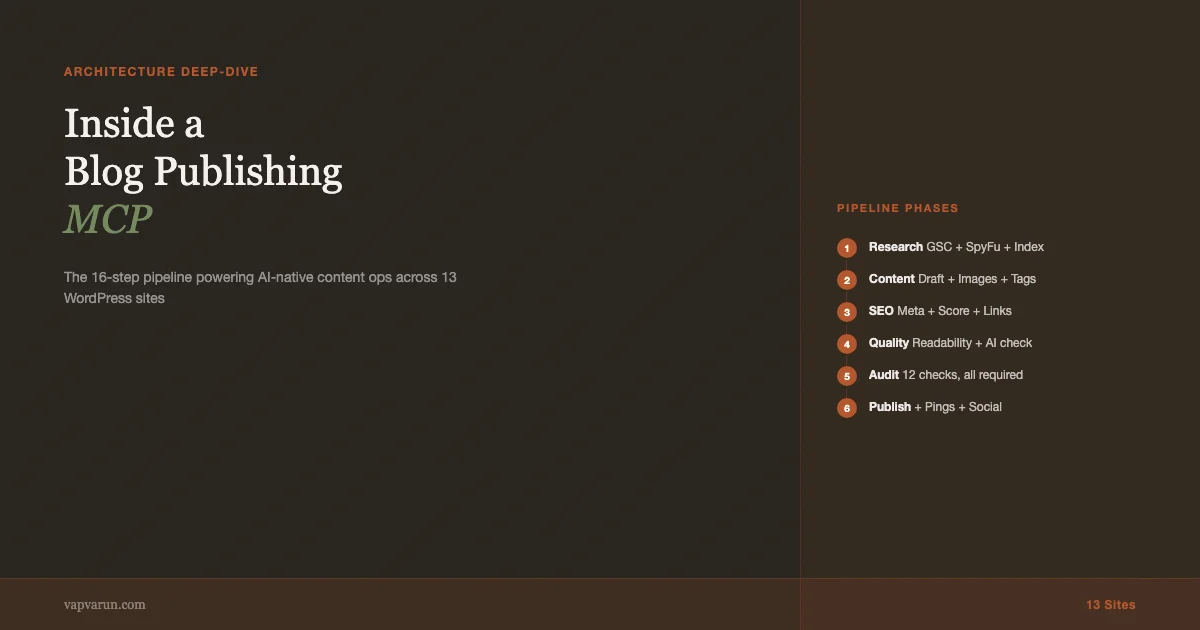
Last year we built an MCP server for our WordPress blog operations and wired it into Claude Code. The system now manages 13 sites, runs a full content pipeline from keyword research to post-publish indexing pings, and handles everything from calendar scheduling to featured image generation. This post is a tour of the architecture: what the server does, how the tools are structured, where AI judgment is useful versus where hard rules are better, and what we learned from running it in production.
Most write-ups about AI content tools focus on the prompt engineering. That is the least interesting part. What matters is how the system handles failure gracefully, how it enforces quality consistently across sites with different rules, and how it integrates with real WordPress infrastructure rather than toy examples.
What a Blog Publishing MCP Actually Is
An MCP server (Model Context Protocol server) is a structured interface between an AI coding assistant and external tools. Instead of the AI writing code to call APIs directly, you define a set of typed, documented tool calls that the AI can invoke. The AI gets clean inputs and structured outputs; the server handles authentication, rate limiting, error handling, and the messiness of real APIs.
For a blog publishing system, this means the AI does not write WordPress REST API calls directly. It calls post_create or seo_meta_update and the MCP server handles the details: which authentication method, which endpoint, how to convert HTML to Gutenberg blocks, what to do when the API rate limits.
The practical consequence is that the AI stays at the level of editorial decisions and quality judgment, while the MCP handles operational plumbing. For a broader overview of what MCP servers enable in WordPress development, see MCP Servers for WordPress: How AI Tools Are Changing Plugin Development. That separation is what makes the system usable at scale. Without it, the AI spends cognitive budget on API error handling instead of content quality.
The Architecture
The server runs in two modes: router mode (the default, exposes 5 aggregate tools) and full mode (exposes all 130+ individual tools). Router mode is the production setting. It uses a dispatch layer that accepts an action parameter and routes to the right handler, which keeps the tool count low enough that the AI’s context is not consumed by tool descriptions.
Tool Categories
The tools are organized into logical categories. Each category handles one layer of the publishing stack:
- Posts: create, read, update, delete, publish with audit gates
- Calendar: scheduling, status tracking, upcoming entries, missed schedules
- SEO: score, keyword analysis, meta generation, internal link suggestions
- Media: upload from file or URL, set featured image, clean up orphans
- Content Generation: draft generation, expansion, rewriting, section fills
- Content Index: local SQLite index of all posts across all sites for deduplication and internal link discovery
- GSC and SpyFu: Search Console data, keyword gap analysis, competitor research
- Publishing: pre-publish audit, pipeline checks, safe publish with full audit chain
- Taxonomy: categories, tags, create, assign
The split between “generating content” and “pushing content” is deliberate. Content generation is fallible and slow. Pushing to WordPress is fast but requires verified state. Keeping them separate means a content generation failure does not leave a half-published post on the site.
The Content Index
The content index is the part that makes the system actually useful for a multi-site operation. It is a local SQLite database that mirrors post metadata (title, URL, categories, tags, keyword density) for all posts across all 13 sites. Before any new post is created, the pipeline runs index_search to check whether similar content already exists. If it does, the pipeline switches to a revamp flow instead of creating a new post.
This matters because content cannibalization is a real problem at volume. Two posts targeting the same keyword on the same site split authority instead of consolidating it. The index search catches duplicates before they are created, not after they are published and indexed by Google.
The index also powers internal link suggestions. When a new post is created, the tool queries the index for related content on the same site and suggests anchor text for natural linking. Before building this, we had several incidents of AI-generated posts with hallucinated internal links pointing to URLs that did not exist. The index search makes that impossible by constraining link suggestions to verified live URLs.
The 16-Step Pipeline
The publishing pipeline has 16 steps. The steps are enforced by a playbook returned from pipeline_start, which is the mandatory first call for any new article. The playbook includes the site’s niche, voice guidelines, forbidden patterns, featured image style, and CTA requirements. Every downstream tool call happens in the context established by that playbook.
| Phase | Steps | What It Does |
|---|---|---|
| Alignment | 0 | Business goal, angle, CTA, scope check |
| Research | 1-2 | GSC + SpyFu data pull, duplicate check via index |
| Content Creation | 3-7 | Draft, categories, tags, featured image, SEO meta |
| SEO | 8-9 | Meta update, SEO score, keyword analysis, headline score |
| Quality | 10-11 | Readability check, AI marker detection |
| Links | 12-13 | Internal links from index, external link validation |
| Audit and Publish | 14-15 | Pre-publish audit (all checks must pass), safe publish |
| Distribution | 16 | Indexing pings, Slack post, social content generation |
The audit gate at step 14 is the most important part of the pipeline. It checks 12 conditions: word count, featured image (with alt text and non-stock-photo verification), categories, tags, internal links, excerpt, SEO score, in-content quote card, schema markup, shareability, presentation quality, and site-specific publish rules. If any required check fails, the pipeline stops. The post does not publish.
Quality Enforcement as Code
The most useful design decision in the server is treating quality rules as code rather than prompts. Prompts are suggestions. Code is enforcement.
Each site has a forbidden_patterns array in its configuration. Patterns with severity: "error" are non-bypassable: they block publishing regardless of any override flag. The patterns run as regular expressions against the full rendered content, title, meta description, and image alt text. Em dashes, stock LLM phrasings, listicle title patterns, autobiographical title framing beyond a usage cap – all of these are caught before the post goes live.
The non-bypassable enforcement means the AI cannot override quality rules by accident or by passing the wrong parameter. We had earlier versions where the pipeline had bypass flags that were too easy to trigger. The patterns are now checked separately from the audit, and they block even when bypass_checks: true is passed. The only way around them is to fix the content.
Off-scope routing is enforced the same way. If a post on vapvarun.com matches a content pattern that belongs on a different site in the network (product comparison roundups belong on the commerce-focused site, beginner tutorials belong on the tutorial site), the publish is blocked with a routing recommendation. This enforces topical authority across the network automatically.

The Featured Image Problem
Featured image generation was the hardest part of the system to get right. The first version used a banner pipeline built on ImageMagick with Stable Diffusion backgrounds. It produced generic images that did not match the brand voice of any individual site. The second version used HTML templates with Playwright screenshots, which produced results good enough to ship but not differentiated across posts.
The current version requires a completely unique HTML file per post: different layout, different palette from the site’s defined bucket rotation, different composition. The pipeline start playbook specifies which palette bucket to use and which variant within that bucket, based on the post type. Code-heavy posts get one palette, opinion pieces get another, data-driven posts get a third. The AI designs the HTML from that constraint.
The result is featured images that look different from each other but stay on-brand. On vapvarun.com, every post uses Georgia serif for headlines, but the color scheme, layout, and composition vary per post. That level of consistency-with-variation is impossible to achieve with stock photos and hard to achieve with general-purpose image AI.
The Redis Cache Problem
The most frustrating operational issue with the system is WordPress object caching. Cloudways uses Redis for object caching, and the cache introduces a lag between when the WordPress REST API accepts an update and when a subsequent read returns the updated state. On a draft post, this means categories, tags, and featured media set via PATCH can show as not set on the next GET for several seconds.
The server handles this with a cache-bust header (Cache-Control: no-cache plus a timestamp query parameter) on reads that need to be fresh. The post-publish verification step uses this unconditionally. The pre-publish audit does not, which means the audit can report false negatives on posts whose metadata was recently set.
The practical workaround: when the audit reports failures that contradict what you just set, verify via direct REST API call with cache-bust headers. If the direct API confirms the data is set, the audit failure is a cache false negative and bypass_checks: true is appropriate. This is the one case where bypass is not a shortcut around quality – it is a response to infrastructure lag.
GSC and SpyFu Integration
The research phase of the pipeline pulls Google Search Console data and SpyFu data before any content is written. The broader automation stack that feeds this pipeline is covered in how n8n + MCP + Claude saves 9 hours per week. The GSC tools identify queries with high impressions and low CTR (position gap opportunities), pages in decline that need refresh, and keyword patterns the site already ranks for. The SpyFu tools identify keyword gaps versus competitors and long-tail opportunities the GSC data misses.
The combination makes content decisions defensible. Instead of picking topics based on intuition, the pipeline starts with data on what the site already ranks for and what adjacent topics have traffic. This is especially useful for multi-site operations where each site has a different keyword territory and you need to route the right topic to the right site.
The research output feeds the content brief, which feeds the writing prompt, which feeds the audit. The chain means the final published post is grounded in the keyword research that motivated it. That connection is easy to lose in manual workflows where research and writing happen in different tools with no formal linkage.
What Runs in Production
The system runs across 13 WordPress sites with distinct editorial identities: personal brand, agency marketing, BuddyPress theme documentation, WooCommerce tutorials, block theme development with AI, accessibility-focused WordPress operations, and several niche verticals. Each site has its own configuration with different voice guidelines, forbidden patterns, keyword territories, and featured image styles.
The AI’s job in this context is content judgment: writing at the right tone for the right site, making keyword placement decisions, generating featured image HTML that matches the brand. The MCP’s job is enforcement and operations: running the 16 steps in order, blocking publishing on quality failures, managing the calendar entries, syncing the content index, firing indexing pings.
The split works because neither side tries to do the other’s job. The AI does not manage retry logic or API error handling. The MCP does not judge whether a title is interesting. Clear boundaries between judgment and enforcement are what make AI-native systems reliable rather than brittle.
The Calendar System
The editorial calendar is a SQLite database that tracks every post across all 13 sites: title, site, scheduled date, status, post ID, and workflow notes. The pipeline reads the calendar to determine what to process, updates it at each stage (post created, tags set, featured image uploaded, audit passed, published), and uses the notes field to log what happened and what needs to happen next.
The calendar is the resumability mechanism. If the pipeline is interrupted partway through processing an entry, the next run reads the entry’s state from the calendar and picks up where it left off. An entry with a post ID but no tags gets the tag step. An entry with tags but no featured image gets the image step. This means interrupted runs do not start from scratch.
The calendar also tracks workflow notes that carry context between runs. When an audit fails, the failure details go into the notes field. The next run reads those notes, skips steps that are already done, and re-runs the steps that failed. This is simple in design but important in practice: without it, a network error during image upload would require re-running the entire pipeline from content generation.
Social Content Generation
Post-publish, the pipeline auto-generates social content for the post. The social tools produce platform-specific copy for Twitter/X, LinkedIn, and where relevant, Instagram caption text. The copy is generated from the post content and stored in the database for the marketing team to review and schedule.
The AI handles the tone adaptation: the same post needs a terse, technical take for Twitter/X and a longer, more professional framing for LinkedIn. The formatting rules for each platform are hard-coded (character limits, hashtag conventions, CTA placement) so the AI does not have to rediscover them each time.
The social content step is the one place in the pipeline where output quality is advisory rather than blocking. Social copy that is imperfect does not prevent publication. The marketing team reviews before scheduling. This is the right trade-off: the AI generates 80% of the way there and humans finish it, rather than either side owning the whole job.
What the Pipeline Does Not Do
It does not replace editorial judgment on topic selection. The calendar entries are created by a human who has reviewed keyword research and decided what to write. The pipeline executes the plan; it does not generate the plan. Topic selection is a business decision that depends on context the AI does not have: which clients are asking which questions, what a competitor just published, what a conference session revealed about audience interest.
It does not guarantee content quality beyond the metrics it can measure. Word count, keyword density, readability grade, and internal link count are measurable. Whether the argument is compelling, whether the examples are genuinely useful, whether the piece will actually help a WordPress developer: these require human readers to assess. The pipeline produces content that meets measurable quality bars. Human review determines whether it is worth publishing on those measures alone.
It does not handle everything that can go wrong on the WordPress side. Plugin conflicts, theme overrides of REST API responses, unexpected authentication failures, WAF rules that block specific content patterns, and object caching that returns stale data under specific conditions – all of these have happened in production and required manual intervention. The pipeline has error handling for the common cases, but WordPress is a complex ecosystem and edge cases are inevitable.
The Reuse Pattern
The architecture described here is not specific to a single blog or a single CMS. The MCP server pattern works wherever you need AI to take controlled, audited actions in external systems. The same approach applies to: customer support ticket routing with quality checks, code review automation with linting enforcement, product catalog management with completeness validation, documentation generation with accuracy gates.
What transfers across use cases is the design principle: AI at the judgment layer, code at the enforcement layer. The AI decides what content to generate; the pipeline enforces that it meets standards before publishing. The AI suggests which tickets to escalate; the system enforces escalation SLAs. The AI drafts documentation; the system checks that all required sections are present.
The reason this pattern works is that AI judgment is good at tasks with high semantic complexity and low structural requirements. Enforcement is the opposite: low semantic complexity, high structural requirements. Combining them at the right layer produces systems that are both flexible and reliable – flexible at the AI judgment layer, reliable at the enforcement layer.
Building Your Own
The MCP server architecture described here is not unique to WordPress publishing. The same pattern applies to any system where you need AI to take actions in external services with quality gates: code review automation, customer support ticket routing, e-commerce catalog management, documentation generation. The pattern is: define typed tool calls, enforce quality rules as code not prompts, keep AI judgment at the editorial layer and operations at the system layer.
For WordPress specifically, the WordPress REST API is well-suited to this pattern because it is well-documented, supports partial updates via PATCH, and has a clear authentication story via Application Passwords. The main operational complexity is the WordPress plugin ecosystem: SEO plugins, caching plugins, and CDN configurations all affect how the REST API behaves in ways that differ from the documentation.
If you want to build something similar for your own operation, the best starting point is the tooling, not the pipeline. Define the 10-15 WordPress operations you do most often, wrap them in typed MCP tool definitions, and test them against your actual WordPress infrastructure. The pipeline structure follows naturally once the individual tools are reliable.
At Wbcom Designs, we can configure this kind of AI-native content operations stack for agencies and plugin businesses as part of our development services. The architecture translates to any multi-site WordPress operation or content-at-scale use case.
The Real Lesson
Building this system taught me more about the limits of AI than about its capabilities. The AI is genuinely useful for content that is structurally complex but judgmentally tractable: writing a 3000-word technical post, generating featured image HTML that matches a design brief, adapting a post’s SEO meta for a specific keyword. These tasks have clear success criteria and the AI can be evaluated on them.
The AI is not useful for deciding whether a topic is strategically valuable for the business, whether a content angle will resonate with the specific audience we’re building for, or whether a piece that passes all the quality checks is actually worth reading. Those decisions require context that the AI does not have and cannot easily acquire from a prompt.
The pipeline is built around that distinction. The AI executes within a carefully constrained space. The constraints are not limitations on the AI’s capability; they are the design that makes the system trustworthy. A system where the AI makes unconstrained decisions about what to publish would produce content that passes mechanical checks and fails the ones that matter.
The infrastructure for AI-native content operations is largely built at this point. The more interesting question is how to use it well: which decisions belong in the pipeline and which belong with the humans who understand the business, the audience, and the specific goals the content is supposed to serve. For the Wbcom Designs network, the answer is clear. For other operations, it depends on the specifics of what you are trying to accomplish and what quality actually means in your context.