BuddyPress and BuddyBoss in 2026: Which One for Your Membership Site?
Short answer: our recommendation is BuddyNext, made by our team at Wbcom Designs, if you are starting a community now, with BuddyX or Reign (also ours) as the theme. It is a free community engine with a feed, spaces, members and messaging, and forums, courses and events from the same maker. Choose BuddyPress if you want a free, open-source social layer with the longest track record and you are happy to add themes and plugins around it. Choose BuddyBoss if you want one commercial platform with a vendor behind it, a theme and an optional mobile app, and you accept a yearly license. BuddyNext leads this page because it is our own product, and I explain below where it does not fit.
I rebuilt this guide in November 2026. The old version claimed BuddyBoss has built-in gamification. The current BuddyBoss pricing page lists gamification in its higher Scale plan, so I corrected that. Prices change often, so confirm before you buy.
Our recommendation
If you are building a community from scratch, I would start with BuddyNext for the engine and BuddyX or Reign for the look. You get the feed, spaces, members, messaging and moderation in a free plugin, a clear Pro price, and one team behind the engine and the theme. BuddyPress and BuddyBoss stay on this page as fair alternatives. If you already run a large BuddyPress or BuddyBoss site with many add-ons, the sensible choice may be to stay where you are, and the limits below say why.
BuddyNext: our pick for a new community
Disclosure: BuddyNext is made by our team at Wbcom Designs. I describe it from its own pages and have not tested it for this article.

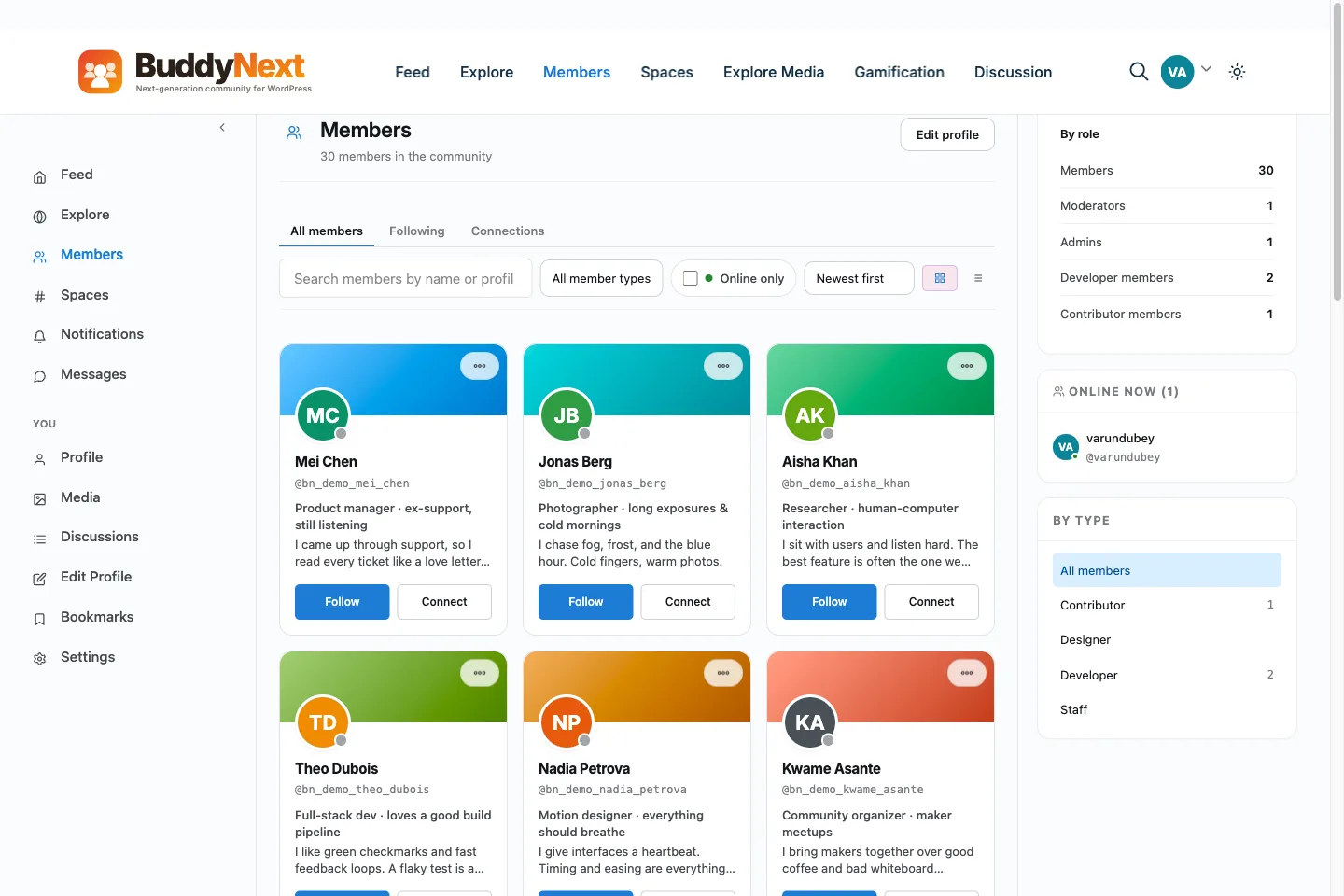
- Free plugin: the community is free on unlimited sites. It includes the activity feed with polls, reactions and scheduled posts, open, private and secret spaces, member profiles with custom fields and a directory, direct messages, notifications, reporting and moderation, a web app (PWA) and a REST API.
- From the same team: forums and Q and A, courses, events and RSVPs, a job board and a marketplace, as separate plugins that the site says are free to start.
- Pro: a second plugin for charging for access, email to members, real-time updates, deeper moderation, analytics and AI. Payments run through your own Stripe or PayPal account, and BuddyNext takes no cut. Pro is $149 per year for 1 site, $249 for 5 and $399 for unlimited, or $399, $599 and $999 once.
- Needs: WordPress 6.9, PHP 8.1 and pretty permalinks.
- Link: buddynext.com and buddynext.com/pricing
Where it does not fit: it is newer than BuddyPress and BuddyBoss, so it has fewer third-party themes, tutorials and reviews. I could not find it on WordPress.org. Direct messages and photo posts run on a separate plugin, WPMediaVerse, and some features need outside services. If you already run a large BuddyPress or BuddyBoss site with many add-ons, a move is a project, and the sensible choice may be to stay.
Themes: BuddyX and Reign
Disclosure: BuddyX and Reign are made by our team at Wbcom Designs, the company behind this site. I describe them from their own product pages and have not tested them for this article.
- BuddyX: version 5.2.0. The site says the free theme has no license key and works on any number of sites. It is listed on WordPress.org with about 3,000 installs and a 5.0 rating from 26 reviews. It works with BuddyPress and BuddyBoss, and mentions BuddyNext as the free engine from the same team. Pro adds member directory layouts, six profile and group header layouts, five header presets and deeper LearnDash and Dokan templates. Pro is $79 per year for 1 site, $119 for 5 sites and $199 for unlimited sites, with a lifetime plan (price not shown) and a 30-day money-back guarantee. Link: buddyxtheme.com.
- Reign: a multipurpose theme for BuddyPress and BuddyBoss communities, version 8.0.8, updated October 7, 2026. Reign only is $99 per year or $249 lifetime for one site, and the bundle with add-ons is $179 per year. It lists support for WooCommerce, Dokan, WC Vendors and WCFM, and includes free versions of several of our plugins. Link: Reign.
The BuddyX page is inconsistent about whether BuddyNext is built in or installed separately, so follow the setup steps on the site. A theme changes how your community looks. It does not change which engine runs it.
What these tools are
Search data for this page shows readers typing “buddyboss vs buddypress”, “benefits of buddyboss”, “buddypress vs buddyboss” and “difference between buddyboss and buddyx pro”. They want to know how the options differ and which one to build on.
- BuddyPress is a free plugin that adds member profiles, activity feeds, groups, private messages and notifications to WordPress.
- BuddyBoss Platform began as a fork of BuddyPress and is sold as a commercial product, with plans, a theme and a separate mobile app service.
- Themes such as BuddyX and Reign style a BuddyPress or BuddyBoss community. They do not replace the engine.
- BuddyNext is a newer community engine from our team, built to cover the feed, spaces, members and messaging on its own.
How I compared them
- Maintained. A recent release on WordPress.org or a current sales page.
- Cost, including renewals. The first-year and renewal price when the vendor shows both.
- What is free. What you can run before you pay.
- Membership and payments. How you charge for access.
- Honest limits. What each option does not do, as far as public pages show.
I did not install or test any of these for this update. Notes come from official listings and vendor pages, and I mark what I could not confirm.
Comparison table
| Option | What it is | Free version | Price as published | Health signal |
|---|---|---|---|---|
| BuddyNext (our pick, made by us) | Community engine | Yes | Pro from $149/year (1 site) | Live, newer product |
| BuddyPress | Social layer plugin | Yes | Free | 90,000+ installs, 4.1 from 375 reviews, v14.5.4 (Oct 23, 2026) |
| BuddyBoss Platform | Commercial community platform | Not stated on the pricing page | Launch $199 first year, $399 renewal; Scale $349 first year, $699 renewal | Plans renamed from Platform Pro and Plus |
| BuddyX (our product) | Theme | Yes | Pro from $79/year (1 site) | Version 5.2.0, 3,000+ installs, 5.0 from 26 reviews |
| Reign (our product) | Theme | No | $99/year (1 site), $249 lifetime | Version 8.0.8 (Oct 2026) |
| PeepSo | Community plugin | Yes (from vendor) | Community bundle from $149/year | WordPress.org listing closed Nov 2024 |
The BuddyPress star rating is the WordPress.org percentage divided by 20.
BuddyPress: the free foundation
- What you get: member profiles, activity streams, groups, friend connections and private messages.
- Cost: free.
- Health: more than 90,000 active installs, a 4.1 rating from 375 reviews, version 14.5.4 and an update on October 23, 2026.
- Link: BuddyPress on WordPress.org
BuddyPress has the longest history and the most themes and add-ons. The trade-off is that you assemble the rest yourself. Paid access, forums, courses and gamification all come from other plugins, and you are responsible for making them work together. The rating is the lowest of the options here with a real review count, so read recent reviews before you commit.
BuddyBoss: a commercial platform
- What you get: a commercial platform that began as a BuddyPress fork. The vendor sells it in plans with a theme and a separate mobile app service.
- Price: Launch (formerly Platform Pro) is $199 for the first year and $399 on renewal. Scale (formerly Platform Plus) is $349 for the first year and $699 on renewal, and adds gamification, media offload, member blogs and domain restrictions. A “Done For You Web” plan is $2,149 for the first year. The page says renewals are at the full price.
- Sites: one license covers one production site, and each extra site license is $99.
- Not included: hosting. The page does not say what, if anything, is free, and the mobile app plans are separate subscriptions with prices I could not see.
- Refund: 14 days, no questions asked.
- Link: buddyboss.com/pricing
The strength is having one vendor for the platform, theme and app. The cost is a license that doubles on renewal and adds up with each extra site. If you need a mobile app, price that separately.
Other options worth knowing
- PeepSo. The vendor offers a free version with groups, friends, photos and chat, and shows a “Powered by PeepSo” label on the free front end. The Community bundle is $149 per year and the Ultimate bundle is $249 per year. Its WordPress.org listing was closed on November 19, 2024, so you get it from the vendor. Link: peepso.com.
- Youzify. A BuddyPress add-on for profiles, with about 5,000 installs and a 4.8 rating from 194 reviews. The last update I saw was March 15, 2026, which is older than the others here.
- Ultimate Member. More than 200,000 installs and a 4.4 rating from 1,445 reviews, aimed at profiles, registration and directories rather than a full social network.
Cost over three years
A rough three-year view helps more than a first-year price. These examples use the prices above for one site. They leave out hosting, a membership plugin, a payment gateway and your time, which are the same whichever engine you pick.
- BuddyNext Pro: $149 per year for one site, or $399 once for lifetime, with annual renewals at a 30 percent discount according to the pricing page.
- BuddyPress with a free theme: $0 for the engine. You pay for any paid add-ons you choose.
- BuddyPress with BuddyX Pro: $79 per year for the theme, so about $237 over three years, or a lifetime plan whose price I could not see.
- BuddyBoss Launch: $199 in year one, then $399 a year, so about $997 over three years. Scale is $349, then $699 a year, so about $1,747 over three years. Add the mobile app service if you need it.
- PeepSo Community bundle: from $149 per year, with the free version as a starting point.
Cost is only one input. A cheaper tool that needs six extra plugins can cost more in your time than a dearer tool that includes them, so count setup and upkeep hours too.
Questions to ask before you choose
- Do I need a mobile app? If yes, check the price and the way the app connects to the engine. BuddyBoss sells app plans separately.
- How will I take payments? If the engine has no built-in payments, choose a membership plugin and test it with the engine before you buy.
- How many members do I expect in a year? A community with thousands of active members needs better hosting and careful testing.
- Who will maintain it? Plugins and themes update often. Decide who tests updates and fixes problems.
- Can I leave? Ask how to export members, posts and messages, and keep a copy.
- Do I rely on add-ons that only work with one engine? Check before you change engines, since some add-ons do not carry over.
Hosting and performance
A community is heavier than a blog. Each page can load a feed, notifications and messages, and these run many database queries.
- Choose real hosting. Shared hosting struggles once members are active at the same time.
- Cache the right pages. Public pages can be cached. Logged-in feeds usually cannot, so use an object cache if your host offers one.
- Limit what loads on each page. Remove widgets and scripts you do not need.
- Test with load. Create a few hundred test members and posts, then check how long the feed and member directory take to load.
- Keep media under control. Photos and videos fill disks quickly. Plan for storage and consider offloading files.
Building a membership site on BuddyPress or BuddyBoss
- Decide what members pay for. Access to a community, to content, to courses or to events. This sets the tools you need.
- Pick the engine and the theme. The engine runs the community and the theme styles it. Switching later is possible but costs time.
- Add a membership plugin for payments. BuddyPress does not take payments on its own. Our guides to the best membership plugins and a membership decision guide compare the choices.
- Set access levels. Decide which groups, forums and content each plan can see, and test with a test member account.
- Drip content. Release lessons or posts over time, so members have a reason to come back each week.
- Add engagement tools. Gamification, polls and events keep members active. WB Gamification, also made by our team, lists BuddyPress among its integrations.
- Plan moderation. Write short rules, choose moderators and decide what happens after a warning.
- Test on a phone. Most members will visit from a phone.
Ways to keep members engaged
- Welcome each new member by name. A pinned welcome post and a first task make the first day count.
- Use groups for interests. Small groups feel more active than one big feed.
- Ask questions. Posts that ask for opinions get more replies than announcements.
- Recognize members. Badges, thanks and featured posts reward people who help others.
- Run regular events. A weekly live session gives the community a rhythm.
- Listen. Run a short poll each month and act on what you hear.
Use cases: which option fits which community
- An online course community. Members need courses and a place to talk. BuddyBoss lists LMS integrations on its platform, and BuddyNext has its own courses plugin. Check each against the course tool you already use, such as LearnDash.
- A professional network or association. Members need profiles, a directory and private groups. BuddyPress or BuddyNext both cover these basics, and a membership plugin handles dues.
- A customer community for a product. You want questions answered and ideas shared. Forums and Q and A matter more than a social feed, so check the forum tool in each option.
- A hobby or local group. Members want a feed, events and photos. Keep it simple and start with a free engine, so that cost does not decide the future of the group.
- A paid creator community. You need payments, gated content and email. Compare the paid plans carefully, because this is where renewal prices and fees matter most.
A step-by-step test plan
Give your top two options the same week on a staging site.
- Day 1. Install the engine and theme. Set up your first group or space and your profile fields.
- Day 2. Add three test members with different roles. Post, comment and send messages.
- Day 3. Add a membership plugin or the built-in paid access. Run a test payment and a refund.
- Day 4. Add a course or an event, if you need one. Check how it shows inside the community.
- Day 5. Test on a phone with a slow connection. Note anything that is hard to tap or slow to load.
- Day 6. Ask two friends to join as new members, without help. Write down where they get stuck.
- Day 7. Score both options on setup time, cost, speed and how it felt for members. Pick the winner.
Common mistakes
- Choosing on the first-year price. BuddyBoss shows introductory prices and renews at the full price.
- Stacking too many plugins. Each add-on adds weight and a possible conflict.
- Ignoring performance. Community pages run many queries. Use real hosting and caching, and test with many test members.
- Launching empty. A community with no posts does not keep members. Seed it with content and invite the first members by hand.
- No exit plan. Ask how you would export members and content before you commit to any platform.
Keeping a community healthy over time
Launch is the easy day. The harder work is the next twelve months. Plan a weekly rhythm: one post from you, one event or live session each month and a short thank you to the most helpful members. Review reports and moderation each week, so small problems do not grow. Watch three numbers: new members, active members and the share of members who post at least once a month. If the third number is low, the community feels empty even when the member count is high, and the fix is usually more small groups and more questions, not more features. Update your plugins on a staging copy first, and keep a rollback plan. Whatever engine you pick, a patient host and a steady schedule matter as much as any feature on a pricing page.
Frequently asked questions
What is the difference between BuddyPress and BuddyBoss?
BuddyPress is a free open-source plugin. BuddyBoss began as a fork of it and is sold as a commercial platform with plans, a theme and a mobile app service. BuddyBoss lists gamification in its Scale plan, not in the base plan.
Is BuddyBoss free?
The pricing page lists paid plans from $199 for the first year and does not describe a free tier. Check the vendor for current terms.
Is BuddyPress still maintained?
Yes. Version 14.5.4 was released on October 23, 2026, and the plugin has more than 90,000 active installs.
How much does BuddyBoss cost?
Launch is $199 for the first year and $399 on renewal. Scale is $349 for the first year and $699 on renewal. Extra sites cost $99 each.
What is the difference between BuddyBoss and BuddyX Pro?
BuddyBoss is a community platform with its own theme. BuddyX is a theme that works with BuddyPress and BuddyBoss. BuddyX Pro adds layouts and templates, from $79 per year.
Can I charge for access on BuddyPress?
Not by itself. You need a membership plugin or a platform with built-in paid access, such as BuddyNext Pro, our pick.
Should I switch from BuddyPress to BuddyNext?
Only if you have a clear reason, such as wanting forums, courses and events from one maker. A switch means moving members and content. For a stable site that works, staying is a fair choice.
If you cannot decide, start with the free option that fits your plan, run it for a month with real members and keep notes on what is missing. Paid plans and add-ons should answer a problem you have seen, not one you expect. That habit keeps your costs low in the first year, and it gives you facts to compare when renewal emails arrive and you have to decide whether to keep paying.
Final thoughts
Pick the engine for the job. BuddyNext, our own product, is the one I would start with for a fresh community, with the limits above. BuddyPress is the free base with the biggest ecosystem, and BuddyBoss gives you one commercial vendor, at a price that rises on renewal. Test your top two on a staging site, run a full member signup and a test payment, and decide after that.
Related reading: WordPress community plugins and themes and ways to build a community website with WordPress.
Facts checked on November 11, 2026 from WordPress.org listings and vendor pages. Prices and features change, so confirm on the vendor page before you buy.