EDD Software Licensing Checks Were Loading Our Store: How We Are Moving Them to a Cloudflare Worker
Every WordPress site that runs a licensed plugin of ours asks our store the same questions, all day, from everywhere. Is this licence valid on this site? What is the newest version? Can I have the zip? Each question is a request to WordPress, which starts PHP, which touches the database, on the same server that sells our products and takes our customers’ orders. When that traffic gets heavy, the store feels it, and so do the customers at checkout.
This is the story of how we found out how much those checks cost us, the two fixes that helped before we wrote any new code, and the system we are building to answer the easy questions from the edge of Cloudflare’s network instead. It is an operator’s account, written in the order we learned things. One thing needs saying plainly at the start: the edge system is currently running in compare mode. It watches real requests and writes down what it would have answered, while the store still answers every customer. We have not switched customers over, and nothing here should be read as a claim that it is serving them. The point of publishing now is that the design and the early numbers are useful to anyone running Easy Digital Downloads Software Licensing, and we would rather show the work than wait for a finished story.
A note on what we leave out. This is a production system that holds customer data and licence state. We describe the design and its rules, and we give ratios rather than counts. We do not publish endpoint names, signing details, resource identifiers or the size of our customer base.
The three questions every licensed plugin asks
Easy Digital Downloads Software Licensing, the add-on most WordPress vendors use to sell licensed plugins and themes, works by having each customer site call home. The customer’s plugin carries a small updater, and that updater makes three kinds of request to the vendor’s store.
- Check or activate the licence. The site sends its licence key, the product and its own address. The store answers whether the licence is valid, expired, disabled or already used up on other sites.
- Get the version. WordPress asks for update information, roughly twice a day per site, and the store answers with the newest version, a changelog and a package link.
- Download the package. When the owner clicks update, the site follows the package link and downloads the zip.
None of these is expensive for one site. Multiply by every site running every licensed product, add the sites that check on every page load because of a plugin bug, add the ones whose object cache or cron behaves oddly, and the store ends up serving a steady background load that has nothing to do with selling anything.
The load matters for a reason that is easy to miss. These are ordinary WordPress requests. They start a PHP worker, boot WordPress and often take a PHP session. The store has a limited number of workers, and every worker busy answering a licence check is a worker that is not serving a customer at checkout.
What broke first: the outage that was not about capacity
Earlier this month the store began timing out on uncached pages while the server’s CPU sat mostly idle. That combination is the signature of something other than a shortage of horsepower. Requests were waiting, not working.
The cause was PHP session locking. Easy Digital Downloads decides how to store its sessions when a setting is empty, and in our case it fell back to PHP’s own file-based sessions. With file sessions, every request that starts a session takes a lock on the session file and holds it until the request ends. Bots replaying cart and add-to-cart links queued up behind one another, every worker ended up waiting on a lock, and ordinary requests, including licence checks, waited behind them. The fix that held was to switch session handling to the database option in the Easy Digital Downloads settings, plus blocking the bot pattern at Cloudflare.
If your store shows idle CPU and 504 errors, check the PHP slow log for the call that stalls, and look at where session handling is configured before you blame traffic. That finding is not about licensing, but it changed how we thought about the licence traffic. Our store was running with too little spare capacity for the part of the load that does not earn anything, and the licence and update requests are exactly that part.
What the logs said about downloads
While we were in the logs we looked at the third question, the package download, and found something that explained a pile of support tickets. In one day of Cloudflare logs for the download path, more than half of the requests were being refused with a 401 error. A number of those sites had a perfectly valid licence. They were refused because the download link they were holding had expired.
The cause is in how the licensing add-on builds download links. The add-on signs each link with an expiry set by a store setting, 24 hours by default. We read the version of the add-on we run, 3.9.7, and found two details that combine badly:
- The expiry is compared against the store’s own time, which includes the store’s timezone offset, so a link marked as lasting 24 hours can actually last longer than that. The exact window depends on the store’s timezone.
- The code that handles the download checks whether the link has expired before it looks at the licence. A site with a valid licence and an old update list is therefore refused, with the message customers know well: Download failed. Unauthorized.
WordPress refreshes a site’s update list only about every twelve hours, and sites with a persistent object cache can keep an old list for much longer. So a link issued days ago can sit in a customer’s dashboard and fail when they finally click. We saw links issued on several different days failing in the same 24-hour window, which told us this was the normal state of the system and not one incident.
The add-on’s own documentation page for this error names two causes: a licence that is expired or not active on the site’s address, and a missing update file. It does not mention expired download links or caching. As far as we can tell, every vendor on this add-on sees these refusals, and the usual advice to customers is to reactivate the licence, which does not touch the real cause. We wrote up the customer-facing side of this last week in Premium Plugin Updates Not Showing in WordPress? What Broke in Ours and How to Check Yours. This post is about the store side.
The cheap fix first: stop the page cache from answering licence requests
Our store runs behind a server-level page cache, Varnish, with the host’s default rules. Those defaults had no exclusions for the licensing add-on’s URLs. That turned out to matter in two ways. Update replies were being cached, so sites received update information that was hours old, including links whose expiry had already passed. And licence checks were being cached, so a customer could activate a licence or renew one and be told by a cached reply, up to several minutes old, that the site was still inactive.
The fix was an exclusion list in the cache settings for the licensing add-on’s request patterns, the edd_action and edd_sl_action query parameters and the /edd-sl/ and /edd-api/ paths. We checked the result by reading the response headers. Before the change, licence and update replies came back as cache hits, with an age of hours. After it, they carried no cache or age headers, the update link was fresh, and the rest of the site was still cached. No purge was needed, because excluded URLs skip the cache lookup.
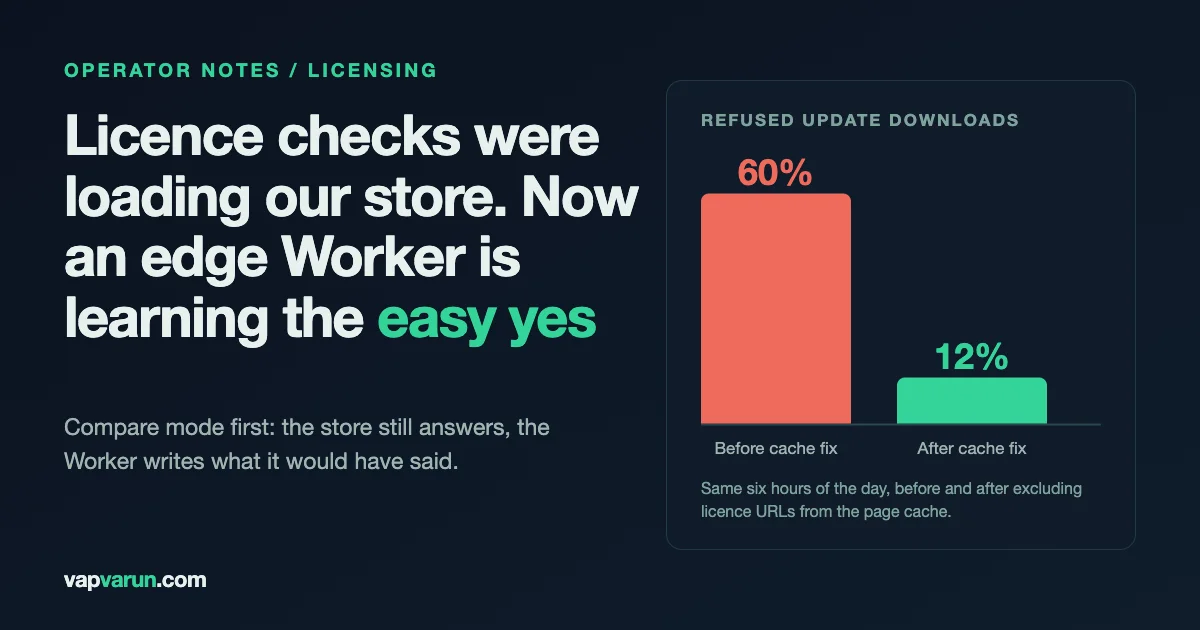
The effect was immediate. In the same six hours of the day, compared with the day before, the share of refused update downloads fell from 60 percent to 12 percent. Valid licences are still refused in some cases, because the real cause, the order of checks in the download handler, is still there. But the cheapest fix removed most of the pain, and it required no code. If you run this add-on behind any page cache, check whether the licensing URLs are excluded. It takes one request:
# Ask the store for a licence check and read the cache headers
curl -sI "https://your-store.example/?edd_action=check_license" | grep -i -E "^(x-cache|age|cache-control|via)"
You should not see a cache hit or an age. If you do, a cache is answering for your store, and your customers can see stale licence status.
The bigger idea: let the edge say yes
With the cache fixed, we still had the underlying shape of the problem: the store spends PHP workers on questions whose answers almost never change. Whether a licence is valid on a site changes when someone buys, renews, activates, deactivates or gets a refund. Most checks are repeats. So we designed a second place to answer them.
Our main site already runs behind a Cloudflare Worker, and every request passes through it. The design adds a second, separate Worker that holds a copy of the licensing data and applies the same rules as the licensing add-on. A licence request arrives at the main site’s Worker, which hands it to the licence Worker. If the licence Worker can give a clear yes, it answers from the edge, quickly, without touching WordPress. If it cannot give a clear yes for any reason, the request goes on to the store exactly as it does today.
Several design rules came out of thinking about what could go wrong. They matter more than the code, so here they are.
- The edge only ever says yes by itself. Every no goes to the store. Every activation and deactivation goes to the store. Every error goes to the store. A wrong yes could give someone service they should not have. A wrong no could lock out a paying customer. By letting the store make every negative decision, the edge cannot refuse a customer, and the worst failure is a slower answer from the store.
- The store is the only writer. The edge holds a copy. The store’s licensing tables stay the source of truth, and nothing writes to them from the edge. There is no second set of records to reconcile.
- It fails open. A missing binding, a kill switch, a database error, bad input or anything unexpected sends the request to the store. The edge can never be the reason a customer cannot update.
- The copy cannot silently go stale. If the copy is older than 48 hours, the edge stops trusting its own yes, and every request goes to the store.
- Every action has its own switch. Licence checks, version checks and downloads each have a mode of off, compare or serve, and the mode lives in a row in the database, so changing it takes effect within a minute without a release.
How the copy stays right
The copy is useful only if it is correct, and a correct copy has to follow changes in the store. We use three mechanisms with different speeds, so that a gap in one is covered by another.
| What | How often | What it protects against |
|---|---|---|
| Live push | Within about a minute of any licence change | A refund or disable that must reach the edge quickly |
| Incremental sync | Every 15 minutes | New products, new package files and new rows, and a missed live push |
| Full copy | Once a day | Anything the other two missed |
The live push works by hooking the licensing add-on’s own events: when a licence is stored, renewed, disabled or changes sites, the licence id goes into a small queue table in the store, and a minute-by-minute job sends the full current row and removes queue entries only after the edge confirms receipt. The queue insert is a single row write, safe when two requests overlap, and nothing is sent in the middle of a customer’s request.
The daily full copy loads into temporary tables and swaps them in only when the row counts and sums of ids match the store, so a failed or partial copy never replaces yesterday’s good one. A heartbeat is recorded on every incremental run even when nothing changed, and the daily report raises an alarm if that heartbeat goes quiet for more than an hour.
A priority we set early, and which shaped the schedule: active, paying customers must never have an issue. A slightly older copy that still says yes is acceptable. A copy that says no to a customer who just renewed is not. That is why the edge never says no on its own, and why the fast path is the push on change.
The rules we had to copy exactly
The risky part of an edge decision is not the plumbing. It is reproducing the add-on’s rules so exactly that the edge and the store agree on every request. For a developer reading this, here are details we had to get right, taken from reading version 3.9.7 of the add-on.
- Expiry uses the store’s clock. Expiry is compared with the store’s local time, which includes its timezone offset, so the edge has to apply the same offset to match.
- Site matching is lenient. The add-on normalises a site address by lowercasing it and stripping the protocol, the port and a leading www. It does not strip trailing paths in the way people assume. Any edge rule that compares addresses has to normalise the same way.
- The version check does not check the licence. The version request returns update information without validating the licence, and the licence decision applies when the package is requested. The edge copies that behaviour.
- Bundles take expiry from the parent and status from the child. A child licence in a bundle takes its lifetime and expiry from the parent licence, and its status from the child, which corrects itself by the child’s own expiry. A missing expiry is treated as expired. We ported this and verified it against real bundle children covering every combination we found.
- Duplicate keys resolve to the lowest id. Where the same key exists on several rows, the add-on resolves it to the lowest id, and the edge does the same.
- Replies include customer fields. A licence reply carries the customer’s name and email, so the edge copy holds the customer table to match the store’s replies exactly. We treat that copy as production data with the same care as the store, and personal data does not pass through any chat or agent tooling. The table is copied server to server.
Download links needed one more design decision, because they are where the support pain was. The edge issues its own short-lived download link after it has checked the licence, so the time limit applies after the licence check, not before it. That is the order other licensing vendors use. As we read their public documentation, one vendor gates downloads by a licence check at download time and only then issues a short-lived storage link, and another ties the download to an authenticated update call rather than a link minted hours earlier. The add-on we run checks link age first. Moving to licence-first is the fix for the refused-but-valid case.
Proving it before it answers anyone: compare mode
We did not want the first real test of the edge to be on a customer, so the first live stage does nothing visible. In compare mode, the store still answers every request. After the reply goes out, the edge works out what it would have said and writes the two answers side by side. A comparison is classified as one of four outcomes: match (same answer), would fix (the edge would have helped, such as an expired-link refusal), miss (the edge declined to answer and sent the request to the store, which is safe), and danger (the edge would have said yes where the store said no).
Danger is the only outcome that matters for safety, and the rule for moving forward is that it must stay at zero. The comparison happens after the customer’s reply, so it cannot slow or change what a customer sees.
What the replay told us before we turned anything on
Before compare mode went live, we replayed two days of real requests from the store’s logs against a test copy of the edge, then asked the store the same questions again. The result that mattered: across everything we replayed, there was not one case where the edge said yes and the store said no.
- For downloads, every link the store served was also served by the edge. In addition, a group of links the store refused only because they had expired were served by the edge, which is the improvement we were after. Others were forwarded to the store, which refused them as well.
- For version checks, the sampled replies were identical to the store’s apart from the package link.
- For licence checks, a large share matched exactly, and the rest differed only in the count of sites on busy free keys, because sites were being added while the replay ran. We verified the logic against the add-on’s own site list for one of our busiest keys, with no per-site differences.
The replay also found real bugs in our port, which is what a replay is for: duplicate-key handling, a price field that can be a string or false, an empty message string, the local-site test, a PHP and WordPress requirement rule, and a stale cached reply from the store itself on product requests without a key. We fixed each and added a test.
The first live evening
Compare mode went live on the evening of 16 October. In the first hours, a clear majority of version checks matched the store, and the rest were forwarded to the store, with nothing the edge would have answered wrongly. For licence checks, roughly two in three matched, and the remainder were forwarded. The forwarded ones were requests from older plugins that identify a product by name instead of by id. The edge declines those on purpose, and the store answers them as before. No danger rows. That is the whole of the live evidence so far, and it is a few hours of traffic, not a verdict. The rule we set is to read the compare table daily for several days and to move an action forward only when danger stays at zero and the volume is meaningful.
The staged plan, and where we are
The switch from compare to serve happens one action at a time, in a fixed order, each time with the previous stage still running:
- Compare mode for licence checks, version checks and downloads. This is where we are as of our last logged change on 17 October.
- Serve licence checks from the edge. Everything else stays in compare mode.
- Serve version checks as well.
- Serve downloads last, after the remaining questions on download history are settled.
Each stage is a single row change in the database, which every Worker instance picks up within about a minute. Rolling back is the same change in the other direction, and the order of rollback is built into the design: set the mode to off and every request goes to the store within a minute. Slower layers behind it, removing the link between the two Workers, stopping the push, removing the sync jobs, restoring the store files, are there for deeper trouble, and each has a tested path.
A few safeguards sit around it that are worth copying whatever your stack:
- A change log for every live change. Any change to a production resource gets a line with the date, who ran it, what changed and who approved it. No line, no change.
- The store’s code lives in git. The store-side code is copied from the repository to the server, and a read-only check compares checksums so that a hand edit on the server shows up.
- A daily report. Sync ages, row counts on both sides, products with missing files, requests by action, top reasons for forwarding, sites that loop, and an alarm on any danger row.
- Support can look up a site. A read-only lookup answers why a given site was refused, using the edge’s decision log, which holds no keys.
What we would tell another vendor
- Measure before you build. Count how many licence, version and download requests you receive, and how many are refused. Our early numbers on refused downloads did more to justify the work than any theory.
- Fix the cheap things first. Check your session handling, and check that your page cache excludes the licensing URLs. Both are settings, and both took pressure off before we wrote a line.
- Make the edge unable to hurt a customer. A yes-only edge with the store as the only writer and a fail-open default gives up some speed for a design in which the worst case is today’s behaviour.
- Replay, then compare, then serve. Real traffic finds bugs that tests do not.
- Put the switch in data, not in a release. A mode row you can change in a minute is a rollback you will actually use.
- Tell customers about the cause. Reactivating a licence does not fix an expired link. If your support replies say that, you are treating a symptom.
What we have not done, and what could still go wrong
- We have not served a single customer answer from the edge yet. Compare mode only records.
- A refund or disable that fails to push live would leave a wrong yes in place until the daily copy fixes it. The design accepts that window, and compare mode must show zero danger rows before any action moves to serve.
- Old updaters that identify products by name are forwarded to the store by design. They will keep costing the store some load until those plugins update.
- We have a second issue unrelated to the edge, a licence key stored under a different setting name by one plugin, which stopped its automatic updates. The first post linked above covers it.
We will write again when licence checks move to serve, with the compare table that justified it and the numbers from the first week.
Sources
- Easy Digital Downloads, Download failed. Unauthorized
- Premium Plugin Updates Not Showing in WordPress? What Broke in Ours and How to Check Yours
- Our own store logs, the add-on’s source for version 3.9.7, and internal design notes, summarised here without identifiers or counts.