Free AI Plan Reality Check 2026: What Claude, ChatGPT, Gemini, and Grok Actually Give You For $0
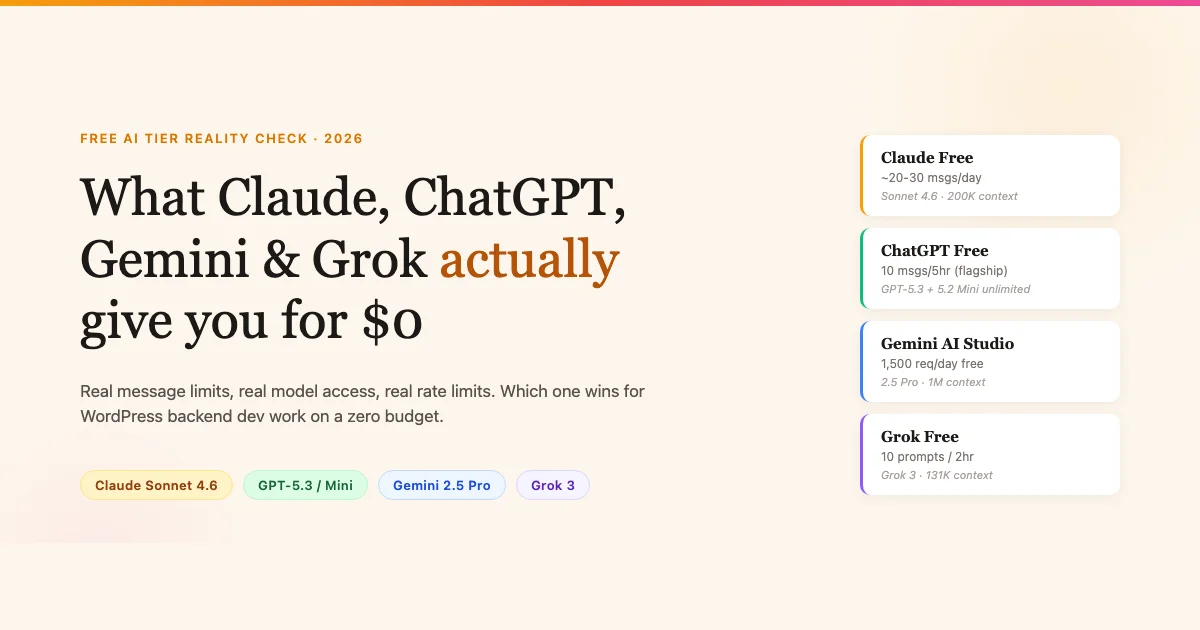
Every AI company wants you on a paid plan. Before you spend a single dollar, here is what each major free tier actually delivers in 2026, tested against the kind of work a WordPress backend developer does every day: reading plugin code, writing hooks, debugging REST endpoints, and generating boilerplate.
How Each Free Plan Was Evaluated
The comparison covers four dimensions that matter to WP backend developers: the model you actually get on the free tier (not the flagship), message or token rate limits, context window size, and file upload or code execution support. All data reflects public plan pages and community-reported limits as of April 2026.
The methodology is straightforward: I looked at what you get when you sign up for each service without entering a credit card, then cross-referenced against developer community reports on Reddit (r/ClaudeAI, r/ChatGPT, r/LocalLLaMA) and X threads where real users document when they hit rate limits and what the experience looks like. I also ran several quick coding sessions on each free tier to sanity-check the documented limits.
Claude Free (claude.ai)
Anthropic’s free tier at claude.ai gives you access to Claude Sonnet 4.6, which is a capable mid-tier model. The flagship Opus is not available on the free plan. Message limits are not published as a fixed number: Anthropic describes it as “limited” usage, and community reports consistently put it around 20 to 30 messages before hitting a daily soft cap, after which you see a rate-limit screen and are prompted to upgrade.
- Model: Claude Sonnet 4.6 (not Opus 4.7 or higher)
- Daily message limit: ~20 to 30 messages, then a wait period (unspecified, typically resets in 8-12 hours)
- Context window: 200K tokens on Sonnet (full window available on free)
- File uploads: Supported (PDFs, images, plain text) within context window
- Code execution: No sandboxed execution on free tier
- Projects: Limited on free – you can create projects but storage and context persistence are throttled
For WordPress work, the 200K context window is the standout feature even at the free tier. You can paste an entire plugin’s source, ask Claude to explain the architecture, and get a complete answer in one shot. The message cap is the real constraint: 20 to 30 exchanges per day is enough for one focused session on a specific plugin problem, but if you are bouncing between three different codebases you will hit the wall fast.
Claude Free: Best Use Cases for WP Devs
Where Claude’s free tier shines for WordPress backend work is long-context code review. Load a complex plugin into the 200K window and ask it to explain an unfamiliar codebase, find potential security issues, or trace how a particular hook fires through the execution chain. These are tasks that benefit from the full context and typically only require 2 to 4 messages, which keeps you well within the daily limit.
Where it struggles is iterative debugging. If you are stepping through a WooCommerce checkout issue that requires 15 back-and-forth exchanges, you might burn your daily allocation on one bug. Save Claude’s free messages for the tasks that need its large context, and use a different tool for quick one-shot questions.
ChatGPT Free (chat.openai.com)
OpenAI’s free tier changed significantly in early 2026. Here is the current structure:
- GPT-5.3 (flagship): Available on free, but hard-capped at approximately 10 messages every 5 hours. In the US, free tier users also began seeing interstitial ads in February 2026 between responses on the flagship model.
- GPT-5.2 Mini: Unlimited on free. This is the lower-tier model, faster and cheaper for OpenAI to run, with noticeably weaker reasoning on complex tasks.
- Context window: 128K on GPT-5.3, 32K on Mini for free accounts
- File uploads: Limited on free (no persistent file storage, single-session only)
- Code execution: Available via Python sandbox, but usage is rate-limited on free accounts
- DALL-E / image gen: Not available on free
The split-model approach makes the free tier harder to evaluate. If you stay on GPT-5.2 Mini you get unlimited usage, which sounds good until you run a complex PHP refactoring task and realize the reasoning quality is a step down from what paid users get. The 10-message cap on GPT-5.3 is particularly tight if you are trying to do iterative debugging where each message builds on the last.
The Ad Interruption Problem
The February 2026 ad rollout on ChatGPT free deserves specific mention because it affects developer workflow in a way that’s easy to underestimate. The ads appear as interstitial screens between your message and the response, typically 5 to 8 seconds. When you are in a debugging flow and waiting for a code fix, that interruption breaks concentration in a way that the raw time cost does not capture.
The ads are currently US-only, so developers in other regions are not seeing them yet. But it signals the direction: the free tier is increasingly a conversion funnel, not a genuine developer tool. If you are in the US and still using ChatGPT free as your primary AI coding assistant, factor the ad interruptions into your daily workflow estimate.
GPT-5.2 Mini for WordPress: What Actually Works
Despite the limitations, GPT-5.2 Mini on unlimited access is useful for specific tasks. It handles well: generating boilerplate PHP (registration functions, admin page scaffolding, CPT declarations), writing PHPDoc comments for existing functions, converting array syntax between styles, and explaining WordPress function documentation in plain language. It is weaker on: reasoning through complex multi-file hook relationships, debugging unfamiliar errors that require understanding implicit WordPress behavior, and tasks that need the full 128K context.
Gemini Free (gemini.google.com and AI Studio)
Google runs two distinct free access points and they behave very differently:
Gemini.google.com (consumer app)
- Model: Gemini 2.0 Flash on free (2.5 Pro is Advanced subscribers only)
- Limits: No hard message cap published, but users report slowdowns and “come back later” prompts after sustained heavy use
- Context window: Reduced on free consumer tier vs API
- File uploads: Supported (Google Drive integration available)
Google AI Studio (aistudio.google.com)
This is the real story for developers. AI Studio is Google’s free developer portal and it gives you access to Gemini models at no cost under rate limits:
- Gemini 2.5 Flash-Lite: Unlimited (high RPM quota), designed for high-volume tasks
- Gemini 2.5 Pro: Rate-limited (15 requests per minute, 1,500 requests per day on free API key)
- Context window: 1M tokens on 2.5 Pro via AI Studio – the largest context window available for free anywhere
- File uploads: Full multimodal support, including video and audio
- Code execution: Yes, built-in Python execution in the Gemini API
- Grounding / search: Available on AI Studio
For a backend WordPress developer comfortable using an API directly, AI Studio’s free tier is exceptional. The 1M context window on Gemini 2.5 Pro means you can load an entire plugin repository, all its tests, and the relevant WordPress core files in a single context. The 1,500 daily request cap is more than enough for individual developer use.
Setting Up Gemini AI Studio: A Five-Minute Guide
The main barrier to AI Studio is the setup step that does not exist with claude.ai or chat.openai.com. Here is the exact process: go to aistudio.google.com, sign in with any Google account, click “Get API key” in the top left, create a new key in a new project, copy the key. That’s the full setup. The key works immediately with the AI Studio web interface and with any HTTP client for API calls.
For WordPress backend devs, the most practical way to use Gemini AI Studio free is through the web UI for interactive sessions (loading code, reviewing architecture, debugging) and through the API for scripted tasks (batch documentation generation, automated code review on a local git hook). Both are fully supported on the free API key.
Grok Free (grok.x.ai)
xAI’s Grok is available free on grok.x.ai with a registered X account:
- Model: Grok 3 (same as paid, not a stripped-down version)
- Rate limit: 10 prompts every 2 hours on the free tier
- Context window: 131K tokens
- File uploads: Supported (images and PDFs)
- Code execution: No sandboxed execution on free tier
- X integration: Can pull real-time data from X posts, useful for checking what the WP dev community is discussing right now
- DeepSearch: Available on free with a daily usage cap
Grok’s limit of 10 prompts per 2 hours is the hardest cap of any of the four. The positive side is that you get the actual flagship Grok 3 model, not a lite variant. For a backend dev, this makes sense as a research tool: use Grok’s X integration to check if a specific WordPress compatibility issue is trending, or to read what plugin authors are saying about a breaking change. Using it as a primary coding assistant on 10 messages per 2 hours is not realistic.
Side-by-Side Comparison Table
| Feature | Claude Free | ChatGPT Free | Gemini AI Studio Free | Grok Free |
|---|---|---|---|---|
| Free model | Sonnet 4.6 | GPT-5.3 (capped) / 5.2 Mini (unlimited) | 2.5 Flash-Lite (unlimited) / 2.5 Pro (rate-limited) | Grok 3 |
| Daily message limit | ~20-30 msgs then wait | 10 msgs/5hr (5.3) or unlimited (Mini) | 1,500 req/day (2.5 Pro), unlimited (Flash-Lite) | 10 prompts/2hr |
| Context window | 200K tokens | 128K (5.3) / 32K (Mini) | 1M tokens (2.5 Pro) | 131K tokens |
| File uploads | Yes | Single-session only | Full multimodal | Images + PDFs |
| Code execution | No | Rate-limited Python | Yes (Python) | No |
| Ads | No | Yes (US, GPT-5.3 free) | No | No |
| Real-time data | No | Browsing limited | Grounding available | Yes (X feed) |
What These Limits Mean for WordPress Plugin Dev Work
Backend WordPress development has a pattern that exposes free tier limits fast. A typical debugging session looks like this: paste a failing REST endpoint, get a diagnosis, try the fix, paste the updated code, get follow-up questions, iterate three or four more times. That is 8 to 12 messages in 30 minutes for a single bug.
Here is how each tool holds up against that pattern:
- Claude: Best for deep, single-session plugin work. The 200K context fits entire plugin codebases. You will exhaust the daily limit if you do more than one or two serious debugging sessions, but for one focused task it is the best free conversational AI experience.
- ChatGPT (GPT-5.3): The 10-message cap per 5 hours kills iterative debugging. Useful for quick lookups and one-shot code generation, but you cannot sustain a back-and-forth on a hard problem. Mini is unlimited but the reasoning quality gap shows on PHP complexity.
- Gemini AI Studio: The technical winner for developers comfortable with an API or the AI Studio UI. Gemini 2.5 Pro’s 1M context window handles scale no other free tier matches. 1,500 requests per day is not a real constraint for a solo developer. The tradeoff is it takes a few minutes to set up versus just logging in.
- Grok: Best used as a research layer, not a coding assistant. Pull X community data, check what’s being said about a plugin conflict, then switch to another tool for the actual fix.
Rate Limit Reality: The Patterns That Catch Developers Off Guard
All four platforms soft-throttle in ways that are not always obvious from the plan page. A few things to be aware of:
- Claude’s reset timer is not published. When you hit the limit, the interface says you have used up your messages but does not tell you when the window resets. Most users report 8 to 12 hours before full capacity returns, shorter windows if usage was light.
- ChatGPT counts tool calls. If GPT-5.3 runs code execution as part of a response, that counts as additional usage toward your cap, not just the message.
- Gemini AI Studio has per-minute limits too. The 15 RPM cap on 2.5 Pro means rapid-fire API calls (from a script, not the UI) will hit rate errors. Spread calls across a few seconds and it is not a problem in practice.
- Grok’s 2-hour window is strict. Unlike Claude where the reset is fuzzy, the Grok timer is consistent. 10 prompts, then a 2-hour lock regardless of how long ago you started the window.
Practical Task Routing: Which Free Tool for Which Job
After running each tool against real WordPress backend tasks, here is the task routing that makes the most sense for a developer working exclusively on free tiers:
Use Claude Free For
- Code architecture review (load the full plugin, ask one comprehensive question)
- Security review of custom authentication or capability checks
- Understanding an unfamiliar plugin’s hook structure from source code
- Writing complex SQL queries for custom WP_Query use cases
- Reviewing pull request diffs that span multiple files
Use Gemini AI Studio Free For
- High-volume documentation generation (docblock comments across a full codebase)
- Automated code review as a git pre-commit hook via API
- Analyzing large log files or database exports
- Multi-file refactoring sessions where you need the 1M context
- Loading WordPress core and plugin source simultaneously to trace execution paths
Use ChatGPT Free (Mini) For
- Boilerplate scaffolding (CPT registration, admin pages, settings API wiring)
- Quick syntax questions and PHP function lookups
- Writing readme.txt changelog entries
- Generating test data and mock arrays
- Regex pattern construction for content filters
Use Grok Free For
- Checking X for real-time community reports on a specific plugin conflict
- Finding what WordPress developers are saying about a recent core update
- Researching whether a security issue in a dependency has been publicly discussed
- Getting a fast summary of what is trending in the WP developer space right now
The Free Tier Verdict for WordPress Backend Developers
Primary pick: Gemini AI Studio (free) with 2.5 Pro. The 1M token context window and 1,500 daily requests is a developer-grade free tier that no other platform matches. If you are willing to use the API or the AI Studio interface, this is not close. You get the near-flagship model, the largest context, code execution, and no ads.
Secondary pick: Claude free. For conversational debugging and code review where you want the best chat experience, Claude Sonnet 4.6 at 200K context is excellent. Budget your 20-30 messages per day toward your highest-priority plugin problem and do not waste them on trivial lookups.
Situational use: Grok. Worth keeping logged in specifically for the X integration and DeepSearch. When you see a WordPress plugin throwing errors you have never seen before, a quick Grok search against recent X posts often surfaces bug reports from other developers who hit it first.
Skip as a primary free tool: ChatGPT free. The ad interruptions on GPT-5.3 and the 10-message cap make it the weakest option for sustained development work. GPT-5.2 Mini unlimited is fine for simple tasks but consistently underperforms on the kind of multi-file PHP reasoning that plugin development requires.
Context Window vs. Message Limits: Why Context Matters More
When developers compare AI tools, message limits get the most attention because they are easy to count. But for backend WordPress work, context window size is often the more limiting factor. Here is why:
A mid-size WordPress plugin is 3,000 to 8,000 lines of PHP across 15 to 30 files. If you want an AI to reason about how a registration hook in one file affects a capability check in another, it needs to hold both files in context simultaneously. A 32K context window (GPT-5.2 Mini) cannot hold a full plugin. A 128K window (GPT-5.3 free) gets you partway there. Claude’s 200K and Gemini 2.5 Pro’s 1M mean you can load the whole thing.
The practical consequence: a tool with unlimited messages but a small context window forces you to fragment your questions. You spend message budget on summarizing what you already told the AI in a previous session, re-establishing context, and re-explaining the codebase structure. A tool with a large context window and a message limit lets you front-load all the context in one message and then ask focused follow-up questions efficiently.
For WP plugin debugging, one session with Claude’s 200K context delivering 15 focused messages is often more productive than 50 messages with a 32K context tool where half the messages are re-establishing context.
Quick Reference: Free Tier Limits at a Glance
For quick reference, here is the hard limit summary that you will actually hit in day-to-day use:
- Claude free: 20-30 messages, then an 8-12 hour soft reset. No code sandbox. 200K context. Best for code review.
- ChatGPT GPT-5.3 free: 10 messages per 5 hours. Ads in the US. 128K context. Hard cap resets on the clock.
- ChatGPT GPT-5.2 Mini: Unlimited messages. 32K context. Weak on complex PHP. Use for boilerplate only.
- Gemini AI Studio 2.5 Pro: 15 RPM, 1,500 req/day. 1M context. Python execution included. Best technical free tier for devs.
- Gemini AI Studio 2.5 Flash-Lite: Effectively unlimited within reasonable use. Smaller model but high throughput.
- Grok 3 free: 10 prompts per 2 hours. Strict timer. 131K context. X feed integration is its distinctive feature.
When the Free Tier Stops Being Enough
Free tiers are research tools and light-use assistants. The moment you are billing client time against AI-assisted development, the math changes. A paid plan’s unlimited or generous usage cap stops being a luxury when you are charging $80/hour and spending 20 minutes waiting for a rate limit to reset.
If you are evaluating whether to go paid, the real comparison is not free vs paid at one platform: it is paid at which platform for which tasks. That calculation is covered in the $20 AI subscription comparison for freelance WordPress developers, which breaks down Claude Pro vs ChatGPT Plus vs Gemini Advanced on real plugin work. If you are specifically considering Claude, the Claude Opus 4.7 field report for WordPress plugin development covers what the flagship model adds over the free Sonnet tier with concrete task benchmarks.
Bottom Line
Free AI in 2026 is genuinely useful for WordPress backend development, with some important caveats. Gemini AI Studio’s free tier is the technical leader for developers comfortable with an API. Claude’s free tier is the best conversational experience but runs out fast. ChatGPT free is weakened by ads and hard caps on its best model. Grok is a specialized research tool, not a general coding assistant.
Set up a Google AI Studio account today if you have not already. It takes five minutes and gives you access to 1M context Gemini 2.5 Pro at zero cost. Use it alongside Claude’s free tier for conversational work and you have a solid free AI setup that will cover most solo WordPress development scenarios without a subscription.
The best free AI stack for WordPress backend developers in 2026: Gemini AI Studio as your primary workhorse, Claude as your deep-context code reviewer, Grok as your community intelligence layer. All three together cost you nothing except the time to set them up.