WooCommerce Alternatives: Why Your Store is Really Slow

WooCommerce powers over 6.5 million stores and holds 33-39% of the global e-commerce market share. Yet every day, store owners blame it for slow sites, frustrated customers, and lost sales. Here’s the uncomfortable truth: it’s not WooCommerce that’s broken—it’s your expectations, your 47 plugins, and your $5/month hosting.
This isn’t another “WooCommerce vs Shopify” comparison. This is an honest conversation about why your e-commerce store is struggling—and why switching platforms won’t fix it.
The Uncomfortable Truth Nobody Talks About
I’ve spent years building and maintaining WordPress e-commerce stores. I’ve seen the same pattern hundreds of times:
- Store owner installs WooCommerce
- Adds “just a few essential plugins” (30+)
- Chooses the cheapest hosting available
- Wonders why their store loads in 8 seconds
- Blames WooCommerce and starts researching alternatives
This is the AAA game on a 10-year-old laptop problem. You can’t run Cyberpunk 2077 on a potato and blame the game developers. The same applies to e-commerce.
The Site Owner’s Pain Points (Real Talk)
The Overwhelm Spiral
Search “best WooCommerce plugins” and you’ll find 50 blog posts, each recommending different plugins, most with affiliate links. YouTube tutorials from 2019 recommend plugins that no longer exist. Every “expert” has a different stack. Facebook groups have 15 different answers to “which shipping plugin should I use?” If you’re looking for shipping guidance, our WooCommerce shipping and logistics guide cuts through the noise with tested recommendations.
The result? Decision fatigue → half-built store → blame the platform.

The WordPress ecosystem moves fast. Plugin compatibility changes. Core updates break things. What worked for someone in 2022 might be a disaster in 2026. This constant churn creates analysis paralysis—store owners spend more time researching tools than actually selling products.
The Shiny Object Syndrome
Here’s how plugin hoarding happens:
- “This SEO plugin has 5 stars!” (installed)
- “This one does the same thing but better!” (also installed)
- “Wait, this premium one has more features!” (bought and installed)
- “My competitor uses this one!” (panic installed)
- “YouTube guru recommends this!” (blindly installed)
Now you have 3 SEO plugins, 2 page builders, 4 “speed optimization” plugins fighting each other, 2 popup plugins, and a partridge in a pear tree. Each one adds database queries, HTTP requests, JavaScript files, and potential conflicts.
“My site has 47 plugins but I’ve only consciously used maybe 12 of them in the past year. The rest were ‘recommended’ or ‘essential’ according to various tutorials.”
— r/woocommerce Reddit thread
The Budget vs Expectation Gap
| What They Want | What They Budget |
|---|---|
| Amazon-level speed | $3.99/month hosting |
| Netflix-like UX | Free theme + 30 plugins |
| Enterprise security | “I’ll handle updates myself” |
| 24/7 support | YouTube tutorials |
| Shopify simplicity | WordPress complexity budget |
Your competitor’s site that loads in 1.5 seconds? They spent $50K on custom development, not $29 on a theme from ThemeForest. The $199 “premium” theme you bought comes with 47 bundled plugins and 300 features you’ll never use—but they all load on every page.
The DIY Trap
“I’ll just learn WordPress myself” turns into 200 hours of tutorials, 15 half-finished courses, and a site that sort of works. The opportunity cost of this time is rarely calculated. If you bill at $100/hour, those 200 “free” hours cost you $20,000 in lost productivity.
The Agency Perspective: Battles We Fight (And Lose)
As someone who works with clients daily, here are the conversations that happen every week:
“I want my WooCommerce store to load as fast as Shopify.”
— Client with 43 plugins, shared hosting, and unoptimized 5MB product images
“Why is my site slow? I only added a few plugins.”
— Client whose “few” means 12 sliders, 3 popup plugins, 2 analytics tools, live chat, and a “speed booster”
The Plugin Negotiation Dance
| Agency Says | Client Hears |
|---|---|
| “We need to remove some plugins” | “You’re taking away my features” |
| “Your hosting can’t handle this” | “You’re trying to upsell me” |
| “This plugin conflicts with that one” | “You don’t know what you’re doing” |
| “We need a staging environment” | “Why are you making this complicated?” |
| “Let’s audit your current plugins” | “You just want to bill more hours” |
The Midnight Plugin Installation Nightmare
Here’s a story every agency knows too well:
Client gets excited after watching a YouTube video at 11 PM. Installs 3 new plugins without telling the agency. Site breaks. Emergency call at 8 AM: “My store is down and I have a sale starting today!”
Agency spends 4 hours debugging a $5 plugin conflict. Client questions the bill: “All you did was delete a plugin.” No—we diagnosed the conflict, tested rollback scenarios, verified database integrity, and ensured no data loss. That’s not “just deleting a plugin.”
The Scope Creep Monster
Original project scope: “Simple 20-product WooCommerce store.”
Six months later:
- “Can we add a membership section?”
- “My friend says I need a rewards program.”
- “I saw this cool feature on Amazon…”
- “Just one more plugin, it’s for analytics…”
- “Why doesn’t my site look like Apple’s?”
Each “small” addition compounds the complexity. The “simple store” now has 15 custom integrations, 3 third-party APIs, and a Frankenstein checkout that only works 80% of the time.
The Real Cost Nobody Calculates
Agency quotes $5,000 for store setup. Client thinks they’re saving money. Over the next 2 years:
- $200/month on random plugins: $4,800
- $500 on “speed optimization” services (that install more plugins)
- $1,000 on recovery after hack (no updates for 8 months)
- $800 on “migration to new theme” (same problems, different coat of paint)
- $1,200 on emergency fixes from plugin conflicts
- 200+ hours of owner frustration
Total actual cost: $15,000+ and still a slow, glitchy store.
“We’ve learned to include mandatory hosting requirements in contracts. No more ‘my nephew will handle the hosting’ projects. It always ends badly.”
— Agency owner on WP Builds podcast
WooCommerce: Why It Still Dominates (Despite the Complaints)
Let’s look at the actual numbers:
| Metric | Data |
|---|---|
| Global e-commerce market share | 33-39% |
| WordPress e-commerce share | 93.7% |
| Active installations | 8+ million |
| Live stores | 6.5+ million |
| Extensions available | 800+ official, thousands third-party |
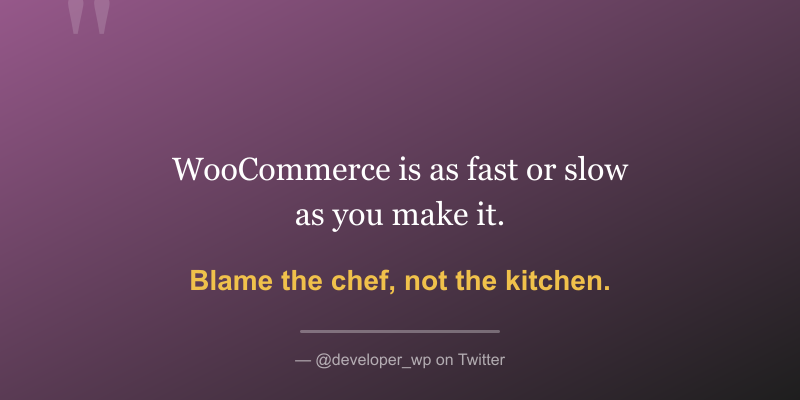
WooCommerce handles billions in transactions yearly. The platform itself isn’t slow—it’s what people do TO WooCommerce that makes it slow.
A clean WooCommerce installation with a well-coded theme and proper hosting loads in under 2 seconds. The problems start when you add 40 plugins and host it on a $3/month shared server with 500 other websites fighting for the same CPU cycles.
Why People Stay with WooCommerce
- Ownership: You own your data, your store, your customer relationships
- Flexibility: If you can imagine it, you can build it
- Ecosystem: More developers, more extensions, more solutions
- No transaction fees: Unlike Shopify’s 2% on external gateways
- WordPress integration: Your blog, your store, one platform
The Alternatives: An Honest Assessment
Yes, alternatives exist. Here’s who they’re actually for:
SureCart — The “Keep It Simple” Option
Best for: Coaches, course creators, digital products, subscriptions, membership sites
SureCart uses headless architecture with cloud servers handling the heavy lifting. This means less load on your WordPress hosting and fewer opportunities to break things with plugins. The checkout is handled externally, so your server only manages content.
Pricing: Free (with 2% transaction fee) or $39/month for Growth plan, $119/month for Pro
Limitations:
- Only 4 payment gateways
- Not suitable for complex product catalogs (100+ physical SKUs)
- Limited shipping options compared to WooCommerce
- Dependent on external service (not self-hosted)
Agency perspective: Easier to maintain because clients can’t over-complicate it. Fewer support tickets. Less “it was working until…” calls.
Easy Digital Downloads — The Focused Specialist
Best for: Software, ebooks, digital downloads, licenses, photography, music, any non-physical product
EDD does one thing extremely well: selling digital products. No physical inventory complexity, no shipping calculations, no bloat. It’s laser-focused on what it does.
Pricing: $199.50/year (Personal) to $499.50/year (All Access)

Agency perspective: If clients only sell digital products, recommend EDD. It’s not better than WooCommerce—it’s more appropriate for specific use cases.
MemberPress — When It’s Really About Access
Best for: Membership sites, online courses, gated content, subscription communities
If your “store” is really selling access rather than products, MemberPress might be more appropriate than WooCommerce. It handles content restriction, drip content, and member management natively without needing 5 WooCommerce extensions.
Pricing: $179.50/year to $399.50/year
WP Sell Services — For Service-Based Businesses
If you’re selling services rather than physical products, a dedicated service marketplace plugin might be more appropriate than WooCommerce. Check out WP Sell Services for a unified approach to service marketplace functionality without the overhead of a full e-commerce solution.
Shopify — The “Not My Problem” Option
Best for: Clients who shouldn’t have WordPress access, physical product retailers who want hands-off hosting
Shopify is hosted, which means clients can’t break the server. Limited app ecosystem means limited chaos. It’s the “we’ll handle everything” option.
Trade-offs:
- Less control over everything
- Higher ongoing costs ($29-299/month + 2% fees on non-Shopify payments)
- You don’t own your data
- Blogging is an afterthought
- Locked into their ecosystem
The Honest Truth About Switching
Here’s what platform switching WON’T fix:
- SureCart won’t fix bad product photos
- EDD won’t fix confusing navigation
- Shopify won’t fix unrealistic expectations
- MemberPress won’t fix thin content
- The plugin is never the real problem
Platform switching is often just rearranging deck chairs on the Titanic. If your business fundamentals are broken, a new shopping cart won’t save you.
The Plugin Bloat Reality Check

Here’s what happens to your load time with each addition:
Fresh WordPress install:     0.8s load time
+ WooCommerce:               1.2s
+ Theme:                     1.5s
+ Page builder:              2.1s
+ "Essential" plugins:       2.8s
+ "Nice to have" plugins:    3.5s
+ "Client requested":        4.2s
+ "Found on YouTube":        5.0s+
Every plugin adds:
- Database queries (often unoptimized)
- HTTP requests (blocking rendering)
- JavaScript/CSS files (more to download)
- Server memory usage (RAM exhaustion)
- Potential conflicts (exponential complexity)
- Security vulnerabilities (more attack surface)
- Update maintenance burden (dependency hell)
The 15-Plugin Rule
Professional, fast-loading stores typically run 10-15 carefully chosen plugins. Problem stores often have 30-50 plugins doing overlapping things.
Every plugin should justify its existence quarterly. If you haven’t used a feature in 30 days, you probably don’t need that plugin.
A Minimal WooCommerce Stack Example
- WooCommerce (core)
- Payment gateway (Stripe or PayPal)
- Shipping calculator (if physical products)
- SEO plugin (ONE, not three)
- Security plugin (Wordfence or Solid Security)
- Backup plugin (UpdraftPlus or similar)
- Cache plugin (matched to your hosting)
- Image optimization (ShortPixel or similar)
- Email marketing integration (ONE)
- Analytics (Google Site Kit)
That’s 10 plugins for a fully functional, fast, secure store. Everything else is likely bloat.
Hosting: The Conversation Nobody Wants to Have
The Brutal Truth About Cheap Hosting
| Hosting Type | Reality |
|---|---|
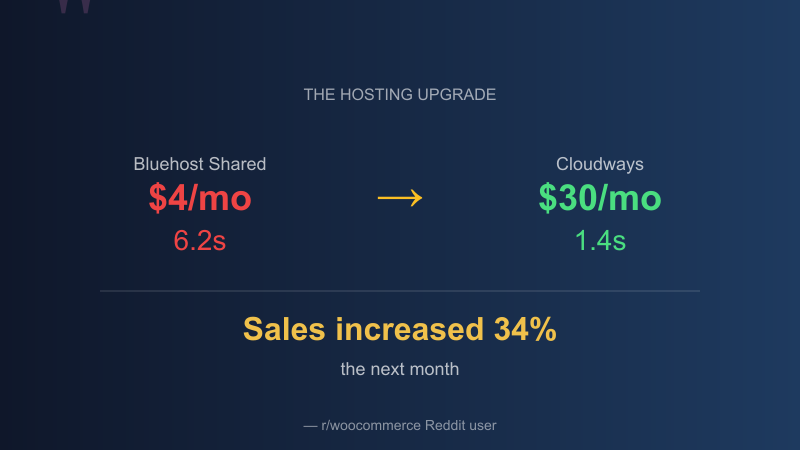
| $3/month shared | You’re sharing a server with 500 other sites |
| “Unlimited” plans | Nothing is unlimited; they throttle you when needed |
| Free hosting | You ARE the product; expect downtime and ads |
| “WordPress optimized” | Marketing speak; means nothing without specs |
What E-commerce Actually Needs
- Dedicated resources (not shared) — Your site shouldn’t compete for CPU
- PHP 8.0+ with OPcache — Modern PHP is 3x faster than PHP 7.0
- Redis or Memcached for object caching — Database queries are expensive
- CDN for static assets — Images, CSS, JS served from edge locations
- Automatic daily backups (not “available for $5 extra”) — Non-negotiable
- Staging environment — Test before breaking production
- SSL included (not upsold) — It’s 2026, this should be standard
- Server-side caching — Varnish, nginx FastCGI, or similar
Recommended Hosting Tiers
| Store Revenue | Monthly Budget | Recommended Options |
|---|---|---|
| Testing/Hobby | $10-20/mo | Cloudways (DigitalOcean 1GB), SiteGround StartUp |
| $0-50K/year | $30-50/mo | Cloudways 2GB, Runcloud, GridPane |
| $50K-250K/year | $50-100/mo | WP Engine, Kinsta, Cloudways 4GB+ |
| $250K+/year | $200+/mo | Dedicated infrastructure, custom solutions |
The Math That Changes Minds
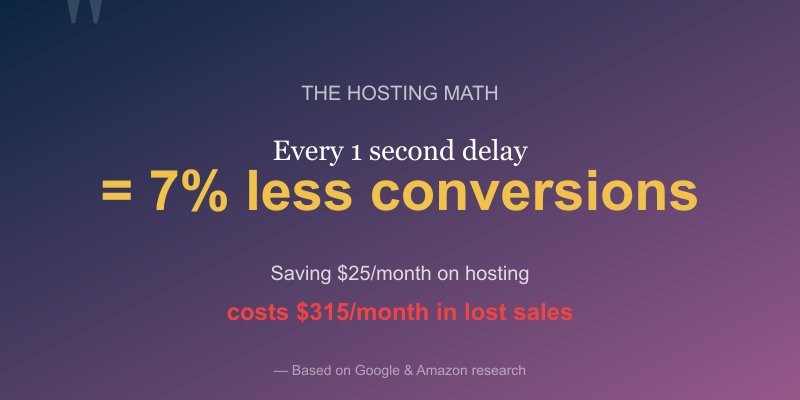
According to Google, bounce rates increase by 32% when page load goes from 1 to 3 seconds, and 90% at 5 seconds. Amazon found that every 1 second of delay costs 7% in conversions.
Let’s do the math:
- 1,000 visitors/month × 3% conversion × $50 average order = $1,500/month
- 3 seconds slower = ~21% fewer conversions
- That’s $315/month lost to save $25/month on hosting
The “cheap” hosting isn’t cheap—it’s the most expensive mistake you can make.
Universal Success Factors (Works for ANY Platform)
These matter more than which plugin you choose. They work for WooCommerce, SureCart, EDD, Shopify—any platform:
1. Speed (The Non-Negotiable)
- Under 3 seconds or lose 32% of visitors
- Under 2 seconds for competitive advantage
- Mobile speed matters MORE than desktop (Google indexes mobile-first)
- Core Web Vitals affect both SEO and user experience
2. Mobile Experience (70%+ of Traffic)
- Thumb-friendly navigation (not tiny menu icons)
- Touch-optimized buttons (minimum 44x44px tap targets)
- No horizontal scrolling ever
- Simplified mobile checkout
- Test on real devices, not just browser dev tools
3. Checkout Simplicity
Every form field is a potential dropout. The average cart abandonment rate is 70%. Reduce friction:
- Guest checkout (always—never force account creation)
- Progress indicators (how many steps left?)
- Auto-fill support (address autocomplete)
- Multiple payment options visible upfront
- No surprise fees at the end (shipping, tax—show early)
- Express checkout options (Apple Pay, Google Pay, Shop Pay)
4. Trust Signals
- SSL certificate (obvious, but still missed)
- Clear return policy (link visible during checkout)
- Real reviews (not just 5-star testimonials—some 4-stars are more credible)
- Contact information visible (phone number, real address)
- Secure payment badges (Visa, Mastercard, SSL seal)
- Social proof (“X customers bought this today”)
5. The Basics Done Well
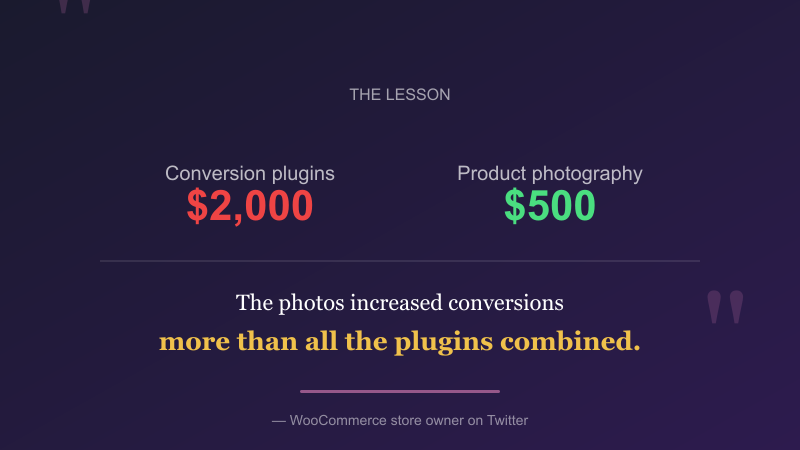
- Good product photos (better than clever copy—hire a photographer)
- Clear pricing (no surprises at checkout)
- Stock status visible (nothing kills trust like “out of stock” after add-to-cart)
- Shipping costs shown upfront (or even on product page)
- Search that actually works (filter by price, color, size)
- Category organization that makes sense to customers, not to you
The Agency’s Guide to Client Education
Setting Expectations Early
These conversations need to happen before the project starts:
- “Your hosting budget determines your speed ceiling”
- “Every plugin is a trade-off between features and performance”
- “Maintenance isn’t optional—it’s ongoing investment”
- “Your competitor’s site cost 10x what you think it did”
- “We can build anything, but not everything should be built”
The Conversation Framework
- What’s your monthly revenue goal?
- What’s your hosting and maintenance budget?
- Are those numbers compatible?
- (They usually aren’t)
- Let’s adjust expectations or budget
When to Walk Away
Some projects are designed to fail:
- Client wants $100K results on $100 budget
- “Just make it work” with 50 existing plugins nobody understands
- No staging, no testing, updates on live site only
- Expects Amazon performance on shared hosting
- “My nephew will manage it after you build it”
- Refuses to invest in hosting upgrade despite evidence
The Maintenance Retainer Pitch
Position maintenance as investment, not expense:
- “A maintained store loses fewer sales to downtime”
- “Updates prevent security breaches that cost thousands”
- “Proactive monitoring catches issues before customers do”
- “It’s cheaper than emergency fixes”
Common Technical Pitfalls and How to Avoid Them
The Image Optimization Disaster
Nothing kills load time faster than unoptimized images. Store owners regularly upload 5MB product photos directly from their camera. That single image takes longer to load than an entire optimized website should.
The Fix:
- Resize images BEFORE uploading (max 2000px width for most uses)
- Use WebP format where possible
- Implement lazy loading (built into WordPress core now)
- Use an image CDN (Cloudflare, Bunny, KeyCDN)
The External Script Nightmare
Every analytics tool, chat widget, and social pixel adds external HTTP requests. Each one blocks rendering and adds latency:
- Google Analytics: 3-5 requests
- Facebook Pixel: 2-4 requests
- Live chat widgets: 5-10 requests
- Social sharing buttons: 5-15 requests
- Popup plugin: 3-6 requests
Before you know it, you have 30+ external requests before your page even renders. Audit everything. If you’re not actively using a tracking service, remove it.
The Caching Confusion
“Install a caching plugin” is common advice. The problem? Many hosting providers already have server-level caching. Installing WP Super Cache on top of Kinsta’s caching creates conflicts, not speed improvements.
Know your stack:
- Managed WordPress hosts (WP Engine, Kinsta, Flywheel): DON’T add caching plugins
- VPS/Cloud (Cloudways, Runcloud): Usually handled at server level
- Basic shared hosting: Might benefit from WP Super Cache or LiteSpeed Cache
The Database Bloat Problem
After 2-3 years of operation, WooCommerce stores accumulate:
- Thousands of transient options
- Orphaned post metadata
- Revision history of every product edit
- Abandoned cart records that never get cleaned
- Order metadata from deleted orders
Regular database optimization isn’t optional for e-commerce. Monthly cleanup of transients and revisions can knock seconds off load times.
Action Plan: Stop Researching, Start Fixing
For Site Owners: Your Next 30 Days
| Week | Action |
|---|---|
| 1 | Audit plugins—delete anything unused for 30+ days |
| 2 | Speed test (GTmetrix)—if over 3s, have the hosting conversation |
| 3 | Test mobile checkout on an actual phone, not browser dev tools |
| 4 | Set up email capture + abandoned cart recovery |
Plugin Audit Checklist
For each plugin, ask:
- When did I last use this feature?
- Does another plugin already do this?
- Is this plugin still maintained (last update)?
- How many database queries does it add?
- Would I pay $10/month for this feature?
For Agencies: Protect Yourself
- Create hosting tier requirements (minimum specs for your projects)
- Plugin approval process (no client installs without review)
- Mandatory staging environments (non-negotiable)
- Monthly maintenance retainers (not optional add-ons)
- Document everything (“client installed X at Y time”)
- Kill switch clause (right to pause if client goes rogue on plugins)
The Psychology of E-commerce Success
Beyond technical factors, psychology plays a huge role:
The Paradox of Choice
Too many options = paralysis. Studies show that stores with fewer, well-curated products often convert better than mega-catalogs. Don’t add every possible variation—curate.
The Urgency Trap
Fake urgency backfires. “Only 2 left!” works until customers realize it’s always 2 left. Real scarcity works. Manufactured scarcity destroys trust long-term.
The Price Anchoring Reality
Showing “was $100, now $50” only works if the $100 was ever real. Customers are savvy. Build value instead of fake discounts.
Resources for Continued Learning
If you want to dive deeper into specific aspects of WordPress e-commerce, here are some valuable starting points:
- For shipping complexities: See our complete WooCommerce shipping guide
- For accessibility considerations: Check our roundup of WordPress accessibility plugins
- For service-based businesses: Explore WP Sell Services marketplace functionality
Conclusion: The Best Store is the One That Works
WooCommerce isn’t dying—it’s being misused. Alternatives aren’t magic solutions. The platform you choose is maybe 10% of your success. Execution is the other 90%.
Stop blaming tools. Stop researching the “perfect” plugin stack. Stop looking for shortcuts.
Pick one platform. Master it. Maintain it. Focus on the fundamentals that actually drive sales: speed, mobile experience, trust, and products people want to buy.
The best e-commerce plugin is the one you’ll actually use properly.
Running a WooCommerce store and struggling with performance? Let’s talk about what’s actually slowing you down—no plugin recommendations, just honest assessment.