Best Request a Quote for WooCommerce Plugins (2026)

The best request a quote for WooCommerce setup is the one that matches how you answer quotes. If you want to hide prices, collect a request for several products and reply with a real number by email, a focused plugin like Woo Product Inquiry & Quote or YITH Request a Quote does it. If you need long custom forms, a form builder can do the job. If you need a full back-and-forth negotiation with accept and convert-to-order steps, check that feature in the plugin before you buy. This guide compares the main options and says where each one fits.
What does a request a quote for WooCommerce plugin do?
WooCommerce shows one price and one add to cart button. That works for stock items. It does not work for made-to-order products, wholesale lots, services with variable scope, or anything where the price depends on the buyer. A request a quote plugin changes the product page. It hides the price, replaces the buy button with a “Request a quote” button, collects what the buyer wants, and gives you a screen to answer from.
Typical users are custom product makers, wholesalers, B2B suppliers and boutique shops. Buyers often want to negotiate, so a quote form beats a cart.
We checked every plugin listed on WordPress.org below in October 2026 for current version, last update and active installs. Plugins from the earlier version of this guide that we could not verify were removed.
What features matter most in a WooCommerce quote plugin?
- Hide price and add to cart on selected products, categories or the whole shop.
- Multi-product requests: one request that covers several items.
- Role control: trade customers keep seeing prices while guests and retail customers ask for one.
- Guest requests: a buyer should not need an account to ask.
- A quote management screen: search, status filters and a place to enter your price.
- Email notifications to you and to the buyer.
- Quote to order: only some plugins turn an accepted quote into an order. Check this if you need it.
- Theme compatibility: the button should work with your theme without template edits.
Which request a quote plugins work for WooCommerce in 2026?
1. Woo Product Inquiry & Quote (ours)
This is our own plugin, so weigh our description with that in mind. Woo Product Inquiry & Quote is a free plugin with one purpose: take the price and buy button off the products you choose, and put a Request Quote button there instead.
- Hide the price on selected products or on all of them
- Request Quote button on product pages and shop archives
- One request can carry several products, and guests can send one without an account
- Quote mode by user role, so wholesale accounts keep their prices and buy button
- A Quote Requests screen in WooCommerce with search, status filters and paging
- Open a request, set a quantity and unit price per line, and send the priced quote by email
- Shoppers get a page showing their own request history
The free plugin has no payment step and no automated quoting engine. You answer each request by hand. That is the right trade for many small shops, but if you need automated quote-to-checkout, look further down this list.
Pro extension. Woo Product Inquiry & Quote Pro is a paid extension that needs the free plugin. It adds three quantity discount bands that are shown on the request form, a stored record of every submitted request, and a CSV export of the customer email list. The free plugin runs the whole request flow, so buy Pro only if you need volume bands or the records and export. The product pages list current plans for annual or lifetime licences.
Best for: shops that answer quotes by email and want the least setup.
2. YITH Request a Quote for WooCommerce
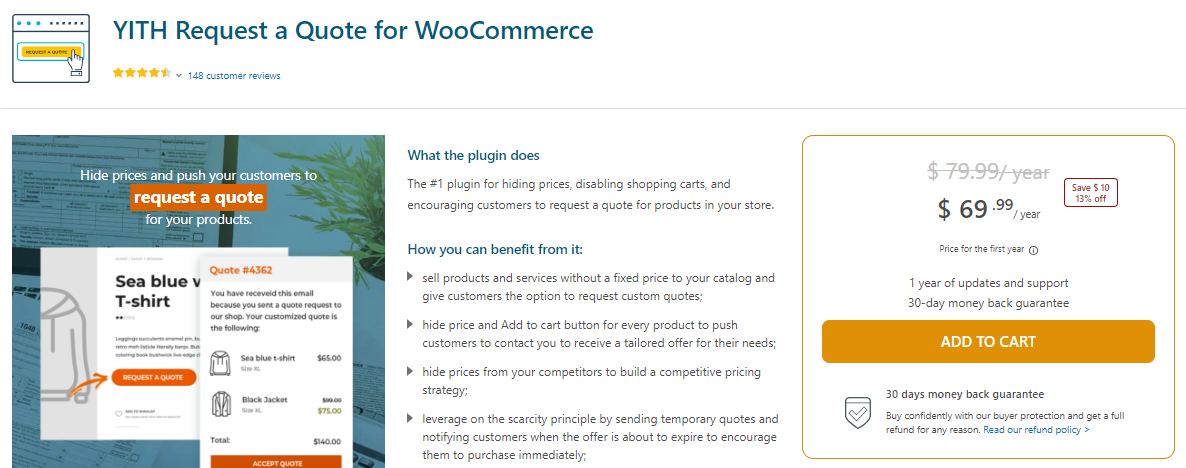
YITH Request a Quote (slug yith-woocommerce-request-a-quote) is one of the best known options. The WordPress.org listing shows around 10,000 active installs and an update this week. It adds an “Add to Quote” button, lets customers build a list of products and submit it with a form, and can hide the price and Add to Cart button for chosen products. That makes it a good fit for wholesale and bulk enquiries. Check the plugin page for what sits in the free version and what needs the paid one.
Best for: shops that want a widely used plugin with a quote list and a proven track record.
Watch for: a feature-rich plugin means more settings to learn. Compare the free and premium feature lists first. See YITH Request a Quote (affiliate link).
3. WooCommerce Request a Quote (WooCommerce.com marketplace)

The Request a Quote extension on WooCommerce.com lets customers submit quote requests for price estimates and hides the add to cart button and price. As a premium extension it comes with marketplace support. Confirm on the product page whether it covers quote status tracking and converting an accepted quote into an order, which matter if your sales team works from the quote.
Best for: stores that prefer extensions sold through the official marketplace.
4. NP Quote Request for WooCommerce
Slug woo-rfq-for-woocommerce on WordPress.org. It has around 8,000 active installs and was updated in October 2026. It is a free quote request plugin, so it is worth testing if you want a free alternative. Read the listing for current features.
5. Request a Quote for WooCommerce – Get a Quote Button
Slug get-a-quote-button-for-woocommerce, about 6,000 active installs, updated in October 2026. As the name says, it focuses on a get-a-quote button. Good for a quick test on a small catalog.
6. CatalogX: Product Catalog, Product Enquiry and Quotes
Slug woocommerce-catalog-enquiry, about 5,000 active installs, updated in October 2026. Its title covers catalog mode, enquiries and quotes together. Pick it if you want an enquiry-style catalog rather than a quote list. Our catalog mode plugin roundup compares options for hiding prices and the cart.
7. Quotes for WooCommerce
Slug quotes-for-woocommerce, about 4,000 active installs, last updated in June 2026. Active, though updated less often than the others. Test it against your current WooCommerce version before relying on it.
8. A form plugin: Gravity Forms, Ninja Forms or WPForms

Form builders are not quote plugins, but they can collect quote requests. Gravity Forms is a premium form builder with conditional logic, entry management and many integrations. Ninja Forms (about 500,000 active installs) and WPForms Lite (about 5 million) are also actively updated. Use a form when your quote needs long, conditional questions, such as measurements or file uploads.

Watch for: a form does not hide the price or replace the add to cart button. You still need a way to link products to the form, and you manage replies outside WooCommerce. See Gravity Forms (affiliate link).
How do the quote plugins compare?
| Option | Cost model | Hides price | Multi-product request | Best fit |
|---|---|---|---|---|
| Woo Product Inquiry & Quote | Free, paid Pro extension | Yes | Yes | Simple quote-by-email flow |
| YITH Request a Quote | Free and premium | Yes | Yes | Feature-rich wholesale quotes |
| WooCommerce.com Request a Quote | Premium | Yes (per listing) | Check listing | Marketplace-supported stores |
| NP Quote Request | Free listing | Check listing | Check listing | Free alternative to test |
| CatalogX | Free listing | Catalog mode | Check listing | Catalog with enquiries |
| Form builder | Free or paid | No | Custom | Complex custom questions |
How do you choose the right quote plugin?
- You answer every quote by hand and want it simple: Woo Product Inquiry & Quote or YITH.
- You offer volume discounts: check for quantity bands. Our Pro extension shows three bands on the request form.
- You need quote to order or payment links inside the plugin: check the premium options first. Our free plugin does not include a payment step.
- Your quotes need long forms: use a form builder, accepting the extra setup.
- You only want to hide prices from some customers: look at role-based pricing. See our guide to role-based price plugins.
If part of the sale is paid up front, our guide to WooCommerce deposits and down payments shows how to take a deposit once the quote is agreed.
How do you set up request a quote for WooCommerce so it converts?
Quote requests only turn into orders when you reply quickly and clearly. A few habits help.
- Limit quote mode to the products that need it. Keep the rest of the catalog on normal buy buttons so ordinary sales are not slowed.
- Keep the form short. Name, email, what they need, and quantity. Add more fields only when you cannot quote without them.
- Test the email path. Send yourself a request from a guest browser and confirm both emails arrive and do not land in spam.
- Reply within a business day. A quote that arrives a week later usually loses to a competitor with a visible price.
- State what the quote includes and how long the price is valid.
- Follow up once. A short reminder a few days later often wins the request.
When should you hide prices and ask for a quote?
Hiding a price costs you some impulse sales, so do it only where a fixed price is wrong. These are the common cases.
- Made-to-order goods: furniture, signage, printed items or anything with sizes and finishes the buyer chooses.
- Wholesale and bulk: the price drops with quantity, or differs by account.
- Parts and equipment: stock, shipping and lead time change the real price.
- Services sold through WooCommerce: the scope decides the cost.
If your price is simple, leave it visible. Shoppers who see a price convert faster than shoppers who must write to you.
What is the difference between a quote, an enquiry and catalog mode?
An enquiry is a question about a product. A quote is a request for a specific price on a specific list of items. Catalog mode simply turns the shop into a display, with no buying at all. Many plugins mix the three, so read what each one actually does. If you want the buyer to leave a list of items with quantities and get a number back, you need a quote flow, not just an enquiry button.
What should a good quote email contain?
Say what was quoted, the quantity and the unit price, any delivery cost, how long the price is valid and what the buyer should do next. A short, clear email gets answered. A long one with no next step does not. If you use Woo Product Inquiry & Quote, the priced quote goes out from the request screen, so keep a template of your usual wording close at hand.
Will hiding prices hurt SEO?
Product pages can still rank for their content when the price is hidden, but search listings that show prices may look less appealing. Keep descriptions, images and specifications strong, and mention the range or “from” information in the text when you are comfortable sharing it.
Frequently asked questions
Can I use WooCommerce for quotes without a plugin?
Not well. WooCommerce has no quote feature of its own. You can hide prices with custom code and link to a contact form, but a plugin gives you a request list and a place to answer from.
Can customers request a quote for several products at once?
Yes, with plugins that keep a quote list. In Woo Product Inquiry & Quote, one request can carry several products, and guests can send it without an account.
Can some customers still see prices?
Yes, with role-based quote mode. In our plugin you choose which user roles see the price and buy button and which see Request Quote, so trade accounts can keep normal prices.
Does our free plugin send automated quotes or take payment?
No. You open each request, set a quantity and unit price per line, and send the quote by email. There is no payment step in the free plugin.
What does the Pro extension add?
Volume discount bands shown on the request form, a stored record of each request, and a CSV export of customer emails. It needs the free plugin and WooCommerce.
Is a form plugin enough for quotes?
For low volume, yes. A form collects the request, but it does not hide prices or manage quote status inside WooCommerce, so busy stores usually outgrow it.