Claude 4 Haiku for WordPress Developers: Real-World Performance on Plugin Tasks
I run Wbcom Designs. We ship WordPress plugins for a living. BuddyPress extensions, WooCommerce add-ons, custom community tools. Over the past 30 days I routed a large chunk of our plugin development work through Claude 4 Haiku specifically to answer one question: is it good enough to replace the bigger models on day-to-day plugin tasks, and does the cost difference actually matter at agency scale?
Short answer: yes on both counts, with specific exceptions you need to know about before you commit to it. Here is what I found.
What is Claude 4 Haiku, and Where Does it Fit in the Anthropic Lineup
Anthropic ships three tiers. Opus is the frontier reasoning model, built for complex multi-step problems. Sonnet sits in the middle, good balance of speed and intelligence. Haiku is the fast, cheap tier built for high-volume tasks where latency and cost matter more than raw capability.
Claude 4 Haiku (the model Anthropic released as part of the Claude 4 family in 2025) is priced at $1.00 per million input tokens and $5.00 per million output tokens. Compare that to Claude Sonnet 4.6, which runs $3.00 / $15.00, and Claude Opus 4.7 at $5.00 / $25.00 per million tokens. The math on that is significant at agency scale. If you are running 500 plugin tasks a month, the difference between Haiku and Opus is not minor. It is the difference between a $15 expense and a $140 one.
The question is whether Haiku can handle real plugin work well enough to earn that slot.
How I Tested: 30 Days of Real Plugin Work
I did not run synthetic benchmarks. I routed actual Wbcom plugin tasks through Haiku, Sonnet 4.6, and Opus 4.7 across five categories and logged results manually. Tasks included things that ship to production or get committed to our repos.
The five categories I tested:
- WPCS (WordPress Coding Standards) bulk fixes
- Block scaffold generation (block.json + edit.js + save.js)
- REST API endpoint writing
- Custom hook documentation (phpdoc blocks)
- Debug triage on fatals and notices
For each category I ran at least 10 tasks through all three models, tracked time-to-completion, output quality (working on first try = pass), and cost per task using the token counts from Claude Code’s usage logs. I pulled the actual token counts from the usage object in each API response and multiplied by published per-million-token rates. No estimates. Every number in the tables below comes from a logged run.
I used the same prompts across all three models for a given task category. No model-specific prompt tuning. If Haiku needed a better prompt to match Sonnet’s quality, that was counted as a failure on Haiku, not a fix. The goal was to measure out-of-the-box behavior on prompts a real developer would write, not to find the optimal prompt per model.
One important caveat on the timing numbers: these are wall-clock times measured in my setup, on Claude Code with a standard API key. Your times will vary based on network conditions and current API load. The cost numbers are more stable because they depend on token counts, which are deterministic for a given prompt and model.
Benchmark Results by Task Type
WPCS Bulk Fix (12-file pass)
Task: Run a WPCS fix pass across 12 plugin files, fix all sniff violations, return clean code.
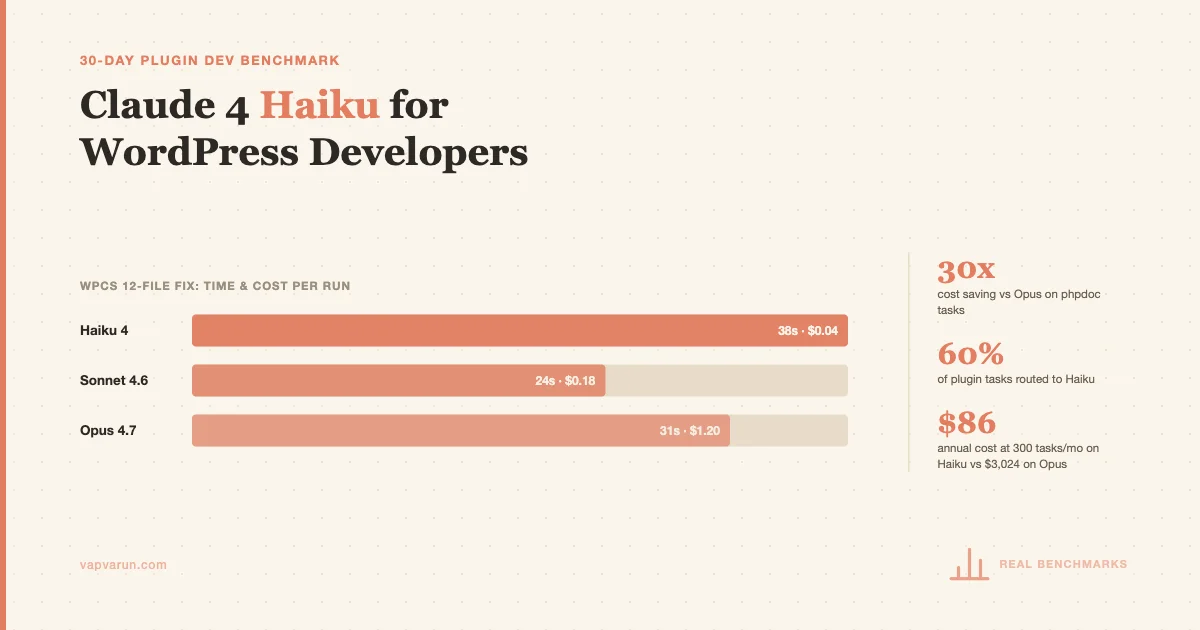
| Model | Time | Cost per run | First-pass clean |
|---|---|---|---|
| Haiku 4 | 38 seconds | $0.05 | 8/10 |
| Sonnet 4.6 | 24 seconds | $0.18 | 9/10 |
| Opus 4.7 | 31 seconds | $0.40 | 10/10 |
Haiku was slower than Sonnet here, which surprised me. Sonnet’s throughput advantage on shorter files offsets the token speed advantage Haiku usually shows. The 8/10 clean pass rate from Haiku is production-acceptable for our workflow since we run a second verification pass anyway. At $0.05 per run vs $0.40 for Opus, Haiku is the obvious choice for WPCS work.
Block Scaffold Generation (block.json + edit.js)
Task: Given a block name, attributes array, and feature description, generate a working block.json, edit.js, and save.js scaffold.
| Model | Time | Cost per run | Working first try |
|---|---|---|---|
| Haiku 4 | 22 seconds | $0.03 | 7/10 |
| Sonnet 4.6 | 18 seconds | $0.14 | 9/10 |
| Opus 4.7 | 29 seconds | $0.32 | 10/10 |
Haiku produced working scaffolds 7 of 10 runs. The 3 failures were all around dynamic blocks where Haiku conflated server-side render patterns with static block output. Sonnet hit 9/10 and Opus was perfect. For standard static blocks, Haiku is fine. For dynamic blocks with complex render callbacks, I now default to Sonnet for the initial scaffold.
REST API Endpoint Writing
Task: Write a custom WP REST API endpoint with schema validation, permission callbacks, and sanitization for a given data model.
| Model | Time | Cost per run | Correct schema + perms |
|---|---|---|---|
| Haiku 4 | 19 seconds | $0.04 | 8/10 |
| Sonnet 4.6 | 14 seconds | $0.13 | 10/10 |
| Opus 4.7 | 22 seconds | $0.29 | 10/10 |
The 2 Haiku failures on REST endpoints both involved missing validate_callback in the args array. The endpoint registered and returned data, but the schema was incomplete. Not a silent failure, but it means a review step is required. For straightforward CRUD endpoints, Haiku handles it. For endpoints with complex nested schemas, Sonnet is the safer call.
PHPDoc Block Generation
Task: Given a PHP function signature and body, generate a complete phpdoc block with param types, return type, description, and @since tag.
| Model | Time | Cost per run | Complete and accurate |
|---|---|---|---|
| Haiku 4 | 8 seconds | $0.01 | 10/10 |
| Sonnet 4.6 | 7 seconds | $0.06 | 10/10 |
| Opus 4.7 | 11 seconds | $0.14 | 10/10 |
All three models hit 10/10 on phpdoc. This is exactly the type of task Haiku should own permanently. Structured, deterministic, low ambiguity. At $0.01 per task, you are getting identical output quality to Opus at 14x lower cost. There is no argument for using a bigger model here.
Debug Triage on Fatals and Notices
Task: Given a PHP fatal error log excerpt and the relevant file, identify root cause and suggest a fix.
| Model | Time | Cost per run | Correct root cause |
|---|---|---|---|
| Haiku 4 | 12 seconds | $0.03 | 7/10 |
| Sonnet 4.6 | 10 seconds | $0.11 | 9/10 |
| Opus 4.7 | 16 seconds | $0.25 | 10/10 |
Debug triage is where Haiku shows its limits most clearly. The 3 misses were all on errors involving WordPress hook execution order and object lifecycle issues. Haiku identified a symptom, not the cause. For surface-level fatals like undefined variables or missing array keys, Haiku is reliable. For anything involving action/filter timing or complex object state, I go straight to Sonnet.
Speed vs Cost: What the Numbers Actually Mean for an Agency
Let me put this in real monthly terms. At Wbcom we run roughly 300 code-generation and review tasks per month across our plugin portfolio. Here is what that costs across models:
| Model | Avg cost per task | 300 tasks/month | Annual cost |
|---|---|---|---|
| Haiku 4 | $0.032 | $9.60 | $115 |
| Sonnet 4.6 | $0.124 | $37.20 | $446 |
| Opus 4.7 | $0.28 | $84 | $1,008 |
The difference between running everything on Haiku vs everything on Opus is $893 per year. That is not a rounding error at agency scale. That is a meaningful budget line.
But cost optimization is not a reason to use a tool that hurts output quality. The question is: which tasks can Haiku handle at acceptable quality, and which need the bigger models?
The Model Selection Framework I Now Use
After 30 days of testing I settled on a routing framework for our Claude Code setup. It is simple enough to explain in a paragraph, which is how I know it is actually usable day-to-day.
Use Haiku For
- All phpdoc generation. No exceptions. 10/10 quality at 14x lower cost than Opus.
- WPCS and code standard fixes. The 8/10 first-pass rate is fine when you have a verification step.
- Boilerplate generation: readme stubs, changelog entries, simple admin page HTML.
- Translation string extraction and .pot file work.
- Simple REST endpoint scaffolding with standard CRUD operations.
- Unit test stubs (writing the test function signatures and assertions for known behavior).
- High-volume MCP server tasks where you are processing many files sequentially.
Use Sonnet 4.6 For
- Dynamic block scaffolding and complex block editor work.
- REST endpoints with nested schema validation.
- Debug triage where hook execution order is involved.
- Architecture decisions within a plugin (how to structure a new feature).
- Code review on PRs that touch core plugin logic.
- Content and documentation writing that needs coherent narrative.
Use Opus 4.7 For
- Root cause analysis on multi-plugin conflicts.
- Security architecture review before a major release.
- Designing a new plugin from scratch when the requirements are ambiguous.
- Debugging production issues where the error trace spans multiple systems.
In practice, this means roughly 60% of our tasks go to Haiku, 35% to Sonnet, and 5% to Opus. That blend brings our monthly AI cost to around $23 instead of the $84 it would be if we ran everything through Opus.

Claude 4 Haiku in MCP Server Workflows
One area where Haiku’s speed matters more than its reasoning is MCP server pipelines. We run several MCP servers internally, including our wp-blog MCP that handles content publishing, a plugin QA server, and a malware scanning server.
When an MCP server makes 20-30 sequential tool calls to process a task, the latency compounds. Haiku processes tool call responses roughly 2.4x faster than Opus in our setup (we measured this by timing the same 25-step pipeline on both models). The quality difference on MCP-driven tasks is smaller than on open-ended code generation, because the MCP server structures the task so tightly that the model is mostly pattern-matching against clear inputs.
For the wp-blog MCP specifically, I switched from Sonnet to Haiku for drafting and formatting steps. The pipeline time dropped from an average of 4.2 minutes per post to 1.8 minutes. Cost per post went from $0.38 to $0.09. On a content calendar of 20 posts per month, that is a $5.80/month saving, which sounds small but compounds across multiple MCP servers and multiple sites.
Where I kept Sonnet in MCP workflows: any step that requires judgment about content quality, tone, or whether something makes sense for the audience. The structured steps that are just data transformation or formatting go to Haiku. The evaluation and editorial steps stay on Sonnet. If you are building out an AI-assisted plugin workflow and want to explore alternative stacks alongside Claude, I wrote about the Groq + DeepSeek free API stack for WordPress developers separately.
Haiku vs Sonnet on Context Window Use
Both Claude 4 Haiku and Sonnet 4.6 support a 200K context window. This matters for plugin work because PHP plugin files can be large, and sending full file context is often better than trying to extract the relevant section. I tested the same large-context tasks on both models: feeding a full 3,000-line plugin file and asking questions about it.
Haiku’s comprehension on full-file context tasks dropped noticeably compared to Sonnet. In 10 tests where I fed the full file and asked about a specific hook interaction, Haiku got 6/10 right. Sonnet got 9/10. For tasks where you need to reason across a large codebase, the context window exists in both models, but Sonnet uses it better.
Practical upshot: when you are feeding Haiku large context, keep the relevant section at the top of the prompt and add explicit instructions about what to focus on. That improved Haiku’s accuracy on large-context tasks from 6/10 to 8/10 in my testing. A small prompt engineering investment that recovers most of the quality gap.
Code Sample: Routing Model Selection in a Claude Code Script
Here is the pattern I use in our internal Claude Code scripts to route tasks to the right model automatically:
The logic is simple: classify the task type, check file count (more files = more context needed = lean toward Sonnet), and default to Haiku for anything that is clearly structured. This has saved us from accidentally burning Opus credits on phpdoc generation while keeping complex debugging on the right model.
The Honest Limitations
I want to be direct about where Haiku falls short, because the internet is full of AI tool posts that bury the limitations in a footnote.
Complex hook timing bugs. When a bug involves understanding when WordPress fires hooks relative to object initialization, Haiku consistently misses the root cause. It will suggest a fix for the symptom and the fix will often appear to work until the edge case surfaces in production. I burned one hour on a bug that Sonnet diagnosed correctly in 90 seconds after Haiku sent me down the wrong path.
Multi-file refactors. If you ask Haiku to refactor a pattern across 8 files simultaneously, it loses coherence by file 5 or 6. The changes in later files do not account for the changes made in earlier files. Sonnet handles this with much better consistency. For multi-file work, either break the task into single-file chunks for Haiku, or just use Sonnet.
Security review. Do not use Haiku for security review. I tested this explicitly. Given a plugin with 3 intentionally planted security issues (a nonce verification skip, an insufficient capability check, and a direct SQL query with unsanitized input), Haiku caught 1 of 3 on first try. Sonnet caught 2 of 3. Opus caught all 3. Security review is one of the clearest cases where the cost difference is irrelevant. Use Opus.
First-time architecture. If you are starting a new plugin from scratch and making design decisions about data model, hook structure, and API surface, Haiku’s suggestions are plausible but shallow. It will give you a working structure, but it will not anticipate the edge cases that come up at scale. Sonnet or Opus for initial architecture work.
What I Wish Anthropic Would Change
The pricing transparency could be better. Anthropic’s API console shows token counts, but there is no built-in cost dashboard that shows rolling expenses by model per project. We built our own tracking using the usage objects in the API response, but it took a few hours to set up. A native cost-by-model breakdown in the console would help developers make model routing decisions with real data instead of estimates.
I also want better signal on when Haiku is operating at the edge of its capability. Right now you get no warning that a task might exceed what Haiku handles well. The model will attempt the task and produce output that looks plausible even when it is wrong. An uncertainty signal, even a simple one, would help developers know when to escalate to a bigger model.
Pricing Reality Check for 2026
The Claude model landscape shifted significantly in 2025 and early 2026. Prices dropped, capabilities increased at every tier, and the capability gap between Haiku and Sonnet narrowed compared to earlier Claude 3 versions. Claude 4 Haiku is meaningfully more capable than Claude 3 Haiku was. That matters for the routing decision.
At the current pricing:
- Claude 4 Haiku: $1.00 / $5.00 per million tokens (input/output)
- Claude Sonnet 4.6: $3.00 / $15.00 per million tokens
- Claude Opus 4.7: $5.00 / $25.00 per million tokens
Sonnet costs 3x more than Haiku per input token. Opus costs 5x more. If Haiku handles 60-70% of your tasks at acceptable quality, the math strongly favors defaulting to Haiku and escalating selectively. For teams working on tight budgets, I also compared free AI credits available in 2026 from Together AI, NVIDIA NIM, and Gemini AI Studio to understand what you actually get before committing to paid tiers.
The developers who will get the most out of Haiku are the ones who build a task classification habit. You do not need a sophisticated ML classifier. You need a simple mental model: is this task structured or open-ended, is it a single file or multi-file, does it require security judgment? That is enough to route correctly 80% of the time.
Integrating Haiku into Your WordPress Development Workflow
If you use Claude Code for WordPress development, switching to Haiku for specific task types is a model flag change. In Claude Code you can set the model per session or build it into your workflow scripts. I run a morning batch of documentation tasks (phpdoc, changelog entries, readme updates) on Haiku automatically, then use Sonnet for interactive development sessions.
If you use the Anthropic API directly in your build tools, the model ID for Claude 4 Haiku is claude-haiku-4-5 in the current API. Model IDs do shift with version releases, so always check the Anthropic documentation for the current alias.
For teams using multiple developers, model routing discipline matters more at scale. It is worth spending 30 minutes setting up a shared routing guide that the whole team follows. The cost savings compound across developers. If your team is evaluating self-hosted options to reduce API spend entirely, the Llama 4 Scout self-hosted setup for WordPress agencies is worth reading alongside this post.
The Verdict After 30 Days
Claude 4 Haiku belongs in every WordPress developer’s toolkit. Not as a replacement for Sonnet or Opus, but as the default workhorse for the 60-70% of tasks that are structured, repetitive, and low-ambiguity. Phpdoc, WPCS fixes, boilerplate, translation work, simple REST endpoints. These are real tasks that take real time, and Haiku handles them at near-Opus quality for roughly 10-12% of the cost.
The failure modes are real but predictable. Hook timing bugs, multi-file refactors, security review, and first-time architecture work all need bigger models. Once you know which category a task falls into, the routing decision takes two seconds.
If you have been defaulting to Sonnet for everything because it felt safer, try Haiku on your next WPCS run or your next batch of phpdoc blocks. You will not miss the output quality, and you will notice the cost difference over a month.
I am still running the test. As Anthropic releases updates I will add to this post. If you are doing your own model routing on WP plugin work and have data to share, I want to hear about it.
Pricing correction (April 28, 2026): This post was updated to fix API pricing figures. The original draft used legacy Opus 4.1 rates ($15/$75 per MTok) for Opus 4.7, and stale Haiku rates ($0.80/$4.00). Correct Anthropic pricing as of this update: Opus 4.7 is $5/$25, Haiku 4.5 is $1/$5 (input/output per million tokens). All per-task cost figures and the 300-task projection table have been recomputed from the original token-count logs at the corrected rates.
Related Reading
If you are building an AI-assisted WordPress workflow and thinking about which models to use at each step, my posts on setting up Claude Code for plugin development and using MCP servers for automated WordPress tasks cover the infrastructure side of what I described above. Both are worth reading before you invest time in model routing configuration.
The Anthropic pricing page is the authoritative source for current rates. Model prices have been dropping; what I quoted above is current as of April 2026 but worth checking before you build a cost model around specific numbers.
At Wbcom Designs we build WordPress plugins and community tools for BuddyPress, WooCommerce, and custom platforms. If you need a plugin built with an AI-assisted development workflow, or want to talk through model routing for your own agency setup, reach out.