Headless WordPress With 2,000+ Posts: Why We Stopped Rebuilding the Whole Site on Every Publish
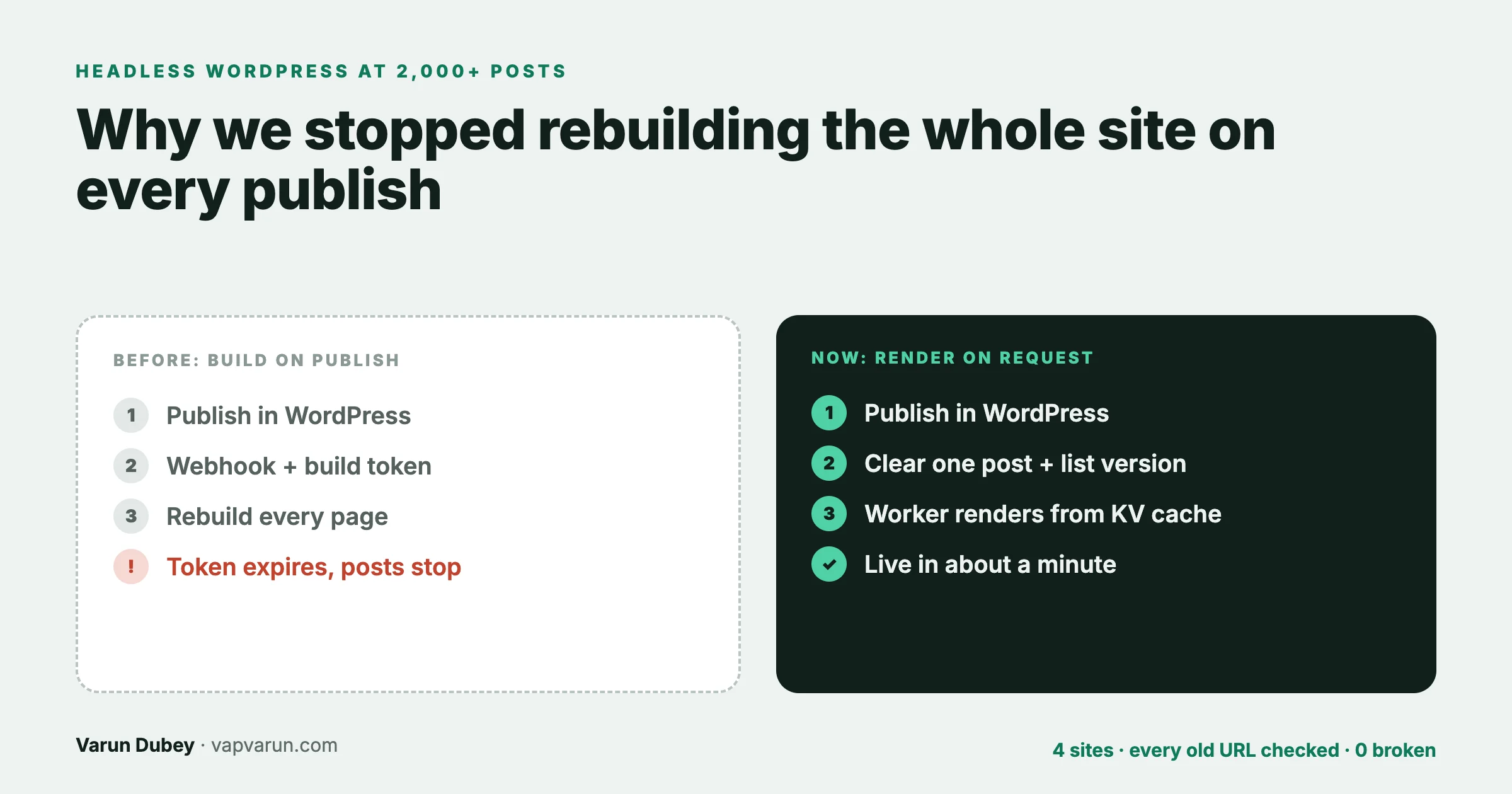
For two years our headless WordPress sites worked the way most headless guides recommend. WordPress held the content. An Astro build pulled every post through the REST API and turned the whole blog into static pages. When we published a post, a webhook started a fresh build, and a few minutes later the new post was live. It was fast for readers, simple to reason about, and fine at a few hundred posts.
It stopped being fine. On 18 October 2026 we moved four sites (vapvarun.com, buddyxtheme.com, reigntheme.com and brndle.com) to a different model: the blog is rendered at request time by a Cloudflare Worker, from WordPress, through a cache that our publishing tool clears on every publish. Nothing is rebuilt when a post goes live. This post explains why, how the new model works, the details that bit us during the move, and how we proved that not one URL broke.
It also corrects our own earlier advice. In April we published WP Astro MCP v3, which recommended rebuilding on publish through a webhook. That is still reasonable for a small site. For a blog that publishes often or has thousands of posts, this post is what we now recommend instead.
The short version
- Static pages stay static. The homepage, product pages and landing pages are still built once by Astro.
- The blog is rendered on request. Posts, the blog list, categories, search and sitemaps come from WordPress at the moment someone asks for them.
- A cache in front of WordPress (Cloudflare Workers KV) keeps it fast. Most visitors never cause a WordPress request.
- Publishing clears one post and bumps one version number. No build, no deploy, nothing on the WordPress server. The new post is live in about a minute.
- Nothing broke. Every URL from the old sites, plus every URL with search history, backlinks or a Bing crawl record, ended on a live page.
Why rebuilding on every publish stops working
The build-on-publish model has three costs that grow quietly with the size of the blog.
1. The build grows with every post
A static build fetches every post and writes every page, every time. Fixing one typo in one post rebuilds thousands of pages. At a few hundred posts nobody notices. Our sites now hold between 586 and roughly 2,500 posts each, and the sister site wbcomdesigns.com, which already ran the request-time model, holds about 8,000. A model whose cost grows with the archive is the wrong model for a blog that keeps growing, and owners told us plainly that they want to keep improving old posts and keep adding new ones.
2. Publishing depends on a chain of systems
In the old model, a post only reached readers if every link held: WordPress fires a webhook, the webhook carries a token to start the build, the build runs on a CI service, the build deploys. On 28 September 2026 the token in that chain expired. Nothing failed loudly. Posts saved fine in WordPress, the webhook fired, and the build simply never started, so new posts on three sites stopped appearing until someone noticed.
We could have renewed the token. The better question was why publishing a blog post needed a build token at all. We already held the credentials that matter (Cloudflare and the publishing tool), and wbcomdesigns.com had been publishing thousands of posts without any of that chain.
3. Updates are slow to land
A refreshed post, a corrected title or a new featured image waited for a full build to go live. When you refresh old posts regularly, as we do, that delay adds up, and it tempts people to batch changes instead of fixing things the moment they spot them.
The model we moved to
Each site is still an Astro project deployed to Cloudflare Workers. The difference is where the blog comes from.
- Astro builds the static pages once, plus two “shell” pages: an empty post page and an empty list page, each holding the site’s header, footer, fonts and analytics with placeholders where the content goes. The build makes no WordPress calls at all.
- A request for a post reaches the Worker. It looks for the post in Workers KV. If it is there, it fills the shell with the post and its SEO data and returns the page. If not, it fetches the post from the WordPress REST API, stores it in KV and returns it.
- Lists work the same way. The blog index, page 2, 3 and onwards, each category and its pages, search results, the homepage “latest writing” cards and the sitemaps are all built on request and cached.
- Publishing clears the cache. After any publish or update, our publishing tool deletes that post’s cache entry and writes a new value to one key, the list version.
The list version trick
A new post changes many lists at once: the blog index, its category, the homepage cards, the post count, search results, the sitemap. Hunting down and deleting every affected cache entry would be fragile. Instead, every list entry has the current list version in its key. When the version changes, every list key changes with it, so the very next request for any list misses the cache and builds a fresh one. The old entries simply expire. One write invalidates everything that depends on the set of posts, without knowing what those things are.
Stale while revalidate
Each cache entry stores when it was fetched. A post entry is considered fresh for six hours and a list for ten minutes. After that, the Worker still answers instantly from the old copy and refreshes it in the background. Readers never wait for WordPress unless nothing is cached at all, and WordPress only sees a trickle of requests no matter how much traffic the site gets.
One cache, not two
We made KV the only cache. Rendered pages go to browsers with a five-minute cache header but are not stored at the Cloudflare edge, so nothing ever needs a Cloudflare purge. Two caches that must be cleared in the right order is how a fixed post keeps showing the old version, and we wanted exactly one thing to clear.
The details that bit us
The model is simple. These are the parts that were not.
An old edge copy turned a live post into a 404
After switching one site, a published post showed “not found”. WordPress had the post; the Worker said it did not exist. The cause was a copy of an earlier REST answer, from before the post was published, still held by the edge cache in front of WordPress for up to a day. The Worker was asking the right question and getting yesterday’s answer. Every REST request from the Worker now carries a unique cache-busting value, so it always reaches WordPress itself, and KV is the only place answers are kept.
Non-English slugs
Two posts had slugs in Japanese and Chinese. The Worker only looks up paths that look like slugs, and the first version of that check allowed plain letters, numbers and dashes. Those two posts 404’d until the check also allowed the percent-encoded form browsers send for non-English characters. The URL audit (below) is what caught them.
Loose spellings of a slug
WordPress is forgiving: it will find a post for an uppercase or slightly different spelling of its slug. In a cached world that is a problem, because each spelling becomes its own cache entry, and publishing only clears the real one. Now any spelling that is not the post’s actual slug gets a 301 to the real one, so only one cache entry per post can ever exist.
WordPress down must not mean “not found”
If WordPress is briefly unreachable, the easy mistake is to treat “no answer” as “no post” and cache a 404. Search engines then see real posts disappear. The Worker now returns a 503 with a retry header when WordPress cannot be reached, which tells crawlers to come back later, and never stores that as a missing post.
The firewall in front of WordPress
Our WordPress origins sit behind firewall rules that block most automated requests. The Worker is an automated request. Each site’s Worker now identifies itself with the agent name its zone allows, and the first preview of the new code returned 503 on every post until that matched.
Reading the wrong SEO plugin
The renderer on two sites read SEO titles, descriptions and schema from Yoast’s REST field. Those sites run Rank Math, so the field was always empty and posts went out with fallback titles and no article schema. It had been that way before the move too; rebuilding the renderer is what surfaced it. The renderer now asks Rank Math for the page head directly and caches it with the post.
Styles that did not apply to injected content
Astro scopes component styles by adding a unique attribute to the elements it renders and to the CSS rules that target them. The post body that the Worker injects into the shell never went through Astro, so it never got those attributes, and the scoped rules silently matched nothing. The first preview showed posts with no typography at all. The styles for anything the Worker injects now live in global stylesheets, written for the injected markup, and each site’s docs say so in bold, because it is the first thing the next person would try to “tidy up”.
Homepage cards that need live data
The homepage is a static page, but it shows the latest posts and a post count. Those can no longer be baked in at build time. The first attempt marked the spots with HTML comments for the Worker to replace, and the build escaped the comments so the Worker never found them. Plain data attributes on an empty list and a counter turned out to be the reliable marker: the Worker fills them on each request from the same cached post list, and the rest of the page stays static.
Proving nothing broke
A change to how every blog URL is served is exactly the kind of change that quietly breaks old links. “It looks fine on the five pages I checked” proves nothing. So the move came with an audit that treated every URL anyone might still use as a test case.
Where the URL lists came from
- The live sites before the change: every URL in the sitemaps and every post from WordPress.
- Google Search Console: every page with impressions in the last 16 months, including pages that no longer exist. That was 637 pages for vapvarun.com and 4,631 for buddyxtheme.com.
- Backlinks: every URL another site links to, from a backlink tool.
- Bing Webmaster Tools: URLs Bing reported crawl issues for.
What we checked
Every URL was fetched before and after the switch, and the results compared. A check that only looks at the status code misses one sneaky case: a URL that returns 200 because WordPress’s own theme rendered it, which is not a page we meant to serve. The audit flags those separately. After the switch, every site’s own URLs returned 200: 728 on vapvarun.com, 3,220 on buddyxtheme.com, 1,451 on brndle.com, and on reigntheme.com every URL ended on a live page.
Redirects by audience, not by word matching
The URLs from search history and backlinks that no longer existed needed somewhere to go. The first draft matched old slugs to new ones by similar words, and it made bad choices: a post about one topic sent to a post that shared a word but served a different reader. So we read the actual search queries behind each dead URL and chose the live page that best answers what those people were looking for.
Each redirect is a single 301 to a live page, applied at the Cloudflare edge before the Worker runs, managed from a file in each site’s repo. That came to 55 redirects for vapvarun.com, 308 for buddyxtheme.com, 26 for reigntheme.com and 65 for brndle.com, plus pattern rules for old tag, author, date and paginated archive URLs. Every target was checked to be a live page before the list was applied, so no redirect leads to another redirect or a 404.
What it unlocked
Once the blog comes from WordPress on request, anything derived from the list of posts can be built the same way and is never stale. On the same day we added:
- a post sitemap with real last-modified dates, listed in each site’s sitemap index,
- a complete
/llms.txtlisting every post for AI assistants, - FAQ schema generated from a post’s own FAQ section, and breadcrumb schema on every post.
We wrote up that part in the llms.txt playbook. None of it would have been practical with a build per change.
When a static build is still the right call
This is not “static is dead”. A full static build is still the simpler choice when:
- the site has a few dozen or a few hundred pages and changes rarely,
- the content lives in the repo (Markdown, a content collection) rather than in a CMS,
- nobody needs a change to go live in minutes,
- or you want zero moving parts at request time.
Our product sites with small blogs stay static for exactly those reasons. The request-time model earns its keep when a CMS holds the content, the archive is large and still growing, and people publish and refresh often. If you are earlier in the decision, our headless migration playbook for business sites covers whether to go headless at all, and why fast sites win bigger clients covers why speed matters to the business.
A checklist if you are making the same move
- Inventory every URL first: sitemaps, the CMS, 16 months of Search Console pages, backlinks and Bing crawl issues.
- Fetch all of them before the change and save the results.
- Build the request-time renderer behind a preview address and test it there before any live switch.
- Bypass any edge cache on CMS API reads, so old answers cannot leak in.
- Return 503, never a cached 404, when the CMS cannot be reached.
- Redirect loose slug spellings to the real slug, so each post has one cache entry.
- Check which SEO plugin the site actually runs, and read its head.
- Wire cache clearing into the publishing tool itself, so nobody has to remember it.
- Switch one site at a time, then fetch every URL again and compare.
- Redirect dead URLs by search intent, in one hop, to pages you have checked are live.
- Write the whole flow into each site’s repo, so any machine and any person can repeat it.
For developers: the core of the cache
This section is for developers. Site owners can skip it.
The whole model rests on one read-through helper. Simplified, it looks like this:
// Read-through KV cache with stale-while-revalidate.
async function cached(env, ctx, key, freshMs, load) {
  const hit = await env.BLOG_CACHE.get(key, 'json');   // { t: fetchedAt, d: data }
  if (hit) {
    if (Date.now() - hit.t > freshMs) {
      ctx.waitUntil(refresh(env, key, load));           // answer now, refresh behind
    }
    return hit.d;
  }
  return refresh(env, key, load);
}

async function refresh(env, key, load) {
  const d = await load();                               // throws if WordPress is down
  await env.BLOG_CACHE.put(key, JSON.stringify({ t: Date.now(), d }));
  return d;
}

// Lists embed the list version, so one write invalidates them all.
const ver = (await env.BLOG_CACHE.get('listver')) || '0';
const page1 = await cached(env, ctx, `list:${ver}:all:1`, 10 * 60e3, () => fetchPosts(1));
Three details matter in the real version. A “not found” result is cached for only 60 seconds, so a post published moments later is not hidden for hours. A WordPress error is thrown, not cached, so the page becomes a 503 instead of a 404. And publishing does two writes through the Cloudflare API: delete post:, then put a new timestamp in listver. KV takes up to about a minute to propagate globally, which is the “about a minute” readers wait for a new post.
For large archives, anything that needs every post (sitemaps, llms.txt) fetches REST pages in parallel batches rather than one after another. A 2,500-post site is 25 pages of 100; sequentially that took over 30 seconds on the first build, in parallel batches it takes a few seconds once and is then served from KV.
Frequently asked questions
Is request-time rendering slower than a static site?
For readers, almost never. Pages are served from the Workers KV cache close to the reader, and stale entries are refreshed in the background. Only a request for something not cached at all waits for WordPress.
Does WordPress get more traffic with this model?
No. WordPress sees a small number of requests to refresh cache entries, not one per reader, so it can stay on a modest server and be locked down from public traffic.
How long does a new post take to appear?
About a minute. The publishing tool clears the cache straight after publishing, and Cloudflare KV takes up to about 60 seconds to spread the change everywhere.
What happens if WordPress goes down?
Cached pages keep being served. A page that is not cached returns a 503 asking crawlers to retry, never a 404, so search engines do not drop posts during an outage.
Do I still need to rebuild the site?
Only when the site’s own code or static pages change. Publishing and editing posts never needs a build or deploy.
Does this work with Rank Math or Yoast?
Yes. The renderer fetches the SEO plugin’s head for each post (title, description, canonical, social tags and schema) and caches it with the post. Check which plugin the site actually runs, because the two expose their data differently and reading the wrong one fails silently.
Is a static Astro build still a good choice?
Yes, for small sites whose content changes rarely or lives in the repo. Request-time rendering is the better fit when a CMS holds a large, growing archive that people publish to and refresh often.