The Real MCP + WP Fusion Stack: How I Wired Claude to Every Client CRM
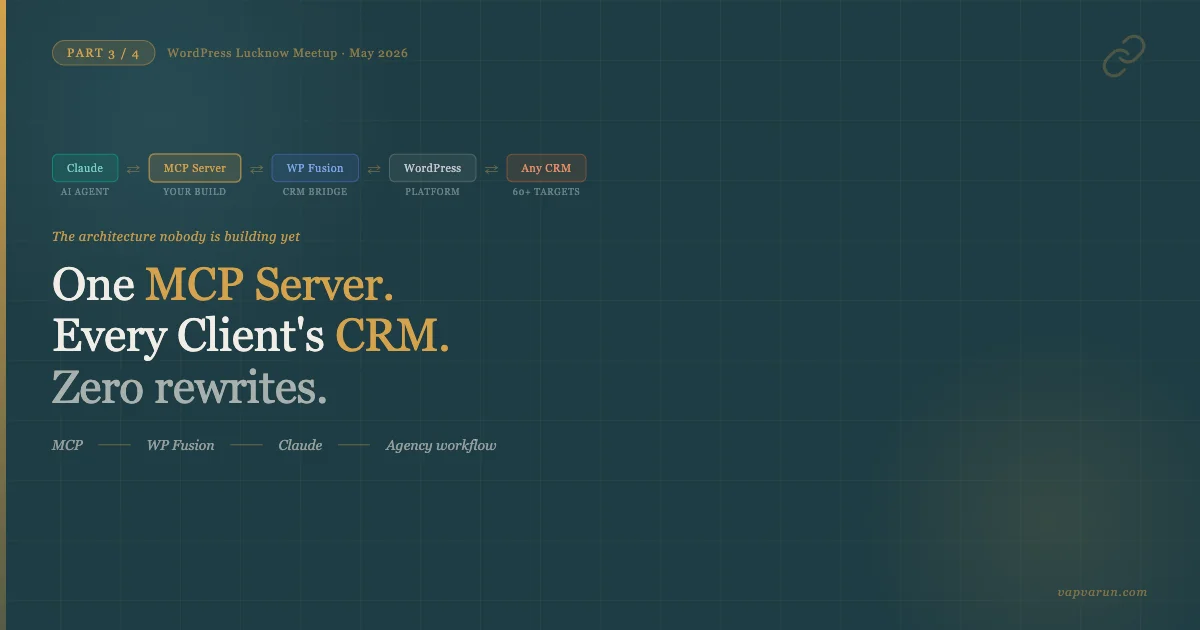
I gave a talk today at the WordPress Lucknow Meetup. The slide that got the most questions was slide 18 – a five-layer architecture diagram showing an AI agent, an MCP server, WP Fusion, WordPress, and a CRM all connected in sequence. People kept asking: “Is this real? Can you actually build this?” The answer is yes, and this post is the full written version of how I did it for client work at Wbcom Designs.
This is Part 3 of a four-part series from the talk. Part 1 covered why CRM fragmentation is the core problem every WordPress agency hits. Part 2 went deep on WP Fusion’s architecture and why it is the correct abstraction layer. Here in Part 3, we get to the part most people are not building yet: wiring Claude (or any MCP client) directly to every client’s CRM through a single WordPress site. Part 4 closes the loop with WooCommerce automation workflows.
If you are an agency owner reading this, that last sentence deserves a second look. One MCP server. Every client’s CRM. That is the productised service hiding inside this architecture.
The Problem This Solves (In Agency Terms)
Here is the situation I kept running into at Wbcom Designs. A client comes in using FluentCRM. We build automations, tag logic, WooCommerce integrations – good work, maybe 40 hours. Eighteen months later they want to move to ActiveCampaign because their sales team needs deal pipelines. Or they grow past FluentCRM’s contact tier. Or they hire a marketing director who already knows HubSpot.
Without a bridge layer, that migration touches everything. Every custom automation, every tag-based access control rule, every AI integration we built – all of it needs to be rewritten against the new CRM’s API. We have been there. It is painful and it is billable but it is not the kind of billing that builds a long-term relationship.
WP Fusion was already solving half of this problem before MCP existed. Its tag system and field-mapping layer means WordPress hooks and access rules survive a CRM swap intact. You change one setting in WP admin – the CRM target – and the same hooks keep firing, now routing to the new CRM. We covered that in Part 2.
The problem that remained was AI integration. Every AI-powered feature we built for a client was bespoke: a custom REST endpoint calling the CRM directly, hardcoded to one CRM’s API surface. When the CRM changed, the AI integration changed too.
MCP fixes the AI side of this. When you put an MCP server in front of WP Fusion, the AI agent talks to MCP. MCP talks to WP Fusion. WP Fusion talks to whichever CRM the client has configured. The AI integration survives the CRM migration for exactly the same reason the WordPress integration does: both go through the abstraction layer.
What MCP Actually Is (The Version That Makes Sense for WordPress Devs)
Model Context Protocol is an open specification from Anthropic. The short version from the talk: USB-C for AI. Before USB-C, every laptop maker used a different charger. Before MCP, every AI integration was custom HTTP routes, bespoke auth, different schemas, different error handling. MCP is the standard that makes AI clients and AI servers interoperable.
An MCP server exposes three types of primitives. Understanding these three is everything:
Tools
Actions the AI can take. A tool has a name, a description the AI uses to decide when to call it, and a JSON Schema defining its input parameters. The AI can call your tool, you execute the action, and you return a result. Think of tools as the write-side: “apply tag”, “create contact”, “trigger sequence”, “score lead”.
Resources
Read-only data the AI can fetch. A resource has a URI and returns structured content. Think of resources as the read-side: “contact record for this email”, “contacts tagged premium in the last 30 days”, “campaign open rate report”. Resources give the AI context before it decides what tool to call.
Prompts
Reusable templates that pre-shape the AI’s behavior for your domain. A prompt called “churn-risk-analysis” might bundle the instructions for how to look at engagement data and decide which contacts to flag. Prompts let you encode marketing expertise once and let any team member trigger it consistently.
The transport layer for our use case is HTTP with Server-Sent Events (SSE). You host the MCP server on your WordPress site (or a dedicated Node.js/Python service alongside it), and any MCP client – Claude Desktop, Cursor, Continue, Zed, a custom dashboard – can connect and call your tools.
The Five-Layer Stack
This is the architecture from slide 18. I have described each layer bottom-up so the dependency chain is clear:
Layer 5 – The CRM: FluentCRM, HubSpot, ActiveCampaign, Klaviyo, Groundhogg, or any of WP Fusion’s 60+ supported targets. This is the system of record for contacts, tags, and sequences. The AI never talks to this layer directly.
Layer 4 – WordPress: User accounts, WooCommerce orders, content access rules, form submissions. The source of behavioral data. WP Fusion hooks into WordPress actions and filters here.
Layer 3 – WP Fusion: The universal CRM bridge. Exposes a consistent PHP API regardless of which CRM is in Layer 5. wp_fusion()->crm->apply_tags() works on FluentCRM and HubSpot identically. This is the abstraction that makes everything above it CRM-agnostic.
Layer 2 – MCP Server: A service (hosted on WP via a plugin, or alongside it as a Node.js process) that exposes MCP tools, resources, and prompts. It calls WP Fusion’s PHP API (via wp-cli, a REST bridge, or a direct PHP bridge) to perform CRM operations. This is the layer you build once and ship to every client.
Layer 1 – AI Agent: Claude Desktop, Claude Code, Cursor, a custom client using the MCP SDK, or any future MCP-speaking AI tool. The agent discovers your server’s capabilities, reads resources to get context, and calls tools to take action.
The elegance of this stack is that Layers 1 and 5 are completely decoupled. The AI does not know what CRM the client uses. The CRM does not know what AI client is calling it. Both are pluggable without changing anything in Layers 2, 3, or 4.
Building the MCP Server: A Real Tool Definition
Let me show what an actual MCP tool definition looks like. This is from the server we built for a client running FluentCRM on their WooCommerce store. The tool is called get_or_create_contact – the AI can give it an email address and optionally a name, and it will either fetch the existing contact record or create a new one if none exists, then return the contact ID and current tags.
// MCP Server tool definition (Node.js with @modelcontextprotocol/sdk)
import { McpServer } from "@modelcontextprotocol/sdk/server/mcp.js";
import { StdioServerTransport } from "@modelcontextprotocol/sdk/server/stdio.js";
import { z } from "zod";

const server = new McpServer({
  name: "wpfusion-crm",
  version: "1.0.0",
});

// Tool: get or create a contact via WP Fusion REST bridge
server.tool(
  "get_or_create_contact",
  {
    email: z.string().email().describe("Contact email address"),
    first_name: z.string().optional().describe("First name if creating new contact"),
    last_name: z.string().optional().describe("Last name if creating new contact"),
    tags: z.array(z.string()).optional().describe("Tags to apply on create or update"),
  },
  async ({ email, first_name, last_name, tags }) => {
    // Call your WP REST bridge endpoint
    // This endpoint internally calls wp_fusion()->crm->get_contact_id()
    // and wp_fusion()->crm->apply_tags() - works on ANY configured CRM
    const res = await fetch(`${process.env.WP_SITE_URL}/wp-json/wpf-mcp/v1/contact`, {
      method: "POST",
      headers: {
        "Content-Type": "application/json",
        "X-WPF-MCP-Key": process.env.WPF_MCP_SECRET_KEY,
      },
      body: JSON.stringify({ email, first_name, last_name, tags }),
    });

    const data = await res.json();

    if (!data.contact_id) {
      return {
        content: [{ type: "text", text: `Error: ${data.message || "Contact operation failed"}` }],
        isError: true,
      };
    }

    return {
      content: [
        {
          type: "text",
          text: JSON.stringify({
            contact_id: data.contact_id,
            crm: data.crm_name,       // "FluentCRM", "HubSpot", etc. - resolved at runtime
            tags_applied: data.tags,
            is_new: data.is_new,
          }, null, 2),
        },
      ],
    };
  }
);

// Resource: fetch contacts by tag
server.resource(
  "contacts_by_tag",
  "wpfusion://contacts/{tag}",
  async (uri) => {
    const tag = uri.pathname.split("/").pop();
    const res = await fetch(
      `${process.env.WP_SITE_URL}/wp-json/wpf-mcp/v1/contacts?tag=${tag}`,
      { headers: { "X-WPF-MCP-Key": process.env.WPF_MCP_SECRET_KEY } }
    );
    const contacts = await res.json();
    return {
      contents: [{ uri: uri.href, mimeType: "application/json", text: JSON.stringify(contacts) }],
    };
  }
);

const transport = new StdioServerTransport();
await server.connect(transport);
Notice what the MCP server does NOT contain: any FluentCRM-specific code. No reference to FluentCRM’s database tables, no calls to `$fluentcrm_api->createContact()`. All of that is on the WordPress side, behind the WP REST bridge. The MCP server calls a single WordPress endpoint. That endpoint uses WP Fusion’s API, which handles the CRM-specific implementation.
The WordPress-side REST bridge plugin registers the endpoint and calls WP Fusion:
// wp-json/wpf-mcp/v1/contact (WordPress plugin)
add_action('rest_api_init', function () {
    register_rest_route('wpf-mcp/v1', '/contact', [
        'methods'             => 'POST',
        'callback'            => 'wpf_mcp_get_or_create_contact',
        'permission_callback' => 'wpf_mcp_verify_secret',
    ]);
});

function wpf_mcp_get_or_create_contact(WP_REST_Request $request): WP_REST_Response {
    $email      = sanitize_email($request->get_param('email'));
    $first_name = sanitize_text_field($request->get_param('first_name') ?? '');
    $last_name  = sanitize_text_field($request->get_param('last_name') ?? '');
    $tags       = array_map('sanitize_text_field', $request->get_param('tags') ?? []);

    // WP Fusion CRM API - same call regardless of which CRM is configured
    $contact_id = wp_fusion()->crm->get_contact_id($email);
    $is_new     = false;

    if (!$contact_id) {
        $contact_id = wp_fusion()->crm->add_contact([
            'user_email'  => $email,
            'first_name'  => $first_name,
            'last_name'   => $last_name,
        ]);
        $is_new = true;
    }

    if (!empty($tags) && $contact_id) {
        wp_fusion()->crm->apply_tags($tags, $contact_id);
    }

    return new WP_REST_Response([
        'contact_id' => $contact_id,
        'crm_name'   => wp_fusion()->crm->slug,  // "fluentcrm", "hubspot", "activecampaign"
        'tags'       => $tags,
        'is_new'     => $is_new,
    ]);
}
This is the complete picture. Two pieces of code: an MCP server that knows nothing about the CRM, and a WordPress endpoint that uses WP Fusion’s CRM-agnostic API. The client can switch from FluentCRM to HubSpot and neither piece of code changes. Only the WP Fusion CRM target setting in WordPress admin changes.

The AI Use Cases This Stack Unlocks
Once the five-layer stack is running, the use cases compound quickly. These are the four I presented at the meetup, all of which we have either built or are actively building at Wbcom Designs:
Marketing Co-Pilot with Natural-Language CRM Queries
The client opens Claude Desktop. They type: “Find everyone who bought our premium plan in March, was not tagged ‘upsold’ in April, and has opened at least one email in the last 14 days.” Claude calls the MCP server’s resource endpoint to fetch contacts by tag combination, then filters by the email engagement criteria using data pulled from the CRM resource. The result comes back as a table with contact names, emails, and suggested next actions.
No SQL. No CRM dashboard navigation. No waiting for a developer to write a custom report. The marketing person gets the segment in under a minute, and the MCP call that produced it works identically whether the client is on FluentCRM or HubSpot.
Segment Without SQL via Tag Composition
WP Fusion’s tag system is essentially a boolean query layer over your CRM. A contact either has a tag or does not. The power of MCP here is giving the AI the ability to compose tag operations through natural language. “Tag everyone with ‘at-risk’ who has the ‘customer’ tag but not the ‘purchased-in-last-90-days’ tag.” That becomes a sequence of MCP tool calls: fetch contacts by tag, filter, apply tag. The AI reasons about the logic; the MCP server executes against WP Fusion; WP Fusion handles the CRM specifics.
Churn Prediction Prompts
This one uses the Prompts primitive. We defined a prompt called churn_risk_analysis that instructs the AI how to interpret purchase history from the store alongside email engagement data from the CRM. The prompt encodes our agency’s understanding of what “at-risk” looks like for a subscription e-commerce client: no purchase in 60 days, declining open rates, last login more than 30 days ago. Any team member can invoke this prompt from Claude Desktop, pass it a contact ID or segment, and get a structured churn score back. The AI’s output (a tag: “churn-risk-high”, “churn-risk-medium”) gets written back to the CRM via a tool call.
We built this once. It runs on FluentCRM for one client and on ActiveCampaign for another. The prompt and the MCP server are identical. The WP Fusion abstraction does the translation below.
Content Personalization on Tag Changes
When WP Fusion applies a new tag to a user (say “premium-member” after a paid plan upgrade completes in WooCommerce), a WordPress action fires. We hook into that action to trigger an MCP-aware AI job: fetch the user’s recent activity via an MCP resource, generate a personalized welcome message for premium members, and push it into the CRM sequence. The personalization uses real data from the contact’s record, not a generic template.
The trigger is WordPress. The context comes from the CRM via MCP. The output goes back to the CRM via MCP. WordPress is the orchestration layer and the source of truth for behavioral events. WP Fusion is the abstraction. MCP is the AI’s interface to all of it.
Why This Becomes a Productized Agency Service
Here is the business model insight from the talk that the developer audience latched onto:
A custom AI integration for a single client, built directly against their CRM’s API, is a one-off project. Decent margin, but not scalable. Every new client is a new build, even if the underlying use case is the same.
An MCP server that works through WP Fusion is a product. You build it once. You deploy it to multiple clients. The configuration differences (which CRM, which field mappings, which tag names) are handled by WP Fusion’s admin settings, not by code changes. You are selling configuration and onboarding, not custom development.
At Wbcom Designs, we have been moving toward this model for the past year. The AI workflows we build for clients – lead scoring, churn prediction, post-purchase personalization – are increasingly built on the WP Fusion abstraction layer. The MCP layer is the next step: making those workflows accessible to AI agents, not just to our own code running in cron jobs.
The pricing implication is real too. A CRM-specific AI integration might command a one-time project fee. A CRM-agnostic AI service layer, maintained and improved over time, is closer to a retainer. Different margin profile, different client relationship.
What Actually Changed When We Shipped This to a Client
One of our WooCommerce clients on FluentCRM was spending about 3 hours per week on manual CRM work: finding segments, applying tags for campaign targeting, pulling lists for review. Not high-skill work, but time that came out of whoever was available.
After we set up the MCP server with the tools described above (contact lookup, tag application, segment query), their marketing person started handling those tasks from Claude Desktop. The queries that took 20-30 minutes of CRM navigation now take 2-3 minutes of conversation. The AI asks clarifying questions when the request is ambiguous, confirms before applying bulk tags, and formats results in whatever shape is most useful for the next step.
The other outcome we did not fully anticipate: the client started asking for capabilities we had not built yet, because they now had a mental model of what the AI could do. “Can Claude also check which customers have a subscription renewal coming up in the next 14 days and draft personalized renewal emails for the ones tagged ‘high-LTV’?” That is a resource + tool composition we added in a follow-up sprint. The MCP server made the capability feel approachable enough that non-technical stakeholders could imagine and request specific workflows.
The Security Layer You Cannot Skip
Every REST endpoint on your WordPress site that exposes CRM data needs protection. The WordPress bridge plugin I described above uses a shared secret key sent as a custom header. This is a reasonable starting point for a WordPress plugin – not every client needs OAuth complexity. But there are additional layers worth implementing:
First, IP allowlisting. If your MCP server is hosted on the same VPS as the WordPress site, you can restrict the `/wpf-mcp/v1/` route to localhost only. The MCP server calls localhost; the internet cannot reach the REST endpoint directly.
Second, rate limiting at the WordPress level. The AI can call tools rapidly. Without rate limiting, a prompt loop or an AI model hallucination could trigger thousands of tag application calls in seconds. Use a request counter stored in WordPress transients and return a 429 if the threshold is exceeded.
Third, action logging. Every MCP tool call that touches the CRM should be logged with a timestamp, the tool name, the parameters, and the outcome. This gives you an audit trail when the client asks “why was this tag applied to 400 contacts yesterday.” WP Fusion’s built-in activity log covers the CRM side; you need to add logging at the MCP bridge layer for the AI-originated actions.
Transport Choices: Stdio vs HTTP
The MCP spec supports multiple transports. For local development and Claude Desktop integration, stdio transport is the simplest: the AI client spawns your server as a subprocess and communicates over stdin/stdout. You just need Node.js (or Python) installed locally, and Claude Desktop’s configuration file points to your server script.
For production use – a hosted MCP server that multiple team members or multiple clients can reach – HTTP with SSE is the right choice. You run the server as a persistent process (behind PM2, a systemd service, or a container), and configure your MCP clients to connect to the hosted URL. The server handles multiple simultaneous connections and the SSE stream keeps the connection open for streaming responses.
For most WordPress agencies starting out, I would recommend stdio locally while you are building and testing, then HTTP deployment when you are ready to hand it to a client or a team. The code does not change between transports – you swap the transport module in one line.
Forward Compatibility: Why This Stack Ages Well
One of the questions from the meetup audience: “What happens when the next AI model comes out? Or when MCP itself changes?” The answer is one of the reasons I am confident in this architecture.
The AI model is in Layer 1. Swapping Claude for GPT-4o or Gemini is a client configuration change, not a server change. As long as the new model speaks MCP, your server keeps working. The MCP specification is maintained by Anthropic and supported by major AI vendors – the incentive to keep it stable and backward-compatible is strong.
WP Fusion has a twelve-year track record of adding new CRM integrations without breaking existing ones. The API surface we call (apply_tags, get_contact_id, add_contact) has been stable across major versions. When a client moves to a new CRM that WP Fusion already supports, no code changes on your side.
WordPress itself is famously backward-compatible. Hooks you register today will still fire in five years. The REST API routes you register will still work.
The weakest link in long-term stability is the MCP server itself – the Node.js or Python service you maintain. But because it is thin (just tool definitions and API calls, no business logic), it is the easiest piece to update when the underlying libraries change.
What to Build This Week
If you want to start today with zero MCP experience, here is the path I recommended at the end of the talk:
Day 1: Install WP Fusion on a staging site with FluentCRM. Map a few fields. Verify that wp_fusion()->crm->apply_tags() works from a mu-plugin test call. You need to confirm the abstraction layer is working before you build anything on top of it.
Day 2: Register a single REST endpoint at wp-json/wpf-mcp/v1/contact that accepts a POST with an email and returns the contact ID and current tags. Test it with a curl call. This is your WP-side bridge.
Day 3: Scaffold a minimal MCP server using the @modelcontextprotocol/sdk package. Define one tool (get_contact) that calls your REST endpoint. Connect it to Claude Desktop via stdio. Ask Claude “look up contact@example.com” and verify you get the right response.
Day 4: Add a second tool (apply_tag). Ask Claude “apply the tag ‘webinar-attendee’ to contact@example.com.” Verify the tag appears in FluentCRM. This is the moment the stack feels real.
Day 5: Add a resource (contacts_by_tag). Ask Claude “show me all contacts tagged ‘trial-user’.” You now have the core of a CRM co-pilot.
From there, the tools and resources you add are driven by what your clients actually ask for. The framework is stable. The use cases compound over time.
The talk runs 50 minutes and we covered all of this plus the WooCommerce automation workflows in Part 4. If you are at the meetup today, the slides are being shared in the Lucknow WordPress community Slack. If you are reading this afterward – the code snippets above are production-ready starting points. Take them, run them against your own WordPress install, and let me know what you build.
The intersection of MCP, WP Fusion, and WordPress is genuinely uncontested right now. Most of the WordPress community is still at “I installed a chatbot plugin.” The agency owners who understand this five-layer stack in the next six months will have a service offering that is very difficult to replicate quickly.