Best WordPress Calendar Plugins in 2026

Our pick: Eventonomy, made by our team at Wbcom Designs, if you want one plugin for the events calendar, RSVPs and ticket sales with no per-ticket platform fee. That is a bias you should know about, so the limits are listed in its entry. For a public events calendar with the biggest community behind it, The Events Calendar is the safe alternative. If you want events and free bookings in one plugin, look at Events Manager. If you only need to show a calendar you already keep in Google Calendar or Outlook, ICS Calendar is the lightest option. If you rent rooms or sell time slots, you need a booking calendar, not an events calendar, and the last two plugins in this list cover that.
This guide was rebuilt in November 2026. I rechecked every plugin against its current WordPress.org page or its own site. One old favorite, All-in-One Event Calendar, was closed on WordPress.org in August 2025, so it is gone from the list. Prices are the ones the vendors show today and they change often, so check the checkout page before you buy.
What people really want from a WordPress calendar plugin
Search data for this page shows what readers type: “wordpress calendar plugin”, “wordpress multiple calendars”, “wordpress weekly calendar plugin”, “best wordpress event calendar”. Those are three different jobs hiding under one phrase:
- Show events. You run a venue, a club, a school or a blog and you want visitors to see what is coming up in a month, week or list view.
- Take bookings. A visitor picks a date or a time slot to reserve a room, a table, a class or a rental. This is availability, not events.
- Sell seats. People register or pay for a place at an event, and you need a guest list, capacity and a way to check people in.
Most “best calendar plugin” lists mix these up. Pick your job first, because a great booking plugin is a poor events calendar and the other way round.
How I chose and ranked these plugins
I used six plain questions. A plugin scores higher when the answer is yes. Our own plugin, Eventonomy, is listed first by editorial choice, as the plugin we recommend for events with RSVPs and tickets. The others follow in order of how well they fit the common jobs.
- Is it maintained? I checked the last update date on WordPress.org or the vendor site. Anything not updated in a year, or closed, is out.
- Does the free version do real work? Many “free” plugins only work as a teaser.
- Can it show more than one calendar view? Month, week, day and list matter for the “weekly calendar” crowd.
- Can it handle more than one calendar or category? Readers ask for “multiple calendars” often. Categories, venues or separate feeds count.
- Is the price clear? I list the price the vendor publishes. Where I could not confirm a price, I say so.
- Does it fit your job? Events, bookings or tickets. I say plainly what each plugin does not do.
I did not install or test any of these plugins for this update. The notes below come from the official listings, vendor pages and documentation, and I mark anything I could not confirm.
Comparison table
| Plugin | Best for | Free version | Paid price (as published) | Last update seen |
|---|---|---|---|---|
| Eventonomy (our pick, made by us) | RSVPs and tickets with no platform fee | Yes | Pro from $99/year for 1 site, lifetime $249 | Current on vendor site |
| The Events Calendar | Public events calendar | Yes | Pro $399/year, Elite $599/year | Nov 5, 2026 |
| Events Manager | Events plus bookings | Yes | Pro add-on, price not confirmed | Nov 5, 2026 |
| My Calendar | Accessible calendars, multisite | Yes | Pro add-on, price not confirmed | Nov 5, 2026 |
| Event Organiser | Developers who like post types | Yes | Extensions, price not confirmed | Oct 30, 2026 |
| ICS Calendar | Showing Google or Outlook calendars | Yes | Pro add-on, price not confirmed | Oct 29, 2026 |
| EventON | Design-led premium calendar | No (paid) | Price not confirmed | Active, per vendor site |
| Booking Calendar | Appointments and rentals | Yes | Paid tiers, price not confirmed | Nov 2, 2026 |
| WP Simple Booking Calendar | Showing availability of one rental | Yes | Paid tiers, price not confirmed | Jun 29, 2026 |
“Price not confirmed” means the vendor page was not readable to me or does not show a fixed number. It does not mean the plugin is free.
1. Eventonomy (our pick)
Disclosure: Eventonomy is made by our team at Wbcom Designs, the company behind this site. I describe it from its own product page and docs, and I have not tested it for this article.
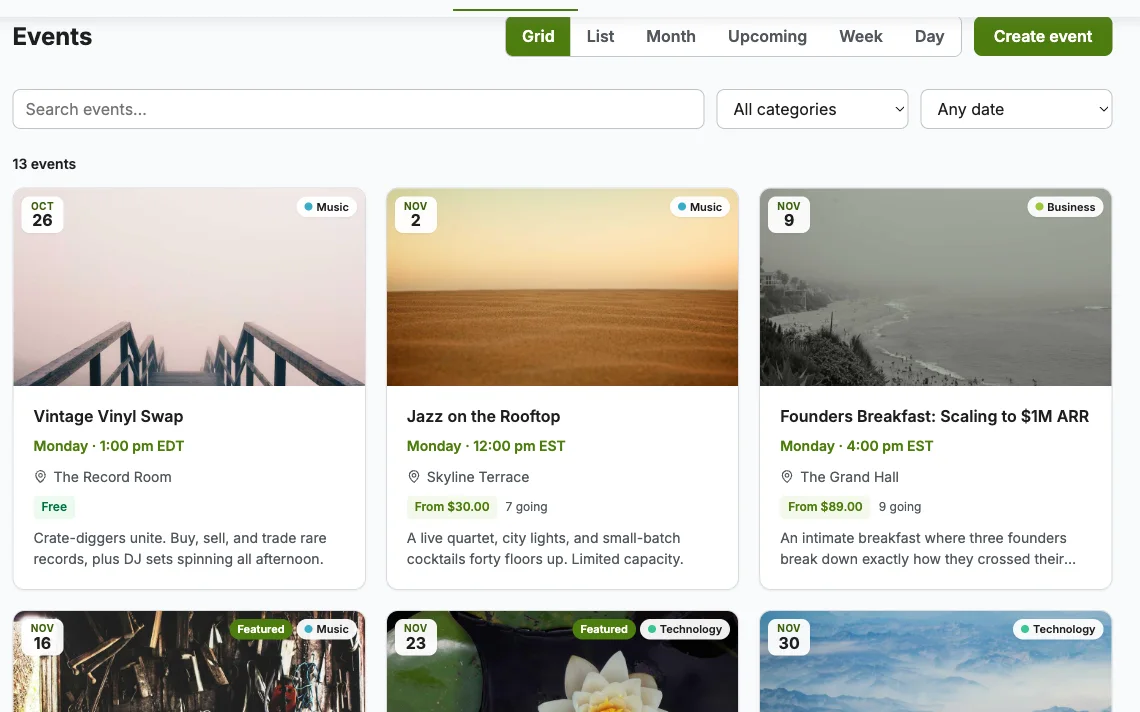
- Best for: clubs, communities and organizers who run RSVPs and sell tickets, and do not want a platform that takes a cut of each ticket.
- Free version: yes. Unlimited events and RSVPs, going, maybe or no answers with guest counts, capacity caps and a waitlist, custom RSVP questions, Grid, List, Month and Upcoming views, daily, weekly and monthly recurring series, an ICS feed with add-to-calendar, a venue and organizer catalog, CSV exports and a Manage Events page for attendees and organizers.
- Paid: Pro starts at $99 per year for one site, and a lifetime license is $249 for one site, $499 for five sites and $629 for unlimited sites. Pro adds paid tickets through Stripe, PayPal or WooCommerce, tax, booking fees and coupons, Week and Day grids, maps, a door check-in scanner, organizer reports, SMS reminders through Twilio and custom email templates.
- Needs: WordPress 6.5 or newer and PHP 8.1 or newer.
- Link: eventonomy.org
Where it fits: the product page says one plugin covers the calendar, the RSVPs and the tickets, and that no platform takes a fee on tickets. You pay a flat license, and only your payment gateway charges its normal fees. Events are stored in their own database tables, not as WordPress posts, which the vendor says keeps large sites fast. Guests can RSVP with a name and email and manage their RSVP through a magic link, with no account needed.
Where it does not fit, so you can decide fairly:
- Week and Day grids, maps and yearly recurring rules are Pro features, not free ones.
- Because events are not WordPress posts, tools that expect events as a post type will not see them. If you rely on post-based plugins for archives or search, check this first.
- I could not find a listing for it on WordPress.org, so it does not have the review count that The Events Calendar has. It is a newer plugin with a smaller track record.
- The product page lists an ICS feed and add-to-calendar buttons. I did not find a two-way Google Calendar sync in its feature list.
I put it first because it is our product and it covers the calendar, the RSVPs and the tickets in one flat license, which is the job most readers of this page end up with. That is my bias, so use the limits above and the comparison table to check it against the others. The Events Calendar and Events Manager have a longer record and bigger communities, and they come next. If you also want an online community around your events, our team builds that stack too, but that is a separate topic from picking a calendar.
2. The Events Calendar
- Best for: a public events calendar that works out of the box.
- Free version: yes. Month, list and day views, saved venues and organizers, event search, Google Maps, categories and tags, Google Calendar and iCal export, REST API endpoints and JSON-LD structured data.
- Paid: Pro is $399 per year and Elite is $599 per year on the vendor site. Pro adds seven calendar views, recurring events, ticket sales through Stripe, PayPal and Square, WooCommerce integration, QR codes and a check-in app.
- Size and health: more than 600,000 active installs on WordPress.org, a 4.2 out of 5 rating from about 2,400 reviews, and an update on November 5, 2026.
- Link: The Events Calendar on WordPress.org
This is the default pick for a reason. It has the largest user base, a long list of add-ons, strong documentation and a large pool of developers who know it. The free plugin already covers the basic “show upcoming events” job well. The trade-off is price. Recurring events and extra views sit in Pro, and the yearly cost is the highest on this page. The ratings also show a mixed crowd, so read recent reviews on WordPress.org before you commit.
3. Events Manager
- Best for: sites that want events and bookings in one plugin.
- Free version: yes. It describes itself as a full event calendar and booking system with one-off dates, recurring series, time slots, online bookings and ticketing.
- Paid: a Pro add-on exists. I could not confirm the current price, so check the vendor page.
- Size and health: more than 60,000 active installs, a 4.2 out of 5 rating from about 550 reviews, and an update on November 5, 2026.
- Link: Events Manager on WordPress.org
Events Manager is the closest rival to The Events Calendar for free features. Its main advantage is that bookings come in the free plugin. If you want people to reserve a place at a workshop without buying anything, you can do it without leaving the free tier. The cost is a busier admin screen with many settings. Plan an hour to set it up the way you want.
4. My Calendar
- Best for: accessible calendars, multisite networks, and people who want fine control over how a calendar looks.
- Free version: yes. Events can be shown in monthly, weekly or daily views, as lists, or limited by category, location or author. It supports recurring events and edits to single occurrences, and it offers a separate calendar per site in a multisite network.
- Paid: a Pro add-on exists. Price not confirmed.
- Size and health: more than 20,000 active installs, a 4.7 out of 5 rating from about 160 reviews, version 3.8.13 and an update on November 5, 2026.
- Link: My Calendar on WordPress.org
My Calendar is a good answer to “WordPress multiple calendars”. You can show one calendar limited to a single category, another limited to a location, and a full one on a third page, all from the same events. It is built with accessibility in mind, which matters for schools, councils and public bodies. The look is more plain than the premium options, and the settings screen rewards people who like to tweak.
5. Event Organiser
- Best for: developers and site builders who want events that behave like normal posts.
- Free version: yes. Events use the WordPress custom post type, so they work with the editor, themes and plugins that know about post types. It supports repeating events on complex schedules and venues.
- Paid: extensions are sold separately. Price not confirmed.
- Size and health: more than 20,000 active installs, a 4.6 out of 5 rating from about 140 reviews, and an update on October 30, 2026.
- Link: Event Organiser on WordPress.org
Event Organiser is a quiet, steady plugin. It does not try to be a ticketing platform. If you are comfortable in templates and hooks, the post type approach gives you easy control. If you want a polished front end with no code, one of the others will save you time.
6. ICS Calendar
- Best for: showing a calendar you already keep in Google Calendar, Microsoft 365, iCloud or another service.
- Free version: yes. You paste a shortcode, point it at an iCalendar (ICS) feed, and the calendar stays in sync. No API keys are needed.
- Paid: a Pro add-on exists. Price not confirmed.
- Size and health: more than 10,000 active installs, a 4.9 out of 5 rating from about 70 reviews, version 12.3.0 and an update on October 29, 2026. It needs PHP 8.1 or newer.
- Link: ICS Calendar on WordPress.org
This is the right pick if your team already lives in Google Calendar and you just want it on a page. You keep editing in the tool you know, and the website follows. You can also show several feeds, which helps the “multiple calendars” reader. It is not an events manager. It does not take RSVPs or sell tickets, and your events do not become pages on your own site.
7. EventON
- Best for: site owners who want a polished, design-first premium calendar and are happy to pay.
- Free version: no, it is a paid plugin sold through its own site and a marketplace.
- Features on the vendor site: multiple organizers, location data with maps and directions, repeating and related events, add to calendar, virtual events with Zoom and Jitsi, structured data for search engines, and optional AI help for writing event text.
- Price: not confirmed. The marketplace page blocked my check.
- Link: myeventon.com
EventON has been around for years and the vendor is still shipping updates in 2026. Its strength is the look of the event card and the add-on library. Its weakness is that you cannot try the full plugin for free, and a lot of the extra features are separate add-ons. Check the add-on prices before you decide.
8. Booking Calendar
- Best for: appointments, reservations and rentals, not public events.
- Free version: yes. A responsive availability calendar and booking form, full-day bookings and time slots, and a modern admin panel for managing bookings.
- Paid: paid tiers exist. Price not confirmed.
- Size and health: more than 40,000 active installs, a 4.8 out of 5 rating from about 650 reviews, version 12.0 and an update on November 2, 2026.
- Link: Booking Calendar on WordPress.org
If a visitor needs to pick a date and a time to reserve something, this is a better tool than any events calendar above. It is one of the older booking plugins and the rating shows that people stay with it. It is not for listing public events. For more options in this group, see our guide to WordPress booking plugins.
9. WP Simple Booking Calendar
- Best for: showing the availability of one holiday home, room or piece of equipment.
- Free version: yes. It shows which days are free or taken and lets you embed that calendar on a page.
- Paid: paid tiers exist. Price not confirmed.
- Size and health: more than 10,000 active installs, a 4.8 out of 5 rating from about 230 reviews, version 2.0.16 and an update on June 29, 2026.
- Link: WP Simple Booking Calendar on WordPress.org
An earlier version of this guide described this plugin as a way to add Google calendars. That was wrong. The WordPress.org description says it is an availability calendar for rentals. For Google Calendar on your site, use ICS Calendar above.
Which plugin should you pick?
- I run a venue, club or school and want a public events list with RSVPs or tickets: Eventonomy, or The Events Calendar for the biggest ecosystem. If accessibility and multiple calendars matter most, choose My Calendar.
- I want events and free bookings in one plugin: Events Manager.
- I take RSVPs and sell tickets, and want a flat license: Eventonomy, with the trade-offs listed in its entry, or The Events Calendar Pro if you want the biggest ecosystem.
- My events already live in Google Calendar: ICS Calendar.
- I am a developer and want events as post types: Event Organiser.
- I want a premium design and will pay for it: EventON.
- I rent rooms or sell time slots: Booking Calendar, or WP Simple Booking Calendar for a single rental.
If you sell tickets, also read our guide to WooCommerce event ticket plugins, which compares the paid ticketing side in more depth.
Mistakes to avoid
- Using a booking plugin as an events calendar. It will list dates but not events with pages, venues and RSVPs.
- Picking a plugin only by install count. A big number tells you about popularity, not about fit. Read the three-star reviews to see what annoys real users.
- Ignoring where the data lives. Some plugins use post types, some use their own tables. Both work, but they change which other plugins can see your events.
- Forgetting the mobile view. Open your calendar on a phone before you launch. A month grid that is hard to tap loses visitors.
- Skipping the renewal cost. A plan that looks cheap in year one can double once you add the add-ons you need. Check whether lifetime licenses exist.
Frequently asked questions
What is the best WordPress calendar plugin?
Our pick is Eventonomy (made by our team) for an events calendar that also handles RSVPs and tickets on a flat license. The Events Calendar is the safest default for a public events list because of its size, documentation and update record. “Best” depends on your job. For bookings, use Booking Calendar. For showing a Google Calendar, use ICS Calendar.
Is there a free WordPress calendar plugin?
Yes. The Events Calendar, Events Manager, My Calendar, Event Organiser, ICS Calendar and Booking Calendar all have free versions on WordPress.org. Eventonomy also has a free version. Paid tiers add things like recurring rules, extra views, ticketing and reports.
How do I show multiple calendars in WordPress?
My Calendar can show separate calendars limited by category, location or author. ICS Calendar can show several external feeds. The Events Calendar uses categories and filters to split one set of events into many views.
Which plugin has a weekly calendar view?
My Calendar shows weekly views in its free version. The Events Calendar lists seven views in its Pro plan. Eventonomy offers Week and Day grids in Pro. Check the exact view list on the plan you plan to buy.
Can I show my Google Calendar on WordPress?
Yes. ICS Calendar takes a public or secret ICS feed from Google Calendar, Microsoft 365 or iCloud and shows it with a shortcode. No API key is needed.
What is the difference between an events calendar and a booking calendar?
An events calendar lists things that happen on set dates, like a concert or class. A booking calendar lets a visitor reserve a date or time, like a room or a haircut. Some plugins, such as Events Manager, do both.
Do these plugins charge fees on ticket sales?
The plugins here are installed on your own site, so none of them takes a platform cut. Your payment gateway still charges its normal fee. Eventonomy states that it takes no per-ticket fee, and The Events Calendar Pro lists no ticket commission fees.
Will a calendar plugin slow my site?
It can, mostly when you load hundreds of events on one page or use many add-ons. Show a limited number of events per page, use caching and test on mobile.
Final thoughts
Pick the job first, then the plugin. If you want a calendar with RSVPs and ticketing on a flat license, start with Eventonomy, our own plugin, and compare it against The Events Calendar and Events Manager using the table above. If you only need to list events, The Events Calendar, Events Manager or My Calendar will serve you well. If you have feeds in Google Calendar, ICS Calendar is faster to set up than any of them. Whatever you choose, test it on a staging site with your real theme before you go live.
Facts checked on November 11, 2026 from WordPress.org listings and vendor pages. Prices and features change, so confirm on the vendor page before you buy.