Plugin Installed Twice? One Folder Name Fix, Plus Free Repos
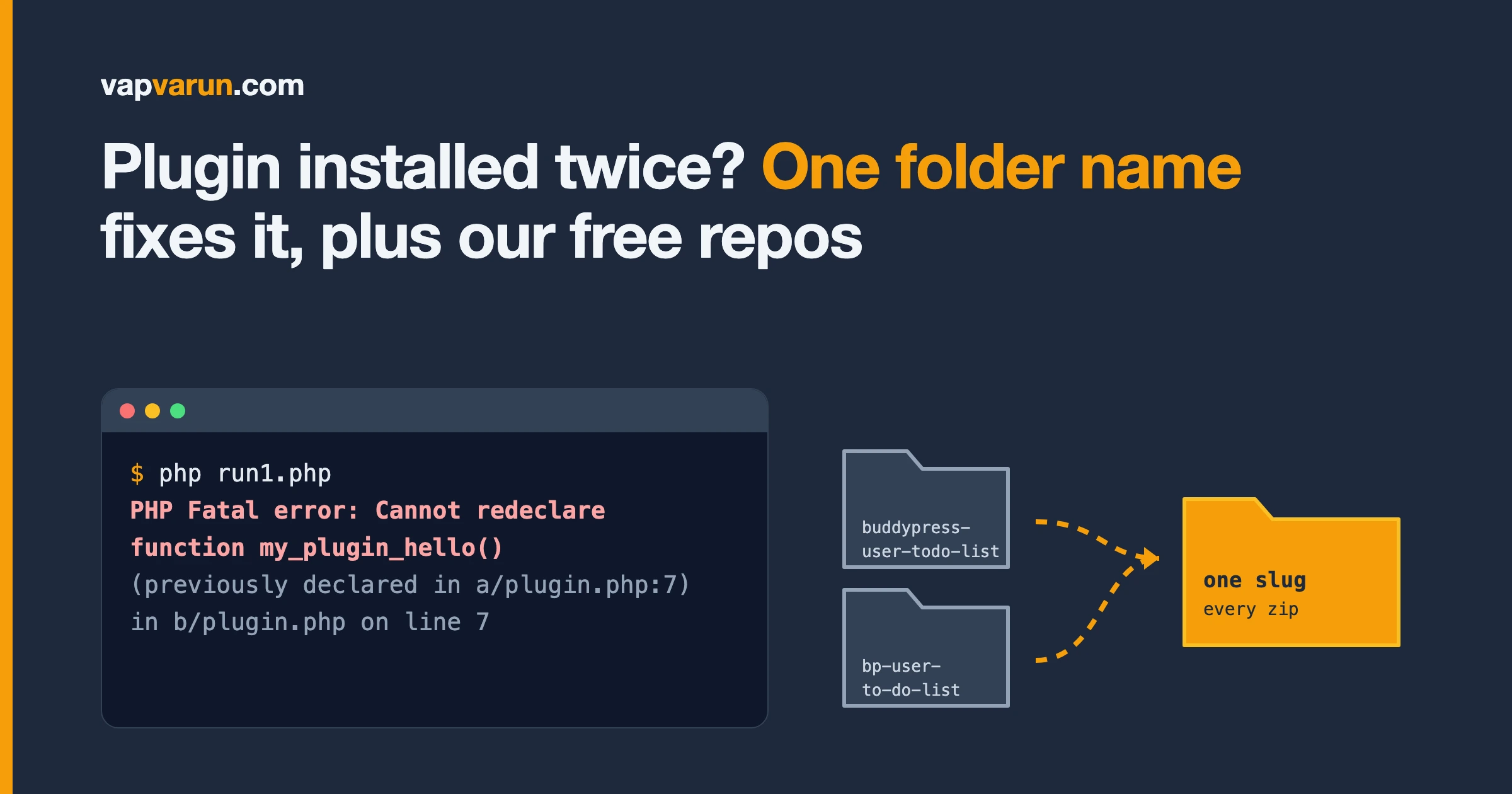
If a plugin lives on WordPress.org and is also sold or mirrored from your own store or GitHub, the top-level folder inside every zip must be exactly the WordPress.org slug. A different folder name makes WordPress see two plugins. A site can end up with both, and when both load, PHP stops with “Cannot redeclare function” followed by the function name. The fix is one rule enforced in one place, plus a second guard that most people get wrong. This post gives you both, with a test you can run in a minute, and then lists the free repositories our team keeps public that you can use today.
Non-technical readers can read the first section and the repository lists. Developers will want the test and the checklist in the middle.
The cannot redeclare function error: what a site owner sees, and the two-minute check
The report usually reads like this: “I clicked activate and got a fatal error”, or “the site went white after an update”, or “it worked before”. The message in the error mentions a function that is declared twice and names two file paths. Look at the two paths. If they point into two different folders under wp-content/plugins that hold the same plugin, this is the problem.
- Open the Plugins screen. Do you see the same plugin name twice, perhaps once with a slightly different version?
- Or open your hosting file manager (or SFTP) and look inside
wp-content/plugins. Two folders for one plugin is the giveaway, for example one with the WordPress.org name and one with the name of the vendor’s own download.
The fix for a stuck site: keep one copy and remove the other. Deactivate the copy with the wrong folder name and delete it, and keep the one that came from WordPress.org, because that is the folder WordPress.org will keep updating. If you cannot reach the dashboard, rename the unwanted folder over SFTP (for example add -old to its name). WordPress then treats that plugin as missing and the site loads again. Before you delete anything, take a backup. In most cases both copies read the same stored settings, so nothing is lost, but that depends on the plugin, and a vendor should confirm it for their own product before telling customers it is safe.
A note on why you may not see a white screen when you click activate. When you activate from the Plugins screen, WordPress runs the plugin file in a protected way and shows “Plugin could not be activated because it triggered a fatal error”, and the plugin stays off. The white screen arrives when both copies are already active. That happens after a site is cloned, after a plugin is activated from WP-CLI or a deploy tool, or when a bundle is installed on top of an older setup.
Why it happens
WordPress identifies an installed plugin by its folder and main file together, a path such as bp-user-to-do-list/bp-user-todo-list.php. It does not know that two different paths hold the same product. When the same plugin is shipped from several places, each zip is built by a different process and nothing forces them to agree on the folder name.
We found a live example on one of our own public plugins while preparing this post. Todo for BuddyPress and BuddyBoss has the WordPress.org slug bp-user-to-do-list, and the zip from WordPress.org unpacks to a folder with that name. The GitHub release zip for version 4.0.1, which we checked on 24 November 2026, unpacks to buddypress-user-todo-list. The main file inside both is bp-user-todo-list.php, and both declare the same top-level function, bptodo_load_textdomain(). Install one from each source and WordPress lists two plugins. Activate both and PHP fails on the second.
This is a normal drift, not a mistake by one careless person. A store zip, a GitHub release zip and a WordPress.org zip are separate artefacts. One is built from the repository name, one from the directory slug, one by a copy script from five years ago. The problem hides because each source works fine alone. It only appears when a customer, a migration or a bundle meets two of them. We will use this as our own example of why the rule below matters.
The fix, in one place
One rule: the first path segment of every zip you ship equals the WordPress.org slug. Three habits make that rule survive a busy release week.
- Take the slug once and lock it in the build script. The build script reads the slug from one variable and builds the zip with that folder name. Nobody types the folder name in a second place.
- Fail the release in CI when the zip folder differs. A short workflow unzips the built file, reads the first path segment and compares it with the slug. A mismatch stops the release. This also catches a repository that gets renamed.
- Check the built zip before upload. A release gate runs the same comparison on the exact file you are about to upload to your store or attach to a release. Check the file, not the folder it came from.
You can write the check in a few lines of shell:
SLUG="bp-user-to-do-list"   # the WordPress.org slug, defined once
ZIP="dist/${SLUG}.zip"

# first path segment of every entry must equal the slug
BAD=$(unzip -Z1 "$ZIP" | cut -d/ -f1 | sort -u | grep -vx "$SLUG" || true)
if [ -n "$BAD" ]; then
  echo "Zip folder does not match WordPress.org slug: $BAD" >&2
  exit 1
fi
Do not stop here, because a locked folder name is the first layer and it can still fail. A customer can have an older copy installed under an old folder name from years ago. A migration can leave one behind. So the plugin itself needs a second layer.
Stopping cannot redeclare function errors: a one-copy guard, and the part most people miss
The usual advice is to define a constant when the plugin loads and stop if it is already defined. That is a good idea and it is not enough. Here is the part that surprises people: an early return at the top of the file does not stop PHP from declaring the functions that sit further down in the same file.
Our team ran the test below on PHP 8.5.5, the version installed on our bench machine. (We have not run it on 8.1 to 8.4, so treat those as expected rather than measured.) Two copies of one tiny plugin file sit in two folders, a/plugin.php and b/plugin.php, with identical content:
A tiny loader includes both, the way WordPress loads two active plugins:
The result, from the real run (paths shortened):
PHP Fatal error:  Cannot redeclare function my_plugin_hello()
(previously declared in /path/to/a/plugin.php:7)
in /path/to/b/plugin.php on line 7
The guard is there, and it never got the chance to run. PHP compiles the second file first. While compiling, it finds a function declared at the top level of the file, with no condition around it, and declares it right then, before a single line of that file executes. The name is already taken by the first copy, so PHP stops. The return on line 3 would have saved us, but line 3 comes after the point of failure.
The fix is to put the declaration behind a condition, so it is declared when the code runs and not when the file is compiled:
Run the same loader against the two wrapped copies and the output is hello, with exit code 0. The second copy loads, hits the guard and returns quietly. The site keeps running on the first copy.
Two details from our own test, so you know the edges. First, a plain class declared in the same position did not fail in our run: PHP defers a failed early class declaration to runtime, where the return prevents it. So functions are the dependable trap, and wrapping classes in class_exists() is a safe habit rather than something this test forced. Second, constants are not a problem when you use define() after the guard, because that line only runs if the guard lets it.
Where to put the wrapped functions
Wrapping every helper in the main file gets noisy. A cleaner pattern is to keep the main plugin file small, with the guard and a single loader call, and move the real code into files that the main file includes only after the guard passes. Functions in an included file are only compiled when the include runs, and the include never runs for the second copy. The main file then has little to wrap. Keep any function that must live in the main file, such as an activation hook callback, wrapped in function_exists().
A checklist for vendors
| Layer | What to do | What it prevents |
|---|---|---|
| Build | Read the WordPress.org slug from one variable and build the zip folder from it | Three zips with three folder names |
| CI | Unzip the built file and fail the release if the first path segment is not the slug | A renamed repo or a copied script shipping a wrong folder |
| Release gate | Run the same check on the exact file before upload to the store or release | A good build replaced by a hand-made zip |
| Plugin | Define a loaded constant and return if it is set | Two copies running their setup twice |
| Plugin | Wrap top-level functions in function_exists() | The compile-time fatal that an early return cannot stop |
| Support | Put the two-minute check and the fix in your docs | Tickets that start with “it worked before” |
Add one more habit that costs nothing: after each release, download the zip from every place you ship it and run the folder check on each. If you also sell through your own store, our related post on why premium plugin updates stop showing covers the other half of keeping a store and its customers in step, and why we sign every plugin update covers proving that the zip a site installs is the zip you released.
Our free and public repositories you can use
While we were checking our own release folders we walked the public repositories on our GitHub accounts: vapvarun, wbcomdesigns and buddynext. Many are useful on their own, so here is a curated list, grouped by what you would use them for. We only list repositories that are public, not forks, not archived, and that have a README. Each one has its own licence and its own state, so read the README and the licence file before you depend on it. Descriptions follow what each repository says about itself.
WordPress plugins and themes
- BuddyNext, the community plugin at the centre of our product line. See buddynext.com.
- Jetonomy, a discussion platform with forums, Q&A, ideas and voting, and a REST API. We wrote about it in Introducing Jetonomy.
- WPMediaVerse, a general-purpose media platform plugin.
- MediaShield, video protection for WordPress.
- WP Sell Services, a service marketplace with vendors, orders, messaging, reviews and disputes.
- WP Career Board, a job board for WordPress (the free core).
- WB Listora, a block-based directory plugin with ten ready listing types, faceted search, maps and frontend submission.
- WB Gamification, points and gamification for BuddyPress and WordPress.
- WB Polls Lite, community polls for your site or BuddyPress activity feeds.
- Product Roadmap, public roadmaps with voting.
- Birthday Widget for BuddyPress, upcoming birthdays with notifications.
- WB Ads Rotator with Split Test, ad rotation and A/B testing with many placements.
- WB CPT and Taxonomy Order, drag-and-drop ordering where you pick a taxonomy term first, so you sort a short list.
- WP Media Category, assign categories to uploaded media.
- WP File Integrity Checker, file change monitoring for security.
- WP Private AI, a proof of concept for adding AI abilities through the WordPress Abilities API and a self-hosted Ollama model, with no cloud calls.
- BuddyX, our free theme for BuddyPress, LearnDash and other communities.
- KnowX, a documentation and FAQ theme for one product or many.
Developer tools and SDKs
- package-signatures, the module that verifies signed plugin and theme updates before WordPress installs them. It pairs with the folder check above: one proves the zip is the one you released, the other proves the zip has the right folder.
- edd-sl-sdk, a software licensing SDK for Easy Digital Downloads stores.
- wbcom-i18n-ai, AI first-pass translation of
.pofiles as part of a build or release: sync new strings, translate, validate, compile. - buddypress-playground-cli, WP-CLI commands that create BuddyPress groups, activity, messages and connections for testing.
- buddynext-snippets, tested copy-and-paste snippets for extending BuddyNext.
- buddynext-importer, a run-once migration from BuddyPress, BuddyBoss, FluentCommunity, PeepSo or Ultimate Member into BuddyNext.
- Wbcom Demo Installer, one-click demo content for our products, removable in one click.
- learndash-testing-toolkit, a WP-CLI plugin that creates LearnDash courses, lessons, quizzes and more for test sites.
- wp-testing-framework, a testing framework that analyses a plugin, with security scanning and performance profiling.
- wordpress-visual-testing, visual regression testing for plugins such as BuddyPress, WooCommerce and LearnDash.
- wp-cli-hook-docs, a WP-CLI command that generates documentation for the actions and filters in a plugin.
- mobile-core, the shared React Native shell behind our mobile apps: authentication, API clients, theme and UI pieces.
MCP servers
These connect an AI assistant to a WordPress task. For the daily setup behind them, see MCP Servers for WordPress Developers.
- wp-astro-mcp, a headless WordPress server that adds an Astro frontend to any site (what it can do).
- wp-plugin-qa-mcp-server, runtime QA for plugins: REST calls against a real site, role-by-role checks and user-journey audits.
- wpcs-mcp-server, PHP lint, PHP compatibility, WordPress Coding Standards and PHPStan behind an assistant.
- wp-malware-cleanup-mcp, malware detection and cleanup over SSH and WP-CLI, with a preview of each change.
- elementor-mcp, generates Elementor landing pages and pushes them to WordPress.
- image-annotator-mcp, annotates screenshots with markers, arrows and callouts for documentation.
- buddypress-mcp, an interface to the BuddyPress REST API for activity, members and groups.
- zoho-desk-mcp-server, Zoho Desk ticket management through an assistant.
EmDash plugins and starters
EmDash is an Astro-based CMS. These MIT-licensed plugins add familiar features to an EmDash site.
- emdash-listora, a directory plugin.
- emdash-reviews, star ratings and moderated reviews for any content.
- emdash-polls, polls with one vote per member and live results.
- emdash-knowx, a searchable knowledge base with article feedback and a report of what readers search for.
- emdash-roadmap, a public roadmap where members vote, with a changelog.
- emdash-learnomy, free courses, lessons, enrolment, progress and a lesson quiz.
- emdash-plugin-starter, the plan and starter for building your own utility plugin on EmDash.
- emdash-showcase, a model site that runs all of the plugins above with realistic content.
A fair warning. Public does not mean supported to the same level as a paid product, and some of these repositories are younger than others. Open an issue in the repository if you hit a problem. If you want to see which of them our team uses in daily work, the post on MCP servers for WordPress developers is the best starting point.
Frequently asked questions
What does “Cannot redeclare function” mean in WordPress?
PHP found two functions with the same name. In a plugin it usually means the same plugin code is loaded from two places, for example two folders, or two different plugins that both define a helper with a generic name. The error shows both file paths, which tells you which two copies collide.
Can a plugin be installed twice in WordPress?
Yes, if the two zips have different top-level folder names. WordPress identifies a plugin by its folder and main file path, so it treats them as two plugins. The same folder name would make an install replace the older copy.
Does an early return stop PHP redeclaring functions?
No. A function declared at the top level of a file, with no condition around it, is declared when the file is compiled, before the return can run. Wrap it in if ( ! function_exists( ... ) ), or keep it in a file that is only included after the guard passes. We showed the failing and the working version above, tested on PHP 8.5.5.
Which copy should I keep?
Keep the one from WordPress.org if the plugin is hosted there, because that folder name is the one WordPress.org updates. Back up first, and check with the vendor that both copies share the same stored settings.
Where to start
If you ship a plugin from more than one place, download each zip today and run the folder check. It takes a minute, and it finds the problem before a customer does. Then add the locked slug to your build and the guard with wrapped functions to your main file. If you are a developer looking for tools, pick one repository from the lists above, read its README and try it on a test site. We keep them public so that other teams can use and improve them.