From One Blog to a 12-Site Network: What WP Astro MCP Can Do
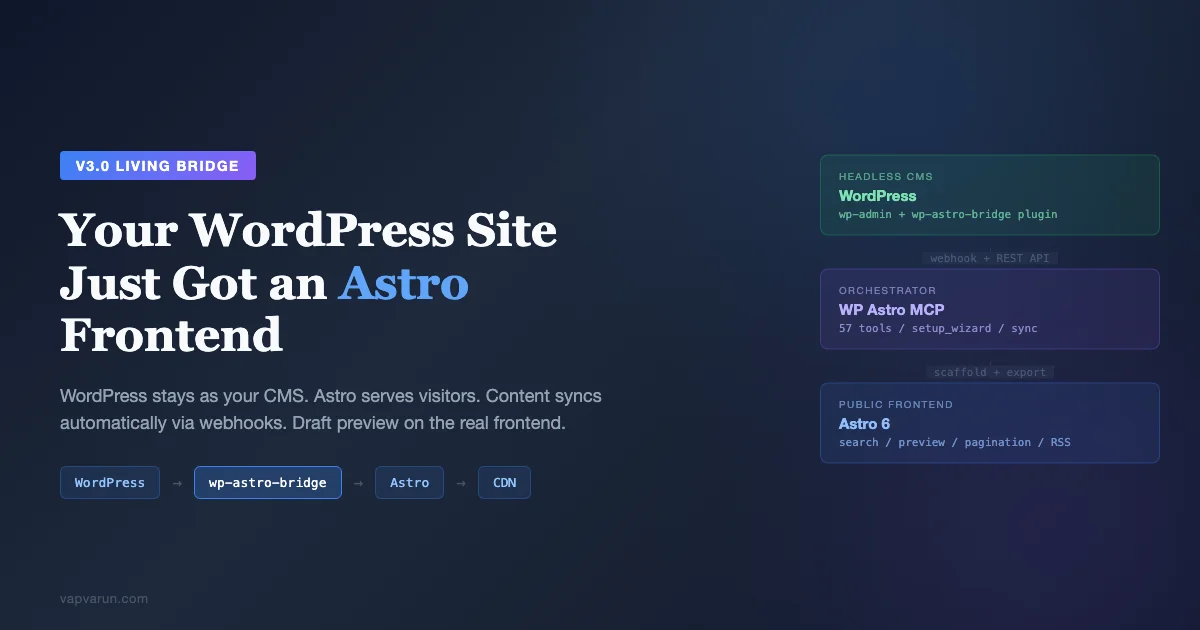
We are moving our entire web presence onto one pattern, and because the tooling behind it is open source, it is worth explaining in full. Headless WordPress with an Astro frontend is the shape: WordPress stays the place we write, and Astro becomes the fast, static layer the public actually sees. wbcomdesigns.com, vapvarun.com, brndle.com, and buddyxtheme.com are all headed there. The glue that makes it practical, rather than a month of brittle scripts, is a Model Context Protocol server we built and open-sourced: WP Astro MCP. This post is the full tour of what it does and what you can do with it.
The idea in one line
WordPress is a great CMS and a heavy frontend. Astro is a great frontend and not a CMS. So run them together.
Keep WordPress as the headless content engine your editors already know. Let Astro serve the public site as static HTML. WP Astro MCP does the wiring through plain commands in Claude Code, so you never hand-build the extract, convert, scaffold, deploy, and sync pipeline yourself.
The problem headless WordPress usually creates
Going headless sounds clean until you actually do it.
You have to fetch content through the REST API, page through thousands of posts, resolve shortcodes, strip Gutenberg block comments, and convert HTML to Markdown without mangling captions and galleries. Then you rewrite internal links, swap media domains for go-live, build content collections, generate redirects, wire a deploy, and set up search.
And that is only day one. The harder part is day two: keeping all of it current every time an editor publishes or edits a post. Most headless projects stall here, because nobody wants to own a fragile sync script forever.
WP Astro MCP orchestrates 57 specialized tools to handle the whole arc, and it keeps the Astro site current as content changes. That second half is the reason it exists.
What you can do with it
Point it at any WordPress site and it reads everything
Register a site with an application password and it auto-detects the WordPress version, REST namespaces, your SEO plugin (Yoast, RankMath, or AIOSEO), ACF fields, WooCommerce, and every post type and taxonomy. There is no manual mapping and no config file to hand-write. A deeper analysis pass counts all content, assesses readiness, and estimates build time before you commit to anything.
Convert content cleanly, not roughly
Every post runs through a 13-step pipeline. It sanitizes for XSS, resolves shortcodes (built-in handlers for galleries, video, audio, and captions, plus custom per-site rules), and strips Gutenberg block comments while keeping the content.
Then it normalizes the HTML, converts to Markdown with WordPress-aware rules, rewrites internal links to Astro paths, swaps media domains, turns YouTube and Vimeo embeds into plain URLs, and rebuilds galleries as image grids. The output is clean Markdown with full frontmatter, not a tag soup you fix by hand.
Preview the conversion before you trust it
You can convert a sample batch and inspect the output quality first. A content audit surfaces every shortcode, block, embed, and complexity hotspot across the site, so a 2,000-post export holds no surprises.
Scaffold a complete Astro project
It generates the content collections, the blog routes, a search page, a draft-preview route, the Astro config, and a content stylesheet. That stylesheet ships a typography baseline and a WordPress block-compatibility layer (alignwide and full widths, captions, columns, galleries, buttons) plus a responsive layer.
On the Tailwind path it wires the typography plugin. On the plain path it ships pure CSS with no build step.
Publish to GitHub and deploy
It can initialize the repo, create it on GitHub, commit with a generated message, and push, with the deploy target set to Vercel, Netlify, or Cloudflare. The whole repo is yours, in your account.
Preview drafts before they are public
Scaffolded projects include a server-rendered preview route with a clear “you are previewing a draft” banner, so you can see unpublished work on the real frontend before it ships.
Do the whole thing in about five minutes
The setup wizard runs the entire flow, from a registered WordPress site to a deployed Astro frontend, in one command. The longer path is the same steps run one at a time, so you can inspect each.
What a run actually looks like
The commands are conversational, not config files. A first setup reads roughly like this:
- Add my site example.com with username admin and an application password.
- Analyze the site, so it counts content and detects Yoast, ACF, and post types.
- Set the output directory and choose Cloudflare as the deploy target.
- Preview a few converted posts to check quality.
- Scaffold the Astro project and export all content.
- Push to GitHub.
From then on, the day-to-day is a single sync command, or nothing at all if the webhook is wired. This is the same conversational, MCP-driven way we run our multi-site SEO stack and analytics across the network, so it fits the rest of the toolchain instead of fighting it.
The shape of it
WordPress (headless CMS)        WP Astro MCP            Astro (public frontend)
  Posts / Pages / CPTs   --->   Extract              --->  content/blog/
  Media / SEO / ACF             Transform (13 steps)        /search, /preview (SSR)
  Menus / Settings              Scaffold + Write            astro.config, package.json
        |                       Sync + GitHub push                 |
        | webhook on publish ----------------------------->  deploy (Vercel/Netlify/Cloudflare)
The conversion pipeline, step by step
It is worth seeing the steps laid out, because each one is a place where a naive export breaks.
- Sanitize. XSS vectors are stripped while real content is left untouched.
- Resolve shortcodes. Galleries, video, audio, and captions have built-in handlers; anything custom gets a per-site rule.
- Process Gutenberg. Block comments are removed, the content inside them is kept.
- Normalize HTML. Entities are decoded, empty paragraphs and stray inline styles are cleaned.
- Convert to Markdown. A WordPress-aware pass handles captions, galleries, code blocks, and embeds.
- Rewrite internal links. WordPress URLs become Astro paths using a URL map, so nothing points back to the old site.
- Rewrite media. Image and file domains are swapped to wherever media will live after go-live.
- Clean artifacts. Conversion leftovers and double-encoded entities are fixed.
- Process embeds. YouTube and Vimeo iframes become plain URLs Astro renders natively.
- Handle galleries. WordPress galleries become clean image grids.
- Fix whitespace. Spacing around headings, lists, and code blocks is normalized so the Markdown reads well.
The remaining steps build the frontmatter and run a validation that reports conversion issues per post, so you can spot a problem file before it ships.
The 57 tools, grouped
The surface is large because the job has real stages. The tools fall into clear groups, and a hybrid command layer lets you discover and run any of them conversationally.
- Site management. Register, test, list, analyze, and configure each site, including per-site output directory, content format, media strategy, component library, and deploy platform.
- Content extraction. Pull posts, pages, and custom post types with filters, plus terms, authors, media, menus, comments, settings, and widgets. A lightweight all-IDs fetch powers a two-phase strategy on large sites.
- Transform. Convert a single post, a preview batch, or raw HTML to Markdown, and manage shortcode rules per site.
- Output and media. Write single posts or batches to the content directory, and bulk-rewrite media domains for a go-live swap.
- GitHub. Initialize, create the repo, commit, push, and check status.
- Sync. Check what changed, pull only the changes, delete removed posts, schedule recurring syncs, and process single-post webhooks.
Keeping it in sync is the real day-to-day win
The first version of any tool like this is a one-shot exporter, and a one-shot exporter is useless the moment an editor changes a headline. The sync tools are what make it a living frontend.
A sync check shows what changed since the last run. A sync pull writes only the changed files. A full sync checks, pulls, deletes removed posts, and commits in one step.
You can schedule a daily sync through GitHub Actions so the site never drifts more than a day. Or you wire the Living Bridge: a WordPress companion plugin fires a webhook the moment a post is published, the server syncs that single post, and pushes it. The static site updates without rebuilding everything.
It is built for scale
This is not a single-blog toy. It is built to run from one blog up to a network of twelve sites and six thousand-plus posts.
Large sites use a two-phase strategy: fetch all post IDs first, then pull content in batches. Requests are rate-limited and retried with backoff when the origin returns a 429. Pagination falls back gracefully when the total-count header is missing, and exports are resumable, so a crash mid-run is reclaimed rather than restarted. Switching between sites is a single command.
How it preserves your SEO
A static cutover is only safe if search does not notice. The extractor pulls your SEO plugin’s fields, whether that is Yoast, RankMath, or AIOSEO, and writes them into each post’s frontmatter, so titles, meta descriptions, and canonical intent survive the move.
It can generate redirects for the platform you deploy to, so old URLs keep resolving instead of turning into 404s. And because the output is static HTML rather than a render-blocked JavaScript shell, crawlers get fast, complete pages. Static delivery also makes content easier for AI assistants to read and cite, which pairs well with the llms.txt approach we use to make WordPress content citable by ChatGPT and Claude.
Why not just use a static-site generator on its own?
Fair question. A plain static-site generator makes you the CMS: you write Markdown in a repo, manage media by hand, and lose the editorial workflow non-technical people rely on.
WordPress already solved authoring, roles, revisions, scheduling, media, and SEO tooling. Throwing that away to gain speed is a bad trade. Headless keeps the authoring you have and adds the speed you want, and WP Astro MCP is the part that makes that combination low-effort instead of a standing maintenance burden. We wrote a longer, honest version of this trade-off after moving a store to Astro: WordPress vs Astro, the honest take.
What it does not do, on purpose
Static frontends drop the dynamic bits, and pretending otherwise causes outages. So the tool is honest about the boundary.
Comments are fetched and can be rendered as static content, but live commenting stays on WordPress or a third-party widget. Forms post to WordPress or a form service rather than to the static layer. Site search is handled by a build-time index on the Astro side rather than a live database query.
Anything that genuinely needs a server request keeps talking to WordPress through the REST API. The rule of thumb is simple: writing, SEO, and media management stay in WordPress; reading stays on Astro.
Why we open-sourced it
We could have kept this internal. We did not, for two reasons. Building it in the open forces a cleaner design and a real security posture, because anyone can read the code. And the headless-WordPress problem is everyone’s problem, so a tool only we can use is worth less than one a whole community can improve. MIT licensing means you can use it commercially, fork it, and ship it without asking us.
Common questions
Does it change how my editors work?
No. They keep writing in the WordPress editor they already use, with the same blocks, media library, and SEO plugin. The Astro layer sits downstream of all of that, so nobody has to learn a new tool to publish.
What happens to my old URLs?
The tool can generate redirects for your deploy platform, so existing links and search rankings keep resolving to the right page. Internal links inside content are rewritten to Astro paths during conversion, so they do not break either.
Which hosts can I deploy to?
Vercel, Netlify, and Cloudflare are wired as targets out of the box. Because GitHub is the source of truth, any host that builds from a repository works, and you can switch hosts without touching the content pipeline.
Does it handle custom fields and custom post types?
Yes. It detects ACF and your registered custom post types when you add the site, and extracts them with filters. A documentation CPT or a portfolio CPT comes across with its fields intact rather than being silently dropped.
Does it work with multilingual sites?
It reads whatever your REST API exposes, so translated posts come across as their own entries with their own slugs. How you route languages on the Astro side is your choice, since the content is plain Markdown in collections you control.
What about WooCommerce products?
Product content extracts like any post type, which is great for catalog and SEO pages. The cart and checkout themselves are dynamic and stay on WordPress or your commerce backend; the static layer links into them.
How do I roll back?
The cutover is just a DNS or proxy change, and WordPress never stops working during the trial, so rolling back is pointing the domain at the old frontend again. Because every deploy is a git commit, you can also revert the Astro side to any previous state.
Is my WordPress data safe?
The connection uses an application password scoped to a user, and the work is read-mostly. The GitHub token is supplied per push rather than written to git config, webhook signatures are verified with a timing-safe compare, content is sanitized during conversion, and the codebase ships 99 tests plus a documented security model. The 3.1.0 release was a dedicated audit pass specifically to make this answer a confident yes.
Do I have to use Claude Code?
It is a Model Context Protocol server, so it runs in any MCP-compatible client. We drive it from Claude Code because that is where the rest of our toolchain already lives, including our custom AI agents for plugin development.
Who it is for
If you run one WordPress blog and want it faster, this gets you a static frontend without changing how you write. If you run an agency or a network, it gets you a repeatable cutover you can apply site after site, which is why we think it matters for where WordPress agencies are heading.
Either way, your editors keep WordPress, your visitors get static HTML, nobody has to learn a new CMS, and nobody has to babysit a sync script. If you want the migration scoped and executed by a team that builds this stack for clients, Wbcom Designs runs MCP server development as a service alongside headless WordPress builds.
Getting started this week
You do not need a big migration project to try it. Point it at a staging copy of one site, run the analysis, preview a handful of converted posts, and look at the Markdown it produces. That alone tells you how clean your content will be on the other side.
If the preview looks good, scaffold the project and push it to a new repo on a preview URL. Keep WordPress exactly where it is during that trial. The cutover, pointing the public domain at the Astro deploy, is a separate, reversible step you take only when you are satisfied.
What the cutover day looks like
The migration and the cutover are deliberately separate events. For weeks you can run the Astro build on a preview URL while the public still hits WordPress, syncing as often as you like, with zero risk to the live site.
Cutover itself is small. You point the public domain at the Astro deploy, usually a DNS record or a proxy route, and move WordPress to an admin-only address like app.yoursite.com. The REST API stays reachable there, so sync keeps working. Editors notice nothing except a faster public site. If anything looks wrong, you point the domain back, because nothing was deleted.
That reversibility is the whole reason we were willing to move four sites at once. A migration you cannot undo is a migration you postpone forever.
A note on cost and hosting
Static frontends are cheap to serve. Prebuilt HTML on a CDN edge has no per-request database query and no PHP process, so traffic spikes that would have needed a bigger WordPress box become a non-event. Vercel, Netlify, and Cloudflare all have generous tiers for this kind of static delivery.
WordPress itself can run smaller once it is admin-only. It no longer serves public traffic, so it does not need to be sized for your busiest day; it needs to be reliable for your editors and for the REST API the sync depends on. For many sites, that turns one stressed server into a small admin box plus a cheap edge.
As for speed, static HTML served from an edge is about as fast as the web gets: no database query, no plugin chain, and no render step on the request path, just a prebuilt file delivered close to the visitor. The exact numbers depend on your assets and host, but the shape is consistent and predictable, which is what matters for Core Web Vitals.
What building it taught us
The biggest lesson was that the export was never the hard part. Pulling content and writing Markdown is a weekend.
The hard part is everything that keeps a static site honest over months: detecting deletions without false positives, surviving a crash mid-export, not corrupting a file when a write fails, and not leaking a token into git history. Most of version 3.1.0 is exactly that unglamorous work, and it is the difference between a demo and something we run our own business on.
It is open source
WP Astro MCP is MIT-licensed and on GitHub. The current release is v3.1.0, with 57 specialized tools, 99 tests, GitHub Actions CI, and a documented security model covering credential handling, webhook signature verification, and content sanitization.
If you run WordPress and want a faster public site without leaving the editor your team already knows, clone it and point it at your site:
Tell me what breaks and what is missing. That feedback is what shapes the next release.