Care Plan Reports Clients Actually Read: What We Send Each Month and Why
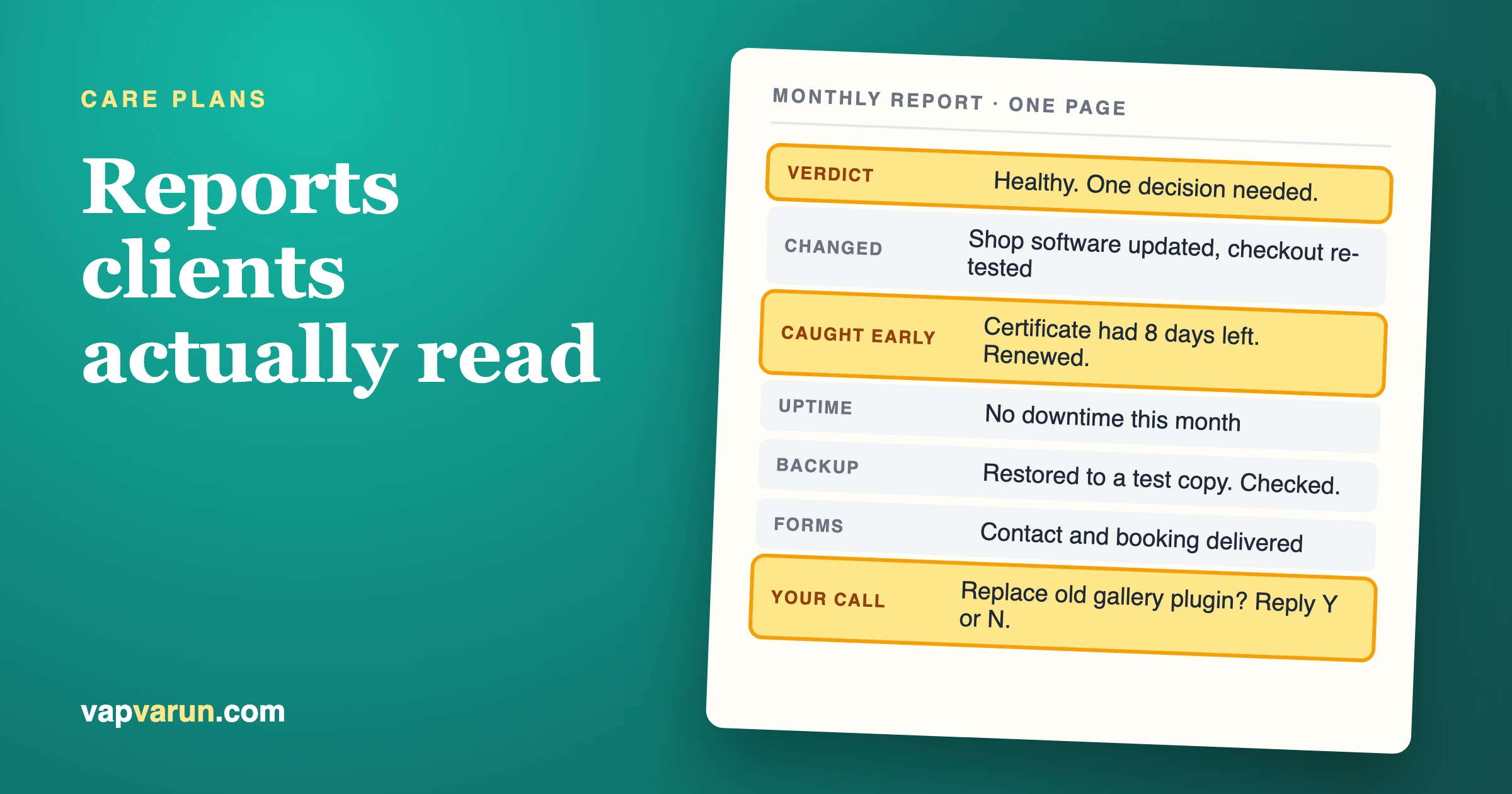
A care plan report that clients read fits on one page, opens with a plain-language verdict, and ends with one decision for the client to make. It shows what we changed, what we caught before it broke, and the handful of numbers a business owner cares about: uptime, a backup we restored to prove it works, updates applied or held back, security events, speed, and whether the forms still deliver leads. Everything else stays in our internal log.
That is the short answer. The rest of this post is the long one: what goes on the page, what we stopped sending, how often we send it, how we word it for people who do not run websites for a living, and why the report matters more at renewal time than most agencies realise. If you sell maintenance or care plans, you can copy the structure. If you buy one, you can use this as a yardstick for what you should be getting.
One note on voice. This is how our team at Wbcom Designs works across the sites we maintain. It is a description of practice, not a case study, so you will not find client names or invented results here.
Why do clients ignore monthly care plan reports?
Clients ignore care plan reports because the report answers a question they did not ask. They want to know whether the site is safe, whether it is making them money, and whether the monthly fee is worth it. The typical report answers a different question: what did the maintenance tool do this month.
Look at what most agencies send. A table of forty plugin updates with version numbers. A screenshot of a scanner dashboard. A PDF generated by a reporting plugin, branded with the agency logo, running to many pages. Every line is accurate. None of it helps a bakery owner or a clinic manager decide anything.
There is a second problem, and it is quieter. When the report is a data dump, the client learns to skip it. Once they have learned to skip it, the report stops doing its real job, which is reminding them every month that someone is looking after their site. Good maintenance is invisible by design. If nothing breaks, the client sees nothing. The report is the only place where invisible work becomes visible, so a report nobody opens leaves the client with nothing to point at when the invoice arrives.
What should a care plan report include?
A care plan report should include six things on one page: what changed, what we caught before it broke, one decision we need from the client, the business numbers, the state of backups and security, and what we plan next month. Each item gets a sentence or two, and a number only where the number means something to a non-technical reader.
Here is the structure we use. Treat it as a skeleton and adjust the weights for each client.
1. A one-line verdict at the top
Before any detail, one sentence: "Your site was healthy all month, one update needs your approval, nothing else needs action." Some months the sentence is less comfortable: "Your site was down for 22 minutes on the 9th, here is why, and here is what we changed." Either way the client gets the verdict in five seconds, and most months that is all they read. That is fine. The rest of the page exists for the month they want more.
2. What changed
A short list of changes in plain words. Not "Updated WooCommerce 9.4.1 to 9.4.2" but "Updated the shop software to the latest version; checkout tested afterwards and working." We keep the version numbers out of the client page and in the internal log, where they can be found if anyone needs them.
If we held an update back, it goes here with the reason. "We did not apply the new version of the booking plugin because it changed how reminders are sent. We are testing it on a copy first." Clients trust a team more when it says no to an update with a reason than when it applies everything on the day it ships.
3. What we caught before it broke
This is the section that earns the retainer. It lists problems found and handled before a visitor met them: a certificate that was eight days from expiring, a form that had stopped sending email after a host changed its mail settings, a plugin that had been removed from the directory for a security issue, a disk that was filling up. Describe the problem in a sentence, what we did, and how we know it is fixed.
Some months this section is empty. We say so in one line: "Nothing needed catching this month." An honest empty section is better than padding it, and it is the reason the section is believable in the months when it is full.
4. One decision we need from you
Every report ends the main section with one ask, or states that there is none. The ask might be approving a plugin replacement, renewing a licence, confirming that a feature can be retired, or choosing between two fixes with different costs. One decision, framed as a choice with our recommendation: "We suggest option A because it removes the monthly licence fee. Reply 'A' or 'B' and we will schedule it."
Limiting it to one matters. Three asks in a report get zero answers. One ask gets a reply, and a reply is proof the client read the report.
5. The numbers that matter to the business
We pick the numbers a business owner would pick if they knew they could ask:
- Uptime. The percentage for the month and, if there was an outage, the date, the length and the cause.
- Backups, tested. Not "backups ran daily" but "we restored the backup from the 12th to a test copy and checked that pages, images and orders were there." A backup nobody has restored is a hope. More on this below.
- Updates applied and held back. A count for each, with the held-back items explained.
- Security events. Blocked login attempts and scans are noise, so we summarise them in one line. Anything that got past the first layer, any new admin account, any file change we did not make, gets its own sentence.
- Speed trend. One measure, compared with last month, on the pages that matter (home page, the main landing page, checkout if there is one). A trend line says more than a score.
- Forms and leads. We submit the contact form, the booking form or the checkout test, and confirm the message arrived. Many sites lose leads for weeks because a form stopped delivering and nobody noticed.
6. Next month
Two or three lines on what is planned: a major update scheduled for a quiet week, a test of a new payment method, a review of the plugin list. This turns the report from a record of the past into a plan, and it gives the client a reason to open next month's.
Sample care plan report structure
Here is the layout as a table you can copy into your own template. The "client wording" column shows the kind of sentence we aim for.
| Section | What goes in it | Client wording (example) |
|---|---|---|
| Verdict | One sentence, healthy or not | "Healthy all month. One decision needed." |
| What changed | Updates applied, in plain words; held-back items with the reason | "Shop software updated and checkout re-tested. Booking plugin update held back until tested on a copy." |
| Caught early | Problems found and fixed before visitors saw them | "Your security certificate had 8 days left. Renewed." |
| Your decision | One choice with our recommendation | "Replace the old gallery plugin? We suggest yes. Reply Y or N." |
| Uptime | Percentage, outages with date, length, cause | "No downtime this month." |
| Backups | Date of the restore test and what we checked | "Restored the 12th's backup to a test copy. Pages, images and orders present." |
| Security | Real events only; noise in one line | "No successful intrusions. One outdated plugin replaced." |
| Speed | One measure on key pages vs last month | "Home page loads about as fast as last month." |
| Forms and leads | Test submissions and delivery check | "Contact and booking forms tested on the 28th. Both delivered." |
| Next month | Two or three planned items | "PHP version upgrade scheduled for the first quiet week." |
The example sentences are illustrations of wording, not results from any particular client.
What should an agency stop putting in care plan reports?
An agency should stop sending raw plugin update logs, long exported PDFs, scanner screenshots and any figure the client cannot act on. If a line in the report would not change what the client thinks, decides or does, it belongs in the internal log.
We stopped sending these, one by one, after noticing that clients never responded to them.
Raw plugin update logs
A list of every plugin, old version, new version, date. It feels like proof of work. To the client it is a spreadsheet in a language they do not speak. We keep the log, because it is useful when we need to trace a regression, and we offer it on request. We do not put it on the page. Usually only the clients with their own developer ask for it.
The forty-page PDF
Reporting plugins and monitoring dashboards can export a large document with charts of every metric. Length reads as thoroughness to the agency and as homework to the client. A page count is not a value count. If the real content is one page, send one page, and link to the detail for anyone who wants it.
Vanity security numbers
"12,847 attacks blocked this month" is the classic. It frightens some clients and means nothing to others, and the number mostly measures how many bots found the site, not how safe it is. We report events that mattered. We mention that routine blocking is happening, once, in a short line.
Jargon
Words like "TTFB", "cron", "object cache" and "core web vitals" have a place, and the place is a technical appendix. In the client page we say "the site responds more slowly on the first visit" and keep the term for our notes.
How often should a care plan report go out?
Monthly is the right cadence for most care plans, sent in the first week of the month so it covers a complete period, with a short alert sent immediately whenever something serious happens. The monthly report is a summary. It should never be the first time a client hears about a real problem.
We split communication into two channels and keep them separate.
- The monthly report. Scheduled, one page, same structure every time. Predictability is the point. Clients learn where to look and how long it takes.
- Event messages. Short, sent when it happens: an outage, a hacked plugin, a failed payment gateway, a licence about to expire. Two or three sentences: what happened, what we did, whether anything is needed from the client. The monthly report then recaps the event in one line, so nobody is surprised.
Delivery matters as much as cadence. We send the report in the body of the email, not as an attachment. An attachment is one more click, and a PDF on a phone is a chore. The email body can be read on the way to a meeting. If the client wants a PDF for their records, we attach one with the same content, not a different, longer version.
How do you explain a website report to a non-technical client?
Explain it in the words the client uses for their own business. Say what happened, what it would have cost them if it had gone wrong, and what you did. Avoid the names of the tools, the names of the technologies and the names of the errors.
A few habits help.
Lead with the consequence. "Your contact form stopped delivering email on the 14th. We found it on the 15th and fixed it. Three test messages are now arriving." The client hears: someone was watching, and the leads are safe.
Write for an owner who has a different job. The reader runs a practice, a school, a shop or a charity. They read the report between other tasks. If a paragraph needs a second read, it is too long.
Offer the detail without forcing it. A closing line such as "Full technical log available on request" respects both kinds of reader.
What does a backup restore test prove, and why put it in the report?
A restore test proves that a backup can actually bring the site back, which a successful backup job does not. Backup jobs report success even when the files are incomplete, the database dump is truncated or the archive cannot be opened. The only evidence is restoring it somewhere and looking.
We restore a recent backup to a separate test copy on a regular schedule, and we check specific things: the home page loads, recent posts and pages are there, uploaded images display, and on shops the latest orders are present. Then we write one sentence in the report with the date. That sentence is worth more to a client than a page of backup logs, because it answers the fear underneath the question: "if the worst happens, can you get my site back?"
We wrote about the wider argument for tested restores, off-site copies and support in What Clients Still Pay an Agency For After AI Site Builders. The report is where that value gets shown every month.
How does the report protect the retainer at renewal?
The report protects the retainer by building a month-by-month record of value, so the renewal conversation starts from evidence rather than from the client's memory of an invoice. Clients who cannot recall anything the agency did will compare the fee with a cheaper alternative. Clients who can recall a caught certificate, a restored backup and a fixed form will compare the fee with the cost of those problems.
Three things in the report do most of the work here.
The "caught early" section is a running ledger. At renewal we can read back through the last twelve reports and list what was found and fixed. No one has to remember. The agency does not have to sell anything. The record is already there, in the client's own inbox.
The decision requests show a relationship. A client who has been asked for decisions and made them has been treated as the owner of the site. That is different from a client who pays a bill and hears nothing. Decisions also create small natural upsells that are honest: a replacement plugin, a speed project, a security improvement. The report is where we recommend them, with a reason.
Held-back updates demonstrate judgment. An agency that can explain why it did not apply an update is showing the thing that automation cannot show. We covered this in Can AI Replace a Website Maintenance Retainer?: tools can apply updates, but deciding which one waits is a judgment call, and the report is where that judgment gets credit.
A related point: the report is a reason to say what is not covered. If a client keeps asking for design changes inside a care plan that does not include them, a polite line in the report such as "Requests outside the plan this month: two small design changes, quoted separately" keeps the boundary visible without a confrontation. For how we think about scope and pricing, see our older post on what a WordPress maintenance retainer includes and what it costs, which still describes the inclusions and exclusions well.
What should you do when the report contains bad news?
Send the bad news early, in plain words, with the fix already in progress, and then repeat it in the monthly report with the outcome. The report should never be where a client first learns about a problem, and it should never hide one.
Bad months happen. A plugin vendor ships a broken release, a host has an outage, a bot floods the login page. The agencies that lose clients are rarely the ones with an incident. They are the ones whose clients found out from a customer. We write incident lines in a fixed shape: what happened, when we noticed, how long it lasted, what we did, what we changed so it is less likely again. Five short items. The shape stops us from either panicking or hiding.
If the fault was ours, the report says so without ceremony. Sorry belongs where there was a real fault, said once, followed by the fix. Over-apologising makes the client more anxious, not less.
How do we keep reports quick to produce?
We keep reports quick by collecting facts automatically and writing the sentences by hand. Tools gather the uptime figure, the update log, the backup status and the speed measurements. A person then turns them into the one-page report and decides which lines matter.
Our own update process is documented in How We Update Five Live Sites Without Breaking Them: a fixed order, a restore point before each step and an automatic check after. That process is also what makes the report cheap to write, because every step leaves a record we can summarise.
Checklist: a care plan report clients will read
Run through this before sending any report. If a line fails, fix the report, not the checklist.
- The first sentence tells the client whether the site is healthy and whether anything is needed from them.
- The whole report fits on one page or one phone screen scroll or two.
- Updates are described in plain words, not version numbers.
- Every held-back update has a reason next to it.
- The "caught early" section lists real catches, or says plainly that there were none.
- There is at most one decision request, with a recommendation and a simple way to reply.
- Uptime is shown, with the cause of any outage.
- The backup line names the date of an actual restore test and what was checked.
- Security lines list events that mattered, not totals of blocked bots.
- Speed is shown as a trend on named pages, in words.
- Forms, bookings or checkout were tested and the result is stated.
- Next month's plan is two or three lines.
- No jargon appears without a plain-language version beside it.
- The report is in the body of the email, with a PDF only if the client asked.
- The technical log is stored and offered on request.
When is a simple report enough, and when do you need more?
A one-page report is enough for most brochure sites, small shops and membership sites. You need more only when the site carries real money or regulated data, or when the client has a technical team that wants the detail. In those cases, keep the one-page summary on top and add an appendix behind it.
Cases where we add detail:
- Busy online shops. Order and checkout checks, payment gateway status, and any failed payments traced to a technical cause.
- Sites with compliance duties. Evidence of access reviews, retention settings and update records for an auditor.
- Clients with their own developers. The full update log, plugin list and change notes, as an attachment behind the summary.
- Large community or membership sites. Load and queue behaviour at peak times, since slowness there affects many people at once.
In all four, the summary page stays the same. People who only need reassurance still get it in thirty seconds. The extra material is for those who asked.
What if you do not want to produce the reports yourself?
Some agencies and freelancers sell care plans but would rather not build the monitoring, restore testing and reporting process themselves. For those, one option is to work with a provider that already runs it. Our team offers Wbcom Designs WordPress care plans, which follow the practice described in this post. It is one option among several, and the right choice depends on your sites, your clients and how much of the work you want to keep in-house.
Whichever route you take, judge a care plan by the report. Ask any provider, including us, to show a sample report before you commit. If the sample is forty pages of logs, you know what the monthly experience will be. If it is a clear page with a verdict, a catch, a decision and the numbers, you know someone is thinking about the reader.
FAQ
What is a WordPress care plan report?
A WordPress care plan report is a regular summary, usually monthly, of the maintenance work done on a site under a care plan. A good one covers updates, backups, security, uptime and speed, in language the site owner can understand.
How long should a monthly maintenance report be?
One page for most sites. If the client needs more detail, put it in an appendix behind the page, so the summary stays quick to read.
Should maintenance reports include plugin version numbers?
Not on the client page. Keep version numbers in an internal log and offer it on request. Describe the change in plain terms and say what was tested afterwards.
How often should a client receive a report?
Monthly for most plans, with an immediate message for any serious event. Busy shops may want a short weekly note as well, and very small sites may do fine with a quarterly check and a monthly one-line confirmation.
What is a restore test, and why mention it?
A restore test means bringing a backup back on a separate test copy and checking that the site works. It is the only real proof a backup is usable, so it deserves a line in every report.
What metrics matter most to clients?
Uptime, tested backups, updates applied and held back, real security events, a speed trend on key pages, and whether forms or checkout still work. These map to the three questions clients have: is it safe, is it working, is it making me money.
How does a report help keep a client at renewal?
It keeps a record of problems caught and decisions made, so the renewal discussion starts with what the plan delivered. Clients who can see the value rarely compare the fee with the cheapest alternative.
Can a reporting plugin do all of this automatically?
A plugin can collect facts: uptime, updates, backup status. It cannot decide which facts matter, explain a held-back update or recommend a decision. Use tools to collect and a person to write.
What should I do if a client never opens the report?
Shorten it, move the verdict to the first line and add a single decision request. A reply to the decision tells you the report was read. If there is still no response, ask by phone once whether the format suits them.
The takeaway
A report is a small product that arrives every month. Treat it like one. Decide who reads it, what they need to know in thirty seconds, and what one action you want from them. Cut the rest. The reports that keep care plans alive are not the longest or the prettiest. They are the ones where the client finishes reading and thinks: someone is looking after this, and I know what they did.