Claude Code Skills That Stay Small: What Goes in SKILL.md, What Goes in references/, and Why Oversized Skills Hurt
Our skills library grew the way most libraries do: one useful procedure at a time, each one a little longer than the last. A skill that began as a twenty-line checklist collected edge cases, examples, old decisions and a table nobody remembered adding. Then the agent started ignoring the bottom half of it, and we had to learn why.
This post is what we learned about writing skills that stay small. It covers how Claude Code loads a skill, what belongs in the main file and what belongs next to it, how to write the description that decides whether the skill triggers at all, why an oversized skill costs you in ways that are easy to miss, and where skills stop and MCP servers and plugins begin. The format and loading rules come from Anthropic’s Claude Code documentation, which we read for this post, and we mark the places where we are giving our own opinion instead. We have written about the skills library that runs our agency and the config layer around hooks and plan mode before, and we do not repeat either here. This one is about the craft of a single skill.
The short version
- A skill is a folder with a
SKILL.mdfile. The description is always in context. The body loads only when the skill is invoked. Supporting files load only when the skill tells Claude to read them. - Put in
SKILL.mdonly what the agent needs on every run: when to use it, the hard rules, the steps in outline, and a map of which reference file to open for which case. - Put everything else in
references/, and executable helpers inscripts/. - Anthropic’s own guidance is to keep
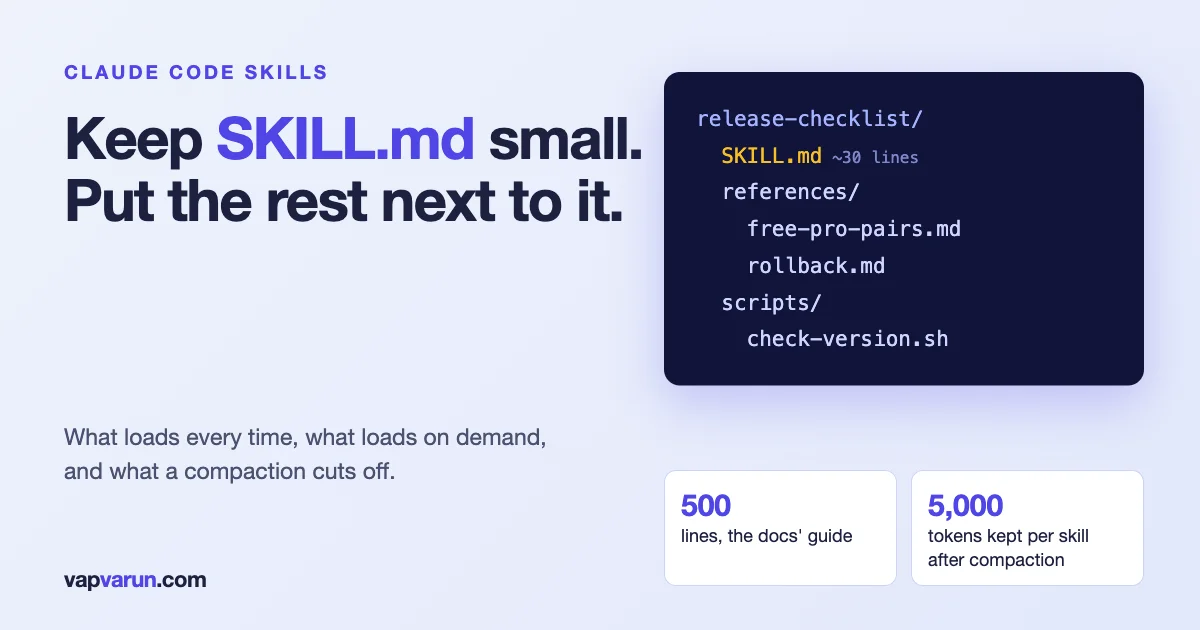
SKILL.mdunder 500 lines. After the conversation is compacted, only the first 5,000 tokens of each skill are re-attached, so the part of a long skill that matters most should come first. - Skills hold procedures. MCP servers give live access to systems. Plugins package and distribute skills and more. They solve different problems and work together.
How a skill loads: the part that decides everything else
Anthropic’s documentation describes a skill as a SKILL.md file with two parts: YAML frontmatter between --- markers, then Markdown instructions. The loading rules are what shape good design, so here they are as the documentation states them.
| Stage | What is in context | What it means for you |
|---|---|---|
| Every session | The description of each skill (unless model invocation is disabled for it) | Descriptions cost context in every conversation, so they have to be short and precise |
| When invoked | The full SKILL.md body | Anything in the body is paid for every time the skill runs |
| On demand | Files the skill points to | Long reference material costs almost nothing until needed |
| After loading | The rendered content stays in the conversation and is not re-read | A long skill occupies space for the rest of the session |
| After compaction | The most recent invocation of each skill is re-attached, keeping its first 5,000 tokens, within a shared 25,000-token budget | The tail of a long skill can silently disappear |
The description cap deserves attention. Per the documentation, the description combined with the optional when_to_use field is truncated at 1,536 characters in the skill listing. The frontmatter also has a few rules that bite: it is read only when the opening --- is the very first line of the file, malformed YAML still loads the skill but with no fields set, and unknown fields are ignored without an error, so a misspelt field name fails silently. The name field defaults to the directory name, and the other fields include disable-model-invocation (to stop Claude loading a skill by itself), user-invocable, allowed-tools, context: fork to run the skill in a subagent, and paths to limit automatic activation to matching files.
Skills live in several places: personal skills in ~/.claude/skills/, project skills in .claude/skills/ (commit these to share them), plugin skills inside a plugin, and organisation-wide skills through managed settings. Enterprise overrides personal, and personal overrides project. Custom slash commands have been merged into skills: a file at .claude/commands/deploy.md and a skill at .claude/skills/deploy/SKILL.md both create /deploy, and the documentation recommends skills for new work because they add a directory for supporting files and control over who invokes them.
What goes in SKILL.md
Think of SKILL.md as the part of the procedure you would want on a card taped to the monitor. Everything on it is read on every run. Our rule of thumb is that each line must earn its place by changing what the agent does in most invocations. That gives four kinds of content.
- The trigger and the job. One or two sentences on what this skill is for and what it is not for, so the agent can decide quickly whether it has the right one.
- The hard rules. The things that must never be skipped: the check that runs before anything is changed, the action that needs the owner’s approval, the file that must not be touched. Short, imperative, and each one a sentence.
- The steps in outline. A numbered list of five to ten steps. Not the detail of each step, just the order and what done looks like.
- A routing map to the references. A short table that says: if the task is X, read
references/x.md. This is what keeps the main file small without hiding anything.
Here is the skeleton we start from. It is a template with the shape we use, not a quote from a real skill of ours.
---
name: release-checklist
description: Runs the pre-release checklist for a plugin or theme. Use when the user says release, tag, ship or publish, or asks whether a build is ready.
---

# Release checklist

Use this for any release. Do not use it for hotfixes that skip staging (see references/hotfix.md).

## Hard rules
- Never tag from a dirty working tree.
- Never publish without the owner's yes in this conversation.
- Version and changelog must match before anything else runs.

## Steps
1. Confirm the branch and that the tree is clean.
2. Run the test and lint commands from references/commands.md.
3. Check version, changelog and readme agree.
4. Build the zip and verify its contents.
5. Ask for approval, then tag and publish.
6. Record what shipped.

## When to read what
| If the task involves | Read |
|---|---|
| Free and Pro pairs | references/free-pro-pairs.md |
| Changelog wording | references/changelog-style.md |
| A failed gate | references/gate-failures.md |
| Rolling back | references/rollback.md |
That file is about thirty lines. Everything the agent needs on a normal release is there, and everything it needs on an unusual one is one file away.
What goes in references/ and scripts/
Anthropic’s documentation shows the layout as a skill folder containing the required SKILL.md, optional supporting Markdown files such as a reference and an examples file, and a scripts/ folder whose files are executed, not loaded into context. It tells you to reference supporting files from SKILL.md so Claude knows when to load them. The documentation does not mention an assets/ directory, so we do not rely on one.
Our split works like this:
- references/ holds anything that is long, conditional or rarely needed: tables of values, per-case branches, worked examples, long lists of exceptions, the reasoning behind a rule, and decisions that applied to one product. Each file should be about one thing and be named so the routing table reads naturally.
- scripts/ holds anything a script can do better than a paragraph: a lint, a count, a checksum comparison, a formatter. A script is executed and its output comes back, so a fifty-line procedure becomes one line in the skill and a small cost in context. This also makes the check deterministic, which is the property you want for anything that must not be argued with.
A useful test for what to move: if a paragraph applies in fewer than one run in three, it belongs in a reference file. If a paragraph describes a computation, it belongs in a script.
Write the description like a router, not a summary
The description is the only part the agent sees before deciding to load the skill, so it is the most important text in the folder. The documentation says Claude uses it to decide when to apply the skill, and that if you omit it the first non-empty line of the body is used, which is rarely what you want.
A good description does three things in a few sentences. It says what the skill does, in plain words. It says when to use it, in the words a person would actually type. And it sets a boundary: what it is not for, if there is a neighbouring skill it could be mistaken for. Compare two descriptions for the same skill.
# Too vague: matches nothing in particular
description: Helps with releases.

# Specific: tells the router when to load it and when not to
description: Runs the pre-release checklist for a plugin or theme. Use when the user says release, tag, ship or publish, or asks whether a build is ready. Not for hotfixes that skip staging.
Some habits that have saved us trouble:
- Use the user’s words. People say ship, publish and tag, not run the release validation workflow. Put those words in.
- One job per skill. When a description needs several “and” clauses to say what the skill does, it is describing more than one skill.
- Keep the description under the cap with room to spare. The limit is 1,536 characters combined with
when_to_use, but a description that long is a sign of a skill trying to do too much. - Do not make descriptions overlap. Two skills that both claim a task make the choice a coin toss. If they genuinely overlap, merge them or add a boundary sentence to each.
- Test the trigger. Start a fresh session, say the thing a person would say, and see which skill loads. Do it with three phrasings.
If you want a skill to run only when you ask for it, the documentation gives you disable-model-invocation: true, which also removes the description from context. That is the right setting for skills with side effects, such as a deploy, where you never want the agent to decide on its own that now is a good time.
Why oversized skills hurt
A long skill costs you in four ways, and only the first is obvious.
1. Every run pays for the whole body
The full body loads on invocation, so a skill of ten thousand words puts all ten thousand into the conversation whether the run needs them or not. That space is not free: it competes with your code, your files and the conversation itself.
2. Loaded content stays
The documentation says the rendered content stays in the conversation across later turns and is not re-read. A large skill invoked early sits in context for the whole session.
3. Compaction cuts the tail
This is the one that surprised us. After automatic compaction, the documentation says the most recent invocation of each skill is re-attached, keeping the first 5,000 tokens per skill, and re-attached skills share a combined 25,000-token budget, filled starting from the most recently invoked. A skill longer than that loses its end after compaction. As a rough conversion, 5,000 tokens is on the order of 3,700 words (our estimate, using the common rule of thumb of about three quarters of a word per token). If the rule that matters most in your skill is on page nine, it may not survive a long session.
4. Long skills dilute their own rules
This is our opinion, not a documented rule: when a skill is long, the hard rules compete with a lot of context for attention, and agents follow short, prominent rules more reliably than a rule buried in a table. The fix is cheap: hard rules at the top, in short sentences, and an enforced check where a rule truly cannot be broken. We wrote about that in why written rules do not reliably govern AI agents.
What our own library looks like
We measured our library on 23 October, on one of our Macs, so these numbers describe that machine and that day. We counted 96 skills. The median SKILL.md is about 1,400 words. Sixteen of the 96 run past 500 lines, ten run past 5,000 words, and the largest is about 9,800 words. In total the descriptions come to roughly 39,000 characters, which is on the order of ten thousand tokens that sit in context in every session by our rough estimate. Half of the skills, 50 of 96, have a references/ folder, which is where the overflow lives.
An earlier audit, noted in our configuration on 27 September, listed seven skills between 10,500 and 25,000 words each. We have not reconciled those figures with today’s count, and the earlier audit may have counted a skill together with its references. The direction is the point: we found oversized skills, wrote a size rule, and have been splitting them since. Our own guideline is to keep SKILL.md under about 500 lines and 5,000 words, with detail in references/. We note that 5,000 words is more than the roughly 3,700 words that survive compaction by our estimate, so for a skill whose rules must survive a long session we aim lower, and keep the hard rules in the first screen.
Here is the small script we use to measure a library. It reads each SKILL.md, counts lines and words, measures the description and flags the usual problems.
import os, re, sys

root = os.path.expanduser(sys.argv[1] if len(sys.argv) > 1 else '~/.claude/skills')
for name in sorted(os.listdir(root)):
    path = os.path.join(root, name, 'SKILL.md')
    if not os.path.isfile(path):
        continue
    text = open(path, errors='ignore').read()
    lines, words = text.count('\n') + 1, len(text.split())
    front = re.match(r'---\n(.*?)\n---', text, re.S)
    desc = ''
    if front:
        m = re.search(r'^description:\s*(.*?)(?=^[\w-]+:|\Z)', front.group(1), re.S | re.M)
        desc = m.group(1).strip() if m else ''
    flags = []
    if not text.startswith('---'): flags.append('no frontmatter on line 1')
    if not desc: flags.append('no description')
    if len(desc) > 1536: flags.append('description over cap')
    if lines > 500: flags.append('over 500 lines')
    if words > 3700: flags.append('tail may not survive compaction')
    if flags:
        print(f'{name}: {lines} lines, {words} words, desc {len(desc)} chars: ' + ', '.join(flags))
It is a blunt tool. It does not judge whether a skill is good, only whether it is likely to be large or malformed. Run it after every few edits and it keeps the library honest.
A refactor recipe for a skill that has grown
- Read it as the agent would. Which sections would you need on a typical run? Mark those.
- Pull out the hard rules. Put them at the top in short sentences. If any one cannot be broken, consider a hook or a script that enforces it.
- Move conditional material to references. Each file one topic, named so the routing table reads like a menu.
- Replace long procedures with scripts. If a section computes something, script it and leave a one-line call behind.
- Rewrite the description. It should mention the words people use, and a boundary.
- Test the trigger and a few runs. In a fresh session, check that the skill loads for three phrasings, and run it on a real task, watching for a reference that should have been read and was not.
- Measure again. Lines, words, description length.
Skills, MCP servers and plugins: which holds what
These three get confused because they all extend Claude Code. They answer different questions.
| Mechanism | What it is | Use it for |
|---|---|---|
| Skill | A folder of instructions, references and scripts that Claude loads when relevant | Procedures and know-how: how we release, how we triage, how we write a post |
| MCP server | A program that exposes tools and data to the agent | Live access to a system: a ticketing tool, a site’s API, a database |
| Plugin | A package that can bundle skills (and other components) for installation | Distributing a set of skills to a team or the public |
The documentation confirms the plugin part: plugins can bundle skills in their skills/ directory, and those skills are namespaced as /plugin-name:skill-name, so they never conflict with your own. It also says Claude Code skills follow the open Agent Skills standard, and that outside Claude Code, for example in claude.ai uploads or the Skills API, only a smaller set of frontmatter fields is allowed (name, description, license, compatibility, metadata and allowed-tools), with other keys causing an error at packaging. If you plan to distribute a skill beyond Claude Code, keep your frontmatter to that set.
The documentation page we read does not compare skills with MCP servers directly, so the following is our own working rule. If the thing you want to write is a procedure, that is a skill. If it needs to touch a live system, that is a tool, usually through an MCP server. Most of our real workflows are both: the skill says how and in what order, and the MCP server provides the hands. A skill that says check the site’s cache status is a recipe. A tool that actually fetches the cache headers is the means. Keeping them apart means you can change a recipe without touching a server, and change a server without rewriting every recipe. We wrote about the operational side of servers in how we pin, test and watch them.
Common mistakes
- Frontmatter not on line one. A blank line or a comment before the opening
---means the file is read as plain content with no fields. - Misspelt field names. Unknown fields are ignored without an error, so
discriptiongives you a skill with no description. - Descriptions that read like marketing. The router needs verbs and the user’s words, not adjectives.
- One skill that does everything. If the routing table has twenty rows, you have several skills in a trench coat.
- Rules that live only in prose. Anything that must hold every time needs a script or a hook behind it.
- References nobody points to. A reference file is read only if the main file says when. List every one in the routing table.
- Copying someone else’s library. Skills encode your procedures. Borrow the structure, write your own contents.
Where to start
Pick the skill you use most and measure it. If it is over 500 lines, split it with the recipe above. Rewrite its description with the words your team actually uses, and test the trigger with three phrasings. Then run the measuring script across your library once, and fix the worst offender. That is an afternoon, and it tends to improve every run that follows.
What we have not verified
- The documentation page we read was truncated at its end, so details beyond the sections we quote may exist.
- The token-to-word conversion is our estimate, not a documented figure.
- Whether longer skills follow rules less reliably is our observation from running a large library, not a measured result.
- The counts for our library come from one machine on one day, and the earlier audit is not reconciled with them.