Don’t Marry a Plugin or Theme: Start From Your Business Flow
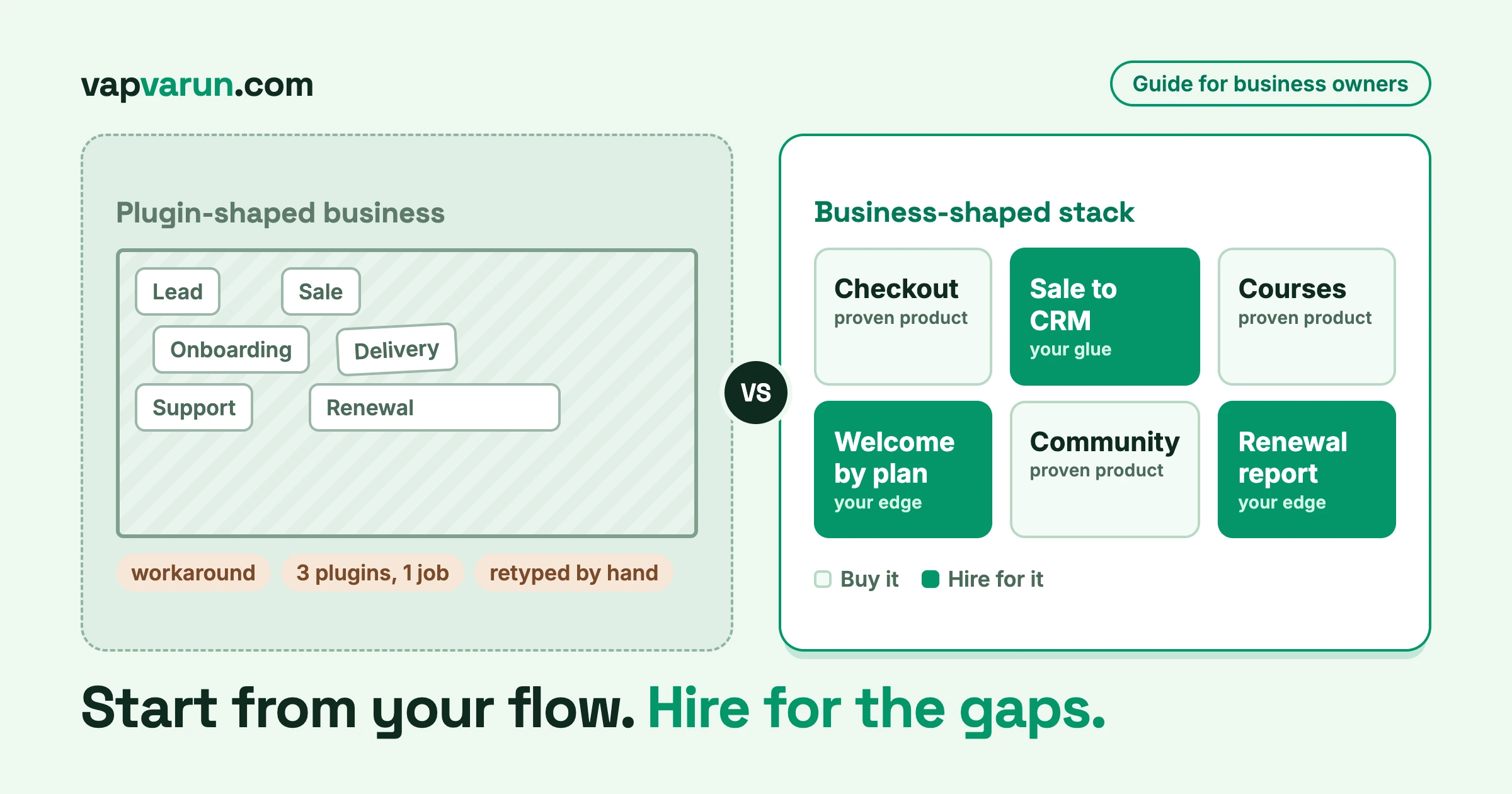
You bought the plugin that every review called the best. Or the theme with the huge demo library and the five-star rating. For a few weeks it felt like progress. Then you tried to do something your business actually does, and the product said no. So you found a workaround. Then another. Now you have a site that works, but only because three people remember which parts are held together with tape. The fix starts with your business flow, not with another plugin.
This is the most common story we hear from business owners who come to us. It is not a story about bad software. The plugin is fine. The theme is fine. The problem is the order in which the decision was made. You picked the tool first, and then you bent the business to fit it.
In this guide we want to flip that order. Start from your business flow, meaning how your business really runs. Use proven products for the parts that every business needs. Then hire a developer for the gaps: the connections between systems, the automations, and the few things that make you different. We will give you a one-page exercise to map your own flow, the signs that you have outgrown a plugin, what to ask when you hire, and worked examples from our own stack.
The stuck moment: your business bends to fit the tool
Here is how it usually goes. A business owner needs a membership area, or a course, or a booking page. They search, compare feature lists, read reviews, and pick the most popular option. It installs in ten minutes. The demo looks great.
Six months later the real work starts. The sales team wants a customer to get a different welcome message depending on the plan they bought. The plugin has one welcome email. Support wants to see a customer’s order history next to their ticket. The plugin has no such screen. Finance wants a monthly report that joins renewals with refunds. The plugin exports a CSV that has to be cleaned by hand.
None of these are strange requests. They are ordinary business needs. But the product was built for the general case, and your case is a specific one.
So the workarounds begin. A snippet in the theme to change one label. A second plugin to add the missing field. A spreadsheet that someone updates every Friday. A shared inbox rule that forwards certain emails to a person who types them into another system. Each fix is small and sensible. Together they become a structure nobody planned and nobody fully understands.
The cost is rarely one big bill. It is a steady leak: hours of retyping, missed follow-ups, customers who get the wrong message, and a growing fear of pressing the update button.
Why plugins and themes are built for everyone, and so not for you
It helps to understand why this happens, because once you see it, you stop blaming yourself or the vendor.
A plugin or a theme is a product. A product maker earns money by serving as many buyers as possible with one codebase. That means every feature has to make sense for thousands of different businesses at once. A good product team will add options, but each option has a cost: more settings, more testing, more support questions. So they add the options that the largest number of customers ask for, and they stop there.
That is the right way to build a product. It is also the reason your odd, specific, valuable requirement will not make it into the next release.
Three things follow from this.
The roadmap is not yours. The vendor decides what ships next. If your need is not common, it waits forever, or it never arrives. You can vote on a feature board, but you cannot steer.
Options are shaped by the average customer. Settings cover the usual cases. The moment your process differs from the usual, you are in workaround territory.
Your business logic ends up inside someone else’s product. The rules about who gets what, when, and why end up spread across settings screens in four plugins. If one vendor changes how their settings work, your business rule changes with it, and nobody tells you.
None of this means you should avoid products. It means you should be clear about what products are good for and what they are not good for. That is the whole point of this guide.
Flip the order: business flow first, then products, then people
Most buying decisions go like this: tool, then process. You pick the plugin, then you adjust how the business works to suit it. We suggest the reverse, in four steps.
- Map your real business flow first. Lead, sale, onboarding, delivery, support, renewal. Write down what happens at each stage and where information has to move from one stage to the next.
- Use proven products for the parts that are truly generic. Checkout, a learning system, a community, forms. These are solved problems. Do not pay anyone to rebuild them.
- Hire a developer for the connections and for your edge. The glue between systems, the automations, the custom layer on your theme, the reports only you need.
- Keep it owned, documented and maintained. You should never be locked to one vendor’s roadmap, and you should never depend on knowledge that lives in one person’s head.
The order matters. Mapping your business flow is cheap and takes an afternoon. It tells you which of your needs are generic and which are not. Without it, you cannot tell whether the plugin you are about to buy fits, and you cannot tell a developer what you want built.
Step one: map your business flow on one page
Take a single sheet of paper, or one screen of a spreadsheet, and draw your business flow on it. Do not open a design tool. This exercise works because it is small.
Write six words across the top: Lead, Sale, Onboarding, Delivery, Support, Renewal. If your business has a different shape, change the words. A restaurant group, a training company, and a software seller will not use the same six. What matters is that you cover the whole life of a customer, from the first contact to the second purchase.
Under each word, answer five questions.
- What happens at this stage, in plain words?
- Who does it: a person, a plugin, or both?
- Where does the information live: which tool, which screen, which spreadsheet?
- What has to move to the next stage, and how does it move today?
- What breaks or gets retyped by hand?
Here is a short example of how one row might look for a business that sells online training.
| Stage | What happens | Where data lives | How it moves today | What is manual |
|---|---|---|---|---|
| Lead | Visitor downloads a guide | Form plugin | Emailed to the sales inbox | Someone copies it into the CRM |
| Sale | Visitor buys a course | Checkout plugin | Order email to the owner | Invoice details retyped for companies |
| Onboarding | Buyer needs access and a welcome | Learning plugin | Access is automatic | Welcome message is the same for every plan |
| Delivery | Student takes the course | Learning plugin | Progress stays in the plugin | Certificates are issued by hand for group orders |
| Support | Student asks a question | Shared inbox | Replies by email | Support cannot see which course they bought |
| Renewal | Annual plan comes up | Payment gateway | Reminder email | Nobody tracks who is likely to leave |
Read the last two columns. That is where your money is leaking. Every cell in “What is manual” is a place where a person is acting as a connector between two systems that do not talk to each other.
Circle the handoffs in your business flow, not the tools
Now take a pen and circle every place where information crosses from one stage to the next. These are the handoffs. In the example, the handoffs are lead to CRM, order to invoice, purchase to welcome message, group order to certificate, and order to support screen.
Most of the value in a custom build lives at the handoffs. A plugin does its own job well inside its own walls. Almost no plugin does a good job of passing the baton to a system it has never heard of. That passing of the baton is exactly what a developer can build for you, and it is exactly what no product can sell you off the shelf, because every business hands off differently.
Mark each stage generic or yours
Finally, mark each stage with one of two letters. G if the work is generic: the same for nearly every business like yours. Y if it is yours: it reflects something unusual about how you sell, serve or price.
Checkout is almost always G. A course player is G. A forum is G. The way you qualify a lead, the rule you use to decide which welcome sequence a customer gets, the report your finance lead needs at month end: those tend to be Y.
When you finish, you will have one page of business flow that shows where products fit, where they do not, and where the manual work hides. This page is the most useful brief you can give a developer, and it costs nothing.
Step two: use proven products for the generic parts
Once you have your page, the temptation can swing the other way. Some owners hear “your business is special” and decide to build everything from scratch. Please do not.
The generic parts of a business are generic for a reason. Thousands of businesses have the same need, so product teams have spent years solving it, testing it, and fixing edge cases you have not met yet. A payment checkout has to handle tax, refunds, failed cards, and a long list of rules that change by country. A learning system has to deal with quizzes, progress, certificates and access. A community has to handle moderation, privacy and abuse. You do not want to find those edge cases by yourself, with your customers watching.
So for every G on your page, use a mature product. A few habits make this go well.
- Pick products that are maintained. Look at the release history, not the feature list. A product that ships fixes often is a product with a future.
- Pick products with clear extension points. A good product lets a developer add behaviour through documented hooks and an API rather than editing the product itself. This is what lets you hire for the gaps later without forking anything.
- Pick fewer products, not more. Each one is a vendor, a renewal date, and an update to test. If one product covers two of your needs well, that is usually better than two products that each do one thing. We make the wider case for fewer vendors in what building the whole stack in-house buys you.
- Do not judge a product by what it could do on the demo site. Judge it by how it behaves with your data, your theme and your other plugins.
There is a related trap on the theme side. A heavy multipurpose theme can feel like a safe buy because it includes everything. In practice, it often means you carry a large amount of code you do not use, and you hit its limits the first time you want a layout it did not plan for. A lighter theme with a small custom layer on top is easier to keep fast and easier to update. We covered the extreme version of this in our playbook on moving from a heavy theme to headless, but you do not need to go headless to apply the idea. You just need to stop letting the theme be the place where your business rules live.
Step three: hire a developer for the gaps
Now we come to the part this guide is really about. You have a page. You know which stages are generic. You have picked products for those. What is left is the set of Y cells and the handoffs between systems. That is the work to hire for.
It usually falls into four groups.
The glue
Glue is the code that moves information between systems so a person does not have to. When an order is paid, the customer record is updated in the CRM, the right access is granted, the finance system gets an invoice, and support sees a note. No one clicks anything.
Glue is where most business owners get the biggest return, because it removes the manual column from your page. It is also the work that is hardest to buy as a product, because it depends on which two systems you want to join and what rules sit between them.
The automations
Automations are the rules that decide what happens next. A customer who buys the annual plan gets a different onboarding sequence from one who buys monthly. A support ticket from a high-value account gets flagged. A trial that has not been used in five days triggers a gentle nudge.
Many tools offer a rules screen, and for simple cases that is enough. When the rules start to depend on data from three places, or when a mistake would cost real money, it is worth having a developer write them, test them, and keep them under version control.
The custom theme layer
If your site needs to look and behave like your brand rather than like a template, that is theme work. Good theme work does not rewrite the theme. It adds a thin, well-organised layer: your design tokens, your layouts, your templates for the pages that matter. It sits on top of a maintained base, so updates to the base do not wipe out your work.
This is also where a skilled theme developer earns their fee. Anyone can paste CSS into a customiser box. A professional builds the layer so that it survives updates, works in light and dark modes if you need them, stays accessible, and does not slow the site down.
The reports
Every business owner eventually wants one number that no product gives them: renewals joined with refunds, leads by source joined with revenue, support load by product. A developer can pull this from the places the data already lives and present it in one screen. This is usually small work with a large effect on decisions.
Step four: keep it owned, documented and maintained
The biggest fear business owners have about custom work is being trapped. They worry that they will end up depending on one freelancer who disappears, or on a pile of code that nobody else can read. That fear is reasonable, and the answer is to ask for four things from day one.
Ownership. The code, the repository and the accounts should belong to your business. You should be able to hand the project to a different developer without asking permission.
Documentation. A short written description of what was built, how the pieces connect, which hooks and settings matter, and how to deploy a change. It does not need to be long. It needs to exist and be current.
A maintenance plan. Plugins update. WordPress updates. PHP versions change. Somebody has to own the job of checking that your custom layer still works after each of these. Decide who it is and how often it happens before the build starts, not after the first break.
Tests and a staging copy. You should be able to try an update on a copy of your site before it touches the real one. The developer should have a way to check that your key flows still work, even if that is a short, written checklist that someone runs by hand.
Taken together, these four things are what keep you from being married to any single vendor, including the developer you hire. A custom layer that is owned, written down and tested is an asset. One that is not is a liability that happens to be working today.
Signs you have outgrown a plugin or a theme
How do you know it is time to stop adding workarounds and start thinking in flows? These are the signals we see most often when a business flow outgrows its tools.
- You keep writing workarounds. A snippet here, a hidden field there, a rule that says “except when”. If your list of exceptions is longer than your list of settings, the product is no longer a fit.
- Three plugins now do one job. You added a second plugin to fill a gap in the first, and a third to fix a conflict between them. Each one is a vendor and a renewal, and the combination is nobody’s responsibility.
- Data is retyped by hand. If a person copies information from one screen to another on a regular schedule, you have found a handoff that needs glue.
- You are afraid to update. If the theme or a key plugin has not been updated in months because “last time it broke something”, the fear itself is the warning. Skipped updates become security risks and compatibility debt.
- The answer from support is “that is not on the roadmap”. One honest no is fine. Hearing it three times on things your business depends on tells you the product is aimed elsewhere.
- You pay for features you never use. A big plan whose most important feature is one setting is a sign you are carrying weight for no reason.
- New staff cannot learn the setup. If it takes weeks to explain where things live, the system has grown past what any one tool was designed for.
- Your reports need a spreadsheet to make sense. When the numbers that run the business live outside the system, the system is not serving you.
One or two of these is normal. If you recognise four or more, stop adding patches and map the flow. The page you produce will tell you whether the answer is a different product, a developer for the gaps, or both.
What to ask when you hire
When you do bring in a developer or a team, a few good questions save a great deal of pain. We want to keep this section short, because the aim of this guide is to help you think in flows rather than to hand you a hiring checklist. There is already a general page on our company site about hiring a WordPress developer if you want the basics. Here are the questions that matter most for flow-based work.
Is this a theme job, a plugin job, or an integration job?
These are three different kinds of work, and a good developer will tell you which one you need.
- Theme work changes how things look and how pages are laid out. It should not hold business rules.
- Plugin work adds or changes what the site can do: a new feature, a new type of content, a rule. It should live in its own plugin, not in a theme.
- Integration work connects your site to another system: a CRM, an invoicing tool, a support desk. This is the glue.
If a developer proposes to put all three in the theme, be careful. Business logic placed in a theme disappears the day you change the theme.
Who maintains it after launch?
Ask directly: who updates it, who fixes it when a plugin update breaks it, and how fast. Ask what the maintenance costs and what it includes. A clear answer here is worth more than a long portfolio.
How is it tested?
You do not need to understand the tools. You need to hear a plain answer. Is there a staging copy? Is there a list of key flows that get checked before every release? What happens if a test fails: does the release wait?
Does it build on the products we already use, or replace them?
A good developer will use the extension points of your existing products rather than editing them. If the plan involves changing the files of a plugin you bought, you will lose the change the next time the plugin updates.
What do we get at the end?
The code, the repository, the documentation, and the accounts. Ask for these by name.
Can you show a flow you connected, not just a site you built?
Portfolios of pretty sites tell you little about this kind of work. Ask for an example where two systems were joined, what rule sat between them, and what changed for the client afterwards.
Worked examples from our own stack
We follow our own advice, so here are three places where we put a flow first and bought or built around it.
Proposal to delivery
When a new client project begins, it starts with a written scope. We produce that proposal as a branded document from a template, so the structure is the same every time and the scope is explicit. The point is not the document. The point is that the scope is written down once, and every later step reads from it.
The same scope becomes the list the team plans against, the checklist that quality checks follow, and the list the client reviews at hand-off. We did not buy a single product that does all of this. We use ordinary tools for planning, testing and release, and we connected them so that the scope travels through the project without being retyped. When something changes, it changes in one place.
Wiring the CRM so the tool does not matter
Our own customer data runs through a CRM that is connected to our store. When someone buys a product, they are enrolled in an onboarding sequence for that product. That is a handoff from sale to onboarding, and it is wired so that nobody has to move a name from one screen to another.
The bigger lesson came from clients, and we wrote about it in our piece on the CRM bridge problem. Teams spend weeks choosing a CRM and then wire their site directly to it, so that changing the CRM later means rebuilding the wiring. We prefer a thin layer between the site and the CRM that holds the rules and the field mappings. Then the CRM is a replaceable part. This is the idea behind this whole guide, applied to one system: keep your logic in a place you control, and let products be products.
Connected products sharing one notification centre
Our community platform, BuddyNext, has a notification centre. Our learning, events and discussion products can show their notifications there too. The partner product keeps ownership of its own text, its own rule about who may see a notification, and its own email. The community side simply shows everything in one place, so a member checks one list instead of five, and nobody receives the same alert twice.
That design came from a flow question: what does a member actually want to see when they log in? They want one place that says what happened to them. Each product could have built its own bell icon. We built one agreed way for products to declare what they send, and let the notification centre collect it. The members see one flow, even though several products are behind it.
This is not “build everything custom”
If you have read our post on why pure custom software is a hard business to run in 2026, you may wonder whether this guide argues the opposite. It does not. The two fit together.
That earlier post is about the economics of a software shop that sells time and starts every project from zero. Its conclusion is that repeatable, productised work and owned products tend to win over one-off builds. This guide is the buyer’s side of the same coin. If you are buying, the sensible move is to buy proven products wherever the need is generic, which is exactly what a productised world offers you. Then you pay for custom work only where it cannot be avoided: the glue and your edge.
In other words, the advice is not “build more”. It is closer to “build less, and build the right things”. A buyer who writes a custom checkout is wasting money. A buyer who copies orders into a spreadsheet by hand is also wasting money. The flow page helps you tell the two apart.
We also wrote about what you actually sell when AI can build a website in an hour. The point there is that value has moved to data, integrations and running things well. The same shift helps buyers: the website is the easy part now, and your advantage lies in how your systems connect.
A note for developers
This section is for developers. If you are a business owner, you can skip to the next heading.
Three habits make flow-based work last.
- Keep business rules out of the theme. Put them in a small plugin of your own, with clear names and a single place to look. A theme change should never change a rule.
- Use the extension points of the products you integrate with. Hooks, REST routes and registries let you add behaviour without touching vendor code. If a product has no extension point for what you need, say so in the proposal. That is a cost and a risk.
- Put an adapter between the site and any external system. A thin layer that maps your fields to theirs, and that you can swap, turns a replacement from a rebuild into a configuration change.
If the question is whether to stay on WordPress or move part of the system elsewhere, our decision framework for choosing between Laravel and WordPress goes into the trade-offs. And if you want to see what the rework costs when the foundation is wrong, what a business website rebuild actually costs is a useful reality check.
Where to start this week
You do not need a project to begin. You need an hour.
- Draw the six columns for your own business and fill in the five questions for each.
- Circle the handoffs and mark each stage G or Y.
- List the manual steps. Put a rough number next to each: how often it happens and how long it takes.
- Pick the single handoff that costs the most time or causes the most errors.
- Decide whether a product, a developer, or a setting change would fix that one handoff.
Fixing one handoff in your business flow well is better than a large plan that never starts. It also teaches you how your business really moves, and that is knowledge you will use in every later decision about tools.
The goal is simple. Your business should shape your stack, not the other way around. Use products for what is common. Pay people for what is yours. Keep the result owned, written down and maintained.
Talk to us about mapping your business flow
If you would like help with the page, or with the build that comes after it, our team at Wbcom Designs does this work in-house, from the first map to launch and long-term upkeep. We will go through your flow with you, show you which parts a product already covers, and be honest about which parts are worth custom work and which are not.
Start with a short conversation. Talk to Wbcom about mapping your flow and bring your one-page sketch, even if it is rough. A rough page is enough to find the first handoff worth fixing.