We Moved Five WordPress Sites to EmDash the Week 1.0 Shipped
Five of our own WordPress sites now run on EmDash CMS, the open source CMS Cloudflare built on Astro. We cut four of them over to EmDash while it was still on a 0.38 release, and the fifth the same day Cloudflare shipped 1.0. The next day we upgraded all five to 1.0.1. This is the honest account of that week: what we moved, what the upgrade cost us, what slowed down, and which sites we would never move.
It is not a pitch to leave WordPress. Our team builds WordPress plugins and themes for a living, and most of our customers’ sites will stay on WordPress for years. It is a field report from people who run both, written for site owners who want to know if a content site belongs on EmDash and for developers who will run the upgrade themselves.
The short version
- All five sites cut over between 24 and 28 September 2026. They hold 230, 234, 326 posts and two larger lead-generation sites checked against 696 and 1,418 URLs.
- On 29 September all five went from 0.38.0 to 0.39.1 and then to 1.0.1. Every post-deploy check passed.
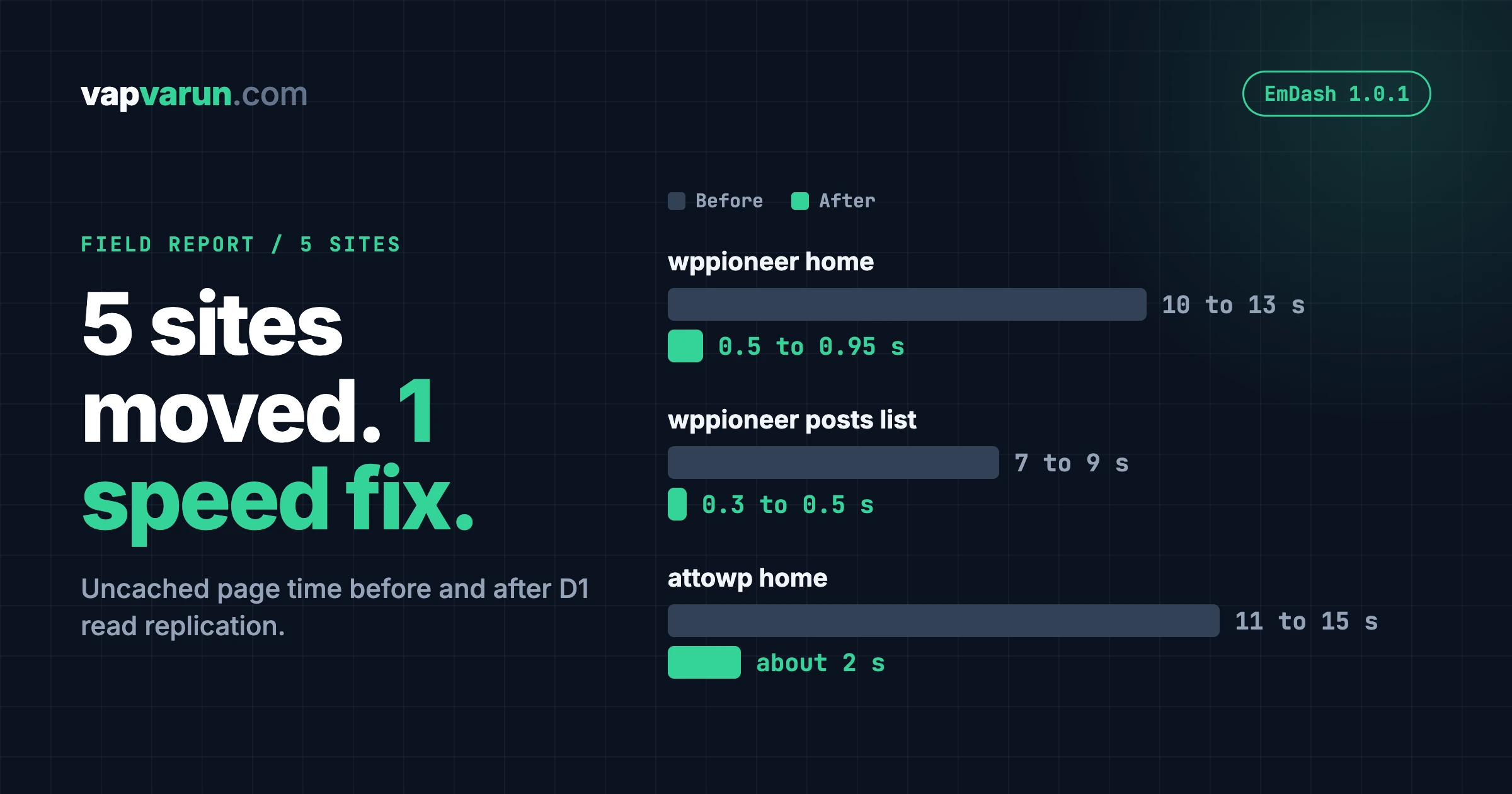
- The upgrade was not free. Pages that missed the cache got slower, up to 10 to 15 seconds, until we turned on D1 read replication. After that, the wppioneer home page dropped from 10 to 13 seconds to under one second.
- We have not installed a single plugin from the new EmDash plugin registry yet, and we say why below.
- Communities, stores, course platforms and membership sites stay on WordPress. We would not move them today.
Developer sections are marked, so a non-technical reader can skip them.
Why content sites were the right first move to EmDash CMS
Our five sites are attowp, wppioneer, woocustomdev, bpcustomdev and tweakswp. They publish tutorials, security write-ups and how-to guides for WordPress, WooCommerce and BuddyPress people. Three of them double as lead-generation sites for our services. Their job is simple: publish well, load fast and stay up.
That is the job where a WordPress install carries the most weight for the least return. A content site does not need a page builder, a membership plugin or a database that serves logged-in members all day. It needs a good editor, clean HTML, solid SEO metadata, redirects, a sitemap and a feed. Every plugin it does not need is code we would otherwise have to update, audit and patch.
Moving to EmDash CMS let us treat each site as a small codebase in Git, deployed through a gated script, with the content in a database we can snapshot and restore. It also let us turn the migration into a repeatable runbook instead of five one-off projects. That matters because we look after many sites, not one. A fix that works on one of them now reaches the whole family through shared templates.
We wrote about the thinking behind this kind of move earlier this year, when several teams were converging on Astro, MCP and edge deployment at the same time. That piece is Something Is Happening in the WordPress World, and We’re All Building the Same Thing. If you want the buyer-side playbook for a headless move that keeps WordPress as the editor, read From Heavy Theme to Headless: A Migration Playbook for Business Sites. EmDash is a different answer to the same question, and we will show where the two differ below.
What we moved and when
| Site | What we moved | Cut over |
|---|---|---|
| attowp | 230 published posts | 24 September |
| wppioneer | 234 posts, 3 pages, 267 of 267 URLs returned 200 | 24 September |
| woocustomdev | 696 of 696 URLs matched the plan | 27 September |
| bpcustomdev | 1,418 of 1,418 URLs matched the plan | 27 September |
| tweakswp | 326 posts | 28 September |
Two things in that table deserve a note.
First, the cutover dates sit on either side of the 1.0 release. EmDash 1.0 shipped on 28 September, so four sites went live on 0.38 and tweakswp went live the day 1.0 landed. We did not rush the upgrade to make a nice story. We cut over once each site passed our parity checks, then took the upgrade as its own project.
Second, “parity” means we compared each EmDash site with what WordPress actually served, page by page, not with the sitemap and not from memory. For wppioneer that meant 267 URLs, every one returning a 200 with identical titles. For the two larger sites it meant checking each URL against a plan that listed what should exist, what should redirect and what should be removed.
Moving a site also gave us a reason to clean it. On tweakswp we trashed 33 old WordPress pages and put 301 redirects behind them. On bpcustomdev we redirected 130 WooCommerce posts to the sister site where they belonged and merged 13 thin posts. A migration is the cheapest moment to ask which pages should exist at all.
Six days earlier: a WordPress core security fix
On 22 September the WordPress security team shipped 7.1.2, a security release for a critical vulnerability tracked as CVE-2026-87902. The release post says an unauthenticated attacker can, under certain conditions, make page template resolution include a chosen readable local PHP file from outside the active theme directories. If the right conditions exist in both the server environment and the active theme, that can lead to remote code execution. The team backported the fix to every branch that still receives security fixes, currently back to 4.7. You can read the full note in the WordPress 7.1.2 release announcement.
Two events that close together invite a lazy headline: the new CMS is safe and the old one is broken. We do not think that is true, and here is what the timing does and does not show.
It does show that a large, mature PHP codebase carries old surface area. A path that has existed for years can still turn out to be dangerous, and every site running that code inherits the risk at the same moment. The fix reached old branches quickly, which is good, but it only helps the sites that actually update.
It does not show that a younger CMS is safer by default. EmDash has far fewer years of attackers looking at it. That cuts both ways: less accumulated exposure, and less accumulated hardening. A young project also has bugs nobody has found yet. Security is not a property of the logo on the login screen. It comes from how fast fixes ship, how fast sites take them, and how much code each site runs that it does not need.
That last point is the one any site owner can act on, on any platform. When we cleaned 60+ WordPress installs on a fully infected WHM server, the problem was a self-reinfecting backdoor that kept returning after every clean, not a single core bug. The lesson carries over to EmDash: what you run, you have to maintain.
For us the smaller attack surface of a content site on EmDash is a real benefit. But we count it as a side effect of running less code, not as proof that the platform cannot be broken.
What EmDash CMS 1.0 is, in plain terms
EmDash CMS is a content management system where developers build the site in Astro, editors write in an admin panel, and agents can work through an API, a command line tool or a built-in MCP server. It is free and MIT licensed. On Cloudflare it runs as a Worker, stores content in D1, which is Cloudflare’s SQLite database, and keeps media in R2 storage.
Cloudflare introduced it on 1 April as a “spiritual successor to WordPress”, and some people took it for an April Fools’ joke. The 1.0 announcement on 28 September was partly a reply to that. It says the most common response to the beta was “let me know when it is 1.0”, and that the last five months went into data safety, database migrations, editorial workflows, localization, plugin security and performance. More than 175 people have contributed across more than 1,800 commits, and volunteers have translated the admin into 25 languages. Cloudflare also moved its own blog onto EmDash in August, a site it says handles millions of pageviews a week with legitimate spikes up to 5,000 requests per second.
For people running real sites, the practical promise is simple. From 1.0, breaking changes only arrive in a new major version. That is the line between an interesting experiment and something you can put on a maintenance plan. The source code is in the EmDash repository on GitHub.
The EmDash CMS plugin registry, explained for site owners
The biggest headline in 1.0 is the plugin registry. It matters because it is a different answer to a question every CMS has to answer: who do you trust when you install code you did not write?
How WordPress plugins work today
In WordPress, a plugin runs inside the same PHP process as everything else. It can read and write the database, touch the filesystem and make network requests. A contact form plugin can, in principle, read unpublished posts or change another plugin’s settings. Site owners rely on the author’s good intent, the review process and the hope that a later update does not change any of that. The model has served the web for twenty years. It has also produced most of the incidents we clean up.
What EmDash CMS does differently
Sandboxed plugins in the registry run in an isolated runtime. Each plugin gets private storage of its own and nothing else by default: no access to site content, media, users, secrets, the filesystem or the network. A plugin gains an ability only when it declares it and the site administrator approves it.
Cloudflare compares installing one to installing a mobile app, and that is a fair description. Before a plugin runs, EmDash shows what it wants to do. A search plugin might ask to read published content and contact its search service, and nothing more. An image optimizer might ask to manage media and still be unable to read user data. The abilities are independent, so approving one does not quietly grant another. If an update asks for more, you see it.
Who owns a plugin
The registry also splits apart three roles a traditional plugin directory holds together: the publisher’s account, the authoritative package record and the catalog where people find the plugin. It is built on AT Protocol, the network that also powers Bluesky. Publishers sign their releases with their own portable account, and the records live in that account. The EmDash catalog is one place that indexes them. Other people can build their own catalogs, with their own moderation rules, over the same publications.
Decentralized does not mean unverified. Before installing, EmDash checks the signed release record, the checksum, the package name, the version, the requested access and any required build provenance. The catalog can hide a listing, but it cannot rewrite a release or take ownership of the plugin.
What this means if you build or sell plugins
For a plugin business this is the interesting part. No single company can suspend your listing and keep your release history. Cloudflare says the registry supports free plugins today and that it aims to add paid plugins later, with the same decentralized model. Until that exists, the commercial path for a premium EmDash plugin is not settled, and anyone who tells you otherwise is guessing. We say that as a company that sells WordPress products.
What we have actually done with it
Here is the honest status. We have not installed registry plugins on any of our five sites. They do what they need with EmDash core and our own site code, and we removed the marketplace setting from our templates while we watch how the ecosystem grows. The sandbox model is the reason we would be comfortable adding a plugin later. “Comfortable later” is not the same as “needed now”, and we will not claim hands-on experience we do not have.
What the upgrade to 1.0 looked like
Here is the part most launch coverage skips, because you only learn it by doing it.
We were stuck on 0.38 without noticing
Before 1.0, our sites pinned EmDash with a ^0.38.0 range. In a 0.x version, a caret range does not move to the next minor release. So every site sat on 0.38 while 0.39, 0.40 and eventually 1.0.1 shipped. Nothing broke, which is exactly why nobody noticed. With 1.0 the pin becomes ^1.x, and minor updates flow in as intended. If you run EmDash on a 0.x pin, check which version you are really on.
One site at a time, with a restore point
On 29 September we took all five sites from 0.38.0 to 0.39.1 and then to 1.0.1. The release notes require stopping at 0.39 first, so that an older runtime never meets the new blocks field. We upgraded tweakswp first as the canary, then the rest one at a time. Every gate passed.
Before touching each site we recorded a D1 Time Travel bookmark. Time Travel restores the whole database to a point in time, so it is the real rollback. We also kept a portable SQL copy of the content tables, with one small surprise. The standard D1 export refuses any database that contains full-text search tables, and every EmDash site has them. So we exported the other tables one by one and kept the file out of Git, because it holds user data.
We also do not start a fleet upgrade during a Cloudflare incident. Migrations run on the first request, and a failure partway through can leave a database half-changed. An earlier EmDash release (0.36) left tables empty that way for a site that hit a D1 failure mid-migration. We were running through a long Asia-Pacific network incident that week, so we gated on the database answering a simple query three times in a row instead of on page speed.
Migrations without making a visitor wait
Database migrations are where a CMS upgrade hurts. On 0.39, migrations run at runtime, on the first request after deploy. On our sites that first request took between 44 and 93 seconds. Cloudflare’s edge gives up on a request after 100 seconds and returns a 524 error, but the Worker keeps migrating in the background. bpcustomdev came closest, at 93 seconds. The rule we follow is to send one request, watch the migrations table, and never retry. A retry can collide with a migration that is still running.
From 1.0.x, migrations can be applied from the command line before the new code takes any traffic. That took 45 to 55 seconds per site and involved no visitor at all. For us that is a good reason on its own to be on 1.0. The command line route did not work on D1 for the 0.39 step, which is why that one still ran at runtime.
Verify the live site, not the deploy log
Two details caught us out. A preview deployment on Cloudflare uses the production database, so opening a preview runs the new migrations on live data. And the admin bundle can take several seconds to load the first time after an upgrade.
Our check after each site is the same every time:
- The migrations count matches the newest migration in the package, and the migration lock is released.
- The current production build still serves the home page, a post, a page, the sitemap and the feed on the migrated database. That is the rollback path.
- The admin loads, the contact form renders and the newest post opens.
The performance surprise, and the fix
After the upgrade, pages that missed the cache got slower, sometimes much slower. Uncached home pages started taking 10 seconds or more to render.
Two things were happening at once. First, after a change in EmDash pull request 3488, a render that may fill the route cache skips the KV object cache. So every render that reaches the Worker runs all of its database queries. Pages served from the edge cache were unaffected, which is why most visitors never saw a problem.
Second, all five of our D1 databases have their primary in the Asia-Pacific region. During the long network incident there, our traffic was being served from Europe, and each query took 200 to 400 milliseconds. A page with dozens of queries adds those delays up fast.
The fix was to turn on D1 read replication for every database, so reads are answered from a replica close to the request. Per-query time dropped to between 12 and 80 milliseconds.
| Page | Before replication | After replication |
|---|---|---|
| wppioneer home, uncached | 10 to 13 seconds | 0.5 to 0.95 seconds |
| wppioneer posts listing, uncached | 7 to 9 seconds | 0.3 to 0.5 seconds |
| attowp home, uncached | 11 to 15 seconds | about 2 seconds |
The attowp home page is still our heaviest, because its topic-mix layout runs about 31 queries. We left it alone, since the cache hides it from readers. If its uncached render ever matters, cutting the per-topic queries is the next step.
We also set the route cache to serve a stale page for up to a day while it re-renders in the background. Freshness windows are shorter for home pages and listings than for posts and pages. Readers get a fast page, and editors still see changes go live, because publishing purges the pages tagged with that content.
The lesson is not specific to EmDash. A CMS release can change caching in a way that looks like a regression. Measure the uncached path, find the queries that make up the time, and fix the cause. Do not raise cache times until the problem hides.
For developers: the notes we wish we had
This section is for people who will run an upgrade themselves. If you are deciding whether to move a site, skip to the next heading.
- Read the
server-timingheader. EmDash responses carry values for database query count, total database time and cache hits. They tell you in one request whether a slow page is a query problem or a cache problem. - Replication needs two switches. The D1 adapter option
session: "auto"does nothing until replication is enabled on the database itself. We had the first for weeks without the second. The setting is reversible, so you can turn it off again. - Never add the
global_fetch_strictly_publiccompatibility flag. In our testing it made replica routing hang. - Purge rules have gaps. Publishing purges tagged pages. Edits to bylines, bios, avatars, menus and settings are not tagged, so purge everything after changing them or the old value stays on cached pages.
- If pnpm says the latest release is 0.38.0 while npm has newer, its metadata cache is stale. Delete the cache for the emdash packages and retry. Install
emdashand@emdash-cms/cloudflareat the same version, because the second pins the first exactly. - Pin
^1.xand schedule a monthly update pass. Take security releases in the same week. The 1.0 admin shows a banner when a core update is available. - Keep the restore point in the repo. We commit the Time Travel bookmark for each upgrade to the site’s ops folder and keep the SQL export out of Git.
We also tested D1 request coalescing and left it off. Once replicas serve the reads, it gave us no measurable gain, and it is still marked experimental.
When we would not move a site to EmDash CMS
This is the question customers actually ask us, so here is the straight answer.
EmDash CMS is a strong fit for content sites: blogs, documentation, marketing sites, lead-generation sites and publications. Most of their traffic is anonymous readers, the feature list is stable, and speed and a small attack surface matter more than a huge plugin catalog.
It is not the right home today for the sites that make up most of our product work:
- Communities and social networks. Member profiles, activity feeds, groups, messaging and moderation depend on a mature ecosystem. Our community platform, BuddyNext, and everything around it is built for WordPress. The people running those sites need it to keep working with the rest of their stack.
- Online stores. WooCommerce brings payment gateways, tax, shipping, subscriptions and thousands of integrations. EmDash’s first ecommerce plugin has only just been announced by a partner, so there is no track record yet.
- Course platforms and membership sites. Enrollment, progress, certificates, payments and access rules are deep WordPress territory, and that is where our LMS work lives.
- Sites where most users are logged in. Edge caching is a big part of why EmDash feels fast. A site where most requests come from signed-in members gets less of that benefit on any platform.
| Site type | Our default today |
|---|---|
| Blog, publication, docs | EmDash is a strong option |
| Marketing or lead-generation site | EmDash is a strong option |
| Community, social network, forum | WordPress |
| Store, marketplace | WordPress with WooCommerce |
| Courses, memberships | WordPress |
| Product site with a busy blog | Often both: product on WordPress, content on EmDash |
The last row is the one we see most. A company with a WordPress community or store often has a blog that would be faster, cheaper to run and safer as a separate EmDash site, while the product stays where its ecosystem lives. That is the pattern we ran on ourselves. For a wider view on where WordPress is and is not losing ground, see Is WordPress Losing? What the Cancellations Actually Tell Us.
If you want to keep WordPress as the editor but serve the front end from Astro, that is the headless route, and our toolkit for it is covered in From One Blog to a 12-Site Network: What WP Astro MCP Can Do. EmDash replaces the editor as well. Which one fits depends on how much your team depends on the WordPress admin and its plugins.
What we are watching next
- Paid plugins in the registry. Until there is a working commercial path, the plugin ecosystem will grow more slowly than the core. Cloudflare has said it wants publishers to earn money from their software. We want to see how.
- The 1.x update cadence. A stable major release is only as good as the minor releases that follow it. We are on a monthly pass and will report back if anything breaks.
- How the ecosystem fills in. Cloudflare names partners building themes, an ecommerce plugin and multi-site platforms on EmDash. Whether those become mature options for stores and communities is the real test of where our line sits.
Questions we get asked
Is EmDash CMS ready for production?
For content sites, our experience says yes. Five of our sites run on it, and the 1.0 promise of breaking changes only in a new major version is what moved it from experiment to maintenance plan for us. We would still keep a restore point and follow a written runbook, the same as for any CMS upgrade.
Is EmDash more secure than WordPress?
Not automatically. The sandbox model for registry plugins is a real design improvement, because plugins start with no access and gain abilities only with approval. But a young codebase has had less scrutiny, and security still depends on how fast you apply fixes and how much code you run.
Can we move our WordPress blog and keep the URLs?
Yes, with planning. We mapped every old URL to a new one, kept the permalink structure, set 301 redirects for anything removed, and compared each site with what WordPress served before cutting over. The WordPress origin stayed behind attowp for a month as a fallback.
Should a store or community move?
No, not today. Those sites depend on ecosystems that EmDash does not have yet. Keep them on WordPress and consider moving the blog instead.
Thinking about moving a content site to EmDash CMS?
If you run a WordPress blog, documentation hub or marketing site and wonder whether it belongs on EmDash, the first step is an audit, not a migration. We look at what the site does, which plugins it really uses, how much of its traffic is logged in, and what has to carry over: URLs, redirects, SEO metadata, authors, media and forms. Sometimes the answer is to move it. Sometimes it is to keep WordPress and run it leaner.
Either way, our team at Wbcom Designs handles it end to end, from the audit through the migration, the cutover and the monthly updates afterwards. You do not need a second vendor for the parts nobody mentioned. Read our view on Astro as a successor to WordPress for CMS work, then tell us about the site you have in mind and we will start with the audit.