Reprint vs a Real Migration: What WordPress’s New Site-Copy Tool Handles and What a 2,000-Post Move Still Needs
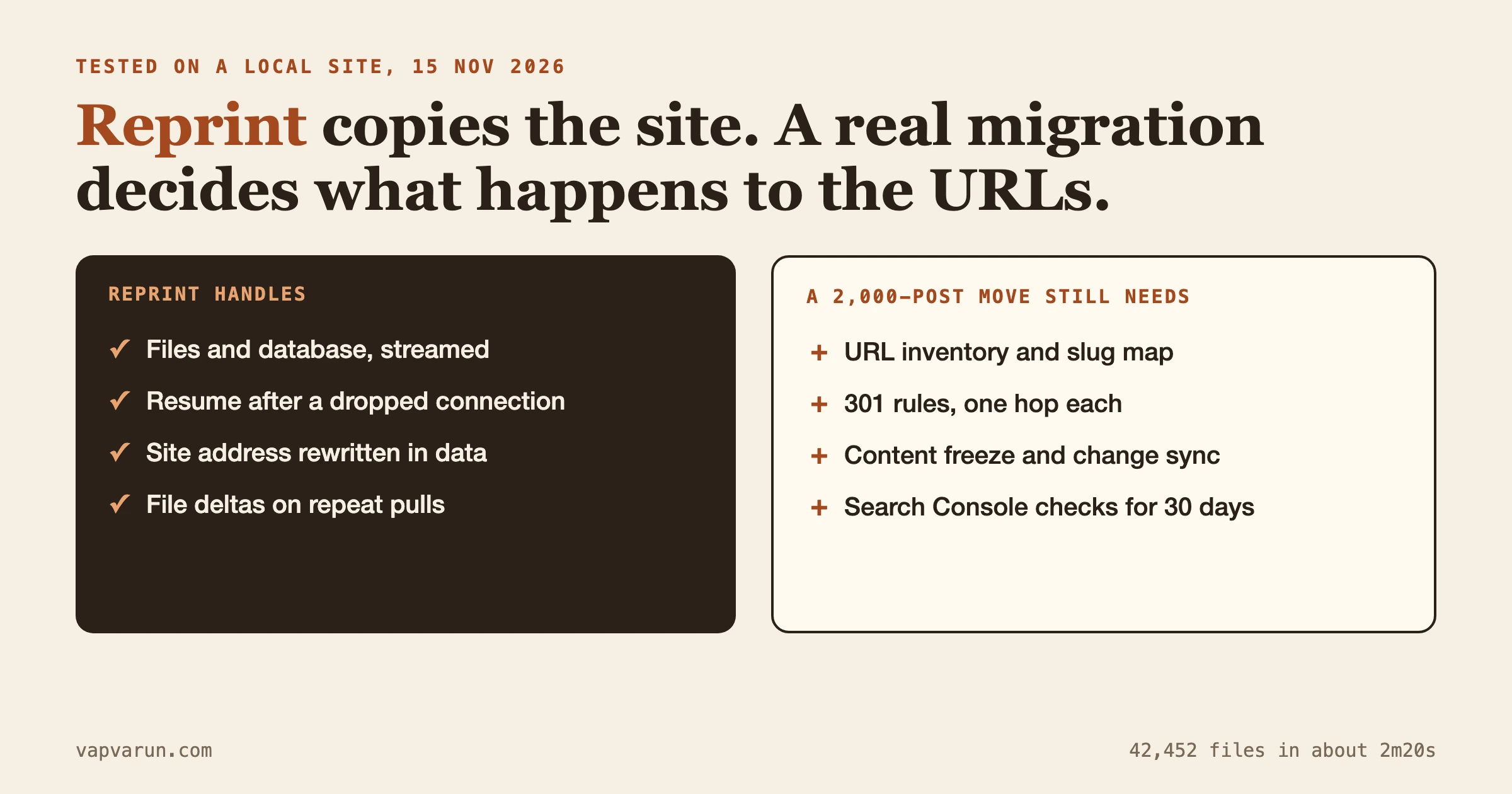
Reprint is the right tool when you need a working copy of a WordPress site: a staging site, a local clone, or a move to a new host where the domain and the URL paths stay the same. It is not a migration plan. It copies files and a database and rewrites the site address. It does not decide where 2,000 old URLs should land, it does not freeze your editors, and it does not tell you whether Google still sees your pages a month later.
We tested Reprint hands-on on 15 November 2026, on a local copy of one of our own test sites, never on a live one. This post covers what we ran, what came out right, what came out odd, and where the work of a large migration starts once the copy is done. Checked on 15 November 2026 against Reprint 0.11.8.
What is Reprint and what does it copy?
Reprint is a free, open-source, PHP-based tool from WordPress.org that copies a site’s files and database to a computer or server you choose. The announcement on WordPress News went up on 13 November 2026 and frames it as part of the Data Liberation work on easier site migration that has been running since 2024.
It has two parts. The Reprint Server plugin goes on the site you want to copy. A command-line client, a single file called reprint.phar, runs on the computer that receives the copy. You authorize the client inside WordPress with a Migration Token, and from then on the client pulls data over HTTPS. No account, no subscription, no outside service in the middle.
The points that matter for a real project, taken from the plugin page and the Reprint handbook:
- It streams files and database rows in parts, so your old host does not have to build one huge archive first.
- A dropped connection can be resumed by running the same command again.
- When you give it a new site address, it rewrites links in HTML, block markup, shortcodes, JSON, base64 and serialized PHP data, and keeps serialized string lengths valid.
- A repeat pull copies only the files that changed. The database, though, is replaced, not merged.
- The destination can use MySQL or SQLite. The client needs PHP 7.4 or newer; the source plugin supports PHP 5.6.20 or newer.
- It does not need SSH access to the old site. Administrator access to install the plugin is enough.
- It works on a live site, and the plugin page says plainly that the copy is not a frozen snapshot.
What did we test, and what happened?
The source was a Local by Flywheel site running WordPress 7.1.4 on MySQL 8.4, with a learning-platform plugin set: 245 post rows, 146 users, about 830 options. We installed Reprint 0.11.8 from the WordPress.org download, ran the client on PHP 8.5.5, and chose a SQLite destination served by PHP’s built-in server at localhost:8881. The site is small. It is nowhere near 2,000 posts, so read the timings as a lower bound.
The commands are the ones from the handbook’s Clone your site guide:
curl -fL https://plugins.svn.wordpress.org/reprint/downloads/reprint.phar -o reprint.phar
php reprint.phar keygen https://example.com --state-dir=./state --out=./reprint-key.pem

# authorize the printed Migration Token under Tools > Reprint Server, then:
php reprint.phar pull https://example.com \
  --private-key-path=./reprint-key.pem \
  --state-dir=./state --fs-root=./files \
  --target-engine=sqlite --new-site-url=http://localhost:8881
Two honest notes on our setup. Local’s site certificate is self-signed, so we passed the client’s --insecure flag, which skips certificate checks. That is acceptable for a throwaway local site and wrong for real data. And we submitted the Migration Token to the plugin’s authorize form over HTTP instead of clicking through it in a browser, because the shared test browser was busy. The form, the nonce and the handler were the plugin’s own.
Results
| Check | Result |
|---|---|
| First full pull | About 2 minutes 20 seconds for 42,452 files (about 1.8 GB counted) plus a 23 MB SQL dump, local disk to local disk |
| Home page on the copy | 200, correct title, no reference to the old host in the HTML |
| Pages | 18 pages in the REST API on both sides. The source JSON held 171 mentions of the old host, the copy held none |
| Media | Images and two large MP4 files returned 200 from the new address |
| Admin login | Worked with an account from the source site |
| Row counts | Posts 245 vs 245, users 146 vs 146. Postmeta 603 vs 607 and options 828 vs 831; we read that as a source that kept running during the copy and did not trace each row |
| Second pull after we edited the site title on the copy | About half a minute, and the edit was gone: the source database replaced it |
That last row is the one to remember. The handbook says it, and we watched it happen: running pull again re-imports the source database over the top of anything you changed on the copy.
What came out odd
- Some old-host strings survived. A privacy-policy page still said “Our website address is: http://learnomy.local.” in plain paragraph text, and so did one revision of it. A membership plugin’s email-template setting held the old address inside a URL-encoded
redirect_to. An updater plugin’s site history kept the old URL, which is arguably correct. A “from” email address on the old domain was untouched, which is also correct. So the rewrite handled attributes, block data and serialized values well, and missed text that only looked like a URL. - It followed symlinks outside the site. Two of our plugins on this Local site are symlinks into a separate code folder, and the Local app itself sits behind another. By default the client followed them, and the copy contained about 1 GB of an application bundle and 773 MB of repository folders outside the WordPress tree. The client has a
--no-follow-symlinksflag. A normal host rarely has this layout, but if yours does, set the flag before the first pull. - The copy carried everything. The source
wp-config.php, adebug.log, and our dev-only must-use plugins all arrived. That is by design, since it copies files, but it means a copy is a full duplicate of your secrets and your leftovers, and the handbook tells you to keep the working folder private. - Removing the plugin left the key behind. After we deactivated and deleted the plugin through WP-CLI, the authorized-keys option was still in the options table. We deleted it by hand. The handbook has a page on removing client access; follow it, and check the options table afterwards.
What we did not test
MySQL as the destination, the push direction, multisite, Windows, the experimental WordPress Playground option, a real host over the internet, a site behind Cloudflare or Wordfence, and anything near 2,000 posts. Our timings say nothing about those cases. We also did not run a plugin-by-plugin check of the copy beyond the pages we opened.
When is Reprint the right tool?
It is the right tool whenever the job is “make another copy of this WordPress site.” That covers more than people expect.
| Job | Reprint fits? | Why |
|---|---|---|
| Local or staging copy to test a plugin or WordPress update | Yes, this is the sweet spot | Clone, break it, throw it away. The live site is untouched |
| Moving a small brochure site to a new host, same domain | Yes | Copy, test on a preview address, pause edits, final pull, switch DNS |
| Owner has admin access but no SSH | Yes | The plugin plus HTTPS is the only access it needs |
| Site with daily orders, comments or new members | Only with a write pause | The copy is not a snapshot, and a database refresh replaces data instead of merging |
| Changing the domain or the URL structure | Copies, but does not plan | It rewrites the site address. It does not build a redirect map |
| Moving to Astro, EmDash or any non-WordPress platform | No | It copies WordPress as WordPress. The destination must run WordPress |
| Merging two sites into one | No | The handbook is explicit that it does not merge |
For a lot of small sites, that first block is the entire migration. A handful of pages, one editor, the same domain: Reprint is a better answer than a paid migration plugin, and it keeps your data off any third-party server. We would use it ourselves for the staging copy on almost any WordPress job.
What does a 2,000-post move still need after the copy?
The copy is step one of a longer job. Our own method for moving a content network is written up in How We Migrate a 2,000-Post Content Network Without Breaking a Single URL. Here is how each stage of that work lines up with what Reprint does.
| Migration job | What Reprint does | What the job still needs |
|---|---|---|
| URL inventory | Nothing | A list built from sitemaps, the database, Search Console, backlinks and Bing, saved before anything changes |
| Slug map and 301 rules | Nothing. It rewrites the site address, not individual paths | One row per old URL, one hop to the page that answers the same need, checked against live targets |
| Content freeze and change sync | Resume and file deltas; database is replaced on each pull | A written freeze window, a way to capture posts, orders and comments changed during the move |
| Search-replace of links in content | Rewrites old address to new address, including serialized data | Rewrites for paths that changed, links to deleted pages, and a check of rendered output, not only stored content |
| Media at scale | Copies the uploads folder, with deltas on repeat pulls | Checksums to prove nothing is missing, repointed references, dimensions, a prune pass after review |
| SEO head parity | Copies the database, so titles and descriptions travel with it | A per-page-type check that title, canonical, robots, structured data and analytics tags match the old site |
| Rollback | Does not touch DNS or routing | The old site kept alive and a switch that undoes the cutover |
| Search Console checks | Nothing | Thirty days of indexing, 404, redirect and traffic checks by page group |
Reprint’s Move to another host guide is upfront about this. It ends at “change the domain routing using your host’s normal process” and adds that Reprint does not perform the traffic switch. The rest of the list above is outside its scope, and it does not claim otherwise.
URL mapping and redirects
When the domain and the paths stay the same, a copy needs no redirects at all, and that is the best case for any migration. The trouble starts when something changes: a new permalink structure, merged categories, retired tag pages, a switch from /blog/post-name/ to /post-name/. Reprint’s URL rewriting changes one address to another inside the data. It does not know that /2014/05/old-post/ should now answer at /old-post/. That mapping is a human decision, made one URL at a time, from the Search Console queries behind each page. Google’s own guide to site moves with URL changes describes the same job.
Content freeze and change sync
A 2,000-post archive is small as data. The database dump from our 245-post test was 23 MB. The slow part is usually the media library and the people who keep publishing. Reprint’s file delta helps with the first. For the second, the handbook tells you to pause new orders, uploads and other writes, then take a final pass. That is the same shape as the plan in Cutover Day for a High-Traffic Site: Content Freeze, Change Sync and a Real Rollback. The freeze length equals the time of your final database pull and checks. With Reprint, rehearse that final pull on the staging copy first and time it, so the freeze window is a measured number and not a guess.
Search-replace and the leftovers
Our test showed why a rendered-output check matters after any automated rewrite. Most references moved; a few plain-text mentions and one URL-encoded value did not. On a 2,000-post site the same pattern shows up as a handful of posts with a hard-coded old domain in a shortcode attribute, a page-builder field, or an email template. After the copy, search the database and the rendered pages for the old host. Anything that comes back is something the rewrite missed, or something that is correct to leave.
Media at scale
Reprint streams large files across several requests and skips known caches, logs and backup archives. It does not prove that the library on the other side is complete. On our own migrations, the file count on the new side was lower by design when byte-identical duplicates were stored once, and we only knew that from comparing checksums. After any copy, compare counts and checksums for the uploads folder before the old server goes away. The same applies to image sizes and any CDN or image-optimization service that sits in front of the old site.
Search Console checks
Nothing in a copy tool can tell you how Google reacts. The checks in Thirty Days After Migration: The Search Console Checks That Prove Nothing Was Lost run after the copy is live: page indexing and 404s, redirect errors, clicks and impressions by page group, Core Web Vitals and sitemaps. Reprint helps you reach the starting line with an accurate copy. It has nothing to say about the race.
How do you use Reprint inside a bigger migration?
Use it for the part it does well and build the rest around it. This is the order we would follow on a WordPress-to-WordPress move with changed URLs.
- Save the URL inventory first. Before the copy, record every address and its status, canonical and title from the live site.
- Clone to a rehearsal site with Reprint. Use a local or staging destination and the new site address. Time the first pull and a second pull.
- Set
--no-follow-symlinksif your source has linked folders, and use--exclude-host-pluginsif you are leaving a managed host, so host-specific plugins do not come along. - Do the path changes on the rehearsal copy. Build the slug map, install the redirect rules, and run the old URL list against the new site.
- Disable outgoing mail, scheduled jobs and payments on the copy. The handbook warns that a copy still points at live services.
- Announce the freeze, pause writes, and run the final pull. Remember that this pull replaces the destination database, so any edits made on the copy that you want to keep must be redone or exported first.
- Switch traffic with your host’s tools, keep the old site running, and start the 30-day Search Console watch.
If the rehearsal copy is also where you made content fixes, you have a conflict: the final pull will wipe them. Keep path changes and redirect rules in files outside the database where you can, so they survive a fresh import. That one habit removes most of the pain of re-pulling.
Is Reprint the same as a migration plugin?
No, and the difference is what you control. All-in-one migration plugins typically wrap the site into a package and restore it on the other side, and some handle the search-replace and the domain change in the same screen. Reprint pulls the site to a destination you run, works from the command line on the receiving end, and leaves the choice of server setup to you. For a developer or an agency this is a feature. For a site owner who wants one button, it is a real hurdle, and one user said so in the plugin’s support forum within days of launch, asking why it does not work like Updraft or other host migration plugins where you install on both sites and paste a token. The project is new, and a friendlier front end may follow. For now, expect a terminal.
What problems do people report with Reprint?
Reprint is two weeks old, so the public record is short. Here is what we found on 15 November 2026 in the support forum, the GitHub repository and the handbook’s troubleshooting page.
- “Why is this not one click?” A support thread opened on 14 November asks why a plugin needs terminal commands and a phar file. It had no reply when we checked. Plan for command-line work, or use a developer.
- A firewall or challenge page blocks the client. The troubleshooting page lists Cloudflare browser challenges (
CLOUDFLARE_CHALLENGE), Wordfence rate limits (WORDFENCE_BLOCKED) and proxies that strip authentication headers (AUTH_HEADERS_STRIPPED). The fix is to allow the client’s requests or its IP address for the Reprint API address, then run the same command again. - Running
pulltwice and losing edits. The handbook and the limits page both say a repeated pull replaces the destination database. Usestart.shto reopen a finished copy, and use the file-only or database-only commands when you want one without the other. - A host that rewrites the domain. If your host serves a temporary preview domain and rewrites the real domain in responses, the preflight stops and reports both domains. Use the real domain as the source address.
- Push can delete more than you expect. An open GitHub issue, number 965, opened on 2 November 2026, reports that
files-pushcan delete target files the push base index never recorded when a local directory becomes empty or is removed. The WordPress.org plugin package only downloads, so this applies if you build with the push side. Read the issue before you use it. - Native Windows clients. Issues 985 and 986, closed on 11 November, fixed symlink handling for native Windows clients. If you are on Windows, update the client first, or run it in WSL as the requirements page suggests.
Frequently asked questions
Can I use Reprint to move a WordPress site to a new domain?
Yes. Pass the new address as --new-site-url and it rewrites links in the copied data. It does not create redirects from the old address, so a domain change on a site with search traffic still needs a redirect plan and the Search Console steps above.
Does Reprint work on a live site?
Yes. The source keeps serving visitors during a copy. The copy is not a single frozen snapshot, so pause writes before the final pull on any site that takes orders, comments or new members.
Is Reprint safe for sites with customer data?
The data travels over HTTPS directly to the client you authorized, without a Reprint cloud service. The copy contains everything: private content, personal data, password hashes and the contents of wp-config.php. Store the working folder where visitors cannot reach it and remove client access when you finish.
Will every plugin work on the copy?
Not automatically. The handbook says a completed transfer does not establish that each plugin works on the destination’s PHP version and database engine. Some plugins need MySQL rather than SQLite, or services from the old host. Test the plugins your site depends on.
How long does a copy take?
Our 42,000-file local test took about two minutes and twenty seconds, disk to disk. A real host over the internet depends on the host’s PHP limits, any firewall, and the size of the media library. Time a rehearsal pull instead of trusting anyone’s number, including ours.
Do we still need a migration partner if we use Reprint?
For a same-domain host move of a small site, probably not. For a large archive with changed URLs, an SEO-sensitive audience or a platform change, the copy is the easy 20 percent and the redirect map, freeze plan and verification are the rest.
When should you bring in help?
Our team at Wbcom Designs does this work as a website migration service: inventory, slug map, a rebuilt staging site, one quiet cutover window, then Search Console watching. We would happily use Reprint for the staging copy on a WordPress-to-WordPress job. The real cons of hiring us: it costs more than running the commands yourself, and a small same-domain host move does not need us. If your move is bigger than that, or the traffic matters, the planning around the copy is where a second pair of eyes earns its fee.
Which way you go depends on one question: after the copy works, does anything about the URLs, the content or the platform change? If the answer is no, run Reprint and enjoy the afternoon. If the answer is yes, the copy is where the project starts.