Cutover Day for a High-Traffic Site: Content Freeze, Change Sync and a Real Rollback
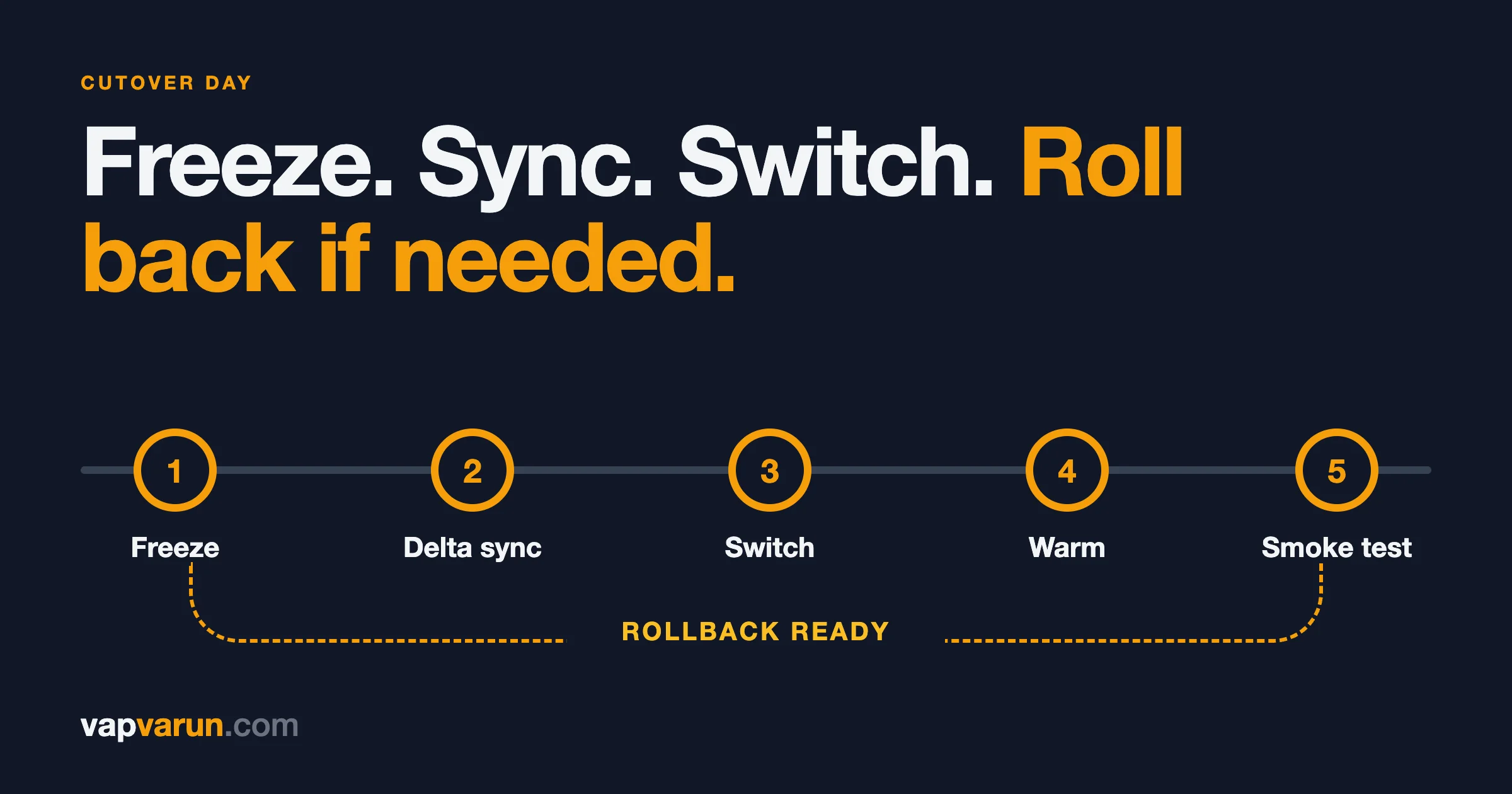
Cutover day for a high-traffic site comes down to one idea: the switch should be small, reversible and boring. All the hard work happens before it. On the day, you freeze changes to content, copy across whatever was created since the last sync, switch the address to the new site, warm it up, run a fixed list of smoke checks, and keep a way back that you have practised. This post is how our team at Wbcom Designs runs that day, and what we write down so nobody improvises at the busiest moment of the project.
It is written for the people who approve the window and for the developers who will run it. Most of it is plain language for decision makers: what happens, who must be available and what could go wrong. A marked developer section near the end has a smoke-check script and the shape of a rollback. You can skip it.
Cutover day is the middle of a longer method. The weeks before it are covered in How We Migrate a 2,000-Post Content Network Without Breaking a Single URL. The first month after it is covered in the last post of this series. If you want to see how we apply the same discipline to routine changes on live sites, read How We Update Five Live Sites Without Breaking Them.
The short version
- Cutover day is a short, scripted event. If it feels dramatic, the preparation was not finished.
- Freeze content, not the site. Readers keep reading. Editors stop changing things for a set window.
- Re-sync the delta. Anything created or changed since the last copy is copied again before the switch.
- Switch at a quiet hour, with the old site still alive. The old site is your rollback.
- Warm the new site and run the same smoke checks every time. A list beats memory.
- Know the exact point of no return, and decide before the window who can call a rollback.
Who needs to be there
A cutover is a team activity, even when only one person types. Before the window we name:
- The switch operator. The person who makes the change and runs the checks.
- The reviewer. A second person who reads the checks as they are run. Two sets of eyes catch the check that was skipped.
- The editor on call. Someone from the newsroom or content team who can confirm that a real article looks right.
- The decision owner. The person on your side who can say "go" or "roll back," and who is reachable for the whole window.
- The host and DNS contacts. People who can change records or lift a firewall rule if needed, with their numbers written down.
We also agree the rollback trigger in advance. For example: "If more than a few key pages return errors after the switch, or the home page does not return a normal page, we roll back." A rule agreed in a calm meeting is easier to follow than a judgement made at midnight.
Choosing the window
The window is the quietest period for your readers, not for your team. For a news site that usually means overnight in the main audience's time zone and away from scheduled events such as elections, match days or earnings. Our service page puts it simply: the switch is made at a quiet hour. Check your analytics for the real low point of the week, not a guess.
Avoid these:
- A day with a planned big story, a product launch or a campaign send.
- The hours before a holiday when nobody can fix a problem.
- A window where the host, the DNS provider or the CDN has its own maintenance.
One week before: the pre-flight
The pre-flight is a read-only pass over everything the switch will touch. It is done days ahead so surprises arrive with time to fix them.
- DNS as the world sees it. Look up the current records for the domain and the www name, including mail and verification records. Email and Search Console verification must survive the switch. Local lookups can mislead because of caches, so we query a public resolver over HTTPS.
- Back up the DNS records and the zone settings. If something goes wrong, you want a copy of exactly what was there.
- Find out where the zone lives. The domain's DNS must be in the same place as the new site's routing for some setups. If it is in another account, moving it is its own stage, done first with the old site still serving. In one case on our side, the client kept control of the zone, so we used a different route: the domain became a custom hostname on our own zone. That avoided moving a registrar at all.
- List the settings that interfere. On the CDN in front of an old WordPress site we check script rewriting features, platform optimisation add-ons and the browser cache time. A browser cache time of four hours on the old site means readers' browsers can hold old pages for hours after the switch, so it must change to respect the new site's own headers.
- Dump and back up every custom rule. Cache rules, firewall rules, redirect rules and page rules. Some will need to be switched off at the moment of cutover, and you must be able to switch them back.
- Check head tags and crawlers. Robots rules, sitemaps, analytics tag, verification tags, and that search and AI crawlers you want are allowed in.
Our recorded pre-flight for earlier cutovers was written into the project notes, so the next site started from a proven list.
The content freeze
A content freeze is a short, agreed period when editors stop creating or changing content in the old system. It exists because anything saved during the move can be lost. A reporter who fixes a typo in the old system after the last copy will see it vanish when the new site goes live.
What we freeze, and what we do not
- We freeze editing. No new posts, no edits to published posts, no media uploads, no menu or settings changes.
- We do not freeze reading. The old site keeps serving readers until the switch.
- We keep an emergency path. If the newsroom must publish breaking news during the freeze, they publish in the old system and send the link to the switch operator, who adds it to the delta list. A freeze with no emergency path will be broken, and a broken freeze is worse than an agreed exception.
How long
As short as the delta sync allows. The freeze starts shortly before the final copy and ends when the new site is confirmed healthy. We prove how long the delta sync takes by running it on the previous days, so the freeze length is a measured number, not a hope. We do not publish a number here, because it depends entirely on how much content changes and how fast your host is.
The things people forget to freeze
- Comments and form submissions that are stored in the old database.
- User registrations and profile changes.
- Orders, subscriptions and anything that carries money. For these, a freeze is not enough, and the design must say where each new order goes during the switch.
- Scheduled posts that will go live during the window. Either move them earlier or later, or make sure the schedule exists in the new system.
- Automated jobs that write content, such as feeds that import items into the site.
The delta re-sync
The delta is everything that changed between the last full copy and the freeze. We design for it from the first day of the project, because a migration that can only be run once is a migration that will lose the last day of content.
Three habits make the delta safe:
- The import is idempotent. Every imported record carries its old ID, and the importer updates a record if it exists and creates it if it does not. We describe this in the previous post of this series on mapping the content model. Running the importer again at cutover only touches what is new or different.
- We compare, not trust. After the delta, we count again: posts by status, media files, authors, categories and redirects, old against new. Every difference has a reason.
- We cover changes and deletions, not only creations. A post unpublished after the last copy must not reappear. A post edited after the last copy must show its latest text. A post deleted must redirect or return a proper not found.
This is the same pattern we use for community migrations. Our forum importers read the old tables, match users by ID and can be re-run to catch up while the old forum stays live. When we moved communities from a hosted network, the method included a delta re-sync at cutover and a verification pass after it.
What to check after the delta
- The newest posts from the old site exist on the new one, with the right text.
- Posts edited during the last day show the new text.
- Posts that were unpublished or deleted are gone or redirected.
- The sitemap on the new site lists the new posts.
- Any redirect created for the new posts exists.
DNS, TTL and the actual switch
The switch itself should be the shortest step of the day. How short depends on the design.
DNS and TTL
TTL, or time to live, tells resolvers how long they may cache a DNS record. Cloudflare's documentation explains the trade-off: a longer TTL increases the chance of cached results, but it also means updates take longer to go into effect. For records proxied through Cloudflare, the TTL is fixed at 300 seconds, so changes take effect quickly, though your own local DNS cache may take longer. See Cloudflare's page on DNS record TTL.
If your records are not proxied and you plan to change them, lower the TTL well before the window, so that by cutover day resolvers hold the old value only briefly. Then raise it again after a stable week. Check the real value with a public resolver rather than trusting what the control panel says.
Our preferred switch: change the route, not the DNS
Where we can, we avoid changing DNS at all. The domain's DNS stays where it is, and the new site is attached in front of the old one with a route. The old site keeps running, untouched and non-public. That makes the switch and the rollback two sides of the same small action: add the route to switch, remove the route to go back. After switching, we purge the edge cache so no old copy survives.
The order on the day
- Confirm the decision owner and the reviewer are present.
- Announce the start of the freeze to editors.
- Run the final delta sync and the counts.
- Switch off the cache and rewrite rules on the old zone that would interfere, having backed them up.
- Make the switch.
- Purge the edge cache.
- Warm up and run the smoke checks.
- Decide: go or roll back.
- Lift the freeze.
Google's guidance on moves also reminds you that crawlers behave differently around a move. Its documentation notes that Googlebot may temporarily crawl the new site more heavily than usual, and that you should make sure the new site can handle it. It also advises having a robots file ready that reflects what you want crawled. Read the details in Google's site move guide.
Cache warm-up
A new site with an empty cache is slow for the first visitors. On a high-traffic site, those first visitors arrive in a rush. Warming the cache means requesting the pages that matter before readers do.
- The home page and main section pages.
- The most visited articles, taken from analytics, not guessed.
- The sitemaps, including the index and each child file.
- Feeds, search pages and any page that does a heavy query.
We confirm the warm-up works by requesting a page twice and checking the cache status header: the first request should miss, and the second should hit. We also check that the cache policy is the new site's own, not a leftover from the old setup. On our cutovers we also test across hosts: a request with a fresh query string on the preview address first, and then on the real domain, to confirm the domain's cache returns a copy with the right canonical address.
For sites that render pages on request from a cache, as ours do, our design note in Headless WordPress With 2,000+ Posts explains why one cache that we clear on publish is easier to reason about on cutover day than two.
Smoke checks
Smoke checks are a short, fixed list that answers: is the site basically healthy? We run the same list on every cutover, because a list does not get tired.
Headers and routing
- The home page returns 200 directly. It must not be a redirect.
- The www name redirects once to the main name, and plain HTTP redirects to HTTPS.
- Response headers do not show the old stack. For a move off PHP, there should be no PHP header in the response.
- The admin or editing address responds as expected.
- Cache status shows a miss and then a hit on repeat requests.
Content and search
- A sample of articles from different years, with images, embeds and the right byline.
- The saved URL list from before the move, run again against the production domain. The old sitemap no longer exists once DNS or the route changes, so this list is the only copy.
- Canonical tags now read the production domain, not a preview address.
- Robots file allows what it should. The sitemap lists real, live addresses.
- Structured data is present on articles.
People and forms
- A real contact or newsletter form submission, with the owner's go-ahead, to confirm the message arrives.
- Login works for an editor.
- Search on the site returns results.
- The page looks right on a phone and on a desktop, in light and dark modes if the design has both.
- Analytics receives a real hit with the right property ID. Tag presence alone is not proof.
Go or no go
The reviewer reads the results aloud. Any failure that the rollback rule covers means roll back. Anything else is written down, fixed quickly or scheduled, and the freeze is lifted only after the decision owner agrees.
A rollback that has been practised
A rollback is not a sentence in the plan. It is a short list of actions that someone has run before. We design it so that going back is as small as going forward.
What our rollback looks like
Because the old site stays running and the switch is a route, rolling back is this:
- Remove the route that points at the new site, and deploy. The old site serves again at once, because DNS never changed.
- Turn the old cache rules back on, and restore the browser cache setting from the backup.
- Purge the edge cache.
- Re-run the smoke checks on the old site.
- Tell editors the old system is live again and the freeze has ended.
These steps are written before the window, with the exact commands or screens, and with backups of every setting they restore.
Why rehearse it
A rollback you have never run is a hope. We recommend rehearsing it against a staging copy before cutover day: switch, check, go back, check again. The goal is that the switch operator has done the back-out at least once, and that the backups restore what they claim to. It is also the best way to find the missing step, such as a setting nobody backed up.
The point of no return
Some changes cannot be undone by a route. New content created on the new site after launch does not exist on the old site. So the plan states the moment after which rolling back means copying new content backwards. Until that moment, rollback is clean. After it, rollback is still possible, but it has a cost, and the decision owner must accept it knowingly. We keep the old server intact and non-public for a month so this stays possible, and retire it only after a clean month.
What triggers a rollback
- The home page, a main section page or key articles return errors.
- Forms, login or search fail and cannot be fixed quickly.
- Canonical tags or robots rules are wrong in a way that would be indexed.
- The new site cannot handle the load.
Server errors deserve special care. Google documents that server errors make its crawlers temporarily slow down, and that already indexed addresses are kept for a time but are eventually dropped if the errors continue. Its page on HTTP status codes and Google's crawlers sets this out. That is the reason we would rather roll back quickly than let a broken site sit in public for hours.
After the switch
- Submit the new sitemap in Search Console, and keep an eye on crawling.
- Keep the redirects. Google advises keeping redirects for as long as possible.
- Watch error logs and the not-found log for the first hours and the first days.
- Lift the freeze, and tell editors where they edit from now on.
- Write down what happened. Time of each step, what failed, what was changed. The notes help the next move.
Then the 30-day watch begins. We cover it in the last post of this series. It matches what our WordPress migration service promises: a cutover at a quiet hour with a way back ready, then 30 days of Search Console monitoring with problems fixed inside the migration.
Common mistakes on cutover day
- No freeze, or a freeze with no emergency path.
- A delta that only covers new posts, not edits and deletions.
- Forgetting old cache settings that hold stale pages in browsers.
- Testing only the home page.
- Running the checks from memory. Use the list.
- No named decision owner.
- Retiring the old site on day one. Keep it for a month.
- A rollback nobody has run.
For developers: a smoke-check script and the rollback shape
This section is for developers. Decision makers can skip it.
The smoke checks are most useful as a script that prints one line per check. This sketch uses plain curl. Replace the domain and the path list with your own.
#!/usr/bin/env bash
# smoke.sh: run after the switch. One PASS or FAIL line per check.
D="example.com"
UA="Mozilla/5.0 (compatible; cutover-smoke)"
fail=0
check() { if [ "$2" = "$3" ]; then echo "PASS $1"; else echo "FAIL $1 (got $2, want $3)"; fail=1; fi; }

# 1. Home is 200, not a redirect.
check "home 200" "$(curl -s -o /dev/null -w '%{http_code}' -A "$UA" https://$D/)" 200

# 2. www redirects once to the apex, http to https.
check "www 301" "$(curl -s -o /dev/null -w '%{http_code}' -A "$UA" https://www.$D/)" 301
check "http 301" "$(curl -s -o /dev/null -w '%{http_code}' -A "$UA" http://$D/)" 301

# 3. The old stack is gone: no PHP header.
h=$(curl -sI -A "$UA" https://$D/ | tr -d '\r' | grep -ic '^x-powered-by: php')
check "no php header" "$h" 0

# 4. The saved URL list: every path returns 200 or a single 301.
while read -r path; do
  code=$(curl -s -o /dev/null -w '%{http_code}' -A "$UA" "https://$D$path")
  case "$code" in 200|301) ;; *) echo "FAIL $path ($code)"; fail=1 ;; esac
done < saved-urls.txt

# 5. Cache: first request may miss, second must hit.
curl -s -o /dev/null -A "$UA" "https://$D/?warm=$$"
c=$(curl -sI -A "$UA" "https://$D/?warm=$$" | tr -d '\r' | grep -i '^cf-cache-status' | awk '{print tolower($2)}')
check "cache hit" "$c" hit

exit $fail
Run it from a machine that is not on your office network, so it sees what readers see. A firewall may block a plain curl agent. If it does, say so in the notes and run the same checks with a real browser.
For the rollback, the important point is that every change on cutover day is recorded as a reversible step. Keep a short file with three columns: the step, how to undo it, and where the backup of the previous value is. When someone says "roll back," the operator reads the file from the bottom up. The same file is the evidence trail afterwards.
A last developer note: take a backup of the exact configuration that is live before the window, and diff it against the configuration after the rollback rehearsal. If the diff is not empty, the rollback is not complete.
Frequently asked questions
How long should a content freeze last?
As short as the final sync allows. Measure the sync on the days before, then set the freeze to that time plus a margin. We do not quote a fixed number because it depends on how much content changes and how quickly the host responds.
Can editors keep publishing during the move?
Yes, up to the freeze. During the freeze, urgent items go through an agreed emergency path and are added to the final sync.
Do we need to lower DNS TTL before cutover?
If your records are not proxied and you will change them, yes, well before the window. For records proxied through Cloudflare, the TTL is fixed at 300 seconds. Better still, design the switch so that DNS does not change at all.
What if we need to roll back after the new site has taken orders or comments?
That is the point of no return, and it needs a plan before the day. Money journeys should not change hands during the window unless the design says where each order lands.
How long do you keep the old site?
We keep it intact and non-public for a month after launch and retire it only after a clean month.
Will rankings drop at cutover?
They can move for a while after any large change, and nobody can honestly promise otherwise. Google says it can take a few weeks or more for new addresses to replace old ones on medium-sized sites. What we promise is the process: addresses accounted for, signals carried across and a way back.