Three Entry Points Every Data Store Needs
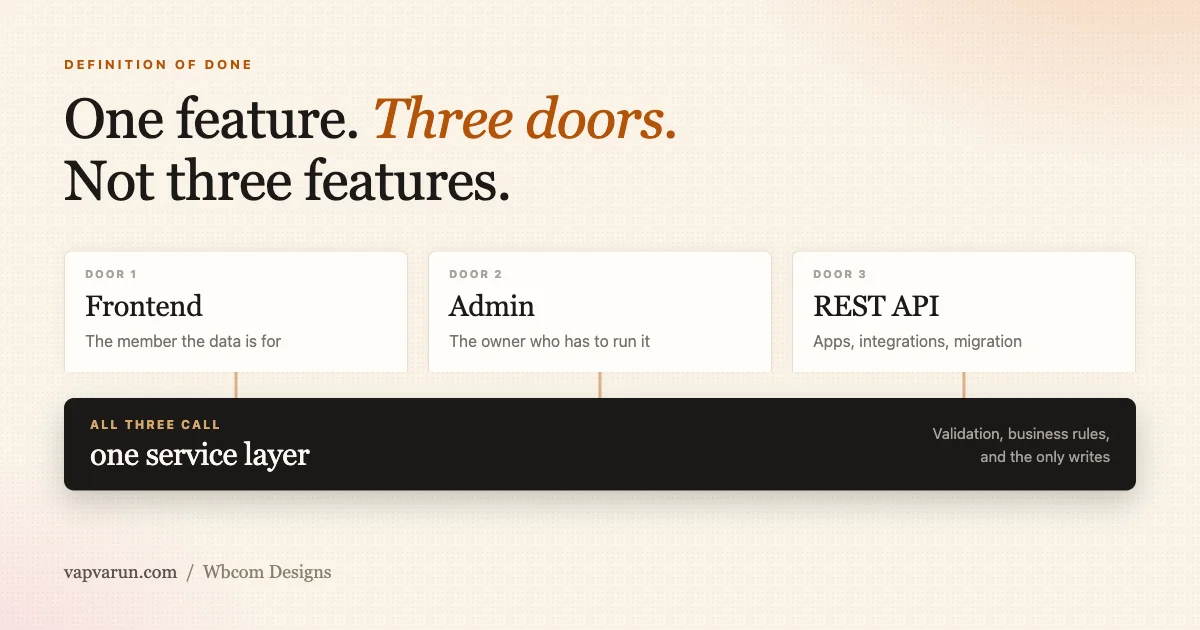
Every WordPress product we maintain eventually grows a custom table. A queue of import jobs, a ledger of vendor payouts, a log of moderation actions, a set of course progress records. The table itself is never the hard part.
The hard part is deciding, before a single row gets written, how that data will actually be reached once it exists.
Our standing internal rule answers that question the same way every time: a custom data store is not done until it has three entry points, and all three are part of the definition of done, not a follow-up task for later.
A frontend surface for the person the data is actually for. An admin screen for the site owner who has to run the thing. A REST API so the data can leave the database and go wherever it needs to go next.
Ship one or two of those and you have not shipped a smaller version of the feature. You have shipped a different, weaker feature that happens to share a table schema with the one that was planned.
This article is about why we hold that line, what actually breaks when a team skips one of the three doors, and how we keep the cost of building all three from tripling the cost of building one. We also walk through a real example from Learnomy, our LMS, because the rule is easier to trust once you have seen it hold up in shipped code rather than in a slide.
The rule we do not negotiate on
“Entry point” is doing specific work in this rule, so it is worth being precise about what counts. An entry point is a place outside the database where a real actor, a member, a site owner, another system, can read or write the store without going around it. Three actors, three entry points.
- Frontend: the surface where the member or customer actually uses the data day to day.
- Admin: a backend screen where the site owner can see, configure and correct the data.
- API: a REST surface to read and populate the store from outside the WordPress admin entirely.
None of these three is optional in the sense of “nice to have if there is time.” Each one serves a different person who has a legitimate, foreseeable reason to touch the data, and each one fails a different person if it is missing.
That is the test we apply when someone proposes cutting a door to hit a deadline: who exactly loses access, and are we comfortable telling them that in plain language.
A table that only has a frontend looks finished to the person who built the frontend. A table that only has an admin screen looks finished to whoever needed to configure something once and never thought about the customer using it daily. A table that only has an API looks finished to the developer who is comfortable in Postman and forgot that the site owner is not.
Each of these is a half-finished feature wearing a finished feature’s clothes, because the person who built it was using the one door they happened to build, and from inside that door everything looks fine.
The three entry points, and who walks through each one
It helps to lay the three doors out side by side, because the failure mode is different for each one. The table below is the version of this rule we actually paste into a code review comment when a pull request is missing a door.
| Entry point | Who it serves | What breaks without it |
|---|---|---|
| Frontend | The member or customer the store exists for | The data fills up with nobody consuming it, or stays empty because nothing prompts anyone to write to it |
| Admin | The site owner running the install | Rules get enforced that the owner cannot see, configure, or correct, and every question becomes a support ticket only we can answer |
| API | Other systems: mobile apps, integrations, migration tooling, reporting | The data cannot leave the site, so nothing outside the admin screen can read or write it |
Notice that none of the three rows describes “the developer who built it.” That is deliberate. A door that only the original author can reach through debugging tools or a database client does not count, because the whole point of an entry point is that someone else can walk through it without asking us for help first.
We treat this the same way we treat the checklist in our big-site readiness checklist: both are standing rules we run before marking anything done. Big-site readiness asks whether a feature survives contact with 2,000 rows.
The three-doors rule asks whether a feature survives contact with the three different people who will need to touch it. They are sibling gates, not competing ones, and a table can pass one and fail the other.
What breaks when a door is missing
Each missing door produces a specific, recognisable failure, not a vague sense that something is unfinished. It is worth walking through each one honestly, because the honest version is more convincing than the abstract version.
Missing frontend
This is the most visible gap and, in our experience, the least common one to ship by accident, because it is obvious in a demo. The store fills with data nobody consumes, or it stays permanently empty because nothing in the product actually writes to it.
This is the exact shape of “we built it and usage was zero” as a retrospective finding: not that the feature was bad, but that nobody who needed it could reach it.
Missing admin
This is the one we consider most under-rated, because it fails quietly instead of loudly. Picture a cap, a threshold, or a rate limit that is live in code, enforced on every request, and has no settings field anywhere in the admin. The rule is real. It affects real customers. Nobody who runs the site can see it, change it, or even confirm it exists.
Customers end up governed by a decision nobody ever showed them, and the site owner cannot answer a basic question about their own product.
The second failure mode of a missing admin door shows up later, during an incident rather than during normal operation. Something goes wrong with the data, a duplicate record, a stuck job, a value that should not be possible, and the owner has no way to inspect it or correct it themselves.
Every one of those incidents escalates straight to us, because we built the only door into that table and it happens to be a code editor.
Missing API
This is the door that is easiest to defer because nothing visibly breaks on day one. It shows up later, and it shows up as lock-in. Migrating data in from another system becomes manual re-entry, because there is no programmatic way to populate the store.
Migrating data out, if a customer ever wants to leave, becomes impossible, which is a thing we should never do to our own customers even by accident.
Integrations that a customer’s own team wants to build against the data have nowhere to attach. Test data has to be created by hand through the admin UI one row at a time, which quietly caps how thoroughly the feature is ever tested, because nobody seeds a thousand realistic rows by clicking a form a thousand times.
The API gap connects directly to something we wrote about in why a bug report is a lead, not a spec: a fix that lands on one surface and misses the others is the same category of mistake as a feature that ships with one door and misses the others.
In both cases the work looks complete from the vantage point of whoever did it, and incomplete from the vantage point of everyone else who touches the same data.
| Symptom you actually observe | Missing door | What to build |
|---|---|---|
| We shipped it and usage was zero | Frontend | A member-facing surface that makes the data visible and actionable where people already work |
| Every question about this becomes a support ticket for us | Admin | A settings and inspection screen the site owner can use without asking us |
| The customer wants their data in their BI tool and we have no answer | API | A REST route to read the store, with pagination and the fields the customer actually needs |
| We cannot seed realistic test data | API | A REST or CLI write path that lets QA and CI populate the table at scale |
| A rule is being enforced that the owner says they never configured | Admin | A settings field for the threshold, with the current enforced value shown as the default |
| The admin screen and the frontend disagree about what is valid | Shared service layer | One validation path both doors call, so they cannot drift apart |
That last row matters enough that it gets its own section, because it is the difference between a rule that is cheap to follow and a rule that quietly gets abandoned under deadline pressure.
One feature, three doors, not three features
The three entry points are not three features that happen to share a table. They are one feature with three doors into it. That distinction changes how the thing should be built, and it is the part of the rule that is easy to state and easy to violate without noticing.
If the frontend, the admin screen, and the REST route are each implemented as separate code paths that each talk to the database on their own, they will drift. Not eventually, immediately.
The admin screen validates a field one way. The REST route validates the same field a slightly different way, because whoever wrote it was not looking at the admin code. The frontend writes a field the admin screen was never updated to display.
None of these are exotic bugs. They are the default outcome of three doors with three separate implementations, and they are exactly the “admin screen and the frontend disagree about what is valid” symptom from the table above.
The second half of the rule is what prevents that: all three doors call the same service layer. One class, one module, holds the validation, the business rules, and the database writes. The three doors do not each reimplement the feature.
They each translate between their own request shape, a form submission, a REST payload, a CLI argument list, and that one shared service.
This is also what makes the rule affordable rather than expensive. On paper, three entry points sounds like three times the engineering work. In practice it is closer to one implementation and a bit, because once the service exists, the second and third doors are mostly thin adapters: parse the request, call the service, shape the response.
Teams that find this rule expensive are almost always the teams that put the actual logic inside the first door they happened to build, so the second and third doors have to reimplement it rather than call it.
The worked example: Learnomy’s migration system
The clearest live example of this pattern in our own portfolio is the course migration system in Learnomy, our LMS. It exists to bring courses in from LearnDash, Tutor LMS, and LifterLMS, and it is reachable through exactly three doors, all of which sit on one shared import service.
- An admin import wizard, for a site owner who wants to click through screens and watch progress.
- A REST surface under
learnomy/v1/admin/migration, with routes forsources,preview,run,runs, a single run by id, and undo. Every route requires themanage_optionscapability. - A WP-CLI command,
wp learnomy migrate, with subcommandspreview,run,undo,status, andruns.
What makes this a good example of the rule rather than just a list of three surfaces is what happens underneath them. All three doors call the same import service. A migration run started by clicking through the wizard produces the same run id, the same audit records, and the same undo behaviour as one started from the WP-CLI command on a server terminal.
They cannot drift apart from each other, because there is only one implementation of “run a migration” for them to drift from. The wizard, the REST routes, and the CLI command are each a thin translation layer over that one service, not three separate attempts at the same logic.
That consistency is not a side benefit we noticed afterward, it is the reason the rule exists. A site owner running the wizard and a developer scripting the same migration from the command line, maybe as part of a staging refresh, get identical results because they are calling the same code.
If you want to see the same pattern applied to the broader hook and REST surface of that product, we cover it in the Learnomy developer platform post.
One door, one audience: the honest exception
It would be dishonest to present this rule as “every table always needs a member-facing screen,” because that is not what it says, and the Learnomy migration system is itself the counterexample worth naming directly.
Course migration is an admin-only operation. There is no member of the site who should ever run a course import. It is something a site owner or an implementation partner does, typically once, when standing up a new install or consolidating an old one.
So the “frontend” door for that particular store is the admin import wizard, not a separate member-facing page. Building a customer-visible screen for an operator-only tool would not satisfy the rule, it would just be a fourth surface nobody asked for and nobody would use.
The rule is about giving every audience that legitimately needs to reach the data a way to reach it, not about mechanically producing three UI surfaces regardless of who is supposed to use them.
The test stays the same one from earlier in this piece: who has a real, foreseeable reason to touch this data, and can they reach it today. For migration runs, that list is site owners through the wizard, scripted operations through WP-CLI, and any external tooling that wants to trigger or inspect a run programmatically through the REST routes.
Nobody on that list is a course learner, so a learner-facing screen was correctly never built. Saying that plainly, instead of pretending the rule always produces exactly the same three UI shapes, is what keeps this a working engineering standard rather than a slogan that gets quietly ignored the first time it does not fit.
Where the logic actually lives
The service-layer half of the rule only holds if everyone agrees on which concerns belong in the shared service and which belong in the individual door. Get this split wrong and you end up with either duplicated logic across the three doors, or a service that cannot be reused because it assumes a specific request shape.
| Concern | Belongs in the service | Belongs in the door |
|---|---|---|
| Business rule validation (is this run allowed, is this state legal) | Yes, the single source of truth | No |
| Capability and authentication checks (is this caller allowed at all) | No | Yes, each door has its own auth model |
| Database reads and writes | Yes, the service is the only writer | No |
| Request parsing (form fields, JSON body, CLI arguments) | No | Yes, translation into a plain call the service understands |
| Response shaping (HTML fragment, JSON payload, CLI table output) | No | Yes, translation back out of the service’s plain return value |
| Rate limiting and pagination | Shared defaults live in the service | Door-specific limits (page size in a UI versus a bulk API call) can override them |
The row worth reading twice is capability and authentication. It is tempting to push permission checks down into the service so they only have to be written once, but that instinct fights the actual shape of the problem, because each door has a genuinely different auth model.
Admin has a nonce plus a capability check on a logged-in session. REST has a capability callback evaluated per request with no session state to assume. CLI has shell access as its own trust boundary, where the operator is already authenticated to the server.
Duplicating capability logic into the service does not remove the duplication, it just moves it somewhere the doors cannot see it and cannot adapt it to their own model.
What the service should own instead is the business rule that sits behind the permission check: is this specific action legal given the current state of the data, regardless of who is asking. “Is this caller an administrator” is a door concern. “Can this migration run be undone right now, given its current status” is a service concern.
Keeping that line clear is what lets the same service serve three doors with three different security models without any of them trusting the wrong thing.
For developers: what the three doors look like in code
The rest of this article has been about why the rule exists. This section is for the developers building on top of our products, or building alongside our team, who want the concrete shape of it. If you are evaluating us as a long-term engineering partner rather than writing code against our stack, the checklist near the end is the part worth skimming even so.
Start with one service class as the single writer for the store. Every insert, update, and delete for that table goes through it, and nothing else touches the table directly, not the admin screen’s save handler, not the REST controller, not the CLI command.
If you find a raw query anywhere outside that class, that is the signal the rule has already started to erode.
Permission checks live in the door, business rules live in the service, as covered above. In practice this means an admin form handler checks a nonce and a capability before it ever calls the service. A REST controller registers its route with a permission_callback that checks the relevant capability before the route’s handler runs.
A CLI command relies on shell access as its trust boundary and skips the web-request checks entirely, because they do not apply. All three, once past their own gate, call the same service methods with the same arguments and get the same guarantees back.
WordPress gives you the seam for the REST door directly: the routes and endpoints handbook documents permission_callback as a first-class part of route registration, not an afterthought. A route registered without one is the door left unlocked.
A useful sanity check on whether the split is right: a REST route that correctly wraps a service is usually a small file. Parse the request, call one or two service methods, map the result to a response, done.
If a REST controller in your codebase is large, that size is rarely REST-specific complexity. It is almost always a sign that business logic leaked out of the service and into the route, which means the admin screen and the CLI command are not actually sharing it.
The REST surface for Eventonomy, our events platform, follows this shape, and we cover its route and hook surface in more depth in the Eventonomy developer platform post if you want a second worked example of thin doors over a shared service.
Idempotency and audit trails belong in the service, not in each door, for the same reason validation does. If “running this import twice should not duplicate the courses” is enforced inside the import service, every door inherits that guarantee automatically.
If it is enforced inside the admin wizard’s JavaScript instead, the WP-CLI command has no such protection, and a careless double-run from a terminal creates duplicate data the wizard would have quietly prevented.
The same logic applies to audit logging: write the audit record inside the service call, once, and every door that triggers that call produces a consistent trail. That is exactly what lets the Learnomy migration wizard and CLI produce identical run records without either one being aware of the other’s existence.
A short checklist we run before calling any data store’s implementation done, developer-facing version:
- Is there exactly one class or module that writes to this table.
- Does every door call that class rather than querying the table directly.
- Does each door enforce its own auth model rather than deferring auth to the service.
- Would running the same action from the admin screen and from the CLI or REST route produce the same stored result.
- Is the store reachable from outside the WordPress admin at all, even read-only, for reporting and migration.
A short checklist before you call it done
For the decision maker evaluating whether this is the kind of standard worth expecting from a long-term engineering partner, the checklist is simpler than the code-level one above, and it applies to any product, ours or otherwise, that stores data on your behalf.
- Can the person the data is for actually reach it, without a developer’s help, through the product they already use.
- Can you, as the site owner, see and correct that data yourself, without filing a support ticket.
- Can your data get out, into a report, a BI tool, another system, without someone manually re-typing it.
- If you asked what happens when this runs from a script instead of the UI, would the answer be the same result, or a different, less trustworthy one.
These four questions map directly onto the three doors, frontend, admin, and API, plus the shared-service question that determines whether the first three actually agree with each other.
We run this same checklist alongside our big-site readiness pass before any list, grid, or data store in our portfolio ships, because a feature that scales to thousands of rows but is only reachable through one door is still an unfinished feature, just a fast one.
Why this is a standing rule, not a one-off checklist item
We maintain a portfolio of products, not a single plugin, and that is exactly why this rule has to be automatic rather than something we remember to apply on the projects we happen to be paying close attention to.
BuddyNext, Eventonomy, Learnomy, Listora, WP Sell Services, WB Gamification, and everything else we build shares this expectation, because a customer who learns “the REST API is solid on this one but missing on that one” has learned something true and unflattering about how we operate, not just about one product.
Owning the full stack, the WordPress core interactions, the database layer, the REST surface, and the frontend that customers actually touch, is the reason we can hold a rule like this consistently instead of hoping each team reinvents it correctly.
We wrote more about what that full-stack ownership looks like across the portfolio in our post on owning the complete WordPress platform stack, and the three-doors rule is one of the concrete, checkable things that consistency buys.
The test we keep coming back to is not whether a feature works. Almost everything we ship works for the person who built it, because they know where the one door is.
The test is whether a different person, a member who was never in the room, a site owner who is not a developer, a script that needs to run at three in the morning without anyone watching, can reach the same data through a door built for them.
When the answer is yes for all three, the feature is done. When it is yes for one or two, it is not smaller, it is just missing the parts that were never optional to begin with.