Website Redesign Cost: How We Quote It and Why Moving the Content Is Its Own Number
What does a website redesign cost, and why do two quotes for the same site differ by four times? Because a redesign is two jobs sold as one. The first is the build: design, templates, components, performance. The second is the content move: every page, photo, PDF and old URL carried to the new site and given a working home. On many sites the move is close to half the work, and it is the part that quotes quietly leave out or fold into a vague “migration” line. Our team quotes them as separate numbers, and this post explains how we do it, so you can use the same method whether you hire us, someone else, or do it yourself.
We will not publish a price list here. Prices depend on the site, and a number printed on a blog post helps nobody. What we will show is the method: what drives website redesign cost, how we count the content move, how we handle old URLs, who should own the hosting, and how to back up the old site before the old host lapses.
A public example: what the content move looks like in numbers
A luxury interior design studio owner described their situation in a public Webflow community thread. We could not re-open that thread when we wrote this, so treat the figures below as the owner reported them and not as something we verified. The shape of the project is what matters.
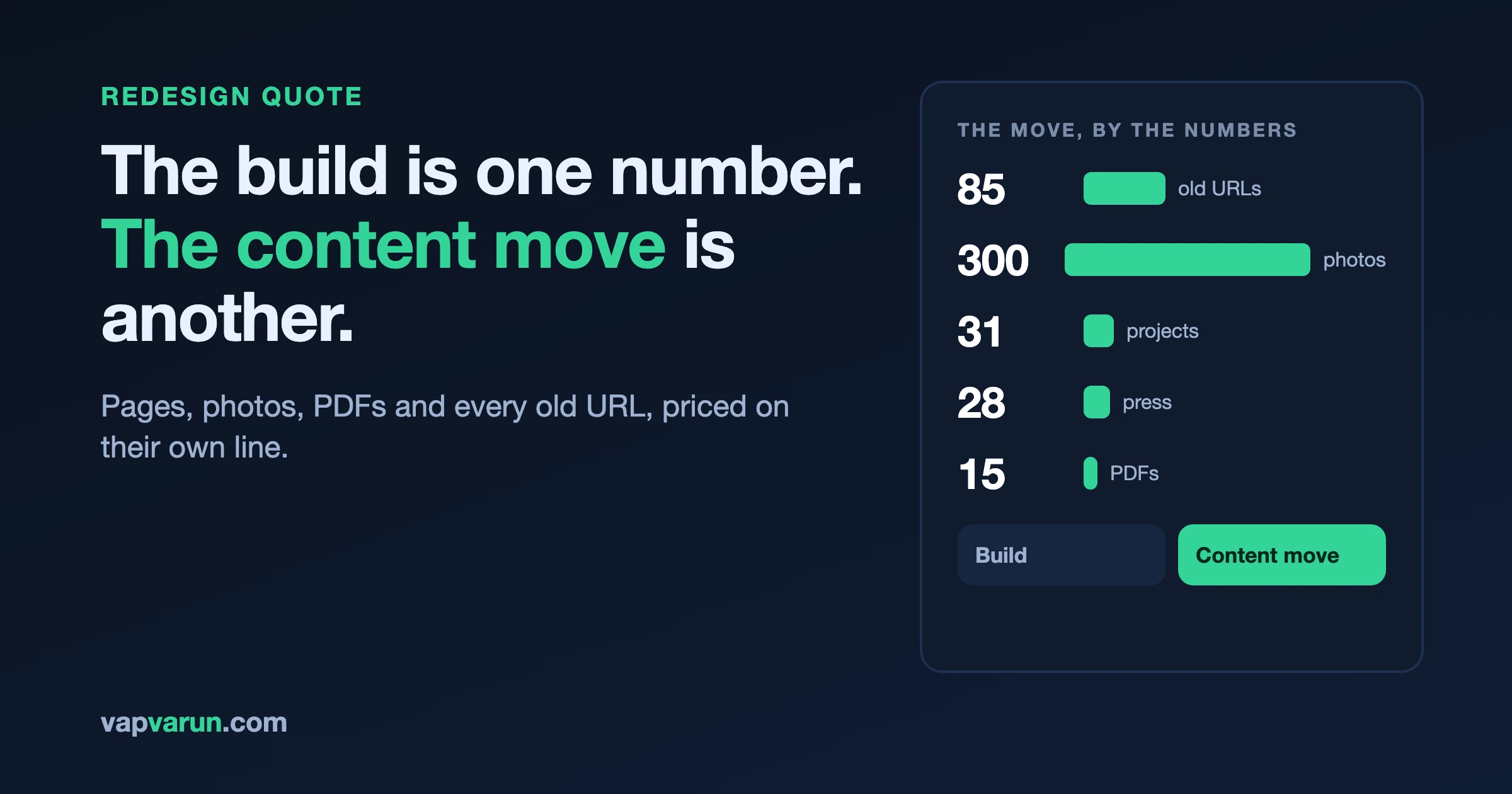
- The current site had 85 pages, and the plan was to cut it to 70.
- 31 of the pages were project pages, each with its own photo set.
- About 300 photos needed to be carried across.
- 28 press covers and 15 PDFs sat on the site.
- Every one of the 85 old URLs needed a redirect to somewhere sensible.
- The quotes the owner received ranged from roughly $7,500 to $30,000.
A spread of four times between quotes sounds like a mystery until you list what each bidder may have priced. One bidder saw “a nice portfolio site, 70 pages” and priced the design. Another saw 300 photos, 31 case-study pages, 28 press items, 15 downloadable PDFs and 85 redirects, and priced the labour of moving them. Both numbers can be honest. They are answers to different questions. That is why we ask the question in two parts.
The studio’s inventory, turned into work
| What the owner has | What it means as work |
|---|---|
| 85 old pages, 70 new | Each page needs a decision: keep, merge, rewrite or drop. At least 15 old URLs have no matching new page. |
| 31 project pages | One template, 31 entries to fill: title, text, photo set, captions, credits, order. |
| About 300 photos | Download, resize, convert, name, add alt text, upload, place. Rights and credits checked. |
| 28 press covers | Images plus a link or a document for each, and a decision about whether they live on one page or many. |
| 15 PDFs | Re-upload, re-link, and decide whether each PDF keeps its old address or gets redirected. |
| 85 redirects | A map with one row per old URL, a target for each, and a test that every row works after launch. |
None of the rows in that table is a design task. Together they are a project of their own, and they decide whether the studio keeps the search visibility and inbound links it has spent years earning.
What drives website redesign cost?
Most quotes depend on the same ten drivers. If you are comparing bids, check that each bidder has priced these, not guessed at them.
| Driver | Why it moves the number |
|---|---|
| Number of unique templates | Every template is designed, built and tested. Seventy pages on three templates cost far less to build than seventy pages on thirty. |
| Number of pages that move | Each page is handled by a person unless it can be imported cleanly, and most cannot. |
| Kind of content | Plain text is cheap. Galleries, tables, embedded forms, filtered lists and mixed layouts are slow. |
| Photos and media | Volume, size, rights, alt text and naming all take time. |
| Documents | PDFs are linked from other sites and from email. Moving them wrongly breaks those links. |
| Old URLs | The redirect map is research, writing and testing, not a plugin setting. |
| Integrations | Forms, CRM, booking, payments, newsletter and analytics each need setup and testing. |
| Search continuity | Titles, descriptions, headings, structured data and internal links decide whether rankings survive. |
| Review rounds | The number of rounds of changes, and who signs off on each, is an honest cost. |
| Hosting, launch and handover | Domain, DNS, SSL, backups, training and documentation. |
Notice how few of these are about how the site looks. A redesign that looks good and loses a decade of search traffic is a failed redesign, and the content move is where that gets decided.
How do we split a redesign quote into line items?
We use five line items. Each one has its own unit, so you can see what changes it. We are describing the structure, not prices.
| Line item | What it covers | What makes it bigger |
|---|---|---|
| 1. Discovery and plan | Crawl of the old site, inventory spreadsheet, goals, keep/merge/drop decisions, redirect strategy | Site size, how many people decide, how messy the old site is |
| 2. Build | Design, templates, components, forms, performance and accessibility work | Number of unique templates and custom features |
| 3. Content move | Pages, photos, PDFs, press, metadata, internal links, rebuilt layouts | Page count, photo count, how structured the old content is |
| 4. Redirects and search continuity | The old-to-new map, testing, sitemap, Search Console checks after launch | Number of old URLs and how many have no direct equivalent |
| 5. Launch and handover | DNS cut-over, backups, training, documentation, accounts in the client’s name | Number of systems connected, team size to train |
The reason to separate lines 2 and 3 is simple. They scale on different things. If you cut the page count from 85 to 70, the build barely changes and the content move shrinks. If you add a new template, the build grows and the content move may not. A single lump price hides this, and it is exactly where scope arguments start. When a client says “can we add five more project pages”, the answer is a number we can point at, not a negotiation.
Why we say the move is often close to half
On sites like the studio’s, with a lot of structured content and media, we find the move takes about as long as the build. On a small brochure site of ten pages it is far less. We do not hold to a fixed percentage. We count the inventory first, then decide. If a bidder will not tell you how many pages and photos they assumed, they have not counted.
How do you count the content move?
Start with a spreadsheet, not a conversation. A crawl of the old site gives you every URL. Add columns by hand.
- Old URL. Exactly as the site serves it, including trailing slashes and any query strings that matter.
- Page type. Project, press, service, article, contact, legal, other. This tells you which template it needs.
- Decision. Keep, merge into another page, rewrite, or drop.
- New URL. Where it lives after launch. For a dropped page, the page that now serves the same purpose.
- Media count. Photos and files on the page.
- Inbound links and traffic. From Search Console and analytics, so you know which pages matter.
- Owner. Who approves the new text.
The totals at the bottom are your quote inputs: pages by type, photos, files, redirects. When two bidders give very different prices, hand both the same spreadsheet and ask them to price from it.
Photos, press covers and PDFs
Photos look like the easy part and are not. Each needs to be downloaded at full size (the old site often holds only a compressed copy), cropped for the new layout, converted to a modern format, named sensibly, given alt text that describes the image, and placed. Credits and permissions need checking, especially for press images and architectural photography. Plan person-days per hundred photos, not a button click.
PDFs are the quiet risk. A downloadable brochure, a press kit or a price sheet is often linked from other websites, from email signatures and from search results. If its address changes and nothing redirects it, every one of those links breaks. Decide per file: keep the same address, or redirect old to new.
What happens to the old URLs that have no home?
Cutting 85 pages to 70 means at least 15 old addresses need somewhere to go. A redirect map gives each one a destination. The rule we follow: send people to the closest page that answers the same need.
| Situation | What we do |
|---|---|
| Page kept, URL unchanged | No redirect needed, but we still test it. |
| Page kept, URL changed | A permanent (301) redirect, one old URL to one new URL. |
| Two pages merged | Both old URLs redirect to the merged page. The merged page should cover both topics. |
| Page dropped, close substitute exists | Redirect to the substitute, such as the parent section or the nearest related page. |
| Page dropped, no real substitute | Let it return a clear “gone” or “not found” response with a helpful page, instead of redirecting everything to the homepage. |
| Old PDF or image people link to | Keep the address if you can, otherwise redirect to the new file. |
Redirecting every dropped page to the homepage is tempting because it is one line of configuration. It sends visitors to a page that does not answer what they were looking for, and it makes it hard to tell later which old pages mattered. We give each dropped page a considered target or let it end cleanly.
A sample map, as a table you can copy
| Old URL | Decision | New URL | Type |
|---|---|---|---|
| /projects/harbour-house | Keep | /work/harbour-house | 301 |
| /projects/old-flat-2014 | Merge | /work/early-projects | 301 |
| /press/magazine-feature-2019 | Merge | /press | 301 |
| /downloads/brochure.pdf | Keep address | /downloads/brochure.pdf | None |
| /news/office-move | Drop | (no equivalent) | Not found page |
These addresses are made-up examples for the layout of the table, not from any client. The point is the columns: old, decision, new, type.
Testing the map
A map you have not tested is a guess. After launch, run every old URL through a script or a crawler and check three things: the response is a single redirect (not a chain), it lands on the intended page, and the destination returns a normal page. Then watch Search Console for the following month. Our guide to the Search Console checks we run for thirty days after a migration lists what we look at. For bigger moves, such as a site with thousands of posts, our test of WordPress’s site-copy tool shows where automated copying left old URLs behind.
Who should own the hosting, domain and accounts?
The client. Everything that can be billed to the client’s own account should be, and the agency should be a user inside that account, not the owner of it. This is the part owners learn about the hard way, usually when a relationship ends or a card expires.
The accounts to put in the client’s name
- Domain registrar. The business owner is the registrant, with their own email address and two-step login.
- DNS. Wherever the records live, the client holds the login, and we have a named user.
- Hosting. Billed to the client’s card or account, not resold and not bundled into our invoice, so the business can see and pay it directly.
- CDN or security service. Same rule.
- Analytics and Search Console. Owned by the client’s Google account, with us added as users.
- Email and forms service. The client’s account, so submissions and mailing lists belong to the business.
- Code repository and backups. The client has access to a copy. A site that only the agency can restore is a site the agency owns in practice.
Why does this belong in a pricing article? Because it affects cost over time. If hosting is billed through the agency, the client pays a margin forever, and leaving is a project. If the client owns it, moving or fixing it is a normal job. We would rather be hired because the work is good than because the keys are in our pocket.
How do you back up the old site before the old host lapses?
Do this before the project starts, not after launch. A small-business owner in a public handover discussion described the usual pattern: the previous developer set up the hosting, the account sits in someone else’s name, the card on it eventually fails, and the site disappears with no copy anywhere. We could not verify that particular story, but the pattern is common enough that we treat the backup as step zero on every redesign.
What to save
- The files. The full web root, including uploads, themes and any custom code.
- The database. Everything, not just the posts.
- A crawl of the live site. The list of every URL and its response, so you can prove later what existed.
- DNS records. Exported or screenshotted before anything changes. Email breaks silently when someone loses an MX record.
- Form entries, orders and subscriber lists. Anything customers sent you, exported to a file you control.
- Analytics and Search Console data. Export the top pages and queries for the last sixteen months, which is the history Search Console keeps.
- Original media. Full-size photos from the owner’s own library, not only the compressed copies on the site.
- Existing redirects and the sitemap. They tell you what the previous team already promised to search engines.
For the developer: a minimal backup
If the old site runs on WordPress and you have shell access, this takes minutes. Store the results somewhere the client owns, and test a restore on a spare environment before you trust it.
wp db export old-site-backup.sql
tar -czf old-site-files.tar.gz wp-content/ wp-config.php .htaccess
wp option get siteurl
wp option get home
Keep the backup until the new site has been live and checked for at least a month. Our migration playbook for business sites covers the order of the other phases.
A scoping checklist you can hand to any bidder
Copy this list into your request for a quote. A bidder who answers every line has done the thinking. A bidder who skips half of it will meet those items as surprises, and you will pay for the surprises.
- How many pages exist today and how many will exist after launch?
- How many unique page layouts does the new design need?
- How many photos, press items and documents move, and who supplies the originals?
- Is the content move in the quote as its own line, with the page and photo counts you assumed?
- Who writes or edits new text, and who approves it?
- Is there a redirect map for every old URL, and who tests it?
- What happens to dropped pages?
- Which forms, booking, payment, CRM and email tools connect to the site?
- How many rounds of changes are included, and what does an extra round cost?
- Who owns the domain, hosting and analytics accounts at handover?
- Is there a backup of the old site before work starts, and where is it stored?
- What checks happen in the first thirty days after launch?
- What will the owner be able to change without calling anyone?
How should you read a quote range like $7,500 to $30,000?
Do not average it. Ask each bidder to tell you what is inside. In our experience a wide spread usually comes from four differences: whether the content move is included, whether redirects are mapped and tested, how many templates are custom designed, and whether the client owns the accounts at the end. A low quote that excludes the move is not cheaper, it is unfinished, and the missing work lands on you or on a second invoice. A high quote that includes a custom design system for a site that needs three templates is not safer, it is bigger than the job.
Put the quotes side by side in the five line items from earlier. Where a bidder left a line blank, ask. The answers will tell you more than the totals.
Frequently asked questions
How much does a website redesign cost?
It depends on page count, number of templates, the amount of content that has to move, integrations and how much support you want after launch. Quotes for the same studio site in one public thread ranged from about $7,500 to $30,000, as the owner reported. Ask for a quote split into build and content move so you can compare like for like.
Why is content migration priced separately?
Because it scales on different things from design. Page count, photo count and document count drive it, while template count drives the build. Separate lines let you change one without arguing about the other.
Do I need redirects if I am cutting pages?
Yes. Every old URL that has traffic or inbound links needs a destination: a closest-match page, or a clean not-found response where no substitute exists.
Should I redirect all old pages to the homepage?
We do not. It sends visitors to a page that does not answer their question and hides which old pages mattered. Map each one to its closest match.
Who should own the hosting and domain?
The business. Bill hosting and the domain to the client’s own account, add the agency as a user, and keep the logins in a place the owner controls.
When should I back up the old site?
Before work starts, and keep it for at least a month after launch. Save files, database, DNS records, form entries, analytics exports and original media.
How long does a content move take?
It depends on the inventory. Count pages, photos and files first, then estimate. Tell any bidder your counts, and ask for the assumptions behind their timeline.
Can the content move be automated?
Some of it can, such as bulk image processing and importing simple text pages. Layout rebuilds, captions, alt text and the redirect map need people, so expect a mix.
The short version
- A redesign quote is two numbers: the build and the content move. Ask for both.
- Count the inventory first: pages, photos, press items, PDFs and old URLs.
- Give every old URL a considered home, and test the map after launch.
- Put hosting, domain and analytics accounts in the client’s name.
- Back up the old site before work starts, and keep it for a month after launch.
If you want a second pair of eyes on a quote you have received, or a scoped estimate built from your own page inventory, you can reach our team through Wbcom Designs.