WordPress 7.2 Secrets API, Application Passwords and OAuth: Where Credentials Belong When AI Agents Call Your Site
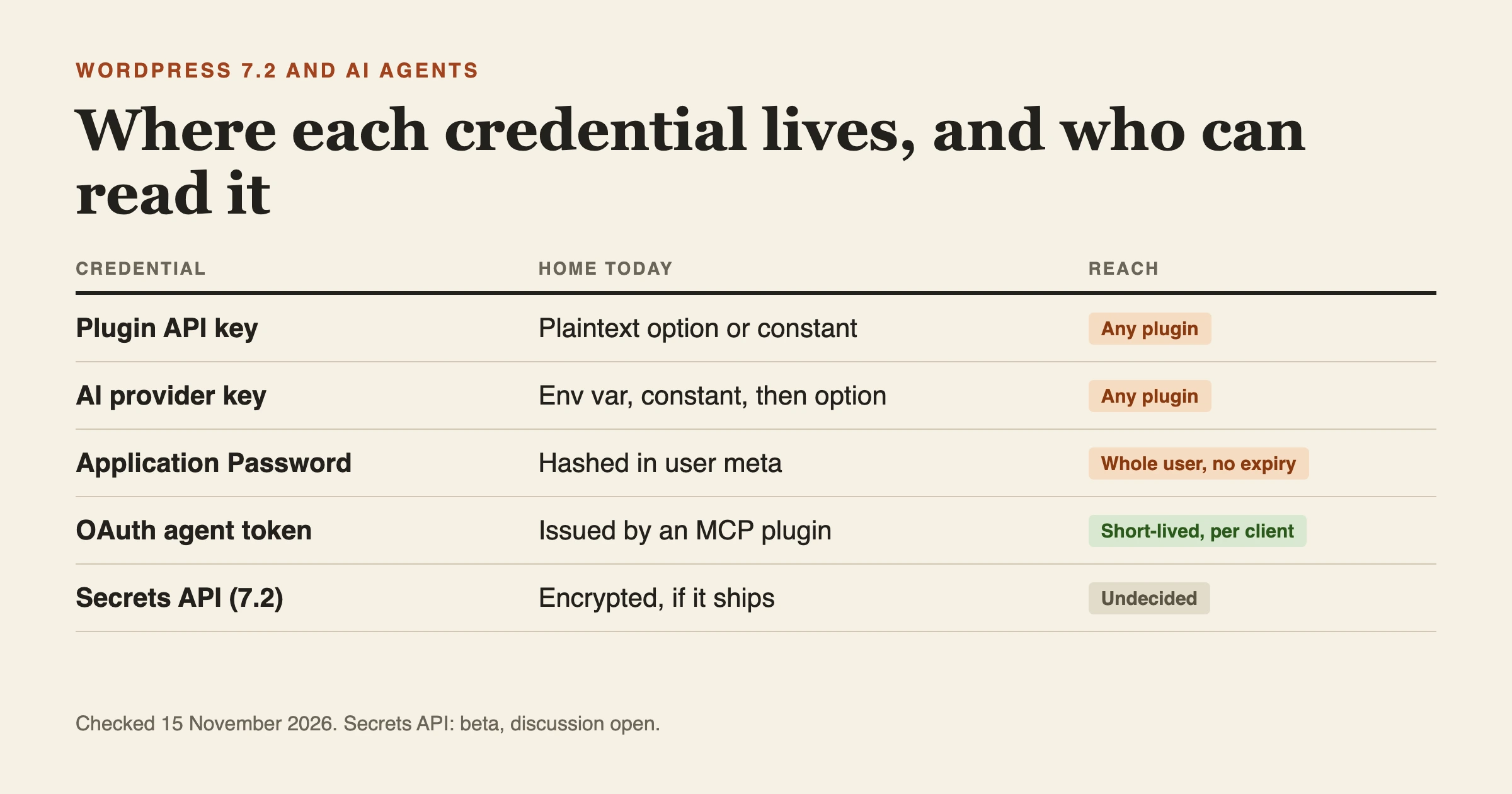
When an AI agent calls your WordPress site, give the agent its own narrow, revocable credential, and keep every credential your site holds for other services out of plain database rows. Today that means an Application Password for a dedicated low-privilege user for scripts, OAuth through an MCP plugin for chat-based clients, and environment variables or constants for provider keys. WordPress 7.2 may add a Secrets API for the last job, but as of 15 November 2026 its place in 7.2 is being argued in public. This post sorts the credential types, says where each one lives, and says what is still undecided.
Checked on 15 November 2026. WordPress 7.2 is in beta, with the final release scheduled for 8 December. Anything about the Secrets API below describes the developer note and the discussion under it, not a shipped feature.
What is the WordPress 7.2 Secrets API?
It is a set of core functions for storing credentials such as API keys and OAuth client secrets in encrypted form, with one previous version of each secret kept so you can rotate without a gap. Eric Mann described it in the core developer note The Secrets API in WordPress 7.2, published on 11 November and last modified on 13 November.
The reason it exists is plain. The August proposal says WordPress has no built-in way to store credentials, so plugins typically write API keys to the options table in plaintext, where they show up in database dumps, backups, staging clones and wp option get output. It also points out that AI integrations raise the cost of a leaked key, because a stolen model-provider key can mean metered spend on someone else's account.
The functions named in the note are:
wp_set_secret( $name, $value )stores a secret and returns aWP_Erroron failure.wp_get_secret( $name )returns aWP_Secretobject, ornullif the secret was never stored, or aWP_Errorif it exists but cannot be read right now.WP_Secret::reveal()is the only method that returns the plaintext value.wp_delete_secret(),wp_list_secrets()(names and metadata, never values) andwp_retire_secret_version(), which deletes the previous version.wp_import_option_as_secret()copies an existing option into a secret, leaves the option for you to delete and flags the secret for rotation.- The
*_network_secret()family for network-wide secrets on multisite. wp_is_secrets_api_available()andwp_secrets_provider_is_writable()for checking what the site can do.- A
wp_secret_changedaction that fires on create, update, import, delete or retire and passes fingerprints, never values.
The note's own minimal pattern looks like this:
$result = wp_set_secret( 'my-plugin/api-key', $api_key );
$secret = wp_get_secret( 'my-plugin/api-key' );
if ( $secret instanceof WP_Secret ) {
	$client->authenticate( $secret->reveal() );
}
Will the Secrets API actually ship in WordPress 7.2?
Not settled. The official 7.2 schedule puts Release Candidate 1 on 17 November, Release Candidate 2 on 24 November, Release Candidate 3 on 1 December and the release on 8 December. The schedule page does not mention the Secrets API. The comments under the developer note do:
- On 12 November, Ryan McCue wrote that he is "a strong -1 on this feature" and thinks it "should be backed out of core until the above is resolved." His argument is that secrets should be kept apart from application data and managed out of band, that a write API is easy to misuse, and that encryption adds little if the database is already encrypted. He also said the AI plugin's secrets bridge did not check whether the provider supported writes and discarded errors silently.
- On 13 November, Matt Mullenweg replied "I agree with @rmccue here" and added that it is "not a great time to be making ourselves a target for very sensitive things like that."
- Later on 13 November, Eric Mann asked to keep it in 7.2. He said the credentials are already in
wp_optionsin plaintext, that backing it out "leaves it undefended for another cycle," and that the read-only, host-managed design McCue asked for is what shipped. He offered to work with Altis on a provider before the release candidate.
The note records no final decision. Treat it as a feature that may or may not be in 7.2, and design your plugins and servers so that either outcome is fine. The same code is available today as a feature plugin, and a commenter from Updraft asked exactly the question you would expect: if it is only in 7.2, plugins that support older versions will wait before using it.
How does it store and rotate a secret?
According to the note, secrets are encrypted with libsodium's XChaCha20-Poly1305. Each secret gets its own key, derived from a random root key, and the root key is itself stored encrypted with a constant you put in wp-config.php called WP_SECRETS_KEY. By default the encrypted records live in the options tables. A drop-in file, wp-content/secrets.php, can replace the key storage, the record storage or the whole provider, for example to hand the job to a hosting platform's secret manager.
WP_SECRETS_KEY must be a base64-encoded random 32-byte value. New installs get one from the installer. Existing sites get a Site Health recommendation that generates the line to add below the salts. The note gives this command for making one yourself:
php -r 'echo base64_encode( random_bytes( 32 ) ), "\n";'Two warnings from the note matter for operations. First, this key is not like the salts. Changing or removing it makes stored secrets unreadable until the old value comes back. Second, without a usable key every read and write fails with a secret_key_unavailable error. Back it up with the same care as your database credentials.
Rotation works like this. Writing a new value moves the current one to the previous slot (WP_Secret_Version::PREVIOUS), so you can fall back while a rotated credential spreads to everything that uses it. Saving the same value again keeps the existing previous version. When you are done, wp_retire_secret_version() removes it. Replacing the encryption key itself goes through WP_Secrets_Key_Manager::rotate_site_key(), which re-encrypts the root key and rewrites no stored secret.
Naming follows plugin-slug/secret-name: lowercase letters, digits, hyphens and underscores, exactly one slash. The note says the prefix stops plugins overwriting each other. It is not access control.
What does the Secrets API not protect against?
This is the part to read twice, because it decides how much it helps with agents. The note and the proposal are direct about it.
- Any code running on the site can read any secret. The proposal puts code execution inside the WordPress process out of scope. A malicious plugin can call
wp_get_secret()andreveal()as easily as your plugin can. - The functions do not check user capabilities. They are called from cron and REST, so you must check capabilities wherever a person enters or manages a value.
- The stated goal is modest on purpose: make a stolen database far less valuable. That covers database dumps, cloud backups, SQL injection that reads the options table, and leaks through exports or debug logs.
- No per-plugin isolation. Real per-caller enforcement, the proposal says, would need a storage provider outside WordPress.
- Printing is masked, not blocked. A
WP_Secretprints as[secret:name]in logs, JSON andvar_dump(), and refuses to serialize. Callreveal()at the point of use and do not cache the object.
For an agent setup the lesson is narrow. The Secrets API protects keys at rest in your database. It does nothing about an agent printing a key into a transcript, a prompt-injected agent calling a tool it should not, or a plugin you installed reading everything. Those are the problems in our earlier post on how agent tools leak secrets.
What breaks if the key is missing or a host manages secrets?
Read-only, host-managed setups are real: Pantheon and Altis both raised them in the proposal comments. When wp_secrets_provider_is_writable() returns false, wp_set_secret() returns a WP_Error. The note advises plugins not to fall back to storing the value in an option. It also says a WP_Error from wp_get_secret() means the secret exists but is temporarily unreadable, and a plugin should not prompt for a new credential then, because doing so can overwrite one that still works.
That advice is exactly what went wrong in a real plugin, which is a useful warning. Pull request 1378 on the WordPress AI plugin (open on 13 November) says its secrets bridge fell back to saving the connector key in plaintext in wp_options whenever a write failed, and deleted the stored secret first. The fix keeps the old value, raises a warning and only falls back when the Secrets API is not usable at all.
Our reading of the rules, as a pattern for a plugin that uses the API (we have not run this: 7.2 is still in beta and we have not installed it):
$secret = wp_get_secret( 'my-plugin/api-key' );

if ( $secret instanceof WP_Secret ) {
	// Use it at the point of call. Do not store the object.
	$client->authenticate( $secret->reveal() );
} elseif ( is_wp_error( $secret ) ) {
	// Exists but cannot be read right now. Do not ask the user for a new key.
	return $secret;
} else {
	// null: never stored. Ask the user to enter it.
}
On multisite, the note says each network has its own root key, and on an install with several networks each root key must be re-encrypted separately. Site and network functions never fall back to each other.
Where do AI provider keys live in WordPress today?
If you use the WordPress 7.0 Connectors API, the developer note says keys are checked in this order: an environment variable first, then a PHP constant, then the database. For AI providers the environment variable is named {PROVIDER_ID}_API_KEY, so the anthropic provider reads ANTHROPIC_API_KEY. In the database, the option name follows connectors_ai_ plus the provider, such as connectors_ai_anthropic_api_key.
The same note is blunt: keys stored in the database are not encrypted, only masked in the interface. It says encryption is under discussion in Trac ticket 64789. A commenter added that a key in the database is a site-wide setting any plugin can read, and a key supplied by environment variable or constant is also reachable by third-party code on the site.
So, for a provider key on a site you care about, the environment variable or constant is a better home than the Connectors screen today, because it keeps the value out of database dumps. It does not make it invisible to code on the site.
What are Application Passwords good for, and where do they fall short for agents?
Application Passwords have shipped with WordPress since 5.6. They are generated per user on the Edit User screen and sent with REST requests as HTTP Basic authentication, which the REST API authentication handbook documents. The core integration guide adds the useful details:
- They are available by default only on sites served over HTTPS.
- They cannot be used for interactive login.
- Two filters control availability:
wp_is_application_passwords_availablefor the whole site andwp_is_application_passwords_available_for_userfor individual users. - Passwords are stored hashed in user meta, each with a UUID, a name, a creation time and last-used data. The "Last Used" column is accurate to within 24 hours.
- Users can view and revoke them on the Edit User screen.
- Scoping a password to limit its access is described as an expectation for future versions, not something that exists now.
That last point is the catch for agents. An Application Password carries the full reach of the user it belongs to. There is no per-tool scope and no expiry. The WPShout article WordPress REST API vs MCP: Application Passwords, OAuth and When You Need Each (12 November) makes the same points, and adds three practical ones: a password pasted into a chat app sits in the chat history and stays valid until someone revokes it; several apps sharing one password overwrite each other's Last Used and Last IP records; and removing an MCP plugin ended its OAuth tokens but left the Application Password working, because that lives in core. Read it with one caveat in mind: it was written by the team behind the Easy MCP AI plugin, which it promotes, and its tests were a single run on a sandbox store.
The sensible way to use an Application Password for an agent follows from that. Create a dedicated user whose role can do only what the job needs. Create one password per tool, named after the tool. Never reuse an administrator's. Use wp_is_application_passwords_available_for_user if you want to confine them to certain accounts. Revoke on a schedule.
When do you need OAuth instead of an Application Password?
When the client is a browser-based assistant, or when you want a credential that expires. Core's REST handbook lists cookie authentication with a nonce and Application Passwords as the built-in options, and points to plugins for OAuth 1.0a and JSON Web Tokens. WordPress core has no OAuth server of its own. WPShout reports that browser versions of Claude and ChatGPT cannot use an Application Password because there is no OAuth sign-in flow to complete, while a plugin that implements OAuth 2.1 can.
In that article's test plugin, the connection is approved on a consent screen, access tokens last one hour and refresh tokens 30 days, rotating, and a reused old refresh token is refused. That is the pattern worth wanting: short-lived access, a record of who approved it, and a way to cut one client off without touching the others. The article also notes that the MCP authorization specification is optional and specific to HTTP, and that it says authorization servers should issue short-lived access tokens.
The choice is not either/or. A script, a cron job or an n8n workflow that you fully control is fine with an Application Password for a locked-down user. A chat client connecting a third party's model to your site is better on OAuth.
What does the official MCP Adapter do about authentication?
The MCP Adapter is the official package that exposes WordPress abilities as MCP tools. Its README describes HTTP and STDIO transports and a permissions model with two layers, and it does not list OAuth or Application Passwords by name. The transport permissions guide fills in the rest:
- With no custom callback, a server allows only logged-in users, using
is_user_logged_in(). - You can pass your own callback when creating a server. It receives the request, so it can read a header, and can return a boolean or a
WP_Errorwith a 401 or 403 status. - If that callback throws an exception, the server falls back to
is_user_logged_in(). - Each ability has its own
permission_callback(for example acurrent_user_can()check), and abilities are private unless marked public. - For local testing,
wp mcp-adapter serve --user=simulates a user over STDIO.
The guide's example reads an X-API-Key header and compares it with an option called my_plugin_api_keys. That is the pattern the Secrets API is meant to improve on: a credential kept in an option. If you write a transport callback like that, store the expected key outside wp_options, and still check capabilities in every ability, because the transport check is only the front gate.
Which credential should live where?
This table is our summary of the sources above. "Rotation" means what you can do today, not what a plugin might add.
| Credential | Where it lives today | If the Secrets API ships | Rotation |
|---|---|---|---|
| Plugin API key for a third-party service | Usually a plaintext option, or a constant you set | An encrypted secret named plugin-slug/secret-name | Replace the value. Today it is manual. With the API the previous value is kept for a fallback. |
| AI provider key (Connectors API) | Environment variable, then constant, then a plaintext option masked in the UI | Not stated in the note. Encryption is discussed in Trac 64789. | Replace the variable, constant or option |
| OAuth client secret your plugin holds | Plaintext option in most plugins | Named in the note as an intended use | Provider-side rotation, then store the new value |
| Application Password | Hashed in user meta, on the user's profile | Unchanged. Not a secret your code stores. | No expiry. Revoke and recreate. |
| Agent token from an OAuth MCP plugin | Issued by the plugin. Short-lived in the one plugin we read about. | Unchanged. Not stored by core. | Expires on its own. Revoke one client at a time. |
| Token held by the agent's machine | A config file or credential store on that machine | Unchanged. Core does not manage it. | Rotate at the provider and replace |
The last two rows are where most leaks happen, and where WordPress cannot help. On our own machines we keep one token per file in one owner-only folder, hand tools the path and never the value, and give each job its own narrow token, as we described in our agent secrets post and our settings.local.json post.
What would we set up for an agent that calls a client site?
This is our own working rule, not a WordPress recommendation. Pick the first line that fits.
- Read-only job, such as a report or an audit. A dedicated user with a read-only role, an Application Password named for the tool, HTTPS only.
- Write job on a script you control. The same, with the narrowest role that can do the write, and the password stored in a file the script reads at call time.
- A chat client or a third party's assistant. OAuth through an MCP plugin, with the access level capped, short-lived tokens, and a way to revoke that client alone.
- An MCP server that runs on someone's machine. Prefer a local process, give it its own credential, and keep abilities private unless they must be exposed. We cover keeping those servers current in our post on pinning, testing and watching MCP servers.
- Keys your plugin holds for other services. Constants or environment variables now. Put every read behind one function, so moving to the Secrets API later is a one-file change.
In every case, ask who can see the credential after it is created. If the answer is "anyone who can read this chat", rotate it.
What mistakes do people report with these credentials?
Checked on 15 November 2026. These are recurring problems from the sources above, paraphrased.
- Pasting an Application Password into a chat app. It stays in the history and works until revoked. Source: WPShout, 12 November 2026.
- Several tools sharing one password. They overwrite each other's Last Used and Last IP, so you lose the record of which tool did what. Same source.
- Assuming removing the MCP plugin removes the access. Its OAuth tokens stopped working, but the Application Password in core kept working. Same source.
- Falling back to a plaintext option when a secure write fails. The WordPress AI plugin did this, and a fix is open. Source: WordPress/ai pull request 1378, 13 November 2026.
- Assuming an authenticated agent should be allowed everything. The MCP specification gives you tool calls, not an approval step, and an authenticated agent can still do things it should not. Source: "MCP Is Dead Simple. And That's Exactly the Problem" on DEV, 12 November 2026, whose author built a demo where a review agent filed an HR complaint with no human approving it.
- Treating a stored key as safe because it is masked or encrypted. Any plugin on the site can read a database key, and the Secrets API proposal puts code running in WordPress out of scope. Sources: the Connectors note and the Secrets API proposal.
Frequently asked questions
Where should I store an API key in a WordPress plugin?
Today, in an environment variable or a constant in wp-config.php, behind one function in your plugin. If the Secrets API ships in 7.2, move the read behind wp_get_secret(). Avoid a plaintext option if the key is worth money.
Is the WordPress Secrets API in WordPress 7.2?
It is in the betas and described in a developer note, but a core contributor has asked for it to be backed out and the discussion records no decision. Check the release candidates and the final field guide before relying on it.
Are Application Passwords safe for AI agents?
They are acceptable for scripts you control if they belong to a dedicated low-privilege user, one per tool, over HTTPS. They have no scope and no expiry, so they are a poor fit for third-party assistants.
Does WordPress core have OAuth?
No. The REST handbook lists cookie authentication and Application Passwords as built in, and points to plugins for OAuth and JSON Web Tokens.
How do I revoke an Application Password?
Open the user's Edit User screen and revoke it there. Revoking one does not affect the others on that account.
Will the Secrets API stop a malicious plugin reading my keys?
No. Its proposal says any code running in WordPress can call wp_get_secret(). It protects keys against stolen databases and backups, not against code on the site.
What happens to secrets if I change WP_SECRETS_KEY?
They become unreadable until the old value is restored. Use the key rotation method in the note instead of swapping the constant.
Where does this leave a site that agents call?
The honest summary is that WordPress still has no built-in way to give an agent a narrow, expiring credential, and the one new piece of core, the Secrets API, protects keys at rest and is not guaranteed to ship. Until that changes, the control is in your own setup: one credential per tool, the narrowest role that works, a place for keys that is not a plain row, and a habit of checking who can read what. If you want a second opinion on how your own site or agent setup holds its credentials, our team at Wbcom Designs can review it with you.