AI Agents on an EmDash Fleet: 9 Mistakes Without a Standard
Our team runs more than a dozen websites on EmDash, the Astro-based CMS that runs on Cloudflare Workers. Most of the day-to-day work on that EmDash fleet is done by AI coding agents: new pages, blog posts, redirects, fixes, version updates. The agents are fast and they are good. They are also very literal. Give one a task with no standard behind it and it does exactly that task, on exactly the site in front of it, in the quickest way that works today.
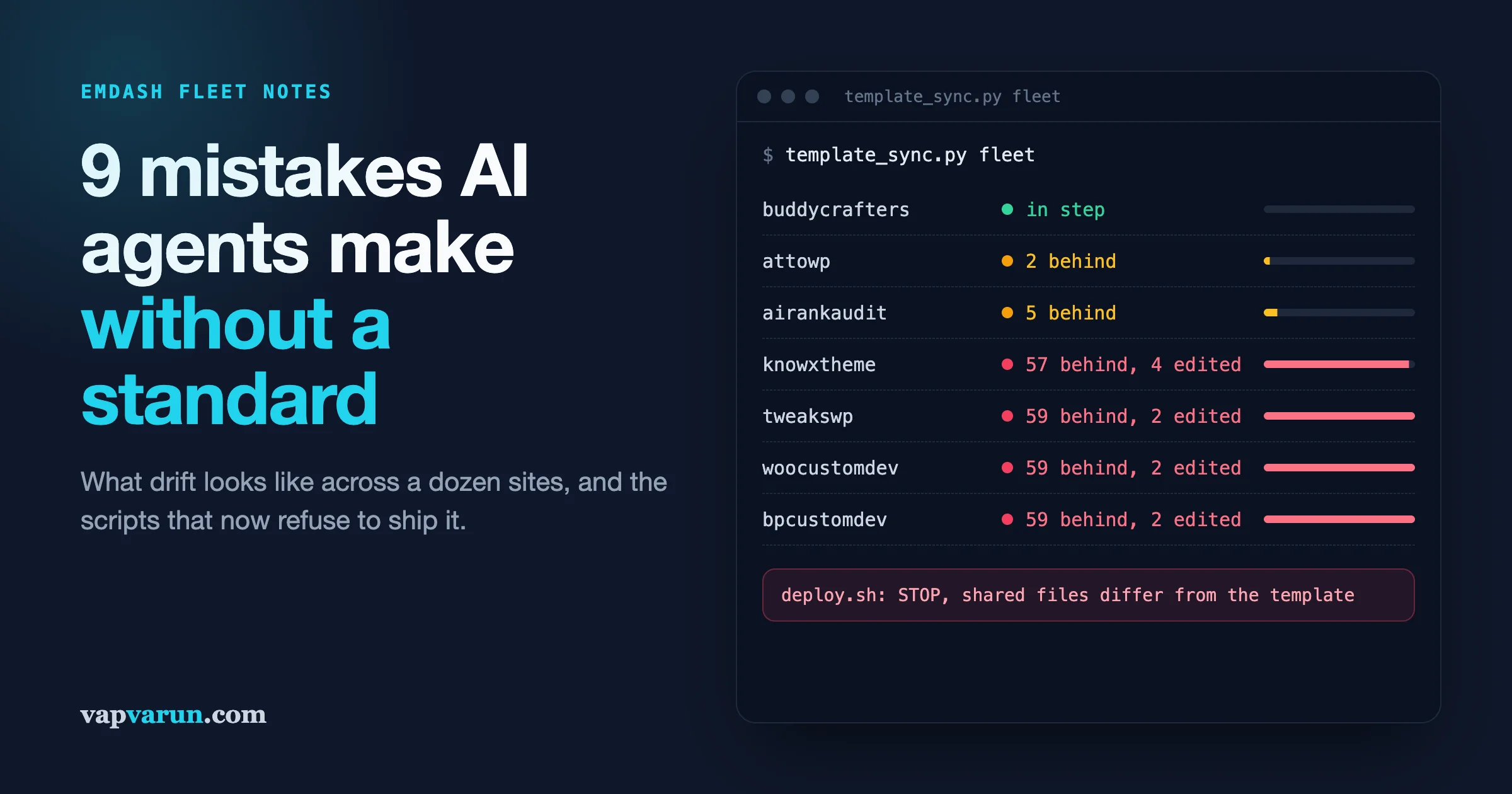
That is the problem. “Works today, on this site” is how a fleet slowly turns into a dozen slightly different codebases that nobody can update safely. This week we found six of our own lead sites sitting 57 to 59 shared files behind their template. Nothing was broken. Nobody had done anything reckless. Every single change that caused it was reasonable on the day it was made.
This post is the list of mistakes we have watched agents make on EmDash sites when no standard was written down, what each one looks like from the outside, how to check for it, and the rule we now enforce so it cannot happen again. If you own a site and just want the short version, read the first part and the checklist at the end. If you build or maintain these sites, the developer section in the middle has the mechanics.
Why an EmDash fleet needs a standard more than a single site does
On one site, a shortcut costs you a little. On a fleet, the same shortcut gets repeated on every site, a little differently each time, and the differences compound.
Every site in our EmDash fleet is built from one of two shared templates. One template is for blogs. The other is for lead and service sites, the ones with landing pages, quote forms and pricing. Each template has a short list of files that belong to the site (its config, its colours, its logo, its pages and its notes) and everything else is shared code that should be identical on every site in that family. When we fix a header bug or improve the sitemap, the fix goes into the template once and every site picks it up.
That only works if two things stay true:
- Site-specific things live only in the files the site owns.
- Shared files are never changed on one site by hand.
An AI agent does not know either of those things unless you tell it, and telling it once in a chat is not enough. A new session starts fresh. A different agent picks up the next task. The rule has to live somewhere every session reads, and the important ones have to be enforced by a script that refuses to continue.
Mistake 1: Patching the page instead of building the feature
What it looks like. You ask for a new interactive page, say a cost calculator for a lead magnet. The agent writes a new component for it, wires it into that one site and ships it. The page works and looks great. Three months later another site wants a calculator and gets its own slightly different copy.
This happened to us on buddycrafters.com, our community-building resource site. We asked for a community website cost calculator. The first version landed as a new block type that existed only on that site. It was good code. It was also a fork: the next time the template updated those block files, the site would either lose the calculator or block the update.
How to check. Look at what a “new page” commit touched. If it changed code files and not only page content, ask why. On our sites, a page is a JSON file of blocks. If a page needs a code change, that is a signal to stop and think, not a normal part of making a page.
The rule we set. New pages are content only. In this order, stop at the first one that fits:
- Use the blocks the template already has. Most pages need nothing new.
- Extend an existing block with a data-driven option, a new field or mode, instead of writing a second block.
- For a true one-off embed, use EmDash’s isolated HTML block, which is content and not code.
- Only then add a new block type, and add it to the template first, then pull it into the site.
The calculator is now a shared block called an estimator. The questions, the choices and every price are page data. The next site that wants a calculator writes a page, not code, and needs no deploy at all.
Mistake 2: Turning a shared change on for everyone
What it looks like. The agent fixes something on one site, correctly moves the fix into the shared template, and the fix changes how every other site looks.
Same week, same site. Our buddycrafters header showed the site name in plain text when the brand has a two-colour wordmark. The fix was small: render the wordmark in the shared header. Before pushing it, we checked what it would do to the rest of the family. Seven live sites already set their title to show in the header, and several of them also had wordmark values sitting in their config from an earlier design. Pushing the change as written would have quietly switched all seven to a two-colour logo the next time they synced. One of them would have gone from its plain store name to a split-colour version nobody had approved.
How to check. Before any shared change, list every site in the family and write one line per site: what this change does to it. If the answer for any site is “its pages look different”, the change is not ready.
The rule we set. Shared changes are opt-in through the site’s own config. The default keeps every site exactly as it was. For the wordmark, the header setting that used to be on or off gained a third value that means “use the wordmark”. Only buddycrafters uses it. The other seven sites render the same HTML they did before.
Mistake 3: Copying single files from the template
This is the one that caught us out this week, and it is the most expensive because you cannot see it until it is large.
What it looks like. A site needs one fix from the template, so the agent copies that one file across. Another session copies a different file the next week. A version update that touched a shared file gets applied by hand to each site, slightly differently on each. Each site keeps working. The record of which template version the site is on never moves.
When we audited the fleet, six of our lead sites, including woocustomdev.com, were 57 to 59 shared files behind the template. Two or three files on each looked “edited on the site”, but when we traced them, nearly all were exact copies of some older template version, brought across one at a time. The one genuine one-off was a small change made during the EmDash 1.4 update. Each site got its own hand-made copy of it, and the template’s version had moved on since. Meanwhile the template had picked up a new section and button system, sitemap improvements, tap-target fixes and the same 1.4 update done properly. None of it had reached those six sites, and the longer they waited the riskier the catch-up became.
How to check. Compare every shared file on the site against the template, and for each one that differs, ask a better question than “does it differ”: is the site simply behind (it still matches the template at its last sync point) or was the file changed on the site? Those need different fixes. Behind means update. Changed on the site means the change belongs in the template first.
The rule we set. An update from the template is always the whole template, never a single file, and it always records the new sync point. Fleet-wide changes such as EmDash version bumps go into the template first, then each site updates from it. We never make the same edit by hand on each site. Our deploy script now checks every site against its template before it deploys anything (more on that below), and a fleet drift check is part of our monthly site review.
We are now bringing the six sites up to date one at a time, each with a full comparison against its live pages before it goes out. woocustomdev was first.
Mistake 4: Deploying without building
What it looks like. The agent changes source code, runs the platform’s deploy command, sees it succeed, and reports done. The live site does not change.
On an Astro site running on Cloudflare Workers, the bare deploy command bundles the Worker, which serves whatever was built last. If nobody ran the build, you ship the old site with no error and a success message. We caught this on bpcustomdev.com: a batch of 135 new redirects was “deployed” and 0 of them answered.
How to check. After every deploy, prove the new build is live. We check that the live site serves the exact stylesheet this build produced, and we test a sample of the URLs the change was meant to affect.
The rule we set. There is exactly one way to deploy: our deploy script. It refuses a repo with uncommitted or unpushed changes, builds, uploads a preview version, compares every URL in the live sitemaps against it, promotes that same version, proves it is being served, and clears the cache. Agents are not allowed to run the bare deploy command at all, and production deploys are run by a person on our team.
Mistake 5: Two doors into production
What it looks like. Everything goes through the careful deploy script, and yet changes appear on the live site before anyone deployed them.
Cloudflare can connect a Worker to a Git repository and deploy every push to the main branch automatically. That is convenient for a single developer. On attowp.com it meant three pushes went live straight to production before our gated deploy ever ran. The gate was there. There was simply a second door around it.
How to check. Look at the checks on your latest commit. If one of them is a Cloudflare build, every push is a production deploy.
The rule we set. One door. The deploy script now looks for that build integration on every run and warns loudly if it finds it, with the exact place in the dashboard to disconnect it.
Mistake 6: Trusting a quiet importer
What it looks like. A WordPress site is migrated, the importer reports success, the post count matches, and the agent moves on. Weeks later someone notices half an article is missing.
EmDash’s WordPress importer is good, but it fails quietly in specific ways, and an agent that trusts “success” will not look. What we have seen on our own sites:
- A theme’s page-builder blocks were dropped without a word. The pages imported as a few stray paragraphs.
- HTML stored in an unusual wrapper vanished: 9 woocustomdev posts rendered about 990 of their roughly 2,000 words.
- The category hierarchy came across flat: 0 of 70 terms kept their parent, so nested category URLs could not be built.
How to check. Count what matters, not what is easy. We compare every sentence of every WordPress post against the migrated version, and we crawl every old URL against the new site, checking status, title, description and canonical.
The rule we set. An import is not done when the importer says so. It is done when the content coverage report shows zero missing text and the URL crawl matches. Both are scripts, and the migration pipeline will not move to the next stage until they pass.
Mistake 7: Copying the reference site’s own files
What it looks like. To start a new site, the agent copies an existing site that looks similar, then edits what it notices. What it does not notice comes along for the ride.
On the first end-to-end migration we ran through our pipeline, the new tweakswp.com shipped with woocustomdev’s 17 cross-site redirects, because that site’s own redirect map was copied with everything else. The same run briefly pointed the new site at another site’s database and media bucket names. Both were caught before launch, and both came from the same habit: treating another site’s own files as a starting template.
How to check. On a new site, every file the site owns should either be generated fresh or reviewed line by line. Anything that names another domain, another database or another bucket is a red flag.
The rule we set. New sites are created from the template, never from another site. Our site creation script resets the site-owned data (the redirect map starts empty), names the database and storage from the new site’s own name, and records the template version it started from, so the drift check works from day one.
Mistake 8: Two sessions in one repository
What it looks like. Work disappears. A file someone was halfway through editing is suddenly back to an older version, or a commit contains changes nobody on that task made.
We often have more than one agent session working at the same time, sometimes in the same site repository: one writing a blog post’s assets into the site’s notes folder while another syncs the template. On bpcustomdev, a template sync overwrote another session’s uncommitted edits, and a broad “stage everything” commit swept a second session’s half-finished files into the wrong commit.
How to check. Before committing in a shared repository, look at what is staged. If a file is in the list that your task did not touch, stop.
The rule we set. In shared repositories, commit the files you changed by name, never everything. The template sync refuses to overwrite any file with uncommitted changes and names the file, so the session that owns it can finish first. This week’s woocustomdev update left another session’s report files untouched for exactly this reason.
Mistake 9: Leaving setup open on a fresh site
What it looks like. A new site is deployed to its preview address so the team can look at it. The admin setup screen is live and waiting for whoever arrives first.
EmDash lets the first visitor finish setup and become the administrator. On a public preview address, that first visitor does not have to be you. Our first pipeline run found exactly that gap.
The rule we set. Setup is locked by default in the shared Worker code on every site. The creation script sets a setup key and prints the one link that opens it. No key, no setup screen.
For developers: how the standard is enforced
If you are a site owner, you can skip to the checklist. This part is for the people building and maintaining the sites.
The theme across all nine mistakes is the same. A written rule helps, but a rule that only lives in a prompt or a doc loses to the next urgent instruction. We wrote about the general version of this lesson in what we moved from written rules into Claude Code hooks. On our EmDash fleet, the important rules are checked by the same scripts every agent has to use, so following the rule is the only path that works.
The template sync script
Each site has a small marker file recording which template it belongs to and the template commit it last synced to. The sync script has a few commands:
statuslists every shared file that differs, split into “behind” (the site file still equals the template at the recorded sync point) and “edited here” (the site file matches neither). It also lists site-only files sitting in shared paths.checkis the same comparison as a gate: exit 0 when in step, 3 when only behind, 1 when anything was edited on the site, a file is site-only, or no sync point was ever recorded.fleetprints one line per site repository: template, last sync point and state. That one screen is how we found the six sites this week.pullcopies the whole template’s shared files into the site and records the new sync point. It no longer accepts a file list. If a site needs one file urgently, that file goes into the template and the site takes the whole update.pushcopies a fix from a site into the template checkout so it can be committed there once. It refuses site-owned files.
The “behind versus edited here” split matters more than it sounds. A plain “these files differ” list made all 59 files look the same. Splitting them showed that 57 were simply behind and two were hand-edited, and that told us the fix was a normal update, not an untangling job.
Files a site legitimately needs that the template does not ship, such as search engine verification files, go into the template’s list of site-owned paths. They do not stay as a standing exception on one site.
The deploy gate
The deploy script is the only way code reaches production, so it is where the rules live. In order, it:
- Cleans sync-conflict duplicate files from generated folders, and stops if it finds a duplicate of a source file. Our repositories once lived in an iCloud-synced folder and tweakswp ended up with 30 duplicate files, 18 of them committed and served.
- Warns if the repository is wired to deploy on push.
- Refuses uncommitted or unpushed changes, because production should only ever serve a commit anyone can look up.
- Runs the template check: it stops when a shared file was edited on the site, and warns when the site is only behind. An environment variable overrides it once, for a real emergency, and the person running it has to say why.
- Builds, uploads a preview version, and runs the site gate against it: every URL in the live sitemaps must keep its status, redirect, canonical, title, description, robots tag, heading, structured data types and share image. Any difference is listed, and the deploy only continues with an explicit flag that saves the difference report into the site’s notes.
- Promotes that exact version, proves the live site serves this build’s stylesheet, and clears the Worker cache.
When we updated woocustomdev this week, that gate found exactly four differences across 325 URLs. All four were meta descriptions that now show the full description we wrote, instead of a cut-down version: an intended template change. Everything else was identical. That is the level of evidence we want before a fleet-wide change goes live.
Page work is content work
Pages on our lead sites are JSON files of blocks in the site repository, pushed with a script that validates every block type before it writes anything. Because the estimator block takes its questions and prices as data, a calculator page is a JSON file. Conditional questions are a “show when” field (for example, only ask about a branded app if the visitor chose to run their own site), and a custom-priced choice is marked with a question mark so it is listed and explained rather than added to the total. The next site that needs a calculator writes content, runs one script, and needs no build or deploy at all.
Opt-in by default
Every shared feature that changes output reads an optional key in the site’s config, typed in one shared file so the editor knows about it. Absent means off, and off means the rendered HTML is byte-for-byte what it was before the key existed. The wordmark, the law-firm style preset, the announcement widget and the business schema all work this way. Before a template change is pushed, we list every site in the family and what the change does to each one, and that list goes in the commit message.
Where the rules live
All of this is written in one skill that every agent session on these sites loads, with the detail split into reference files so the core rules stay short. We wrote about why that split matters in keeping Claude Code skills small. Every trap we hit gets a dated entry there, with the root cause and the fix that went into a script. The migration pipeline that moved our first sites, which we described in moving five WordPress sites to EmDash, carries every one of those fixes, so the next migration does not relearn them.
A checklist for anyone running an EmDash fleet with agents
You do not need our scripts to use the ideas. If you run more than one EmDash site, or plan to, these are the questions we would ask of any setup:
- Is there one shared template, with a written list of the files each site owns? If every site is its own copy, start there.
- Can you tell, for any site, which template version it is on and whether any shared file was changed on the site?
- Do new pages need code? If the answer is often yes, your blocks are not data-driven enough yet.
- Is every shared change opt-in, with a written line per site on what it changes?
- Is there exactly one way to deploy, and does it build, compare against the live site, and prove the new version is served?
- Is the deploy-on-push integration switched off?
- After a migration, did you count missing text and crawl every old URL, or did you trust the importer?
- Do agents stage files by name in any repository another session might be using?
- Is setup locked on every fresh deploy?
- Is drift checked on a schedule, so a site that falls behind shows up in a month, not a year?
If more than two of those are a no, the site is not unsafe today. It is just collecting the kind of differences that make next year’s update a project instead of a routine.
What this buys a site owner
None of this is visible on a good day. Visitors see a fast site with the right pages. The value shows up on the days that matter: when a platform update lands and every site takes it in an afternoon, when a security fix goes out to the whole fleet at once, when a new landing page takes an hour of writing and no developer time, and when a deploy that would have broken 135 redirects stops itself and says why.
It is also why we can let agents do most of the routine work at all. Agents do not get tired and they do not skip steps they know about. They skip the steps nobody told them about. Write those steps down, put the important ones inside the scripts they have to run, and an agent becomes a very consistent member of the team instead of a fast source of drift.
Our team at Wbcom Designs runs this fleet in-house, from WordPress migration through launch and the years of care after it. If you are moving a site or a network of sites to EmDash, or you already have and want it kept in step with a standard like this one, we would be glad to talk it through. If you are still deciding where each site should live, start with how we choose between WordPress, headless Astro and EmDash.