Spend Limits on a Cloudflare Workers Fleet: What We Plan to Set After Our Images Quota Ran Out
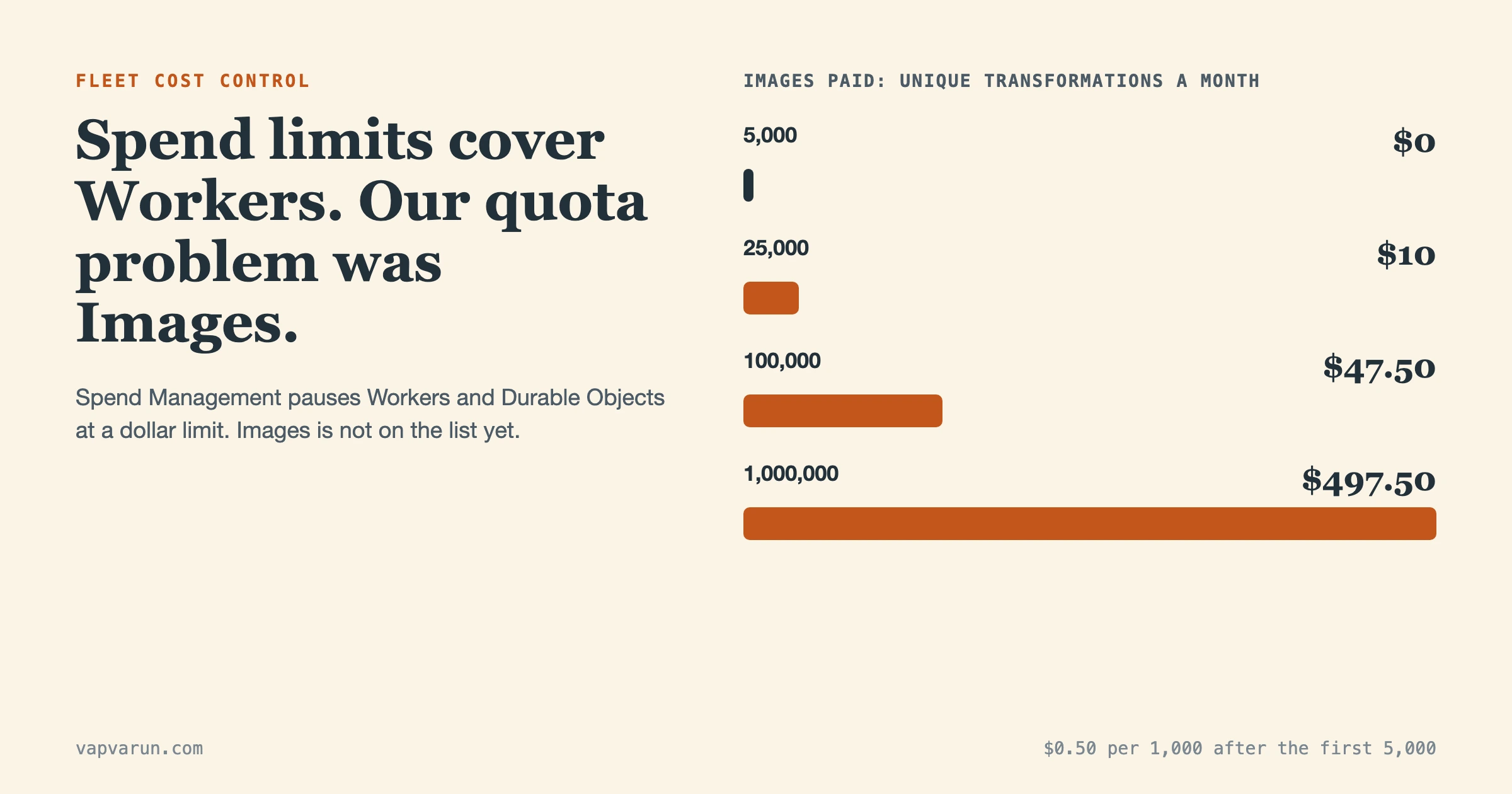
Cloudflare’s new Spend Management lets a pay-as-you-go account set a monthly dollar limit on Workers or Durable Objects and have Cloudflare pause that product when the limit is reached. It also sends email alerts at 80 and 100 percent of a threshold. For a small fleet of content sites, our answer is: set alerts first, set one high hard limit only as a runaway guard, and do not expect it to cover the thing that actually bit us, which was the Cloudflare Images quota.
We have not changed a Cloudflare setting for this post. Everything below comes from Cloudflare’s announcement and documentation, read on 15 November 2026, plus our own incident note. Where we describe what we plan to set, we say so. Checked on 15 November 2026, and the feature is in beta, so details can move.
What happened when our Images quota ran out?
In early October 2026 our EmDash sites started returning 500 errors on image requests. The five sites share one Cloudflare account and serve images through an /_image route. The Worker log showed IMAGES_TRANSFORM_ERROR 9422 with the message that free unique transformations for the account had been exhausted. That is not a site bug. It means the account’s Cloudflare Images transformation allowance was used up.
The symptom was lopsided. Image sizes that had already been generated kept working from cache. Any new image or new size failed.
Two facts from the incident note explain why a small fleet ran out. Each image on these sites is requested at roughly ten different widths, up to 4800 pixels. And Cloudflare counts every combination of source image and parameters as one unique transformation. Cloudflare’s Images pricing page says the Free plan includes 5,000 unique transformations each month, and that past that point new transformations return error 9422 while cached ones keep being served. A few hundred images at ten widths each is enough to reach 5,000.
We diagnosed it by tailing the Worker’s logs while requesting a single /_image URL. On 5 October 2026 we bought the Images and Stream Starter bundle, and resizing worked again. At the time we also proposed trimming the shared image breakpoints so fewer sizes get generated; as of that note, it was proposed and not done.
Notice what kind of failure that was. On the Free plan, Cloudflare stops, and says you are not charged for going over. Once you pay, the same usage becomes a bill. A Free plan fails closed and a paid plan fails open. Spend Management is aimed at the second case, and as we will see, it does not reach Images yet.
For more on how these sites are set up, see We Moved Five WordPress Sites to EmDash the Week 1.0 Shipped.
What is Cloudflare Spend Management?
It is a set of spend controls announced on the Cloudflare blog on 13 November 2026. Cloudflare says it is in beta for any pay-as-you-go customer, starting with Workers and Durable Objects. You can set it up in the dashboard under Billing, with the cf command-line tool, or through the REST API. In the billing API, each limit or alert is called a spend policy.
The documentation separates four controls, and the difference between them is the whole decision:
| Control | Scope | At the threshold |
|---|---|---|
| Spending limit | Workers or Durable Objects, across the whole account | Cloudflare blocks the product’s supported operations |
| Email alert | Workers or Durable Objects, across the whole account | Cloudflare emails you; the product keeps running |
| Budget alert | Account-wide usage-based spend, all products combined | Cloudflare emails you; nothing is paused |
| AI Gateway spend limit | AI requests routed through a gateway, by user, model or provider | The gateway blocks matching requests until the budget window resets |
A few mechanics worth knowing before you click anything:
- A policy needs an amount greater than zero, entered in US dollars. In the CLI the threshold is in cents.
- Spend is estimated for the current subscription billing period, with included usage deducted first. The period starts when your paid subscription began, not on the first of the month. A subscription that renews on the 15th resets its limit on the 15th.
- Email policies notify at 80 and 100 percent of the threshold. If spend jumps past both between checks, you may only get the 100 percent email.
- A limit created in the dashboard does not have an email recipient. To be told when it trips, update the policy and add a notification address.
- The dashboard shows spend in near real time, which Cloudflare puts at under ten minutes, and keeps an audit log of who changed what.
- One enabled limit per product on an account.
What does a limit actually stop?
A Workers limit stops new invocations of your Workers. Cloudflare’s Workers page lists them: incoming HTTP requests, Cron Triggers, Queue consumers, Email Worker invocations, and calls from other Workers or Durable Objects. Visitors get error 1103. Static assets served without running your Worker continue to load. Requests that need Worker code, such as those routed through run_worker_first, can fail.
For a site that runs entirely as a Worker, that distinction barely helps. A paused Worker is a down site. Our EmDash sites render pages and serve images through Workers, so a tripped Workers limit would take every one of them offline together.
The part that matters most for a fleet is scope. The limit applies to the whole account, not to one Worker or one environment. The Workers page says it directly: a test Worker can reach the shared limit and interrupt a production Worker in the same account. You cannot target a single Worker, a Durable Object namespace or a billing metric. Five sites in one account share one limit.
Durable Objects have their own separate limit. A Workers limit does not include Durable Objects, Workers AI, KV, R2 or anything else, and a Durable Object can still fail when it calls a Worker that has been paused.
What does Spend Management not cover?
Quite a lot, and the gaps line up with our incident.
- Images. The only products you can limit or alert on today are Workers and Durable Objects. Images transformations are not on that list, so the limit that would have mattered to us does not exist yet. Cloudflare says more products will follow without naming them.
- Everything else that bills by use. KV, R2, D1, Workers AI and the rest have no per-product policy. The usage-based billing page lists Images, R2, Stream and others as usage-billed products, so the account-wide budget alert is the one email control that might see them. We have not tested that an Images overage trips a budget alert, so treat that as a question, not a promise.
- An exact maximum bill. The documentation says a limit does not guarantee a maximum invoice. Metering takes time, operations already in progress finish, and Cloudflare notes that enforcement can fail. The Workers Paid subscription fee stays payable.
- Stored data. Durable Objects storage can keep accruing charges while the objects are paused.
- Per-application budgets. The announcement lists application-based and agent-based budgets, and faster enforcement, as future plans. Enforcement is asynchronous and based on periodic refresh, so there is a gap between crossing the line and being blocked.
The Images case has a further twist. Cloudflare’s Images pricing page says the Free plan stops at 5,000 unique transformations with no charge, and that on the Paid plan you get 5,000 included and then pay $0.50 per 1,000 unique transformations. By that arithmetic 100,000 unique transformations in a month is 95,000 beyond the allowance, or about $47.50. A million would be roughly $500. That is a modest bill for a fleet of blogs and a large one for a runaway loop that requests new sizes forever, and nothing in Spend Management would stop it today.
Is a paused content site better than a surprise bill?
Only for some products. The question to ask of every control is what happens to a visitor when it fires. For a content site, a pause is an outage with a polite error code, so we treat hard limits as a last resort and alerts as the everyday tool.
| Situation | Alert | Hard limit | Our reasoning |
|---|---|---|---|
| Normal month, small drift upward | Yes | No | You want a nudge, not an outage |
| Traffic spike from a good post or a crawler | Yes | No | A pause throws away the traffic you wanted |
| Runaway loop in a Cron Trigger or Queue consumer | Yes | Yes, set high | Nobody is watching at 3 a.m.; a pause is cheaper than the loop |
| Staging or test Worker in the same account | Yes | Avoid sharing | A test Worker can trip the limit for production |
| Durable Objects with alarms | Yes | Yes, set high | The reported nightmare cases are loops; storage still bills while paused |
| Images, KV, R2, D1 | Budget alert only | Not available | No per-product policy exists for these yet |
| AI calls through AI Gateway | Optional | Yes, per user or model | The gateway pauses AI requests, not your pages |
The AI Gateway row is the one place where a hard limit is almost free of downside, because the thing that stops is the model call and the page can still render. If you run AI features on a Worker, AI Gateway spend limits are worth setting before the Workers limit.
What do we plan to set on our fleet?
We have set nothing yet. This is the plan, in the order we will do it, and it is ours, not Cloudflare’s recommendation.
- Read the billable usage dashboard for the last two or three billing periods. Cloudflare’s billable usage page shows a daily chart stacked by product. We want to know what a normal month looks like per product before choosing a single number.
- Check how the account is classified. Spend Management is for pay-as-you-go accounts. We have not confirmed ours qualifies, so that is step zero.
- Set an account-wide budget alert just above a normal month. It is informational, it covers the usage-billed products together, and it is the only control in this set that might notice an Images overage.
- Add email alerts for Workers and Durable Objects. They fire at 80 and 100 percent of the threshold, and the product keeps running.
- Add one hard limit for Workers and one for Durable Objects, set well above a normal month. Our rule of thumb is to start at around three times a normal month, so ordinary spikes never touch it and a real runaway does. We will attach a notification address to each limit, since the dashboard does not.
- Move test and staging Workers out of the production account, or accept that they share one limit.
- Cut the number of image widths. Fewer unique transformations is the only fix that works today for the Images quota, and it is cheaper than any alert. Ten widths per image is more than a blog page uses.
- Write down the unpause steps. To resume you can raise the limit above current spend, turn it off, or remove it, and changes take a few minutes. Whoever is on call needs that sentence in front of them.
The order matters. Alerts cost nothing and break nothing. A hard limit can take five sites down at once, so it goes in last and gets rehearsed. Our approach to changing live sites applies here too: one change at a time, a way back at each step.
How do you set a limit or alert from the command line?
These are the commands Cloudflare publishes on its cf CLI page, copied with placeholder values. We did not run them, because we changed no setting. Use the account ID, not a zone ID, and a token with Account, Billing, Edit permission to change policies.
# An email alert at $20 for Durable Objects. The product keeps running.
cf billing spend-policies create \
  --name 'Durable Objects $20 email alert' \
  --product-id durable_objects \
  --enabled true \
  --threshold-cents 2000 \
  --action notification \
  --notification-email you@example.com

# A spending limit for Workers. This one blocks. Add --dry-run to preview first.
cf billing spend-policies create \
  --name 'Workers spending limit' \
  --product-id workers \
  --enabled true \
  --threshold-cents 5000 \
  --action usage_block \
  --notification-email you@example.com \
  --dry-run

cf billing spend-policies list
cf billing spend-policies get
Three details from the page save grief. The limit counts spend already recorded this period, so creating a $50 limit when you are already past $50 can block usage shortly after. Updates replace the whole policy, so you must provide every required option even when changing one number. And a policy update needs the latest version from a fresh get.
What are the cost numbers on Workers?
Workers charges are small per unit, which is why a limit set well above normal is a sensible guard. Cloudflare’s Workers pricing page says the Paid plan has a minimum charge of $5 per month, with 10 million requests and 30 million CPU milliseconds included, then $0.30 per extra million requests and $0.02 per extra million CPU milliseconds. Its own example for 100 million requests at 7 milliseconds of CPU each comes to $27.00 for requests and $13.40 for CPU time, on top of the base fee.
Two things follow. A site that serves normal traffic stays close to the base fee, so a limit at several times normal is still a small number in dollars. And a runaway that makes a hundred million extra requests costs tens of dollars on Workers alone, not thousands. The nightmare bills that circulate online come mostly from Durable Objects and database operations, which is why we want separate alerts there.
What mistakes do people report with cloud spend controls?
Spend Management is two days old, so reports about it are thin. What exists is a pile of older reports about Cloudflare bills with no cap, and the mistakes in them are the ones to avoid. These are self-reported by the authors and we have not verified the figures.
- A loop with no brake. In April 2026 a developer described a Durable Object alarm loop that produced a $34,000 bill in eight days with no active users. The fix they listed was a circuit breaker in code. A spending limit is a second brake, not a replacement.
- Trusting an alert to stop spending. Budget alerts are informational only. Cloudflare says so on its budget alerts page. An email at 3 a.m. changes nothing until someone reads it.
- Watching the wrong meter. The same Hacker News thread says Workers usage notifications watched CPU time and not Durable Object rows, so nothing fired. The new per-product policies are meant to close that gap for Workers and Durable Objects.
- Small apps with large bills. A Geekflare guide lists a user who wrote 4.83 billion rows in a month through two bugs, and a reported $36,000 bill from a queue loop that ppc.land covered, which that article attributes to a Reddit post and notes the thread showed no decision from Cloudflare. Treat the dollar figures as claims.
- Forgetting the limit has no email. A dashboard-created limit has no recipient, so it can fire silently. Add a notification address.
- Sharing an account between test and production. The documentation warns about this one itself.
How do you tell which product is driving the spend?
Before any limit, find the product. Cloudflare’s billable usage dashboard draws a bar chart of daily usage charges for the selected billing period, stacked by product, with a table below it that breaks the whole period down by product and shows included allowances such as “first 1M included.” You can hover over a day to see the per-product split. That chart is where a loop shows up: one product’s bar jumps on a single day and stays tall.
Read it with three questions in mind.
- Is the increase steady or a spike? A steady climb is traffic or a growing library. A spike on one day is usually a bug, a crawler or a retry storm.
- Which product moved? Workers requests, Durable Objects duration, R2 operations and Images transformations each point at a different cause. A jump in Images with flat Workers points at new image sizes, not at more visitors.
- Did anything ship that day? A deploy, a template change or a new plugin on the same date is the first suspect. A shared image-breakpoint change multiplies unique transformations across every site that uses the template.
The same chart tells you what a normal month costs, which is the number every threshold in the plan above depends on. If the account has no history because the paid plan is new, start with alerts only and add the hard limit after a full billing period.
How do the Free and Paid Images plans fail differently?
The two plans fail in opposite directions, and that changes what you should watch.
| Images Free | Images Paid | |
|---|---|---|
| Included | 5,000 unique transformations a month | First 5,000 unique transformations a month |
| Past the allowance | New transformations return error 9422; cached ones still serve | $0.50 per 1,000 unique transformations |
| Charged for going over? | No | Yes |
| Failure you see | Broken new images, a visible outage on new content | A larger invoice, no visible symptom |
| Control available today | None needed to stop spend; watch the count | Budget alert only; no per-product limit |
On the Free plan you find out because pictures break. On the Paid plan you find out because the invoice changes, unless an alert gets there first. That is the reason the budget alert sits in our plan even though it cannot stop anything: after we paid for the bundle, the quiet failure became the likely one.
How will we check that the controls work?
A control that has never fired is a guess. Once we set policies we will check three things before trusting them. First, that the alert email arrives at an address someone reads, since the dashboard does not add one to a limit. Second, that the policy list and the audit log show the settings we meant, using the history commands in the CLI, which cover both configuration changes and threshold events. Third, that the unpause steps work: raising the limit above current spend or turning it off, then confirming the site returns within the few minutes Cloudflare quotes. We will run that rehearsal at a quiet hour with the old settings written down, in the same spirit as the rollback rehearsal in our cutover day post. A threshold event is not proof that blocking finished or that an email was delivered, so we will look for the effect, not the log line.
Frequently asked questions
Does Cloudflare Spend Management cap my whole bill?
No. It limits Workers and Durable Objects usage charges separately, and each limit is an estimate, not a guaranteed maximum. Other products have no per-product limit yet.
What happens to my site when a Workers limit is reached?
New Worker invocations are rejected and visitors see error 1103. Static assets served without running your Worker keep loading. Raise the limit, turn it off or remove it to resume, and expect a few minutes for it to apply. The block also ends at the start of the next billing period.
Can I set a limit on one Worker only?
No. A Workers limit covers all Workers on the account. If you need isolation, use separate accounts.
Is Cloudflare Images covered by spending limits?
Not yet. The supported products are Workers and Durable Objects. Images is usage-billed, so an account-wide budget alert may notice an overage, but that email does not stop anything.
Does the free Images plan charge me when I run out?
No. Cloudflare says you are not charged for exceeding the Free plan limits. New transformations return error 9422 and cached ones keep being served, which is what we saw.
Should a content site use a hard spending limit?
Set alerts first. Use a hard limit only as a runaway guard, far above your normal month, because when it fires every Worker-backed page stops.
What is the short version for a small fleet?
Spend Management is a useful new brake for Workers and Durable Objects, and a weak answer to an Images quota problem. Our incident was a quota that ran out, not a bill that got out of hand, and the fix that worked was spending a few dollars and generating fewer sizes. The plan is alerts everywhere, one high limit as a runaway guard, tested with a dry run, and a written note on how to switch it off. We will report back once we have set it and watched a billing period. For how these sites use Workers and a KV cache, see Headless WordPress With 2,000+ Posts, and for the rules we give the agents that touch them, AI Agents on an EmDash Fleet: 9 Mistakes Without a Standard.