Hundreds of Old Page-Builder Client Sites: Rebuild With AI, Keep Maintaining or Let Them Go
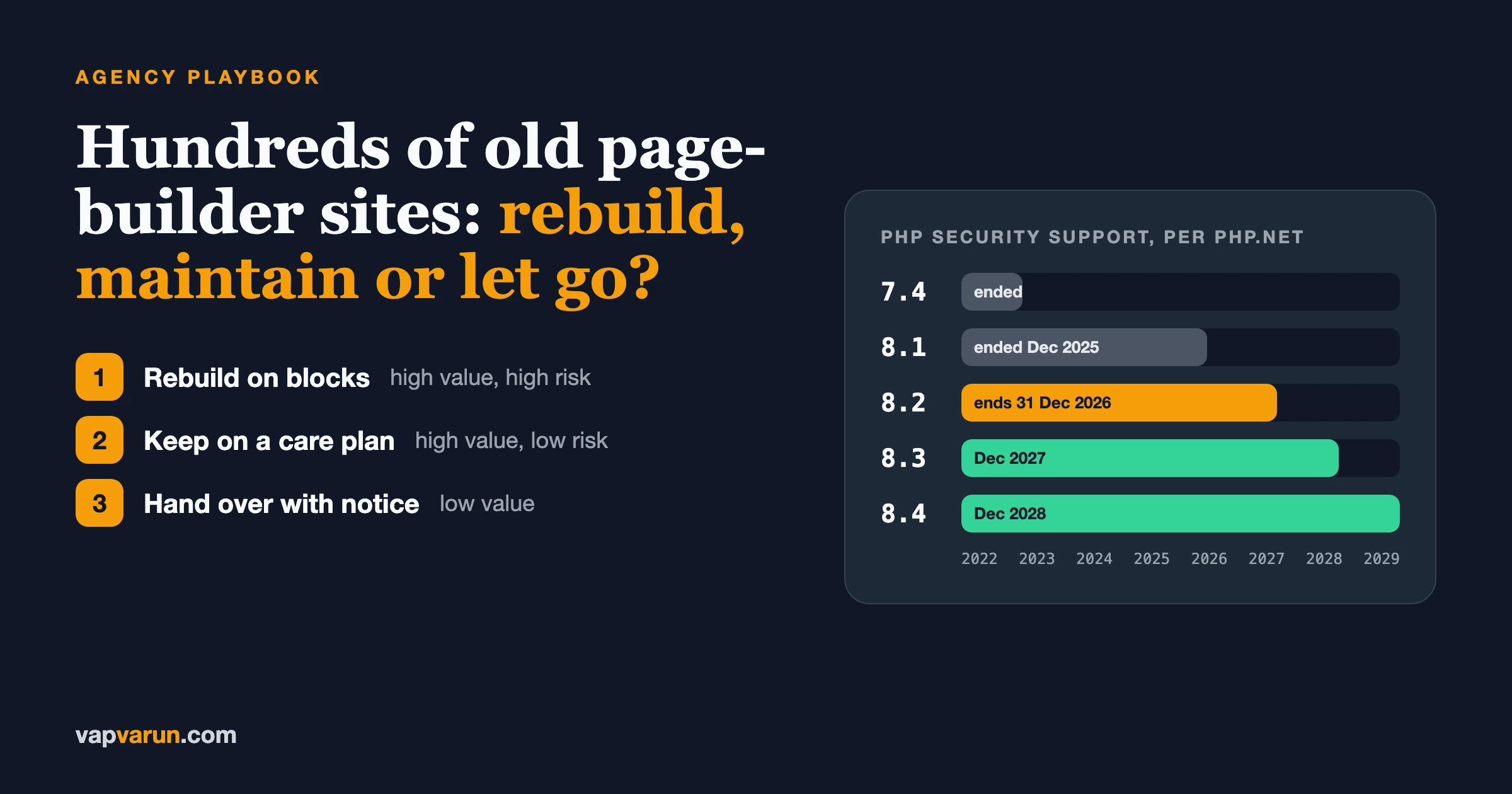
If your agency is sitting on a large fleet of old Elementor, Divi or WPBakery client sites, do not decide all of them at once. Score every site on five things, then put each one into one of three outcomes: rebuild it on the block editor, keep it on a care plan, or hand it over or retire it with notice. AI tools make the rebuild cheaper than it was two years ago, mostly in content extraction and first-draft layouts, but they do not remove the testing, the redirects or the client conversation.
This is the playbook our team uses for that triage. It is written for agency owners first. There is one section for developers, marked clearly, with the WP-CLI commands we use to inventory a fleet. Facts that change (PHP support dates, WordPress requirements, builder prices) were checked on 21 November 2026.
Why is this decision landing on agencies now?
Because three clocks are running at the same time, and most old builder sites are behind on all three.
PHP 8.2 loses security support in six weeks
According to php.net’s supported versions page, PHP 8.2 gets security fixes until 31 December 2026. PHP 8.1 already reached end of life on 31 December 2025, and PHP 7.4 on 28 November 2022 (php.net end-of-life list). PHP 8.6 shipped on 19 November 2026.
| PHP branch | Security support until | What it means for an old builder site |
|---|---|---|
| 7.4 | Ended 28 Nov 2022 | Unpatched for three years. Hosts are forcing upgrades. |
| 8.1 | Ended 31 Dec 2025 | Unpatched. Common on sites last touched in 2023. |
| 8.2 | 31 Dec 2026 | Six weeks left. Plan the next move now. |
| 8.3 | 31 Dec 2027 | WordPress’s recommended minimum. |
| 8.4 | 31 Dec 2028 | A sensible target for a rebuild. |
WordPress itself is not the blocker. The WordPress requirements page recommends PHP 8.3 or newer and says WordPress still works on PHP 7.4 in a legacy environment, with a warning that those versions are past end of life. The current release is 7.1.5. The blocker is the old builder, the add-on packs bolted onto it, and the theme that was bundled with it in 2019. When a host moves a site to a newer PHP, those are the files that fatal.
Builder licences renew every year
Here is what the three big builders list today, checked on 21 November 2026 on each vendor’s own page. Elementor was running Black Friday discounts on first-year prices, so the renewal price is the one to budget for.
| Builder | Plan | Price listed | Sites |
|---|---|---|---|
| Elementor | Essential | $60 a year | 1 |
| Elementor | Advanced | Renews at $108 a year | 3 |
| Elementor | Expert | Renews at $204 a year | 25 |
| Divi | Divi (yearly) | $89 a year | Unlimited |
| WPBakery | Regular | $82 lifetime, one year of support | 1 |
| WPBakery | 10 sites | $592 lifetime, one year of support | 10 |
Sources: elementor.com/pricing, elegantthemes.com/join, wpbakery.com/pricing. For one site these are small numbers. Across a fleet of a few hundred client sites, on licences that are often in the agency’s name, they add up, and somebody has to track which site sits on which key.
Builders are adding AI, which changes nothing for sites nobody touches
All three pricing pages now sell AI features. Elementor lists an MCP connection for tools like Claude Code and Cursor. WPBakery lists “MCP included”. Divi Pro includes yearly AI agent credit. That helps when you build new pages. It does nothing for a 2019 site on PHP 7.4 that nobody has logged into for two years.
How do you score each site in the fleet?
Score five factors from 0 to 3. Add them up. It takes about ten minutes a site once the inventory below is done, and it turns a vague worry into a sorted list.
| Factor | 0 | 3 |
|---|---|---|
| Revenue to you | No retainer, no work in two years | Active retainer or regular paid work |
| Client relationship | Unreachable or hostile | Engaged, pays on time, still growing |
| Technical risk (higher is worse) | Current PHP, current builder, no dead add-ons | PHP 8.1 or older, builder years behind, abandoned add-on packs |
| Licence exposure | Client owns every licence | Runs on your agency’s builder and add-on keys |
| Content size | Under 20 pages | Hundreds of pages, custom post types, a shop |
The score does not decide for you. It tells you where to look. Read it in two halves:
- Value = revenue + relationship (0 to 6).
- Cost of standing still = technical risk + licence exposure (0 to 6).
Content size is the multiplier on rebuild effort. A five-page brochure site and a 900-page site with a WooCommerce shop can score the same on value and risk and still need completely different quotes.
What are the three outcomes, and when does each fit?
Outcome 1: rebuild on the block editor
For high value and high risk. The client is worth keeping and the site is a liability as it stands. Rebuild it on WordPress core blocks with a theme you control, drop the builder and the add-on packs, and land on a current PHP version.
The rebuild is also the moment to fix what the client has complained about for years: speed, mobile layout, the form that nobody can edit. Pitch it as that, not as “we need to replace the builder”.
Outcome 2: keep it on a care plan
For high value and manageable risk. The site works, the builder is current or close, and the client is not ready to spend on a rebuild. Put it on a care plan that covers updates, backups that are actually tested, PHP upgrades on staging first, and a monthly report. Price the care plan to include the builder licence if it sits on your key, so the cost is visible.
A care plan is also the honest home for sites that will be rebuilt later. It buys time without pretending the problem is gone. Our post on care plan reports clients actually read covers what we send each month.
Outcome 3: hand it over or retire it with notice
For low value, whatever the risk. A site that earns you nothing and carries your licence keys and your name on the footer is pure exposure. Hand it to the client with everything they need, or, if the client agrees the site is no longer needed, retire it properly.
Letting go is not failure. It frees the hours you were spending on unpaid emergency fixes.
The decision table
| Value (0 to 6) | Cost of standing still (0 to 6) | Default outcome |
|---|---|---|
| 4 to 6 | 4 to 6 | Rebuild. Quote it this quarter. |
| 4 to 6 | 0 to 3 | Care plan now, rebuild on a planned date. |
| 2 to 3 | 4 to 6 | Offer a care plan with a PHP upgrade; if declined, hand over. |
| 2 to 3 | 0 to 3 | Care plan if they want one; otherwise hand over. |
| 0 to 1 | Any | Hand over or retire with notice. |
What do AI tools actually speed up in a rebuild?
Less than the demos suggest, and more than sceptics admit. Here is where we see real time saved and where we do not.
Content extraction: a real saving
The slowest part of leaving a builder used to be getting the words and images out. Each builder stores content differently. Elementor keeps layouts as JSON in post meta. WPBakery and Divi 4 store layouts as shortcodes inside the post content, which is why a deactivated WPBakery leaves [vc_row] tags all over a page. Newer Divi versions use a different format, so check the version first.
An AI agent with access to a staging copy can read those structures, pull out headings, body text, images, buttons and links, and write them back as clean core blocks. What used to be a copy-and-paste week becomes a script plus a review. The review is not optional: agents drop content that sits in an unusual widget, and they happily keep hidden text that should have been deleted years ago.
Layout reproduction: a first draft, not a finished page
Give an agent a screenshot and a design system and it will produce a block pattern that looks close. “Close” is the problem. Spacing, breakpoints and the hover state on the main button are where client sign-off goes to die. It works when you hand the agent your own theme’s tokens and patterns to build from, so it is assembling known parts instead of inventing CSS for every section. That is the reason we keep a small, consistent set of patterns and not a fresh design per client.
Testing: AI writes the checklist, people click the checkout
Agents are good at listing every URL, every form and every redirect that needs checking, and at comparing old and new pages for missing text. They are not a substitute for a person submitting the contact form and checking the email arrives, paying for a test order, or opening the site on a phone. Our post on whether AI can replace a maintenance retainer goes through the same split for ongoing care.
What AI does not speed up at all
- The client deciding what the site is for now.
- Redirect decisions for pages that are being merged or dropped. Our 2,000-post migration playbook covers the URL work.
- Integrations: CRMs, booking tools, payment gateways, the email marketing form someone wired up in 2020.
- Accessibility judgement on the final page.
- Getting the client to approve.
For developers: how do you inventory a fleet quickly?
Skip this section if you do not run the servers. If you do, WP-CLI gives you the numbers for the scoring sheet in a few minutes per site. These commands are read-only.
# Run on one site first
wp core version
wp eval 'echo PHP_VERSION . PHP_EOL;'
wp theme list --status=active --fields=name,version
wp plugin list --fields=name,status,version,update --format=csv

# How much published content each builder holds
wp post list --post_type=page,post --post_status=publish --meta_key=_elementor_edit_mode --format=count
wp post list --post_type=page,post --post_status=publish --s='[vc_row' --format=count
wp post list --post_type=page,post --post_status=publish --s='[et_pb_section' --format=count
The two --s searches catch WPBakery and Divi 4 shortcodes in published content. Elementor marks the pages it edits with the _elementor_edit_mode meta key. Once that works on one site, loop it over your WP-CLI aliases and you have a CSV for the whole fleet:
#!/usr/bin/env bash
# fleet-inventory.sh: one CSV row per site.
# sites.txt holds one WP-CLI alias per line, for example @client-acme
# The list is read on fd 3 because SSH aliases would swallow stdin.
echo "site,wp,php,elementor,wpbakery,divi4"
while read -r site <&3; do
  wpv=$(wp "$site" core version 2>/dev/null)
  php=$(wp "$site" eval 'echo PHP_VERSION;' 2>/dev/null)
  el=$(wp "$site" post list --post_type=page,post --post_status=publish --meta_key=_elementor_edit_mode --format=count 2>/dev/null)
  vc=$(wp "$site" post list --post_type=page,post --post_status=publish --s='[vc_row' --format=count 2>/dev/null)
  dv=$(wp "$site" post list --post_type=page,post --post_status=publish --s='[et_pb_section' --format=count 2>/dev/null)
  echo "$site,$wpv,$php,$el,$vc,$dv"
done 3< sites.txt
Two notes from running this kind of loop. First, read the site list on a separate file descriptor, as above, or the first SSH connection eats the rest of the list. Second, a site where wp fails entirely is itself a finding: it usually means the site already fatals on the PHP version WP-CLI runs, and it goes straight to the top of the risk column.
What does one rebuild look like from start to launch?
Most single-site rebuilds in the rebuild group follow the same order. The order matters more than the speed of any step.
- Freeze and copy. Take a full backup and build a staging copy on the PHP version you are moving to. Do not touch the live site until launch day.
- List every URL. Export the sitemap and the top pages from Search Console. Every URL either keeps its address, gets a 301 to its new home, or is deliberately retired.
- List every moving part. Forms, where they send email, any CRM or booking connection, tracking scripts, cookie banner, payment gateway. This is the list that breaks launches, so it is written down before design starts.
- Agree the templates. Show the client the four or five page types, not forty pages. Approval on templates is approval on most of the site.
- Extract and rebuild content. This is where the AI tooling earns its place: content pulled out of the builder and written back as core blocks inside the approved patterns, then reviewed page by page.
- Test the moving parts by hand. Submit every form, check every email arrives, run a real payment in test mode, open the site on a phone.
- Launch with redirects in place. Then watch Search Console and the 404 log for thirty days and fix what shows up.
- Move the site onto the care plan. Same day. The rebuild is only worth it if the next four years do not repeat the last four.
The builder is removed at the end, not the start. Keep it installed but unused on staging until every page is rebuilt and checked, so you can compare old and new side by side.
How do you price a page-builder rebuild?
Price by templates and content volume, not by page count. A site with 200 pages built from four templates is a smaller job than a site with 30 pages that are all different.
The structure we use:
- Discovery, fixed fee. Inventory, content audit, URL list, integrations list. This is paid even if the client does not go ahead, and it becomes the scope.
- Templates, per template. Home, service page, post, landing page, and so on. Each one designed, built as block patterns and approved.
- Content migration, per block of content. Priced per 50 or 100 pages, with AI extraction included and a human review pass per page.
- Integrations, per integration. Forms, CRM, booking, shop.
- Launch and 30 days of checks. Redirects, Search Console, broken links and fixes.
Then roll the care plan into the quote. A rebuild with no care plan after it is how you end up with the same problem in four years. If you want a sense of what a healthy agency project size and recurring share look like, our post on the two numbers that make a WordPress agency profitable uses published survey data.
What AI changes in the pricing is mostly the migration line. Do not give all of that saving away. Keep the review pass in the price: it is the part that protects the client.
How do you have the conversation with the client?
Lead with their risk and their goal, not your tooling. Most clients do not know which builder their site uses and do not care.
A short email that works for the rebuild group:
Your site runs on PHP 8.1, which stopped receiving security fixes on 31 December 2025, and on a page builder version that will not run on the newer PHP your host is moving to. We can keep it safe on our care plan for now, but the better fix is a rebuild on the standard WordPress editor: faster pages, easier editing for your team, and no third-party builder licence to renew. We would like 30 minutes to walk you through the options and a fixed quote.
For the care plan group, the same opening, then: "Our care plan covers the upgrade on a staging copy first, and we report back each month."
For the hand-over group, be direct and kind. Say you are narrowing the sites you maintain, give a date, and list exactly what they will receive.
How do you hand over or retire a site properly?
Give notice in writing. Sixty to ninety days is fair for a site you have looked after for years. During that window:
- Send a full backup (files and database) and confirm the client can open it.
- Transfer or document hosting, domain and DNS access. Many old sites have the domain on the agency's registrar account. Move it.
- Replace your licence keys. Tell the client which builder and add-on licences the site needs and that they must buy their own.
- Remove your admin accounts and API keys after hand-over, and change any shared passwords.
- Take your agency credit off the footer if you no longer stand behind the site.
- If the site is being retired, agree whether the domain should redirect somewhere or simply close, and keep a final archive for an agreed period.
Write it as a checklist the client signs. Months later, when the site breaks under someone else, that checklist settles the question of who was responsible.
Where do Brndle and a care plan fit in?
We rebuild on WordPress core blocks with a theme we control, and for many agency sites that theme is Brndle, the free, GPL theme our team publishes for agencies: one theme for unlimited client sites, with colour schemes, font pairs, header and footer styles, dark mode and a set of Gutenberg blocks for landing pages. Using the same base across the rebuild group is what makes AI-assisted layout work: the agent builds from known patterns instead of guessing.
It is not the right base for every site. A large WooCommerce store or a membership site may need a different stack. The point is to pick one base for most of the fleet so you are not maintaining a dozen.
Common mistakes people report with old builder sites
These come from the WordPress.org support forums. Each is a real thread, paraphrased.
- Inheriting a site that fatals on newer PHP. In January 2024 a developer picked up a client site they had not built, updated a few plugins and then hit "Unparenthesized a ? b : c ? d : e is not supported", which locked them out of the dashboard. The reply: the WPBakery version on the site was not compatible with the active PHP version and needed updating (WordPress.org forum, 10 January 2024).
- Letting the host change PHP without a staging test. A store owner on PHP 7.4 had the host run a script that moved the site to 8.4. The site crashed on add-to-cart and wp-admin. Replies pointed at an out-of-date theme and bundled WPBakery (JS Composer) (WordPress.org forum, 10 April 2025).
- Forgetting the add-on packs. Upgrading to PHP 8.2 threw deprecation warnings from an "Unlimited Addons for WPBakery" plugin, not from the builder itself (WordPress.org forum, 26 October 2023). The add-ons are often the most abandoned code on the site. Inventory them too.
- Turning off a builder setting and losing the layout. A site owner found their whole site blank after an Elementor update. The support reply suggested the Containers experiment had been switched off, which hides content built with containers (WordPress.org forum, 9 February 2024). On an unmanaged site, auto-updates plus builder feature flags is a risky mix.
- Content locked in shortcodes leaks everywhere. In October 2026 a Divi site owner found raw Divi shortcodes in the machine-readable file an AI-visibility plugin generated (WordPress.org forum, 13 October 2026). The plugin author fixed it, but the pattern repeats: any tool that reads post content sees builder markup, not words.
Frequently asked questions
Should we rebuild every old page-builder site?
No. Rebuild the sites that are worth keeping and risky as they stand. Put the rest on a care plan or hand them over. A fleet-wide rebuild is usually a cash-flow problem dressed up as a technical plan.
Can AI rebuild an Elementor or Divi site on its own?
It can extract content and draft layouts quickly, especially from a consistent pattern library. It cannot decide redirects, test integrations or get client sign-off. Budget for a person on every page.
Is it safe to keep a site on PHP 8.2?
Until 31 December 2026, PHP 8.2 receives security fixes. After that it does not. Plan the upgrade to 8.3 or 8.4 on a staging copy before then.
Does WordPress still run on PHP 7.4?
Yes, WordPress lists PHP 7.4 as working in legacy environments, but recommends 8.3 or newer and warns that older versions are past end of life. Old builders and add-ons are usually what breaks first on newer PHP.
Who should own the builder licence?
The client, ideally. If it is on your agency's key, list it in the care plan price or move it to the client at hand-over.
How much notice should we give before retiring a site?
We use sixty to ninety days in writing, with a backup, access transfer and a signed checklist. Shorter is possible if the client agrees.
Where to start this week
Run the inventory on ten sites. Score them. Send three emails: one rebuild, one care plan, one hand-over. You will learn more from those three replies than from any spreadsheet of the whole fleet, and the next ninety sites will go faster.
If you would rather our team ran the triage with you, from the inventory to the rebuilds and the care plans after them, that is the work we do at Wbcom Designs, in-house, from first audit to long-term maintenance.