Model Context Protocol for WordPress Agencies: The Complete Guide
Two years ago I would have explained a new integration by writing a custom REST client, mapping the API endpoints, handling auth, and wiring it to whatever tool needed it. I did this for analytics. For our CRM. For deployment hooks. Each connection was its own small project. Then I started building with MCP – the Model Context Protocol – and I stopped writing one-off integrations almost entirely.
This post is the map. If you have landed here from a search, or from a link in one of my other articles, this is where the whole picture lives. I will explain what MCP actually is in plain terms, why it changes something specific about running a WordPress agency, and then route you to each of the deep-dive posts I have written on individual use cases.
What MCP Actually Is (Plain Terms)
MCP stands for Model Context Protocol. Anthropic published the spec and the SDK in late 2024. The idea is simple: instead of baking tool-specific logic into an AI model or into every app that wants to use AI, you define a standard way for AI hosts to talk to external tools and data sources.
There are four moving parts:
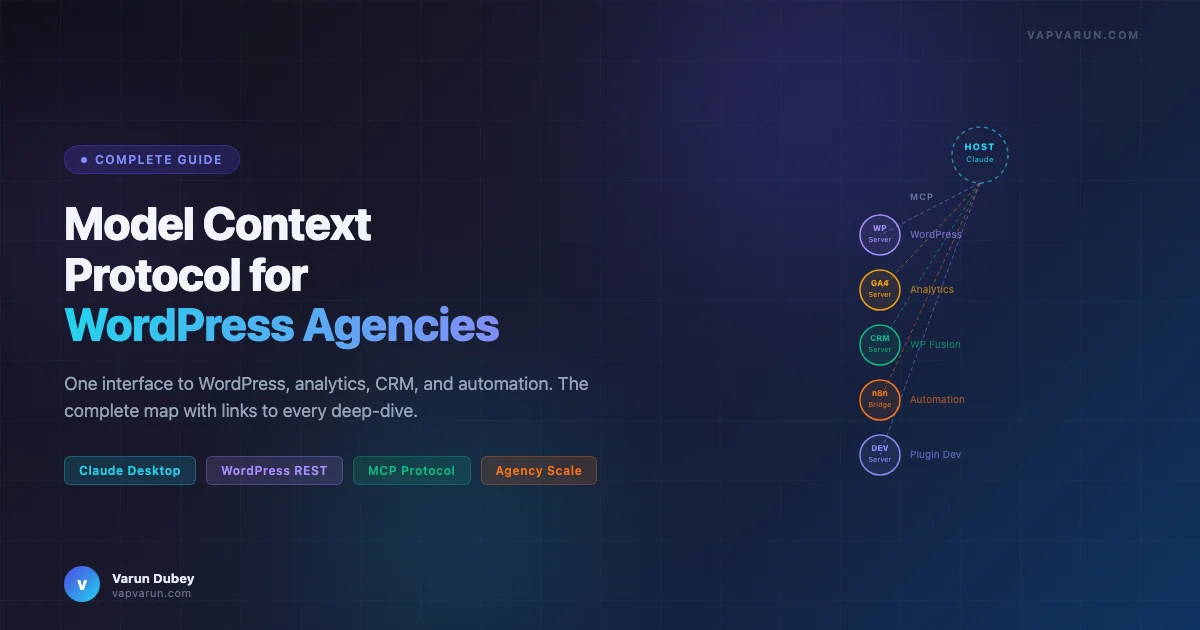
- Host: The AI client the user is running. Claude Desktop is a host. Claude Code is a host. Cursor is a host. The host manages the conversation and decides what context to pass to the model.
- Server: A small program you write and run that exposes capabilities over a standard interface. Each server is a self-contained thing – a WordPress server, an analytics server, a CRM server.
- Tools: Functions the model can call. A WordPress MCP server might expose tools like
post_create,post_update,media_upload,calendar_get_upcoming. - Resources: Read-only data the model can access. Site configuration, a list of published posts, a plugin manifest.
The transport layer is either stdio (the server runs as a child process of the host) or HTTP with Server-Sent Events. For local development I almost always use stdio. For shared team tools I run an HTTP server.
The key thing MCP does is separate the capability layer from the model layer. The model does not need to know how WordPress works. It just needs to know what tools exist and what they do. I write a server that knows how WordPress works, and the model picks up the tools automatically from the server’s schema.
Before MCP, getting Claude to interact with an external system required either function calling with bespoke JSON schemas in every conversation, or a custom integration layer that had to be rebuilt for each client setup. MCP standardizes that interface so any compliant host can talk to any compliant server.
A Minimal Server in Forty Lines
To make this concrete: here is the shape of a working MCP server in TypeScript. It exposes one tool that returns a WordPress site’s recent posts. This is not pseudocode – this is runnable.
import { McpServer } from "@modelcontextprotocol/sdk/server/mcp.js";
import { StdioServerTransport } from "@modelcontextprotocol/sdk/server/stdio.js";

const server = new McpServer({
  name: "wp-posts",
  version: "1.0.0",
});

server.tool(
  "get_recent_posts",
  "Returns the 5 most recent published posts from a WordPress site",
  {
    site_url: { type: "string", description: "Base URL of the WordPress site" },
  },
  async ({ site_url }) => {
    const res = await fetch(
      `${site_url}/wp-json/wp/v2/posts?per_page=5&status=publish`
    );
    const posts = await res.json();
    return {
      content: [
        {
          type: "text",
          text: JSON.stringify(
            posts.map((p) => ({ id: p.id, title: p.title.rendered, slug: p.slug })),
            null,
            2
          ),
        },
      ],
    };
  }
);

const transport = new StdioServerTransport();
await server.connect(transport);
Add this server to your Claude Desktop config under mcpServers, point it at a site, and Claude can now answer questions about your recent posts without you writing a single prompt template or function-calling schema. The model reads the tool description and figures out when to call it.
Why This Matters Specifically for WordPress Agencies
WordPress agencies run on heterogeneous toolchains. A typical client setup at Wbcom involves WordPress with BuddyPress, WP Fusion, and ecommerce functionality layered on top, plus an analytics stack (GA4, GSC, sometimes SpyFu), a CRM layer (Groundhogg or ActiveCampaign depending on the client), a hosting control panel (Cloudways, RunCloud, or a custom VPS), and some form of project tracking.
Before MCP, interacting with that stack via AI meant context-switching constantly. I would copy a post ID from WordPress, paste it into a prompt, ask Claude to draft an update, copy the output, paste it back into WordPress. I would export a CSV from GA4, paste it into a prompt, ask for analysis. Every step was manual handoff.
With MCP, I have servers for each layer. Claude can pull the analytics data directly. It can read the current post content from WordPress, check the SEO score, propose changes, and write them back. The entire loop happens inside a single conversation without me doing data plumbing.
The agency-specific gains are real and compound quickly:
- One interface across all client sites: I have one WordPress MCP server that handles all sites via a site config table. I do not write a new integration per client.
- Composability: I can combine servers in one conversation. Ask Claude to check GA4 for underperforming posts, then pull those posts from WordPress, then analyze their SEO scores, then schedule rewrites on the content calendar. Each step calls a different server.
- Auditability: Every MCP call is logged. I know exactly what the model did, what it called, and what came back. This matters when you are operating on live client sites.
- Team scalability: Once a server is built, anyone on the team can use it from their own Claude Desktop or Cursor setup. I build it once; the team gets the capability immediately.
The economics are not trivial either. Our Claude API cost for running workflows across 15+ sites is roughly $2-3 per day. That covers analytics pulls, content audits, SEO checks, and calendar management across the portfolio. The alternative was a combination of manual work and third-party SaaS tools that cost orders of magnitude more.
The Map: MCP Application Areas (and Where to Go Deep)
Below I have mapped every MCP application area I have built and written about. Each section gives you enough context to know if that use case is relevant for your setup, then links you to the full post where I go into the architecture, the code, and the real-world results.
| What you want to do | Application area | Deep-dive post |
|---|---|---|
| Automate blog publishing across multiple sites | Publishing ops | Inside a Blog Publishing MCP |
| Share your MCP servers with the community | Open source strategy | Open-Sourcing Your AI Workflow |
| Pull GA4 data directly into Claude for multi-site analysis | Analytics | Google Analytics via Claude MCP |
| Combine GSC + GA4 + SpyFu for competitive SEO | SEO | The Multi-Site SEO Stack |
| Wire Claude to your client CRM via WP Fusion | CRM | The Real MCP + WP Fusion Stack |
| Build n8n + Claude automation pipelines | Automation | n8n + MCP + Claude Agency OS |
| Build custom Claude agents for plugin development | Plugin dev | Custom AI Agents for WordPress Plugin Development |
| Run a headless WP + Astro setup with MCP tooling | Headless | From One Blog to a 12-Site Network: What WP Astro MCP Can Do |
Publishing Operations
This is where I started. The blog publishing MCP handles the full content pipeline: it reads a content calendar, generates posts, assigns categories and tags, runs SEO checks, generates featured images, and stages content for review. The architecture post explains how the server is structured, how tools chain together inside a Claude conversation, and how I handle failures gracefully so a broken featured image step does not kill the entire run. If you are thinking about content automation at any scale, start here – it shows what a production MCP server actually looks like from the inside, not a toy example.
Read: Inside a Blog Publishing MCP: The Architecture That Powers AI-Native Content Ops
Open Source Strategy for MCP Servers
Once you have built a useful MCP server, the question is whether to keep it internal or publish it. I made the case for open-sourcing your workflow tools and have followed through on it. The reasons are not primarily altruistic: open-sourced MCP servers build reputation faster than any blog post, attract contributors who find bugs you missed, and force the kind of documentation discipline that makes the tools more reliable for internal use too. This post covers when to open-source, how to structure a public MCP server repo, and what happens after you ship it.
Read: Open-Sourcing Your AI Workflow: The Case for Publishing Your MCP Servers
Analytics and SEO
I have two posts in this area because the use cases are different enough to warrant separate treatment. The GA4 post is about setting up a working multi-site analytics MCP – the exact config, the authentication approach, and the queries that give useful data instead of just raw API responses. The SEO stack post goes broader: it covers combining Google Search Console, GA4, and SpyFu through MCP to build a competitive content strategy. If you run more than three sites and want analytics that do not require exporting CSVs, these two posts together give you the full picture.
Read: Google Analytics via Claude MCP: A Working Setup for Multi-Site Analytics
Read: The Multi-Site SEO Stack: GSC + GA4 + SpyFu Through MCP
CRM Integration
WP Fusion is how I connect every WordPress site to a CRM. It is not glamorous, but it is the plumbing that makes marketing automation actually work in a WordPress context. Wiring Claude to that layer via MCP means I can query contact records, check tag assignments, and trigger automation flows from inside a conversation. The WP Fusion post covers the real implementation: how the MCP server talks to WP Fusion’s REST layer, what authentication looks like across multiple client sites, and the specific workflows that have saved the most time in practice.
Read: The Real MCP + WP Fusion Stack: How I Wired Claude to Every Client CRM
Automation with n8n
MCP and n8n serve different roles and they are better together than either is alone. n8n handles trigger-based orchestration – it is good at “when this happens, do that.” Claude handles reasoning – it is good at “given this situation, decide what to do.” Connecting them through MCP lets you build automation flows that have both reliable triggers and intelligent decision points. The post covers the operating system I run at the agency: which workflows live in n8n, which decisions go to Claude via MCP, and how the two systems hand off to each other. It includes real time savings data from our actual setup.
Read: The AI-Agency Operating System: n8n + MCP + Claude Saves 9 Hours Per Week
Plugin Development
Custom AI agents for WordPress plugin development is where I think MCP becomes genuinely transformative rather than just convenient. The repo tour post walks through how I have structured Claude agents that can read a plugin codebase, understand its architecture, identify patterns, and contribute code changes that fit the existing style. This is not vibe-coding: the agents are constrained by manifests, code flow maps, and audit scripts that catch regressions before anything ships. The post covers the full repo structure and the tool chain that makes it work in production at Wbcom’s portfolio scale (60+ plugins).
Read: Custom AI Agents for WordPress Plugin Development: A Full Repo Tour
Headless WordPress
The WP Astro setup is the most architecturally interesting thing I have running right now. WordPress handles content management and plugin functionality. Astro handles the frontend. MCP servers bridge the two: they can trigger rebuilds, sync content, check deployment status, and run QA checks across the network from a single Claude conversation. The post covers what this architecture actually looks like at scale (12 sites) and where the real pain points are compared to a traditional WordPress setup. If you are thinking about headless, this is the practical field report that marketing posts about Astro do not give you.
Read: From One Blog to a 12-Site Network: What WP Astro MCP Can Do
Getting Started: Your First MCP Server in 30 Minutes
If you want to get hands-on today rather than reading more, here is the fastest path to a working MCP server connected to a WordPress site.
Prerequisites
- Node.js 18+ installed locally
- Claude Desktop installed (available at claude.ai/download)
- A WordPress site with Application Passwords enabled (WordPress 5.6+, it is on by default)
Step 1: Install the MCP SDK and scaffold the server
mkdir wp-mcp-starter && cd wp-mcp-starter
npm init -y
npm install @modelcontextprotocol/sdk node-fetch
Step 2: Write the server
Create index.js using the minimal server pattern from the first section of this post. Add your site URL and application password credentials as environment variables – never hardcode credentials in the server file itself.
Step 3: Register with Claude Desktop
Edit ~/Library/Application Support/Claude/claude_desktop_config.json and add your server entry:
{
  "mcpServers": {
    "wp-starter": {
      "command": "node",
      "args": ["/absolute/path/to/wp-mcp-starter/index.js"],
      "env": {
        "WP_SITE_URL": "https://your-site.com",
        "WP_APP_PASSWORD": "your-application-password"
      }
    }
  }
}
Step 4: Restart Claude Desktop and test
After restarting, you should see a hammer icon in Claude Desktop indicating MCP tools are available. Ask Claude: “Use the get_recent_posts tool to show me my latest posts.” If it works, you have a live MCP connection to WordPress.
The next step is adding more tools: one for creating drafts, one for updating post metadata, one for checking publishing status. Each tool follows the same pattern. Once you have five or six tools, Claude can handle a full content workflow without you doing any manual data plumbing. From there the path to a full publishing automation pipeline is shorter than you think.
Security and Authentication Considerations
I want to address this directly because running AI tooling with write access to live WordPress sites is not something you should do carelessly. Here is how I think about the security model for MCP servers that touch client sites.
Use Application Passwords, Not Admin Credentials
WordPress Application Passwords (Settings > Users > Application Passwords) are scoped and revocable. Create a separate application password for each MCP server. If a server is compromised or starts behaving unexpectedly, you revoke that password without touching anything else. Never put your actual WordPress admin password in an MCP server config.
Least Privilege Per Server
If a server only needs to read posts, give it a user role that can only read posts. Do not give every MCP server administrator credentials because it is convenient. This matters especially when running servers that talk to client sites – a misconfigured tool should not be able to delete content or modify users.
Audit Logs
Every tool call in a well-built MCP server should be logged with a timestamp, the tool name, the parameters passed, and the result. I log to a local SQLite database. This gives me an audit trail when something goes wrong – I can see exactly what Claude called and what came back, rather than debugging from symptoms. This discipline also surfaces patterns: if a particular tool is being called with unexpected parameters, the logs catch it before it becomes a problem.
Dry Run Mode
For any tool that writes or deletes, I add a dry_run parameter that simulates the operation and returns what would have happened without actually doing it. This is essential for testing new workflows on production data. Run in dry-run mode first; check the output; then run for real. I learned this the hard way after a bulk-update tool touched more posts than intended on a client site early on.
Rate Limiting
Claude can call tools in loops, especially in agentic workflows. Your MCP server should implement rate limiting that prevents it from hammering the WordPress REST API if Claude ends up in a retry loop. I use a simple token bucket with a cap of 100 requests per minute per site. That is generous for interactive use and tight enough to prevent runaway loops from causing real damage.
Where the Ecosystem Is Heading
The MCP ecosystem is moving fast. A few directions I am watching closely and building toward in the next phase of our agency toolchain.
Hosted MCP Servers
Right now almost all MCP servers run locally via stdio. The protocol supports HTTP transport, and there is a clear trajectory toward hosted MCP servers that teams can share without everyone running local processes. Anthropic has started exposing some first-party tools this way. For agencies, this means a shared server your whole team connects to – one deployment, everyone gets the same tools, and you manage credentials in one place rather than across every developer’s local machine.
Authorization and Multi-Tenancy
The current protocol is authentication-aware but the authorization model is still maturing. For multi-client agency setups, you need servers that know which user is calling and scope their access accordingly. OAuth 2.1 support is in the spec; implementations are arriving. This will unlock proper multi-tenant MCP servers where different team members get different access levels to the same server – a junior developer can read but not publish, a senior can do both.
MCP in the WordPress Plugin Ecosystem
I expect WordPress plugins to start shipping their own MCP servers as a first-class feature. The pattern is obvious in retrospect: a plugin that exposes its data and actions via MCP becomes composable with every AI workflow without any custom integration work. We are already doing this at Wbcom for our own plugins. The question is when the broader plugin ecosystem catches on. My guess is 18 to 24 months before MCP support is a checkbox in plugin readme files the way REST API support was five years ago.
Sampling and Agentic Loops
The protocol includes a sampling capability that lets servers request completions from the model. This enables agentic loops where the MCP server itself can ask the model to reason about something mid-tool-call. Most implementations do not use this yet. When they do, it will enable a qualitatively different kind of automation: servers that do not just execute instructions but actively collaborate with the model to figure out what to do next. The current pattern – model calls tool, tool returns result, model decides next action – will give way to a tighter feedback loop. The custom agents work I have done for plugin development is pointing in this direction already.
The Short Version
MCP is a standard interface between AI models and external tools. For a WordPress agency it means: one server per system, all systems composable in a single Claude conversation, no custom integration per client, full audit trail. The productivity gain is real and the security model is manageable if you are deliberate about it.
The posts linked in the map section above go deep on each application area. Pick the one closest to the problem you are trying to solve and start there. If you are new to all of this, the publishing MCP architecture post is the best starting point – it is the most complete example of a production server and the patterns there apply to every other domain.
I add to this cluster as I build and write. If there is a WordPress agency use case you want me to cover that is not here yet, the contact link is in the footer.